Easy Steps to Learn Keyboard: A Practical Guide Today
Keyboard Gurus presents a beginner-friendly guide to easy steps to learn keyboard, with practical drills, structured practice plans, and clear tips to build confidence quickly.


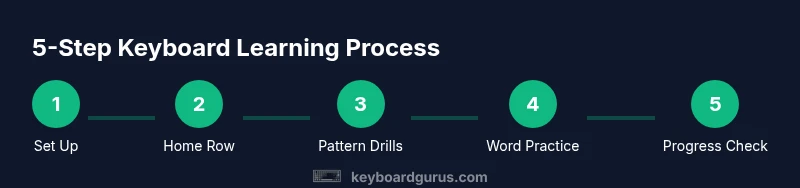
According to Keyboard Gurus, you’ll master the fundamentals of keyboard use through easy steps to learn keyboard. This quick path covers posture, finger placement, touch typing basics, and a structured practice plan to build confidence fast. Whether you are a student, gamer, or professional, this approach keeps you moving with short, repeatable tasks and measurable milestones.
Why Beginners Benefit from a Structured Path
According to Keyboard Gurus, a structured, repeatable learning path reduces overwhelm and accelerates skill acquisition. When you learn to type, your brain forms muscle memory that translates into faster, more accurate keystrokes over time. A well-paced plan helps you avoid fatigue and discouragement by breaking goals into small, achievable milestones. The benefits extend beyond speed: improved posture, reduced repetitive strain, and greater confidence in computer use. This article lays out a practical, evidence-based approach with concrete drills, everyday practice suggestions, and realistic expectations. By following organized steps, you’ll see progress within days and meaningful improvement within weeks.
Establishing a Baseline: What You Can Do in the First Week
Your first goal is to establish a baseline—what your current accuracy and speed look like. Spend 15 minutes a day focusing on accuracy rather than speed, and keep a simple log. If you already have some typing experience, record your starting words per minute (wpm) and accuracy so you can measure progress. The most important metric early on is comfort with the keyboard and a consistent rhythm. This block sets the stage for gradual increases in complexity.
Posture and Setup: The Foundation of Long-Term Comfort
Healthy typing starts with a comfortable workspace. Sit with feet flat, back supported, and elbows at about a 90-degree angle. Place the keyboard at elbow height so wrists remain neutral. Avoid resting wrists on sharp edges, and use a palm rest if needed. Small ergonomic adjustments—screen position, chair height, and lighting—reduce fatigue and support longer practice sessions. Remember: comfort boosts consistency, and consistency compounds results.
The Home Row and Finger Placement: Mapping Your First Milestones
The home row anchors your typing. Left hand covers A, S, D, F; right hand covers J, K, L, ; with thumbs on the spacebar. Each finger is responsible for a set of keys, and returning to the home row after each keystroke trains muscle memory. When you pause to look, you disrupt speed and accuracy; keep eyes on the screen and rely on feel. Practice simple words that emphasize home-row letters before adding other letters.
Basic Drills for Beginners: Building Accuracy Before Speed
Begin with short drills that emphasize accuracy. Typing programs or free online drills provide guided sentences focusing on common finger movements. Start with repetitive patterns like 'asdf jkl;' and increase complexity gradually to include common words. Practice with a metronome or rhythmic cue to maintain a steady pace. Consistency matters more than raw speed in the early stages.
Progression: Adding Punctuation, Numbers, and Capital Letters
Once you’re comfortable with letters, introduce punctuation and numbers in small batches. Type sequences that include commas, periods, numbers, and capital letters using the same home-row technique. Slow, deliberate practice prevents slippage in accuracy when your hands are handling multiple finger actions. Always re-check your posture after adding new character sets to maintain long-term comfort.
Practice Schedule: Crafting a Realistic Routine
Create a daily schedule that fits your life. Short, focused sessions (15-25 minutes) are often more effective than long, infrequent binges. Alternate between accuracy drills and speed-focused tasks to balance cognitive load. Use a predictable routine—for example: warm-up, home-row drills, word practice, punctuation, brief typing test, and reflection. A consistent rhythm beats sporadic, longer sessions.
Choosing Hardware and Setup That Supports Learning
A keyboard that feels good to type on makes practice enjoyable. You don’t need the fanciest gear to begin; a comfortable keyboard with a responsive key feel and a reliable layout is enough. If you have ergonomic concerns, consider a switch type you prefer, a wrist rest, and an adjustable desk or chair. The right setup reduces fatigue and makes daily practice sustainable.
Measuring Progress and Staying Motivated
Track your progress with simple metrics: accuracy, words per minute, and consistency across sessions. Use a logbook, a spreadsheet, or a typing app that displays trends over time. Celebrate small wins—completing a week of consistent practice, improving accuracy by a few points, or maintaining rhythm for a 10-minute block. Motivation compounds just like practice.
Common Pitfalls and How to Avoid Them
Rushing to speed often undermines accuracy and long-term skill. Avoid peeking at the keyboard; develop muscle memory by relying on touch typing. Slouching or tensing shoulders breaks rhythm and increases fatigue. If you notice pain, take a break and reevaluate your setup. Small, right-sized challenges beat large, overwhelming goals.
Tools & Materials
- keyboard or laptop(Prefer a comfortable, full-sized keyboard for baseline practice)
- ergonomic chair(Supportive seating with backrest and adjustable height)
- deskmat or wrist rest(Optional but helpful for neutral wrists)
- timer or metronome(Use 60-80 BPM to pace practice)
- typing software or online drills(Choose a beginner-friendly program)
- notebook or digital log(Track daily practice and milestones)
Steps
Estimated time: Total time: 90-120 minutes
- 1
Set up your workspace
Arrange a comfortable desk, chair, and keyboard height. Ensure your screen is at eye level and you have adequate lighting. Establish a dedicated typing area to minimize distractions.
Tip: Take 2 minutes to adjust your chair and keyboard before starting. - 2
Learn the home row
Place your left and right index fingers on F and J keys respectively, with the rest of your fingers on A S D F and J K L ;. Return to this row after each keystroke to build memory.
Tip: Quiet, deliberate movements early on yield better long-term speed. - 3
Practice simple patterns
Type short sequences focusing on home-row keys, then expand to common letter combos. Use repetitive strings like 'asdf jkl;' to reinforce finger placement.
Tip: Use a metronome and keep eyes on the screen. - 4
Introduce basic words
Move from patterns to real words that use home-row and nearby keys. Focus on accuracy; avoid rushing words with non-home-row letters.
Tip: Count error-free characters per minute to monitor progress. - 5
Add punctuation and numbers
Incorporate commas, periods, and numbers gradually. Maintain correct posture and finger placement while typing symbols.
Tip: Pause if you lose rhythm and reset to home row. - 6
Build a short practice loop
Create a 15-20 minute routine: warm-up, home-row drills, word practice, punctuation, quick test.
Tip: End each session with a quick, honest self-check. - 7
Track progress daily
Record accuracy and wpm after each session. Look for trends rather than single-session spikes.
Tip: Review your logs weekly to adjust difficulty. - 8
Progress to real-world typing
Practice with emails, notes, or simple documents to apply skills in context. Increase duration gradually as comfortable.
Tip: Balance speed with accuracy; speed comes later.
Got Questions?
What is the fastest way to learn keyboard typing?
Focus on accuracy first, then gradually increase speed. Use proper finger placement and consistent practice rather than rushing through drills.
Target accuracy first, then speed; stick to a steady practice routine.
Do I need a mechanical keyboard to learn typing?
No. A comfortable keyboard with responsive keys is sufficient for beginners; any keyboard works as long as you practice regularly.
Not required; pick any comfortable keyboard and practice consistently.
How long should I practice every day?
Start with 15-20 minutes per day and gradually extend to 30-45 minutes as your stamina and accuracy improve.
Begin with 15-20 minutes daily, then grow as you stay consistent.
Can games help learning keyboard?
Yes, typing games can improve speed and accuracy when used as a regular part of practice, not a replacement for drills.
Typing games help with rhythm and motivation when used with drills.
What is touch typing?
Touch typing means typing without looking at the keyboard, relying on muscle memory and the home row layout.
It's typing without looking; rely on muscle memory and home row.
Watch Video
What to Remember
- Practice with a clear routine every day.
- Prioritize accuracy over speed in early stages.
- Maintain neutral wrists and good posture.
- Log progress and celebrate small wins.
- Progress naturally when drills become routine.