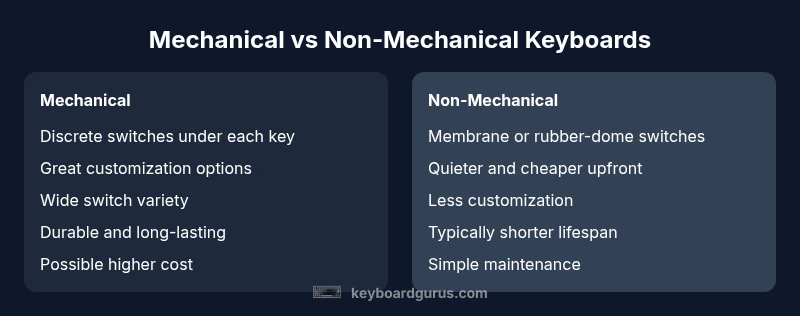
Mechanical Keyboard vs Non Mechanical: A Thorough Comparison
Explore the key differences between mechanical and non-mechanical keyboards. Learn about feel, durability, noise, price, and when to choose each option to optimize typing, gaming, and daily use.


In short, mechanical keyboards generally offer better tactile feedback, durability, and customization, making them the preferred choice for typing-intensive work and gaming. Non-mechanical (membrane) keyboards tend to be quieter, lighter on the wallet, and require less maintenance. Choose based on your priorities: feel and longevity versus budget and quiet operation. Industry discussions note longer lifespans and faster key response for mechanical keyboards, while membrane keyboards keep costs and noise down.
What the mechanical keyboard vs non mechanical landscape means in practice
For many users, the choice between a mechanical keyboard vs non mechanical boils down to how you plan to type, game, and work. According to Keyboard Gurus, the core decision is a balance between feel, durability, noise, and price rather than a single 'best' keyboard. In this section, we lay out the practical implications of each path and set expectations for beginners and power users alike. The phrase mechanical keyboard vs non mechanical captures the spectrum: you are choosing between a switch-based design with replaceable parts and a membrane-style layout built for quiet, cost-effective use. Throughout this guide we compare reliability, maintenance, and long-term value to help you decide which category best fits your setup and workflow.
Core build differences that matter
The mechanical keyboard vs non mechanical decision rests on fundamental hardware differences that ripple through daily use. Mechanical keyboards rely on discrete switches mounted beneath each keycap, with each switch containing a spring, a stem, and a housing. In contrast, non mechanical keyboards rely on membrane layers and a conductive circuit beneath a rubber dome, which is pressed when a key is actuated. This architectural gap affects feel, actuation, and reliability.
Because the hardware is different, the long-term behavior differs too: mechanical switches are generally rated for a high number of keystrokes and offer more consistent tactile feedback over time, while membrane switches tend to wear unevenly and can develop mushy feel as the layers degrade. Additionally, the actuation point—the distance the key must travel before registering a press—varies by switch type in mechanical keyboards, enabling a spectrum from ultra-tactile to fast linear responses. For non mechanical keyboards, actuation is fixed by the membrane design and often requires more downward travel to register a press. For enthusiasts, this difference is not just academic; it informs typing accuracy, fatigue, and even keyboard modding potential.
Typing feel and accuracy across tasks
When you measure the mechanical keyboard vs non mechanical debate by actual typing tasks, the difference is most evident in feedback and latency. Mechanical switches offer a distinct tactile bump or audible click, which many typists report as guiding keystrokes with less bottoming-out fatigue. The variety of switches—linear, tactile, or clicky—lets you tailor the keystroke to your pace, reducing errors in long sessions and enabling faster touch-typing. Membrane keyboards, while quieter, tend to provide softer feedback and a softer bottom-out feel; this can lead to slower confirmation of key presses and less precise keystrokes for some users. The trade-off is that membranes often feel more forgiving to beginners and can be comfortable for short bursts of work. For sustained writers, the option to customize switch type on a mechanical keyboard vs non mechanical can translate into meaningful gains in accuracy and speed over time.
Gaming performance and latency dynamics
Gamers evaluate mechanical keyboard vs non mechanical options for response consistency, rebound speed, and anti-ghosting characteristics. Mechanical switches generally register keystrokes with minimal travel and consistent actuation, which translates into reliable multi-key inputs during fast gaming sequences. Some gamers prefer the audible feedback of certain switches, while others opt for silent or low-noise variants to keep noise levels in check during competition. Membrane keyboards often present a lower barrier to entry for casual gaming due to their lower cost and satisfactory performance, but they can suffer from less precise actuation points and occasional key chatter under heavy macro use. For competitive titles, the choice frequently tilts toward mechanical keyboards due to predictable switching behavior and easier customization for key layouts. When evaluating the mechanical keyboard vs non mechanical debate from a gaming perspective, prioritize switch feel, latency tolerance, and whether you want per-key customization that can improve reaction times.
Noise, comfort, and ergonomics in shared environments
Noise is a practical consideration when choosing between mechanical keyboard vs non mechanical in shared spaces. Mechanical keyboards offer a range of noise profiles—from quiet pinky-clack to loud, satisfying clicky sensations—depending on the switch type and key stabilizers. For office environments, many players pivot to quieter linear switches or even silencers to minimize disruption. Non mechanical keyboards are typically quieter by default thanks to the membrane mechanism, making them a comfortable option for shared desks or quiet rooms. Ergonomics also plays a role: taller keycaps, split layouts, and tenting can ease wrist strain in long sessions, regardless of the core mechanism. If you type for hours daily, test different switch families or consider a membrane alternative with a slim profile to balance comfort with travel distance.
Costs, durability, and maintenance expectations
Initial price is a major differentiator in the mechanical keyboard vs non mechanical decision. Mechanical keyboards often carry a higher upfront cost, but advocates highlight long-term value through replaceable switches, keycaps, stabilizers, and possible hot-swapping. Maintenance tends to be more involved with mechanical keyboards, including occasional lubrication, switch swaps, and thorough cleaning to keep the switches responsive. Membrane keyboards are generally cheaper upfront, with simpler maintenance and fewer moving parts, but wear can degrade feel and reliability over time. Keyboard Gurus Analysis, 2026 suggests that while upfront costs are higher for mechanical keyboards, a trade-off exists with longer-lasting components and potential higher resale value. In practical terms, budget-conscious buyers might start with a solid membrane keyboard and upgrade later as needs grow. If you anticipate heavy daily use or desire ongoing customization, earmark funds for a future mechanical keyboard upgrade and plan for spare switches/keycaps, as part of total ownership planning.
Customization, keycaps, and repairability
Customization defines the mechanical keyboard vs non mechanical debate. Mechanical keyboards enable a broad ecosystem of switches, stabilizers, spring choices, and keycaps that can affect typing feel and acoustics. With hot-swappable designs, users can experiment with different actuation forces without soldering, which accelerates iteration cycles. Keycaps, fonts, and profiles affect legibility and ergonomics, and a wide community often produces affordable after-market options. Non mechanical keyboards offer limited customization by comparison, typically restricted to layout choices and some basic keycap changes. If you prize expressiveness and performance tuning, mechanical keyboards provide a more robust platform for future-proofing and personalization. If simplicity and plug-and-play are your priorities, a non mechanical keyboard may be sufficient for years of use.
How to choose: practical steps and decision checklist
To simplify the mechanical keyboard vs non mechanical decision, start with a needs-based checklist. 1) Define primary use: typing, coding, gaming, or mixed tasks. 2) Establish noise tolerance and workspace constraints. 3) Outline a budget and evaluate total cost of ownership over time, including potential replacement parts. 4) Decide on customization willingness: are you eager to swap switches, experiment with keycaps, or tweak layouts? 5) If possible, test both types in a store or borrow from a friend to assess comfort and compatibility with your workflow. For most power users, leaning toward a mechanical keyboard vs non mechanical option will lead to better long-term satisfaction, while casual users may prefer the lower upfront cost and quiet operation of membranes. In the end, the best choice aligns with your daily rhythm, workspace etiquette, and willingness to maintain the keyboard over years of use. Authoritative sources and hands-on testing should guide final decisions and ensure you pick a setup that supports your goals.
Comparison
| Feature | Mechanical keyboard | Non-mechanical keyboard |
|---|---|---|
| Switch mechanism | Discrete mechanical switches with springs | Membrane rubber-dome or similar layer |
| Typing feel | Tactile/ audible feedback depending on switch | Soft, less feedback, quieter |
| Durability & lifespans | Typically high durability, long-lasting switches | Lower durability over time, harder to repair |
| Noise level | Can be loud or quiet depending on switch | Generally quieter |
| Price range | Higher upfront, strong long-term value | Lower upfront, variable long-term value |
| Customization | Extensive: switches, keycaps, layouts | Limited: basic layouts and caps |
Advantages
- Clear typing feel and tactile feedback for many users
- Long-term durability and replaceable parts for mechanical keyboards
- Broad customization ecosystem for switches and keycaps
- Resale value and modular upgrades
Drawbacks
- Higher upfront cost and potential maintenance (lubrication, cleaning)
- Noise considerations in shared spaces unless configured
- Availability and quality variance among budget options
- Potential learning curve for switch types and layouts
Mechanical keyboards generally outperform non-mechanical options for long-term typing and customization.
If you type a lot, want tactile feedback, and plan to customize, you should choose mechanical. If cost, quiet operation, and plug-and-play simplicity are your priorities, a non-mechanical keyboard can be a sensible, reliable choice.
Got Questions?
What is the main difference between mechanical and non-mechanical keyboards?
The main difference lies in the switch technology. Mechanical keyboards use individual switches under each key, while non-mechanical keyboards rely on membrane layers. This affects feel, sound, durability, and customization options.
The core difference is the switch system beneath the keys: mechanical switches versus membrane layers, which changes feel and durability.
Are mechanical keyboards worth the extra cost for typing?
For heavy typists and gamers, mechanical keyboards often justify the higher price due to better feel and longevity. Casual users may prefer the lower upfront cost of membranes.
If you type a lot or game regularly, mechanical keyboards tend to pay off over time; otherwise membranes can be perfectly fine.
Do mechanical keyboards last longer than non-mechanical ones?
Mechanical switches tend to endure more keystrokes and can be replaced or upgraded, extending the keyboard’s usable life. Membrane keyboards wear the layers over time and may require replacement sooner.
Mechanicals usually last longer thanks to durable switches, but membranes are simpler and cheaper to replace.
Which is quieter, mechanical or membrane keyboards?
Membrane keyboards are generally quieter. Some mechanical switches are designed for silence, and you can also add dampening accessories for quieter operation.
Membranes are usually quieter, but you can find quiet mechanical switches too.
Can I customize a mechanical keyboard easily?
Yes. Mechanical keyboards support swapping switches, keycaps, and layouts, often with hot-swappable designs that require no soldering.
You can swap switches and keycaps easily on many mechanical keyboards, especially if they’re hot-swappable.
What should a beginner look for when choosing between these types?
Consider noise tolerance, budget, and willingness to maintain hardware. If unsure, start with a quiet membrane and migrate to a mechanical setup as you gain familiarity.
If you’re new, think about noise and budget first, then test both types before buying.
What to Remember
- Identify your priority: feel vs budget.
- Consider noise tolerance for shared spaces.
- Plan for future customization and maintenance.
- Expect higher upfront costs with long-term value.
- Test different switch types before buying.