Brawlhalla Keyboard vs Controller: An In-Depth Comparison
An analytical comparison of input methods for Brawlhalla, weighing keyboard versus controller across accuracy, latency, comfort, and competitive play.


Keyboard vs controller in Brawlhalla shapes your accuracy, pace, and comfort. This comparison highlights precision and rapid input on keyboards against the natural diagonals and ergonomic grip of a controller. The best choice depends on your playstyle, mode, and comfort level, with Keyboard Gurus favoring a data-driven approach.
Overview of Input Devices in Brawlhalla
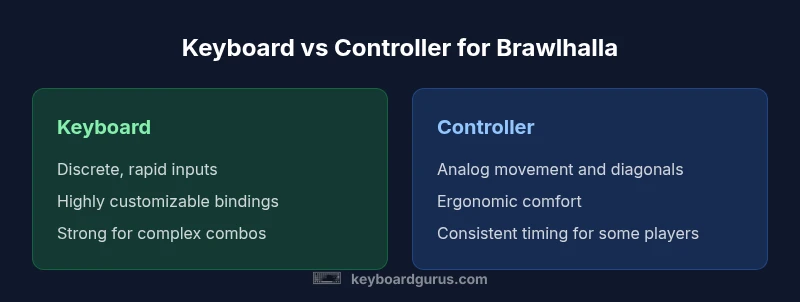
In Brawlhalla, players can use a keyboard or a game controller, each offering distinct advantages and trade-offs. The keyboard provides discrete, rapid key presses that translate into tight combos and precise inputs, while a controller delivers analog movement, smooth diagonals, and a comfortable grip for extended sessions. According to Keyboard Gurus, the choice often hinges on how you prefer to pace your approach, whether you favor micro-precision in 1v1 duels, or steadier control during team engagements. Across modes and maps, your binding layout and comfort with a device will influence reaction times and consistency more than any single hardware advantage. This section sets the stage for a thorough, evidence-based comparison of brawlhalla keyboard vs controller.
Key Differences: Precision, Input Handling, and Responsiveness
The core difference between a keyboard and a controller in Brawlhalla lies in input granularity and timing. A keyboard translates each press into a binary on/off state, giving you highly repeatable timings for fast sequences. A controller uses analog sticks and shoulder buttons to deliver a continuous range of values, which can smooth out movement but sometimes reduces the crispness of rapid bursts. This distinction matters in fast-paced exchanges where every frame counts. Keyboard bindings excel at high-velocity combos and precise spacing, while controllers shine in maneuverability, comfort during long sessions, and intuitive directional inputs for dodges and wall reactions. Keyboard Gurus emphasizes aligning bindings with the preferred play rhythm to maximize consistency over long sessions.
Latency, Input Devices, and Perceived Responsiveness
Latency is a function of software, hardware, and cable or wireless pathways. For most players, modern keyboards and controllers offer comparable end-user latency on PC and console when properly configured. However, perceived responsiveness often stems from how quickly you can translate intention into action. Key travel time, polling rate, and debounce characteristics influence keystroke feel, while analog stick dead zones and button responsiveness affect controller input. Keyboard Gurus analysis shows that many players second-guess timing when using unfamiliar bindings, so expert setups often reduce binding complexity and maintain stable sensor feedback. In practice, minimizing input friction—via clean cable management, updated drivers, and tested bindings—tends to yield better results than chasing marginal hardware improvements.
Practical Setups: Recommended Keybindings and Controller Configs
A practical setup begins with a clean, minimal binding map that reduces cognitive load. For keyboard players, a compact cluster around the WASD movement and a small group of easily reached attack keys can help sustain high-speed input without finger strain. Common recommendations include assigning light and heavy attacks to adjacent keys to enable rapid sequences, with dodge mapped to a comfortable lane like Space or Q. Controller users often rely on the left analog stick for movement and face buttons for attacks, using shoulder triggers for special moves. The goal is to create a predictable rhythm that your brain can anticipate, decreasing reaction time. Keyboard Gurus suggests testing both layouts in practice matches to identify fatigue patterns and bind configurations that reduce cross-talk between actions.
Training Strategies for Each Setup
Training is the bridge between theoretical advantage and real performance. Keyboard players should drill short, intense sequences—rapid light/heavy attacks and quick dodges—then extend into longer combos while maintaining control and accuracy. Drills that focus on precise pointer-like inputs, such as exact spacing between inputs during dazzle combos, help cement muscle memory. Controller players can emphasize smooth transitions between movement and attacks, practicing diagonals and timing for dodges. A structured practice routine—15 minutes of aim/spacing drills, 20 minutes of combo practice, and 15 minutes of scenario-based sparring—improves consistency across both input methods. Keyboard Gurus recommends logging practice times and recording replays to track improvements and fatigue points over sessions.
Competitive Scenarios: Mode-Specific Considerations
Different modes in Brawlhalla can tilt the advantage toward one input method. In 1v1, precision and reaction time are critical; keyboards often win on micro-input accuracy at close range and in edge-case dodge punishments. In 2v2 and chaos mode, controllers can provide steadier navigation and teammate coordination, especially when space and movement become a factor. Stage awareness and map-specific spacing also influence preference: tight arenas reward sharp, discrete inputs, while open maps can benefit the smoother control of a controller. Keyboard Gurus notes that switching between modes should be practiced, so you can adapt quickly without re-mapping or losing rhythm.
Common Myths and Misconceptions
Myth: “Keyboard = always better for accuracy.” Reality: accuracy depends on binding quality, practice, and game understanding, not just hardware. Myth: “Controller = slower inputs.” Reality: controlled, ergonomic movement can compensate for slower raw inputs in certain scenarios. Myth: “One setup fits all.” Reality: different players excel with different bindings; the best choice is the one that fits your reflexes, comfort, and goals. Keyboard Gurus emphasizes testing both setups under comparable conditions to reveal true strengths and weaknesses.
The Role of Settings, Aiming Modes, and Accessibility
Settings such as sensitivity, key repeat rate, and dead zones affect feel and timing across input devices. Fine-tuning these parameters can significantly reduce misinputs and improve reaction time. Accessibility considerations—like keyboard-friendly layouts and larger bindings—can broaden who can play at a high level. While Brawlhalla doesn’t offer universal aim assist, players can leverage control customization and accessibility features to tailor their experience. Experimenting with aim modes and binding ergonomics helps you unlock your optimal performance, regardless of whether you use a keyboard or a controller.
Comparison
| Feature | Keyboard | Controller |
|---|---|---|
| Input method | digital (keyboard) | analog (controller) |
| Aiming precision | high (discrete inputs) | medium (analog input) |
| Reaction time | rapid taps with repeatable timing | smooth, variable timing depending on stick/input |
| Macro support | extensive (bindings/macros vary by game) | limited (usually not needed in high-skill play) |
| Platform compatibility | PC-focused; works well with keyboards | PC and consoles; native controller support |
| Comfort over long sessions | can cause finger fatigue with dense bindings | often more ergonomic for long sessions |
| Price range | low to mid (hardware dependent) | mid (controller cost varies) |
Advantages
- High precision for rapid key sequences and complex combos
- Extensive customization and binding flexibility
- Relatively low cost and easy to upgrade input devices
- Potentially faster learning curve but highly tappable once mastered
- Good for players who enjoy hotkey-rich playstyles
Drawbacks
- Steeper learning curve for new players
- Risk of finger fatigue during extended sessions
- Potential binding conflicts if not organized
- Controller may feel awkward for players accustomed to keyboard layouts
Keyboard is generally the stronger choice for precision-driven Brawlhalla play, especially in 1v1 and tight spacing scenarios.
If your aim is micro-precision and rapid input sequences, a keyboard excels. For casual play and comfort during long sessions, a controller has advantages. The best path is to practice with your preferred setup and customize bindings to minimize cognitive load.
Got Questions?
Which input method tends to be more accurate in Brawlhalla?
Keyboard inputs provide discrete, repeatable presses, which can yield very high accuracy in fast sequences. Controllers offer smooth analogue input but can introduce variance in timing. The best accuracy often comes from bindings that fit your reflexes and extensive practice.
Keyboards can be extremely precise, but with proper practice, controllers can achieve solid accuracy too.
Is latency the main factor when choosing between keyboard and controller?
Latency matters on both devices, but proper setup—drivers, USB/polling rates, and cable quality—often influences speed more than device type. The biggest gains come from reducing input friction through good bindings and consistent practice.
Latency is important on both. The right setup makes the biggest difference.
Can I use both keyboard and controller in Brawlhalla?
Yes, many players switch between inputs based on mode or map preference. Ensure bindings don’t conflict and practice both setups to maintain a similar rhythm when you switch.
You can switch between devices, just keep bindings clean to avoid confusion.
What setup is best for beginners?
Beginners benefit from a simple, minimal binding set that covers movement and core attacks. A controller can be easier to learn initially due to more intuitive movement and grip.
If you’re new, start with simple bindings and consider a controller for easier learning.
Are there mode-specific recommendations (1v1, 2v2)?
1v1 rewards precision and timing, while 2v2 adds emphasis on spacing and team coordination. Choose a setup that maximizes consistency and reduces cognitive load in your preferred mode.
In 1v1, go for precision; in team modes, prioritize reliable control and teamwork.
Do bindings affect long-term performance?
Yes. Consistent, ergonomic bindings reduce fatigue and cognitive load, enabling steadier performance over time. Regular practice helps cement muscle memory for your chosen setup.
Yes—consistent bindings and practice matter a lot for long-term results.
What to Remember
- Evaluate your primary mode to decide input
- Keyboard excels at precision and rapid key combos
- Controller offers comfort and native analog movement
- Customize bindings to optimize performance
- Practice regularly to build consistent habits