Analog-Input Keyboards Compared: Keyboard Like Wooting Guide
An analytical comparison of analog-input keyboards versus traditional and programmable non-analog models, with practical criteria, setup tips, and a clear verdict for enthusiasts exploring a keyboard like Wooting.


An analog-input keyboard—often marketed as a keyboard like Wooting—offers per-key actuation curves and true proportional input, enabling nuanced control in games and creative apps. If you rely on precise key pressure for FPS, racing games, or editors, this category can improve performance. However, expect higher costs, a steeper setup, and a more involved software ecosystem compared with standard mechanical keyboards. Keyboard Gurus provides this guide to help decide if it’s right for you.
Introduction to Analog-Input Keyboards
According to Keyboard Gurus, the landscape of keyboards has expanded beyond simple on/off actuation. Analog-input keyboards deliver per-key pressure sensitivity, which enables a continuum of input rather than a binary press. The phrase keyboard like wooting has entered conversations about devices that offer this kind of nuanced control, typically through specialized firmware, sensor data, and curves that map key depression to digital output. For enthusiasts, this isn’t just about novelty; it’s about redefining how you interact with games, video editing, and creative software. In this guide, we break down the core concepts, compare options, and outline practical steps to evaluate whether an analog-input model fits your workflow.
What defines a 'keyboard like Wooting'?
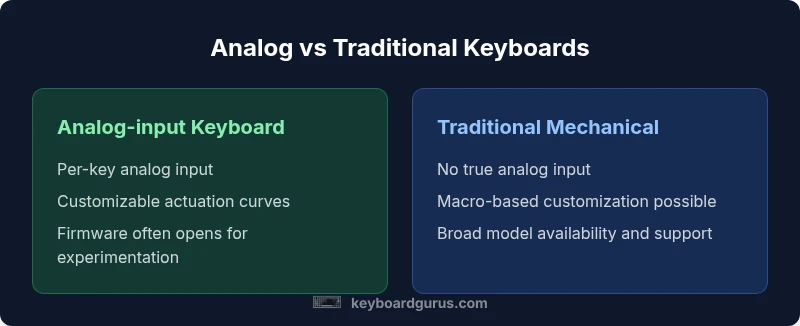
A keyboard like Wooting is defined primarily by two features: true analog input and per-key actuation curves. Analog input means the keyboard can detect varying degrees of press, not merely whether a key is down or up. Per-key actuation curves allow you to tailor how each key responds as you depress it, which can affect things like responsiveness in shooters or the precision of shortcuts in design software. Beyond inputs, these keyboards often come with configurable firmware and companion software that lets you map curves, adjust sensitivity, and implement profiles for different games or tasks. When you encounter a product described as a keyboard like Wooting, expect a design philosophy focused on giving you fine-grained control rather than relying solely on fixed key thresholds.
How analog input changes gaming and productivity
The benefit of true analog input shows up in practice as smoother acceleration curves in racing and more nuanced movement in certain shooters. In productivity, per-key curves can translate to more precise control over tool selections and brush sizes in creative software. Keyboard Gurus Analysis, 2026 notes that interest in analog-input keyboards among enthusiasts has grown as people seek to replace conventional keyboards with devices that can encode more information directly at the key level. While this opens new workflows, it also introduces a learning curve: you’ll likely need to re-tune your sensitivity settings, practice with new key mappings, and adjust profiles to match your favorite games and apps.
A recurring theme is that the “best” curve is context dependent. A linear mapping might excel in one game and feel twitchy in another. Curve presets can mitigate this but require experimentation. For some users, the extra control translates to fewer accidental presses and smoother keyboard feel during long sessions. For others, the added complexity isn’t worth the marginal gains. The choice hinges on your priorities and willingness to invest time in setup and optimization.
Use cases and scenarios
Different users benefit from analog-input keyboards in distinct ways. Competitive FPS players may prefer per-key sensitivity to fine-tune weapon handling, crouch toggles, or sprint keys. Content creators who adjust brush pressure or pressure-sensitive shortcuts in photo/video apps can leverage nuanced input for more natural workflows. Students and professionals who value programmable macros coupled with variable input can craft profiles that shift behavior across apps. Finally, keyboard enthusiasts tend to experiment with firmware openness, keycaps, switch variants, and the ability to swap firmware features over time. In all cases, a successful adoption starts with a clear goal—whether it’s speed, accuracy, or a more expressive input model—and a plan to validate gains against your current setup.
Design choices and trade-offs
When evaluating an analog-input keyboard, you’ll encounter several design decisions that affect price, durability, and usability. Firmware openness varies widely: some keyboards offer deeply configurable firmware with documented curves, while others rely on vendor-provided software with limited access to low-level controls. Switch technology and build quality can influence tactile feel and longevity, and many models still use a fixed switch design rather than hot-swappable hardware.
Another important trade-off is software ecosystem. A robust suite of configuration tools makes it easy to map curves, assign profiles, and switch between gaming and typing modes. On the downside, dependence on proprietary software can complicate cross-platform use or future software changes. It’s also common to encounter a higher price point, reduced availability, and a smaller community compared to mainstream mechanical keyboards. If you value experimentation and deep customization, these trade-offs may be acceptable or even desirable.
Software, firmware, and ecosystem considerations
A core part of evaluating keyboards like Wooting is assessing the software and firmware ecosystem. Look for per-key curve configuration, per-profile hotkeys, and the ability to export and share custom mappings. Firmware updates can add features or improve compatibility, but they can also reset settings if you’re not careful. Community tutorials and documentation are a big plus because they help you learn how to tune curves for specific games and productivity tasks. Keyboard Gurus suggests prioritizing devices with clear upgrade paths and transparent release notes so that you can stay current without starting from scratch with every update.
Cross-platform compatibility is another practical concern. Some keyboards offer Windows, macOS, and Linux drivers, while others rely primarily on companion apps. If you use multiple devices or operate in a mixed-OS environment, verify that the keyboard supports your system without requiring a separate, cumbersome toolchain. Finally, consider the learning curve: even with excellent software, you’ll need time to calibrate curves, test loadouts, and integrate analog input into your routine. A deliberate test plan can help you determine whether the benefits justify the investment.
How to compare options with a decision framework
To make a reasoned choice, create a framework that translates your priorities into measurable criteria. Start with these dimensions:
- Analog depth: Does the keyboard offer true per-key analog input, continuous curves, or only basic partial support?
- Curve configurability: Can you edit curves per key, or are you limited to global settings?
- Firmware openness: Is the firmware open, open-source, or vendor-locked?
- Software quality: Is the companion software intuitive, stable, and cross-platform?
- Build quality and layout: Are there hot-swappable switches, high-durability keycaps, and a form factor that matches your setup?
- Price-to-value: Does the performance justify a higher price relative to non-analog keyboards?
In the following sections, a side-by-side comparison provides concrete criteria to guide your decision. The goal isn’t to declare a winner for everyone but to help you map your use case to the right kind of keyboard. The trade-offs should be weighed against how much you value nuanced input versus simplicity, stability, and cost.
Comparing options with a decision framework (continued)
If you’re unsure where to start, a practical path is to identify your top three usage scenarios: fast-paced gaming, precise creative control, and long typing sessions. Then gauge how well an analog-input keyboard supports those tasks compared with a traditional mechanical keyboard or a non-analog programmable model. The intent is not to force a choice but to reveal which features yield the biggest benefits for your workflow. In this guide, we emphasize objective, repeatable criteria so you can perform your own testing and reach a well-supported conclusion.
Practical evaluation: hands-on test plan
A robust hands-on test plan minimizes bias and clarifies expectations. Begin with three objective tests:
- Response accuracy test: Measure how reliably the actuation curve translates physical pressure into digital input at multiple grip levels. Repeat across keys you use most.
- Game and app test: Run a curated set of titles and productivity tools that matter to you, comparing input quality, control, and muscle memory with and without analog curves.
- Profile stability: Save several profiles for different games or tasks and verify how easily you can switch between them without losing calibration.
Document your findings, particularly where you notice improvements or regressions. If you’re sharing results with the Keyboard Gurus community, include your firmware version, software build, and any curve presets you used. A careful, methodical approach will help you decide whether the investment translates into genuine gains in your daily workflow.
Real-world use cases and expectations
Real-world experiences vary. Some users report noticeable advantages in precision and control, especially in fast-action or pressure-sensitive contexts, while others find the benefits marginal for their typical tasks. The power of an analog-input keyboard is most evident when you have a clearly defined need for per-key distinction and fine-grained input, such as nuanced edits in creative software or highly tailored in-game actions.
If your routine involves long gaming sessions, you may appreciate smoother input curves that reduce fatigue and improve consistency. For typing exclusively, the advantage may be less pronounced, and a well-built traditional keyboard with a comfortable layout could be a more practical choice. As always, the decision should align with your objectives, budget, and willingness to experiment with curves and profiles.
Limitations and trade-offs you should plan for
No product is perfect for every user. Analog-input keyboards—while powerful—often require more time to tune and maintain. The learning curve can be steeper, and the opportunity cost includes potential software fragility or vendor-specific features that may evolve over time. Availability is another factor; not every retailer carries these models, which can affect long-term support and replacement parts. Finally, while curves offer nuanced input, not all games or professional workflows will benefit equally. The most successful adopters are those who actively measure gains against the upfront time invested in setup and calibration.
Validation and next steps: how to decide with confidence
If you’re leaning toward a keyboard like Wooting, begin with a small, structured trial period. Pick one game and one productivity workflow, set up a basic per-key curve, and compare performance to your current keyboard. Track objective metrics such as accuracy, control, and response consistency, along with subjective impressions like comfort and fatigue. Seek feedback from communities such as Keyboard Gurus members who have experience with analog-input keyboards. A balanced approach—combining hands-on testing with community guidance—will help you reach a grounded conclusion about whether an analog-input keyboard delivers meaningful advantages for your setup.
Feature Comparison
| Feature | Analog-input keyboard (wooting-style) | Traditional mechanical keyboard | Non-analog programmable keyboard |
|---|---|---|---|
| Analog input capability | Yes, per-key | No | No |
| Programmable actuation curves | Yes, per-key | Partial | Yes, per-key with macros |
| Software ecosystem | Dedicated software with per-key control | Varies by vendor (often basic) | Macro-focused software without per-key curves |
| Firmware openness | High openness (development-friendly) | Low openness | Medium openness |
| Hot-swappable switches | Typically No | Often Yes or No depending on model | Usually Yes in dedicated programmable models |
| Best for | Gamers and creators needing nuanced input | Typing and gaming with standard input | Users who want macros and simple automation without analog input |
Advantages
- Enables true per-key analog input for nuanced control
- Customizable actuation curves per key
- Potential improvements in precision for certain games and tasks
- Active community and evolving tooling support
Drawbacks
- Higher price than standard mechanical keyboards
- Steeper learning curve and setup time
- Software/firmware can be less stable or vendor-locked
- Availability can be limited compared to mainstream keyboards
Analog-input keyboards offer unique, per-key control that benefits niche gaming and creative workflows more than general use.
If your work or play relies on nuanced input and you’re willing to invest time in setup, an analog-input keyboard can be worthwhile. For casual gaming or typing-focused tasks, a traditional keyboard often delivers better value and simplicity.
Got Questions?
What makes a keyboard like Wooting different from a traditional mechanical keyboard?
A keyboard like Wooting provides true per-key analog input and configurable actuation curves, allowing nuanced pressure-based control. Traditional keyboards are binary in actuation and rely on fixed thresholds. The practical impact depends on your gaming or creative workflow and how much you value precision.
A Wooting-style keyboard gives you more than just on/off keys; it reads how hard you press each key and uses that to control actions, which can change how you play or work.
Is an analog keyboard suitable for FPS gaming?
Analog keyboards can offer subtle control in FPS games, particularly in aiming and movement, by translating pressure into proportional input. The benefit varies by game and how you configure curves. It’s worth trying if you’re seeking small, repeatable advantages and are comfortable with setup."
For FPS, analog input can help with finer aim and movement, but results depend on your curves and the game.
Can I replace the switches on an analog keyboard?
Switch replacement options depend on the model. Some analog-input keyboards support hot-swappable switches, while others use fixed hardware. Check your chosen model’s specifications and firmware support before committing.
It varies by model—some let you swap switches, others don’t.
Are there software caveats when using per-key curves?
Yes. Per-key curves require stable software and sometimes firmware updates. Users should save profiles, document their curves, and be prepared for occasional adjustments after updates.
Per-key curves rely on the software; keep backups and expect occasional tweaks after updates.
Do analog keyboards require special drivers?
Most analog keyboards need vendor-specific software or drivers to access curves and profiles. Cross-platform support can vary, so verify compatibility with your OS and devices.
They usually need a vendor app, so check which OS you’ll use.
What should I consider before buying a keyboard like Wooting?
Define your priority: max analog control or simplicity; budget constraints; software ecosystem; and future-proofing through firmware openness. Read community reviews and test hands-on where possible.
Think about how much you’ll use the analog features, your budget, and the software you’ll rely on.
What to Remember
- Identify your top use-cases (gaming vs. productivity) before buying
- Expect extra setup time and learning curve with analog-input keyboards
- Prioritize firmware openness and software quality for long-term satisfaction
- Balance price against the value of per-key curves in your workflow
- The Keyboard Gurus team emphasizes hands-on testing to validate benefits