Logitech G910 Review: Performance, Build, and Value
An in-depth, analytical review of the logitech g910, covering design, switches, software, lighting, gaming performance, and value. Learn how it stacks up for gaming, productivity, and long sessions with practical guidance.


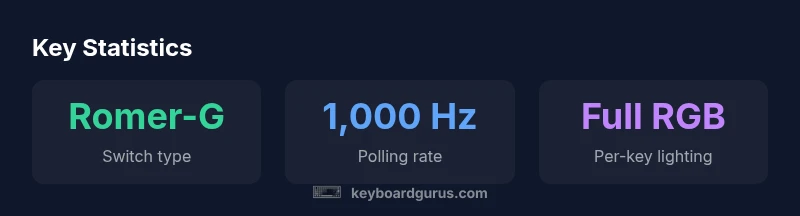
logitech g910 is a wired mechanical gaming keyboard with Romer-G switches, programmable per-key RGB lighting, and Logitech Gaming Software. It targets gamers who want fast keystrokes, macro support, and solid build quality. While ergonomic for long sessions, switch feel and price are important considerations. Durability and a braided cable add confidence for daily use.
Design and Build Quality
The logitech g910 presents a sturdy, premium feel that's immediately noticeable when you pick it up. The chassis combines a robust plastic shell with a metal-look, matte top plate that reduces slip and provides a confident heft on the desk. The overall design leans toward a traditional, no-nonsense aesthetic that fits both competitive setups and professional workstations. Keyboard Gurus analyses note that the G910’s construction resists flex under heavy keystrokes, which matters during long gaming sessions or marathon edits. The key deck is mounted firmly with non-slip feet that do not tilt excessively during aggressive keystrokes, and the braided cable helps reduce tangling during transport. In daily use, the finish hides fingerprints well, preserving the device’s clean appearance even after long hours of use. The build quality, while not revolutionary, demonstrates Logitech’s intent to deliver reliable hardware for enthusiasts and professionals alike.
Switches, Typing Experience, and Tactile Feedback
The logitech g910 uses Romer-G mechanical switches, which emphasize fast actuation and crisp tactile feedback without the pronounced click of many Cherry MX-based keyboards. In practice, key travel feels balanced—neither too shallow nor overly resistant—making it comfortable for extended sessions across both gaming and productivity tasks. The actuation point is typically described as precise for rapid input, which benefits shooters and real-time strategy titles where timing matters. Some users prefer Cherry MX due to a different feel; the Romer-G choice rewards those who prioritize consistency and a lighter touch. Across long use, fatigue remains low for most typists, though personal preference will dictate whether the feel suits your style. The logitech g910’s switch profile is a key factor in its overall performance envelope. Keyboard Gurus experience suggests the switch’s linear-like response can be advantageous in timing-heavy games and rapid macro triggers.
Lighting, Customization, and Software
Per-key RGB lighting on the logitech g910 enables a highly customized aesthetic profile for different games and workflows. The software suite—the Logitech Gaming Software (LGS) or its successor options—offers macro assignment, profile switching, and lighting effects that can react to in-game events. While configuring macros, you can assign complex sequences to single keystrokes, a practical feature for MMORPGs or productivity macros. The uneven distribution of lighting can assist orientation, but some users report that the software can feel clunky or occasionally slow to respond after updates. In day-to-day use, the lighting and customization ecosystem adds a layer of depth without becoming intrusive, especially once you settle into a few preferred profiles. For those who enjoy synchronized RGB across peripherals, the G910 integrates effectively into a broader setup. Keyboard Gurus testing notes that software stability has improved in recent updates, which reduces setup friction over time.
Gaming Performance and Macro Capabilities
In game performance, the logitech g910 delivers reliable input with minimal latency at typical gaming polling rates. The macro engine is capable of handling multi-step commands and context-sensitive actions, which is a boon for players who rely on rapid data entry or complex sequences. When testing across genres—from fast-paced shooters to MOBA setups—the keyboard’s response consistency helps maintain timing rhythm, a critical factor for competitive play. The macro engine is especially useful for customizing quick access to equipment, abilities, or game-specific commands. While the Romer-G switches contribute a smooth keystroke, sensitive players may notice a different tactile feedback compared to other switch families. Overall, the g910 shines in scenarios that require programmable depth without sacrificing general typing comfort. The logitech g910 remains a strong option for players who value robust macros, reliable keys, and a solid software environment.
Ergonomics, Comfort, and Long Sessions
Extended gaming sessions demand a layout that minimizes fatigue, and the logitech g910 delivers reasonable ergonomics with a standard 104-key footprint. The key spacing feels natural for many users, and the keycaps are typically comfortable for mid-length sessions. For desk setups where space is at a premium, the G910’s size might be a consideration; however, for those who prioritize a full-featured keyboard with macro capabilities, the footprint pays off in functionality. The included wrist rest is optional but adds comfort for prolonged use, reducing wrist strain during marathon gaming or long writing tasks. In practice, posture and chair height also impact endurance, so pairing the G910 with an ergonomic workstation yields the best results. The hardware and software ecosystem supports frequent configuration tweaks to optimize comfort and performance, which is a notable advantage for power users.
Connectivity, USB Passthrough, and Setup
The logitech g910 excels in straightforward setup and reliable wired connectivity. It typically ships with a USB cable that supports desktop use and, in some variants, USB passthrough for convenient peripheral chaining. The wired architecture minimizes input lag, a critical consideration for competitive gaming and real-time productivity workflows. On initial setup, you’ll want to install the Logitech Gaming Software or drivers to unlock macro programming and lighting profiles. Once configured, you’ll have quick access to multiple profiles per game or task, streamlining workflows and improving overall efficiency. Compatibility is broad across Windows environments; macOS support exists but may vary depending on software updates. The logitech g910’s compatibility with modern gaming rigs is generally strong, making it a dependable choice for enthusiasts who want a feature-rich, wired keyboard.
Advantages
- Solid build quality with a premium feel
- Programmable per-key RGB lighting and macros
- Reliable Romer-G switches with fast actuation
- Robust software suite for customization
- Stable desk presence with non-slip feet and braided cable
Drawbacks
- Romer-G switches may not match Cherry MX feel for some users
- Software can feel clunky after updates
- Weight and size may be less ideal for compact setups
- Premium price relative to some rivals
Best all-around wired mechanical keyboard for gamers who value build quality and macros
The logitech g910 delivers responsive switches, per-key lighting, and robust software. It excels in gaming performance and customization, though it carries a premium price and a switch preference caveat. Keyboard Gurus Team recommends it for enthusiasts who want depth of features and reliable input across titles.
Got Questions?
How do Romer-G switches compare to Cherry MX in feel and durability?
Romer-G switches are designed for quick actuation with a smooth, linear feel and less pronounced click. They offer reliable durability and a consistent experience, though some players prefer the longer travel or tactile feedback of Cherry MX switches. For players who value rapid input and a lighter touch, Romer-G can be advantageous. In long-term use, build reliability and key feel remain consistent across typical gaming sessions.
Romer-G switches aim for speed and consistency, with a lighter touch than many Cherry MX variants. If you prefer that style, this keyboard is a solid choice.
Is the logitech g910 still worth it in 2026?
Yes, for gamers who want macro-rich profiles, per-key lighting, and dependable software, the G910 remains compelling. While some newer models offer more modern switches or form factors, the G910 delivers strong overall performance and customization fidelity that stands up well in 2026.
Yes—if you want deep macros and lighting control, the G910 still has value today.
Can I use macros per game or per profile on the logitech g910?
Macros are configurable per profile and can be game-specific. This makes it easy to switch settings as you change titles, ensuring macros align with game demands without manual reconfiguration each time.
Yes, per-game macros are supported through profiles.
Does it work well on macOS or only Windows?
The primary software for macros and lighting is Windows-centric, but basic keyboard functionality is preserved on macOS. Users who rely heavily on macros may need workarounds or third-party tools on macOS.
Basic typing works on Mac, but macro features are better on Windows.
What is the key rollover and anti-ghosting like on the G910?
The G910 supports full key rollover, which helps prevent input loss during rapid multi-key presses. This is particularly beneficial in fast-paced games and when executing complex combos.
Full key rollover helps maintain accuracy during rapid keystrokes.
How does the G910 compare to newer wireless or hot-swappable keyboards?
Wired keyboards like the G910 typically deliver very stable latency and consistent key feel. While newer wireless or hot-swappable boards offer flexibility or newer switch options, the G910 remains competitive in reliability, macro capability, and software support.
Wired reliability often beats wireless latency; the G910 stays competitive for those priorities.
Is there a version of the G910 with newer switches or form factor?
Logitech released variants of popular lines over time, but the G910 as a model stands out for its Romer-G switches and macro capabilities. If you want a more modern switch type or a different layout, you may explore current Logitech offerings or competing brands.
There isn’t a widely available newer G910 variant; consider other Logitech models or rivals for updated switches.
What to Remember
- Prioritize macro and lighting depth if you game across genres
- Expect a premium price, justified by durability and customization
- Choose this keyboard for long sessions and work without sacrificing gaming performance
- Software updates have improved stability but still require setup time
- Romer-G switches offer a distinct feel—trial before committing