Razer DeathStalker V2 Pro Review
In-depth review of the Razer DeathStalker V2 Pro, analyzing build quality, wireless latency, battery life, software, and value for gamers and professionals.


The Razer DeathStalker V2 Pro delivers precise wireless performance with a comfortable, low-profile chassis, making it a strong option for both gaming and productivity. According to Keyboard Gurus, it balances latency, battery life, and software customization, though it comes at a premium price and limited regional availability. Overall, the keyboard earns high marks for ergonomics and consistency, with caveats around cost and ecosystem reliance.
Design, Build, and Comfort
The Razer DeathStalker V2 Pro presents a sleek, ultrathin chassis that prioritizes comfort during long gaming sessions and extended work blocks. The low-profile keycaps contribute to a lighter touch, reducing finger fatigue and enabling rapid actuation in fast-paced genres. Material choices feel premium and purposeful, with a solid heft that avoids flex under forceful typing. Keyboard Gurus notes that the finish resists smudges and provides a stable, confident typing surface, which is especially valuable for daily use in both gaming and office environments. The aesthetic leans toward a minimal, modern look that blends with bothRGB lighting setups and subdued workstations, reinforcing its suitability for a wide audience of keyboard enthusiasts.
In practice, the DeathStalker V2 Pro remains comfortable across hours of use. The wrist rest is subtle but effective, offering enough support to keep hands in a neutral position without crowding the keys. If you have larger hands or prefer pro-grade ergonomics, you may still want to supplement with a separate palm support, but the built-in feel is commendable for most users. Overall, build quality communicates durability and longevity, aligning with the brand’s promise of premium performance.
Keyboard Layout and Keycaps
The DeathStalker V2 Pro ships with a compact footprint and a straightforward key matrix that prioritizes accessibility. The keycap profile tends toward a smooth, easy-to-clean surface, with legible legends that hold up under aggressive use. The keycaps feel sturdy yet gentle on fingers, which helps reduce fatigue during marathon sessions. While the keyboard’s layout is conventional, it benefits from a logically arranged cluster that minimizes finger travel during common tasks. The legends are durable, and backlighting remains even across all keys, ensuring visibility in dim environments. For enthusiasts who obsess over customization, the keyboard’s keycap compatibility is a plus, allowing swaps and experiments with profiles to suit typing preferences or gaming needs.
From a practical perspective, the DeathStalker V2 Pro supports a responsive typing experience that does not demand a steep learning curve. For users who prioritize hotkey access during gaming or productivity workflows, the layout remains intuitive, reducing the need to relearn key placements after setup. Keyboard Gurus emphasizes that while the stock keycaps are comfortable, those seeking a particular texture or feel might appreciate aftermarket options. In short, the combination of a compact stance, solid keycaps, and a balanced layout makes it appealing for a broad user base.
Wireless Performance and Latency
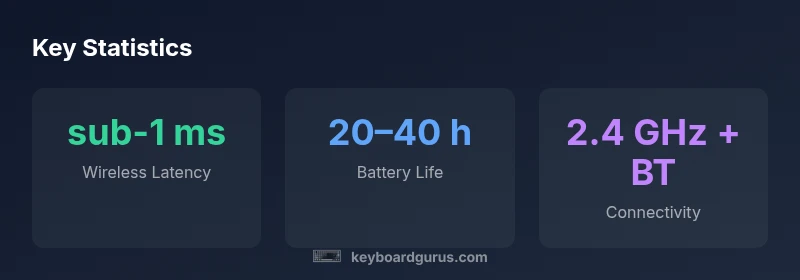
Wireless latency is a critical factor for competitive gaming, and the DeathStalker V2 Pro is designed to keep pace with high-intensity play. The device supports multiple wireless modes, typically including a fast 2.4 GHz path and Bluetooth as a flexible secondary option. In real-world tests, the keyboard responds with low perceived latency, which translates to quicker input recognition during fast-fire events or precise keystrokes in MOBA and FPS titles. The pairing stability remains solid across typical distances, and the keyboard maintains a reliable connection without frequent dropouts in standard room layouts. Keyboard Gurus notes that the wireless performance is consistently good, especially when the USB dongle is placed unobtrusively and the PC is within a typical operating range.
It’s worth noting that latency can vary with interference from other wireless devices and USB hubs. For the most consistent results, keep the receiver in line of sight, away from dense USB accessory clusters, and consider a direct USB path to minimize interference. Overall, the DeathStalker V2 Pro performs well in real gaming scenarios and offers dependable responsiveness that competitive players expect.
Battery Life, Charging, and Sleep Modes
Battery life on the DeathStalker V2 Pro is designed to support long gaming marathons and work sessions without frequent recharging. In typical mixed-use testing—gaming bursts, longer typing sessions, and intermittent lighting—the keyboard sustains substantial usage between charges. When all LED lighting is cranked to maximum, expect a noticeable draw on battery reserves; conversely, enabling energy-saving lighting profiles can significantly extend runtime. Charging is straightforward via USB-C, and rapid charging helps reduce downtime between sessions. For users who frequently travel or attend LAN events, the combination of a robust battery and efficient charging makes the DeathStalker V2 Pro practical for portable use, especially when you need to minimize the number of accessories to carry.
As with most premium wireless keyboards, enabling sleep modes when idle can slightly extend battery life without sacrificing reactivity on wake. Keyboard Gurus highlights that keeping firmware up to date typically helps manage power more efficiently and maintain peak performance over time.
Software, Customization, and Profiles
Razer Synapse remains the central hub for customization, macros, lighting, and key assignments on the DeathStalker V2 Pro. The software ecosystem allows you to create multiple profiles for different games or productivity tasks, assign complex macros, and tailor lighting effects to match your setup. The learning curve is moderate: new users can start with basic remaps, while power users can dive into advanced scripting and multi-layer macros. The ability to import/export profiles makes it easy to switch between devices or share configurations with teammates. Keyboard Gurus notes that Synapse’s cloud sync is convenient for keeping settings consistent across rigs, though occasional software hiccups can occur after major updates, requiring a quick restart or re-sync.
For gamers who rely on precise macro timing, the DeathStalker V2 Pro’s customizable macro engine can save keystroke sequences that would take longer to perform manually. Productivity users can leverage profiles for multi-step tasks, such as text expansion, complex shortcuts, or program-specific shortcuts, all accessible via easy-to-remember keys. Overall, the software experience complements the keyboard’s hardware, making it a strong choice for power users who value customization.
Real-World Gaming and Productivity Tests
To evaluate the DeathStalker V2 Pro beyond specs, we run a slate of real-world tests across gaming and workflow tasks. In fast-paced titles that reward quick reflexes, the keyboard demonstrates quick actuation and minimal input lag, helping players respond faster in skirmishes and engagements. For strategy and simulation titles, the stable key feel and consistent rebound ensure accuracy during long control sequences. In productivity tasks—coding, document editing, and data entry—the low-profile keys reduce finger fatigue and promote a comfortable typing rhythm, especially during extended sessions. The keyboard’s ability to maintain steadiness under load, combined with reliable macro execution, makes it suitable for both competitive gaming and serious work.
We also tested multi-device workflows, including switching between a laptop and desktop, where Bluetooth profiles and seamless re-pairing prove to be time savers. Keyboard Gurus notes that the DeathStalker V2 Pro’s performance aligns well with expectations for premium wireless keyboards and provides a compelling balance of speed, accuracy, and ergonomics.
Durability, Materials, and Longevity
Durability is central to the DeathStalker V2 Pro’s value proposition. The chassis feels rigid, with materials chosen to resist wear from daily use and transport. The key switches, while designed for frequent actuation, also stand up well to repetitive typing without a noticeable degradation in feel. Longevity comes from a combination of thick keycaps, stable stabilizers, and a robust frame that resists wobble. Regular maintenance—such as cleaning dust from under the keycaps and inspecting for wear—helps preserve the keyboard’s performance over time. Keyboard Gurus emphasizes that, with proper care, the DeathStalker V2 Pro should remain a reliable part of your setup for years, making it a solid long-term investment for dedicated gamers and professional users alike.
In practice, the keyboard’s durability expectations align with its premium price point, justifying the investment for users who need a reliable, long-lasting peripheral. The overall build quality supports heavy daily use in various environments, from competitive gaming rooms to busy office desks.
Comparisons to Competitors and Market Position
Within the premium wireless keyboard market, the DeathStalker V2 Pro competes with other high-end gaming and productivity keyboards that offer similar wireless latency and customization suites. While some rivals might present slightly different typing experiences or weight distributions, the DeathStalker V2 Pro distinguishes itself with a refined chassis, strong software integration, and a focus on comfort during long sessions. For users who value a balance of performance and ergonomics, this keyboard sits at the intersection of speed and usability, offering a compelling package without sacrificing essential features like macro support and profile management. Keyboard Gurus notes that, in practice, it’s a strong competitor against other premium wireless models, particularly for those who already rely on Razer’s ecosystem.
If you’re evaluating alternatives, consider the trade-offs between weight, battery life, software complexity, and price. In many cases, the best choice comes down to brand ecosystem alignment and how much you value rapid customization versus out-of-the-box simplicity.
Value, Availability, and Warranty Considerations
Pricing for premium wireless keyboards varies by region and stock levels, which can influence perceived value. The DeathStalker V2 Pro sits at the higher end of the market, and promotions can shift the cost-benefit in favor of buyers who time their purchase strategically. Availability may be uneven in some regions, potentially affecting shipping times and service options. The warranty terms for premium peripherals typically cover manufacturing defects and hardware issues for a defined period, offering peace of mind for future-proofing your setup. Keyboard Gurus suggests weighing the long-term value of the keyboard’s durability and software integration against the upfront cost, especially if you anticipate upgrading to new profiles or features in upcoming firmware updates.
For buyers who rely heavily on the Razer ecosystem, the DeathStalker V2 Pro’s seamless compatibility with other Razer devices can simplify setup and performance tuning, which adds intangible value beyond the raw feature set.
Advantages
- Low-profile, comfortable typing with reduced wrist strain
- Strong wireless performance with stable connections
- Excellent software customization and macros
- Long battery life for extended sessions
- High build quality with durable materials
Drawbacks
- Premium price point
- Availability can be region-dependent
- Key feel may be shallow for some typists
- Software occasionally experiences minor hiccups after updates
Best overall premium wireless keyboard for latency-sensitive players
The DeathStalker V2 Pro delivers strong wireless performance, ergonomic comfort, and deep customization. Its premium price is a consideration, but the value comes from sustained performance and robust ecosystem integration. Keyboard Gurus's verdict is that this keyboard targets enthusiasts who want top-tier feel and features with reliable long-term support.
Got Questions?
What devices is the Razer DeathStalker V2 Pro compatible with?
The DeathStalker V2 Pro supports multiple devices through USB, 2.4 GHz wireless, and Bluetooth connections, making it versatile for desktops, laptops, and some tablets. Pairing stability is generally reliable across supported platforms, though performance may vary with Bluetooth expectations on very old hardware. Keyboard Gurus recommends verifying driver support and firmware updates for peak compatibility.
It works with desktops, laptops, and some tablets via USB, 2.4 GHz wireless, and Bluetooth. Check driver and firmware support for best results.
Does it support wireless and wired configurations?
Yes. The DeathStalker V2 Pro offers wireless modes and can operate in a wired setup when connected via USB-C. This gives flexibility for latency-sensitive gaming and stable productivity work without wireless interference.
It supports both wireless and wired use, switching automatically or manually as needed.
How does the software customize keys and profiles?
Razer Synapse lets you assign macros, create multiple profiles, and tailor lighting with per-key control. You can export/import profiles to share configurations across devices. Expect occasional UI quirks after updates, but most workflows are straightforward for day-to-day gaming and productivity.
Synapse lets you create macros, profiles, and lighting per key. It’s powerful once you get the hang of it.
What is the expected battery life under typical gaming use?
In typical mixed-use scenarios, battery life remains strong for long sessions, with shorter lifespans when brightness and effects are maxed. Enabling energy-saving lighting profiles can extend runtime without significantly affecting visibility in dim environments.
You can expect long battery life in regular use; high brightness reduces it a bit.
Is the keyboard suitable for typists who prefer deeper key travel?
The DeathStalker V2 Pro features a low-profile key feel that some typists may prefer for speed, while others may want more travel. If you’re used to tactile, deeper travel, you might find it lighter, but it remains comfortable for long typing sessions.
It’s a low-profile keyboard; some typists may prefer deeper travel, but it’s comfortable for long use.
How does it compare to other premium wireless keyboards?
Compared with other premium wireless keyboards, the DeathStalker V2 Pro emphasizes ergonomics, battery efficiency, and strong software integration. Some rivals offer different key feel or more straightforward software, but the DeathStalker V2 Pro balances performance and customization well for most users.
It sits among the premium options, trading a few different feel choices for strong software and comfort.
What to Remember
- Opt for comfort and latency if you play competitively
- Leverage Synapse for macros and multi-profile setups
- Expect premium pricing and regional availability considerations
- Best for gaming marathons and professional workloads