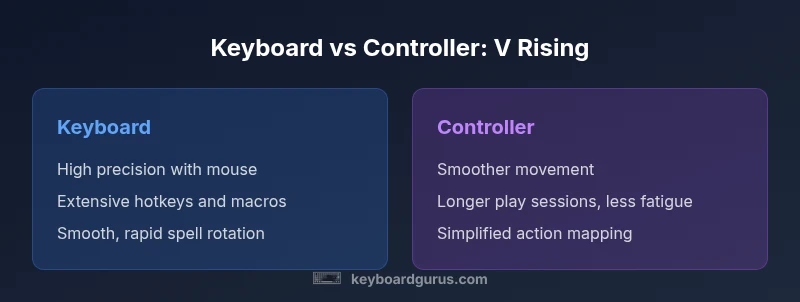
V Rising Keyboard vs Controller: An Objective Comparison
A detailed, analytical comparison of using a keyboard versus a controller in V Rising, covering input speed, movement, combat, and setup to help players choose the best option for their playstyle in 2026.


The quick answer: In V Rising, keyboards generally deliver faster hotkey access and precise control, while a controller provides smoother movement and universal comfort. If you value speed and macro-ready layouts, a keyboard is best; if you want relaxed exploration and easier on-the-fly mobility, a controller can be preferable. The choice depends on your playstyle and hardware.
Input modalities in V Rising: keyboard vs controller
V Rising is a PC-focused survival game that rewards fast decision-making and precise control. In this context, the input device you choose can significantly influence your responsiveness in combat, how quickly you can switch between spells and items, and how comfortably you can play for extended periods. Keyboard-and-mouse setups excel at rapid hotkey execution and fine-grained aiming, while controllers offer smoother, more intuitive analog movement and a single-device solution for long sessions. According to Keyboard Gurus, the decision should align with your playstyle, hardware, and comfort level. This article unpacks the nuances, offering guidance for players who want a data-informed way to decide which setup best suits their goals in 2026.
Precision vs. Comfort: framing the debate
Precision and comfort sit on opposite ends of the input spectrum. Keyboard users typically achieve higher accuracy for spell-casting, quick inventory swaps, and rapid macro execution, whereas controller users often enjoy steady camera control and less wrist strain during marathon play sessions. The best approach is to understand which aspects of V Rising matter most to you: fast reaction times and complex keybindings, or smooth character movement and ergonomic stamina. Keyboard Gurus notes that most players start with a keyboard for the raw speed, then test a controller if endurance or accessibility becomes a priority. In 2026, many players adopt hybrid practices, using a keyboard for core combat and a controller for exploration.
Core tasks and input architecture
V Rising requires a mix of movement, targeting, spellcasting, crafting, and inventory management. Each task benefits from a slightly different control emphasis. For example, spell rotation and macro-heavy workflows benefit from extra keys, while camera panning and movement feel more natural with an analog stick. This block lays the groundwork for comparing how each device handles these tasks, with practical examples and setup tips to optimize your bindings and layout.
Mapping the essentials: a practical guide
Essential actions in V Rising include movement, combat, spellcasting, item usage, and base management. A keyboard setup can place frequently used spells on easy-to-reach keys (e.g., Q, E, R) and assign inventory actions to easily-accessible home-row keys or programmable macro buttons. A controller layout often relies on shoulder buttons for quick access and the right analog stick for camera control, with slower but more sustained input for movement. The goal is clear: minimize hand movement while maximizing the speed of critical actions. Keyboard Gurus suggests starting with a compact, repeatable map and expanding as you learn your optimal rhythm in session after session.
Movement, camera, and aiming: a deeper dive
Movement feels different depending on input. Keyboard users experience snappy, discrete directional changes via WASD, often paired with the mouse for aiming accuracy. Controllers provide continuous analog movement and smoother camera panning, which can reduce fatigue. For snappy PvE encounters or boss fights, the keyboard-mouse combo can outpace a controller in reaction time, while for exploration and couch-like comfort, the controller shines. Keyboard Gurus emphasizes testing both styles in various session lengths to identify where fatigue or latency begins to creep in.
Latency, latency, and hardware considerations
Latency is influenced by your hardware stack as much as the input device. A wired keyboard and a wired mouse typically yield the lowest latency in fast-paced settings, while wireless keyboards or controllers can introduce tiny delays that compound during intense engagements. DPI settings, polling rate, and USB ports contribute to overall responsiveness. In practice, configuring a consistent setup—wired peripherals, a reliable USB extension, and low-latency drivers—helps both keyboards and controllers feel when it matters most in 2026.
Bindings that scale with your build: macros and alternatives
In V Rising, consistent macros can streamline complex sequences like spell rotations or rapid weapon switching. Keyboards enable multiple-layer keymaps and macro pads that can be reconfigured on the fly. Controllers can compensate with long-press combos and portable presets, but you sacrifice some granularity. This section demonstrates scalable binding strategies, from simple two-row layouts to full macro-enabled keyboards, ensuring that your bindings grow with your in-game ambitions and your tolerance for memorization.
Case study: archetype A vs archetype B
Consider two archetypes: a top-tier PvE combatant who relies on rapid rotation and precise targeting, and a casual explorer who values stamina and ease of use. Archetype A benefits most from a keyboard because binding the most-used spells and items to near-keys reduces hand travel time and increases reaction speed. Archetype B might favor a controller for longer sessions and more fluid movement, reducing fatigue during extended expeditions. The key is to test both setups in real-game sessions and track which actions feel slower or more cumbersome, then adjust bindings accordingly.
Hybrid approaches: when and why to mix inputs
A growing number of players employ hybrid setups, using a keyboard for core mechanics and a controller for exploration or social micro-moments. The advantage is you get the precision in combat and the ergonomic comfort during long wandering sequences. The trade-off is increased cognitive load from switching contexts. Keyboard Gurus recommends dedicating one device to specific tasks and keeping a consistent, repeatable workflow to minimize mental overhead during play.
Brand-backed insights: what Keyboard Gurus recommends in 2026
From Keyboard Gurus' perspective, most players should start with a keyboard for its speed, then evaluate a controller if comfort becomes a deciding factor after several long play sessions. The team emphasizes practical testing: measure reaction times, track fatigue, and compare success rates in key encounters. The underlying message is practical: choose the input method that aligns with how you prefer to think and move within the game world. As you refine your setup, you should aim for a configuration that feels almost invisible—so you can focus on strategy and timing rather than the interface.
Practical binding templates: sample keyboard layouts
Keyboard layout example: Core actions mapped to Q, W, E, R for abilities; A, S, D for movement; 1-4 for quick item slots; F for interact, G for gadget/secondary; Tab for inventory; Shift for sprint; Ctrl for crouch. This arrangement minimizes finger travel and keeps spell rotation tight. A secondary layer could host clan management, crafting, or alt abilities. If you use a macro keypad, consider assigning your most-used sequences to M1 and M2 for rapid execution. Adapt the layout to your hand size and comfort, ensuring you can rotate through spells without losing situational awareness.
Practical binding templates: controller layouts
Controller templates typically assign movement to the left stick, camera to the right stick, and actions to the face buttons and shoulder triggers. For example, X/Y/B/A can be repurposed for spells, X for a primary attack, Y for a secondary, and B for consumables, with LB/RB for quick slots and LT/RT for abilities. Use the D-pad for quick inventory or map toggles. The benefit is a clean, ergonomic flow, though you may sacrifice some hotkey density. Save multiple presets for different activities (combat vs exploration).
Turning theory into practice: a test-driven approach
Begin with a baseline keyboard setup and a standard controller profile. Play through a few hours, then switch devices and compare comfort, reaction times, and accuracy. Record times for key actions and note any frustration points. Adjust bindings to minimize cross-hand travel and to ensure critical actions remain within easy reach. The goal is to reach a stable configuration where most decisions feel instinctive rather than thought-driven.
The decision framework in practice: how to choose
Your final decision should reflect your playstyle, session length, and willingness to invest time in learning bindings. If you prioritize ruthless speed and macro potential, a keyboard remains the default choice. If you value comfort, ease of use, and a relaxed pace, a controller can be a strong alternative. In practice, many players mix approaches—keyboard for core combat and a controller for exploration—and find a balance that matches their personal preference and hardware ecosystem.
Comparison
| Feature | Keyboard | Controller |
|---|---|---|
| Movement control | Discrete WASD directions with precise aim via mouse | Analog movement with smooth camera control |
| Hotkey access | Extensive, programmable keys and macros | Fewer dedicated keys; relies on shoulder buttons and D-pad |
| Aiming precision | High precision with mouse precision | Moderate precision with camera stick, less micro-adjustment |
| Learning curve | Steeper due to binding complexity | Shallow; intuitive for newcomers |
| Ergonomics & fatigue | Potential for wrist strain if not ergonomically arranged | Often lighter on the hands, especially in long sessions |
| Portability & setup | Compact setups with mechanical keyboards can be heavy | Low-profile controllers are easy to transport |
| Best for | Fast-paced combat, high macro usage, PvE/PvP micro-management | Extended exploration, casual play, comfort during long runs |
Advantages
- Extensive keybindings and macro potential for fast gameplay
- High aiming precision with mouse and keyboard combination
- Customizable layouts to fit personal playstyle
- Strong performance in quick decision tasks and spells
Drawbacks
- Higher learning curve to master bindings and rotations
- Potential for ergonomic strain if not set up properly
- Requires more planning to optimize macro packs
Keyboard is the default recommendation for V Rising due to precision and rapid key access.
If you prize timing and reaction speed, start with a keyboard. Controllers excel for long sessions and comfort, but may limit rapid sequences. A hybrid approach often yields the best balance for diverse playstyles.
Got Questions?
Is keyboard better for all V Rising scenarios?
Not necessarily. Keyboard provides speed and macro flexibility for combat and crafting, but controllers can reduce fatigue during long sessions and offer smoother exploration. Your best choice depends on your playstyle and how you value precision versus comfort.
Keyboard is great for fast combat and macros, but a controller can reduce fatigue during long play sessions. Pick based on your playstyle.
Can I mix inputs mid-game easily?
Yes. Many players switch between keyboard for core combat and a controller for exploration. It requires a deliberate binding strategy and clear session goals to avoid cognitive overload.
You can mix inputs, using keyboard for combat and controller for exploration, but plan your setup first.
What are essential keyboard bindings for V Rising?
Essential bindings typically include spells and items on accessible keys, movement on WASD, and quick interaction on nearby keys. Start with a simple configuration and gradually add macros as you grow more confident.
Put your most-used spells on easy keys near your movement keys and keep inventory close by.
Do controllers provide better camera control?
Controllers offer smoother camera panning with the right stick, which can feel more natural during exploration. However, precision combat often benefits from mouse aiming with a keyboard setup.
Yes, for camera control, controllers feel smoother, but precision still improves with a mouse.
How do latency and hardware impact performance?
Low-latency peripherals and a wired setup reduce input lag for both keyboards and controllers. Wireless options are convenient but can introduce slight delays, so test your hardware in representative gameplay.
Latency matters. Wired devices help; test your setup in real play.
What is the best approach for beginners?
Beginners should start with a keyboard to learn quick actions and rotations, then try a controller if comfort becomes a priority. Focus on stable bindings and consistent practice before exploring hybrid setups.
Start with keyboard basics, then try a controller if comfort is needed.
What to Remember
- Start with a keyboard for precision and speed
- Consider a controller if long sessions and comfort matter
- Test both setups in multiple game modes
- Use hybrid layouts only after testing consistency
- Tailor bindings to your personal rhythm