Can You Get Keyboards for Tablets? A Practical Guide
Explore how to add keyboards to tablets, including Bluetooth and USB-C options, compatibility tips, setup steps, and budget-friendly picks.


Yes. You can get keyboards for tablets in a variety of formats—from slim Bluetooth folio cases to full‑size USB‑C docks. Most tablets support Bluetooth pairing, and many newer models accept USB‑C keyboards or adapters, turning a tablet into a portable workstation. The short answer: there are options that fit iPadOS, Android, and Windows tablets across budgets and work styles.
Compatibility and ecosystems
Tablet keyboard compatibility hinges on the operating system, port availability, and wireless standards. iPadOS and Android tablets support Bluetooth keyboards by default, while Windows tablets can pair via Bluetooth or USB-C connections. The most universal approach is a Bluetooth keyboard; it works regardless of vendor, and newer Bluetooth standards minimize audio latency and pairing delays. If your tablet has a USB-C port and supports USB-C host devices, you can attach a wired or USB-C powered keyboard, which can deliver lower latency and a more laptop-like feel. For many users, the real question is not whether you can connect a keyboard, but which connectivity suits their workflow: wireless mobility and cross-device pairing for casual notes, or a tethered setup with power and reliability for long writing sessions. The Keyboard Gurus team has observed that a growing number of keyboards now offer multi-device pairing, allowing a single keyboard to switch between a tablet, a phone, and a laptop with the press of a key. When choosing between formats, assess battery type, Bluetooth version, and whether the keyboard supports a built-in trackpad or numpad, as these features influence productivity.
Types of Tablet Keyboards
Tablet keyboards come in several distinct formats, each designed to balance portability, typing comfort, and protection for the device. The most common is the folio-case keyboard, which blends a protective shell with a ready-to-type surface. These are ideal for students and commuters who want a light setup and an integrated stand. Detachable Bluetooth keyboards offer flexibility: you can type only when you need it and leave the keyboard behind for quick note-taking. For professionals who want a laptop-like experience, USB-C or USB-C powered docks provide larger key travel, dedicated function keys, and a built-in trackpad. Some keyboards include backlighting for low-light working conditions, while others prioritize rugged construction for travel. A growing subset includes multi-device keyboards that can pair with a tablet, phone, and computer with a single press of a button. When choosing between formats, assess how you carry your tablet, how often you type, and whether you need extra features like a built-in stand, a trackpad, or extra ports.
How to choose the right keyboard for your tablet
Choosing the right keyboard starts with your tablet model and primary tasks. Check compatibility: ensure the keyboard supports your OS (iPadOS, Android, or Windows) and the port type (Bluetooth vs USB-C). Weight and footprint matter if you travel a lot; heavier keyboards with larger keys feel closer to a laptop, while compact layouts boost portability. Key travel and tactile feedback vary widely across models, so if you type a lot, try to test before buying. Backlit keys help in dim conditions, but may drain battery faster. A built-in trackpad can replace a mouse for quick navigation, but it may reduce battery life and increase price. Finally, consider price versus durability: budget options can be perfectly sufficient for light use, but premium models offer better reliability and longer warranties. Map features to your workflow: long writing sessions, on-screen editing, or mixed media work all benefit from different keyboard and case configurations.
Pairing, setup, and workflow tips
Most Bluetooth keyboards pair in seconds; put the keyboard in pairing mode, choose the device from the tablet’s Bluetooth menu, and you are ready to type. If you use USB-C, connect directly to the tablet’s port or a compliant USB-C hub; be mindful of power delivery to avoid device recharging or data issues. Multi-device pairing is a major productivity boon: switch between tablet, phone, and laptop with a single key combo. Customize your shortcuts to match common tasks such as copy, paste, and app switching. Keep the keyboard case or stand clean to prevent grip issues. When typing long documents, use landscape orientation and built-in trackpad options to mimic a laptop posture. Finally, maintain battery health by turning off lighting when not needed and charging the keyboard as recommended by the manufacturer.
Budgeting and value for tablet keyboards
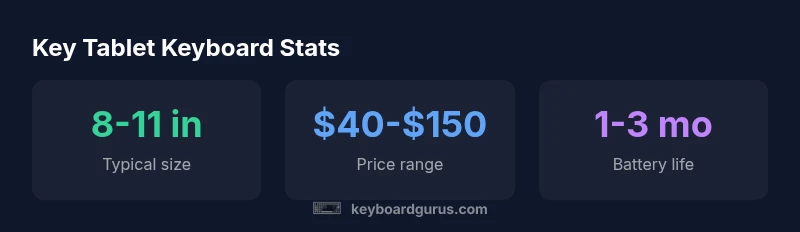
Budgeting for a tablet keyboard means balancing price, reliability, and features. Basic Bluetooth keyboards without a trackpad or backlight often cost between $40 and $70 and provide solid typing comfort for everyday notes. Mid-range options with a trackpad or multi-device pairing typically fall in the $70‑$120 range, delivering better ergonomics and flexibility for longer writing sessions. Premium models can approach $150 or more, especially if they offer rugged housings, premium key switches, or built-in stands with adjustable angles. Before buying, read user reviews and verify warranty terms. If you need a budget solution for students, prioritize good key travel and a compact footprint; for professionals, prioritize a trackpad and durable case. Remember that compatibility and battery life can significantly affect the total cost of ownership over time.
Durability, travel, and care
Traveling with a tablet keyboard means considering protection, weight, and resilience. Look for reinforced hinges, spill resistance, and protective padding in folio-type cases. Detachable keyboards should be secured to prevent loss during transit, and USB-C docks with extra ports can reduce accessory clutter. If you travel frequently, choose a keyboard with a robust finish and a low profile so it slides easily into bags. Cleaning is simple: wipe with a microfiber cloth, avoid moisture on keys, and store the keyboard away from extreme temperatures. Battery maintenance is important: for replaceable batteries, rotate usage to extend life; for rechargeable models, avoid deep discharge. Finally, consider warranties and service opportunities in case of wear and tear, especially on hinges and connectors.
Maintenance, warranty, and where to buy
To maximize lifespan, inspect the keyboard connections regularly, keep firmware up to date, and follow storage guidelines. Most reputable sellers offer a one- to two-year warranty on accessories; extended warranties can be worth it if you rely on the keyboard daily. When shopping, compare retailers for return policies and shipping speeds. Check compatibility not just with a single model but with the entire lineup of devices you use, including tablets from different brands. Avoid keyboards that require proprietary dongles you can easily lose; instead prioritize Bluetooth or USB-C keyboards with standard compatibility. If you are unsure, read community feedback and expert guides from Keyboard Gurus to understand durability, latency, and compatibility across ecosystems.
Real-world usage: students, gamers, and professionals
Students tend to value compact, affordable Bluetooth keyboards with dependable battery life and straightforward multitasking—ideally 60‑120 words per minute typing speeds. Gamers require low latency and sometimes additional macro keys, though most tablet keyboards do not match desktop setups; look for models with responsive key switches and optional palm rests. Professionals benefit from multi-device pairing, reliable keystroke accuracy, and a protective case that doubles as a stand. In all scenarios, the best approach is to test a few options within your budget, verify OS compatibility, and read recent user reviews to avoid models with flaky Bluetooth connections. Ultimately, the right tablet keyboard should feel natural, stay securely attached or stored when you travel, and align with your workflow.
Common tablet keyboard formats and compatibility
| Category | Tablet Compatibility | Connection Types |
|---|---|---|
| Folio-case keyboard | iPadOS, Android | Bluetooth, built-in battery |
| Detachable Bluetooth keyboard | iPadOS, Android | Bluetooth |
| USB-C keyboard dock | iPadOS, Android, Windows | USB-C |
| Bluetooth keyboard with trackpad | iPadOS, Windows | Bluetooth |
Got Questions?
Are external keyboards compatible with all tablets?
Most modern tablets support Bluetooth keyboards and USB-C keyboards with adapters. Always check your device specifications for port type and OS compatibility before buying.
Most tablets work with Bluetooth keyboards; if you have a USB-C port, you can often use a USB-C keyboard or adapter. Check your model's specs.
Do I need a keyboard case or can I use a separate keyboard?
Both work. Keyboard cases offer portability and protection, while separate keyboards can provide more key travel and a larger layout. Choose based on your typical usage and transport needs.
You can choose a separate keyboard or a case; pick the one that fits how you carry and use your tablet.
What is the best budget keyboard for students?
Look for compact Bluetooth keyboards with good key feel and a reliable battery, usually in the $40-$80 range. Favor devices with multi-device pairing if you switch between devices.
For students, a compact Bluetooth keyboard at a reasonable price is usually enough.
Will using a keyboard drain my tablet's battery?
Using a keyboard consumes minimal power, but wireless keyboards and backlit keys do draw some battery. Expect shorter tablet battery life under heavy use, and manage with sleep modes.
A keyboard uses a bit of power, but you can mitigate by turning off backlighting when not needed.
Are folding or mini keyboards worth it for travel?
Folding or mini keyboards save space but often trade off comfort and tactile feel. If you type a lot, try a compact Bluetooth option with a larger key layout.
Folding keyboards save space; test typing feel before buying.
“The tablet keyboard accessory market continues to diversify, delivering flexible Bluetooth and USB-C options that suit work, study, and play on the go.”
What to Remember
- Start with Bluetooth for broad compatibility
- Match keyboard size to your tablet for portability
- Look for a model with a trackpad if you want a laptop-like workflow
- Budget between $40 and $150 for good options
- Check compatibility before buying