Keyboard and Mouse Tray Comparison Guide
A comprehensive, expert-backed comparison of keyboard and mouse trays, covering ergonomics, installation, space planning, and budgeting to help you choose the right tray for your desk setup.


For most desks, a retractable keyboard tray with a dedicated mouse platform combines ergonomic reach, tilt, and space efficiency better than a fixed under-desk tray. Fixed trays are simpler and cheaper but offer less adjustability, which can limit long-term comfort and adaptability in varied setups.
What is a keyboard and mouse tray and why it matters
A keyboard and mouse tray is an accessory designed to hold your keyboard and mouse off the main desk surface, typically mounted under or on the edge of the desk. The right tray can transform posture and reach, reducing shoulder strain and encouraging a neutral wrist position. For many users, this setup improves comfort during long sessions of typing, gaming, or coding. Keyboard Gurus emphasizes that the best tray aligns with your natural elbow angle and allows you to bring the input devices close enough without crowding the desk surface. This is especially important for people who alternate between sitting and standing, or who share a workspace with others.
While the exact setup varies by desk and body size, the core goals are consistent: keep wrists straight, avoid reaching forward, and reduce desk glare and clutter. The keyword here is adjustability: the more you can tailor height, tilt, and depth to your body, the more natural your typing will feel. In our analysis at Keyboard Gurus, ergonomic outcomes improve when users can fine-tune both keyboard and mouse planes to maintain a 90-degree or slightly greater elbow angle. A well-chosen tray supports wrists and forearms, not just the hands, encouraging healthier movement patterns over the course of a workday.
Design principles that influence comfort
Choosing a keyboard and mouse tray means weighing several design principles that affect comfort and usability. First, adjustability is king: tilt and height adjustments matter as your chair height or table position changes. Second, keyboard depth and mouse platform size must accommodate your typical input width without forcing you to crowd devices. Third, the material and finish impact durability and feel—smooth glide rails matter for long sessions, while a faux-leather or padded edge can reduce edge pressure on the wrists. Finally, cable management and anti-slip surfaces help maintain a clean, stable setup.
From a usability perspective, most users will benefit from a tray that allows easy micro-adjustments in real-time, rather than a fixed, non-adjustable platform. Keyboard Gurus’ guidance emphasizes trying before buying whenever possible: test the tray’s glide or pivot range, check that the mouse platform doesn’t collide with the keyboard, and confirm compatibility with your chair and desk height. A thoughtful tray should disappear as an afterthought, letting you focus on your tasks rather than hardware constraints.
How to map options to your space: fixed vs retractable trays
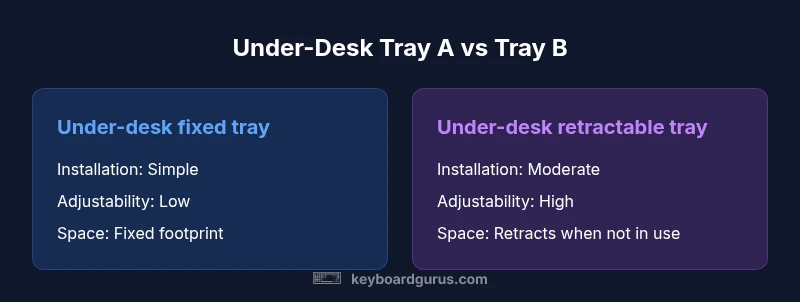
Two common configurations dominate home and office desks: fixed under-desk trays and retractable trays with a mouse platform. Fixed trays are typically lower cost and easier to install, and they work well for straightforward setups with limited space. However, their lack of travel and tilt means you must adapt your seating and desk height to the tray’s fixed position, which can limit ergonomics for different users.
Retractable trays, by contrast, offer more ergonomic latitude: you can slide the keyboard in and out, tilt the surface for palm comfort, and position the mouse platform to match your reach. This flexibility translates to better long-term comfort for varied tasks and users. The trade-off is a higher price and a bit more installation complexity, plus you’ll need adequate space beneath the desk to accommodate the sliding mechanism. Keyboard Gurus notes that the overall value increases when you frequently adjust your posture or share a workstation with others who have different preferences.
Compatibility, space, and desk footprint considerations
Space efficiency is a recurring concern, especially on smaller desks or in multi-use rooms. Retractable trays can reclaim desktop surface by tucking away when not in use, but they also demand floor space and clearance under the desk for rails or a model with a mouse platform. If you rely on a sit-stand desk, confirm that the tray’s range aligns with your standing height and desk travel. For larger keyboards or gaming setups, ensure the tray can accommodate a full-size keyboard plus mouse without forcing awkward angles.
Compatibility extends beyond the tray itself. You should check how the tray integrates with existing accessories such as monitor arms, footrests, CPU holders, and cable raceways. In some environments, curved or oddly shaped desks may require custom mounting brackets or a different style of tray attachment. Keyboard Gurus collaboration with ergonomic specialists suggests measuring your elbow-to-desk distance, chair height, and arm length before selecting a tray to avoid postural compromises.
Materials, finish, and durability: what to expect
Most keyboard and mouse trays feature a metal or reinforced aluminum frame with a composite or metal surface for the keyboard and a separate mouse platform if included. The choice of material influences weight, stability, and long-term wear. Rails or sliders should be smooth and quiet, with minimal resistance as you slide the keyboard in and out. Non-slip padding on the underside helps prevent shifting, while a padded edge on the keyboard tray can protect wrists during frequent typing.
Durability is about both rough handling and everyday wear. Look for trays with corrosion-resistant finishes, tested load ratings, and warranties that reflect confidence in long-term use. Real-world testing, as reported by Keyboard Gurus, shows that higher-quality rails tend to deliver consistent glide after years of daily use, reducing the need for maintenance or replacement. While premium models cost more upfront, their longevity can offset the initial investment over time.
Installation, setup, and first-use calibration
Installation complexity varies by mounting style. Fixed trays usually require minimal mounting hardware and can be installed with a screwdriver and basic tools. Retractable trays demand a bit more precision to align rails with desk edges and ensure the track travels without binding. The ideal setup process includes labeling components, confirming right-angled mounting, and testing the range of motion before plugging in cables. A simple calibration step—adjusting height, tilt, and front-to-back depth—ensures the keyboard and mouse sit at a natural angle.
Cable management becomes part of the setup. Route power and peripheral cables away from sliding components to avoid snagging. Test your reach in both seated and standing postures, and adjust the tray until the wrists are level and the elbows rest at about a 90-degree angle. If you encounter interference with desk grommets or monitor arms, you may need additional brackets or an alternate mounting position. Keyboard Gurus recommends a two-hour installation window for first-time setups and an annual check to maintain smooth operation.
Budgeting, value, and long-term cost considerations
Price ranges for keyboard and mouse trays vary by design, materials, and adjustability. Fixed trays tend to be more affordable upfront, with options that cover the basics at a lower cost. Retractable models incur higher upfront costs but offer improved ergonomics, space savings, and adaptability for different users. When evaluating value, consider not only the purchase price but also the potential impact on comfort, posture, and productivity over years of use. In our 2026 review, Keyboard Gurus highlights that investing in a robust rail system and a spacious mouse platform can reduce wrist strain and minimize furniture wear. A longer-term perspective often reveals that mid-range retractable trays provide a favorable balance between initial cost and daily gains in comfort and efficiency.
Comparison
| Feature | Under-desk fixed tray | Under-desk retractable tray with mouse platform |
|---|---|---|
| Installation effort | Low (basic mounting) | Moderate (rails and alignment) |
| Ergonomic adjustability | Limited (fixed height/tilt) | High (height, tilt, and depth) |
| Space efficiency | Requires constant clearance | Retracts to free desk surface when not in use |
| Cable management | Basic provisions | Integrated channels and better routing options |
| Maintenance & durability | Simple, durable | Complex mechanism may require occasional maintenance |
| Best for | Tight budgets, simple setups | Dynamic users, shared desks, long-term comfort |
Advantages
- Lower upfront cost with fixed trays
- Easier installation for simple desks
- Broad compatibility with many desks
- Retractable trays enhance ergonomics and space efficiency
- Better long-term comfort for varied users
Drawbacks
- Fixed trays offer limited adjustability
- Retractable trays cost more and require more space under the desk
- Possible compatibility issues with monitor arms or footrests
- Maintenance may be required for sliding rails
Retractable trays generally offer superior ergonomics and space efficiency for most users, with fixed trays remaining a solid, budget-friendly choice for simple setups.
Choose a retractable tray if you value adjustability and long-term comfort; select a fixed tray if you need a budget-friendly, quick-install solution and have a straightforward desk.
Got Questions?
What is the main difference between fixed and retractable keyboard trays?
Fixed trays are cheaper and easier to install but offer limited motion. Retractable trays provide adjustable height, tilt, and depth, improving ergonomics but cost more and require more space.
Fixed trays are cheaper and simpler, but retractable trays adjust height and tilt for better ergonomics.
Are keyboard and mouse trays compatible with sit-stand desks?
Most trays are designed to work with sit-stand desks, but you should verify the tray’s travel range and mounting compatibility with your desk’s frame and any integrated height adjustment.
Yes, but check travel range and mounting compatibility with your sit-stand desk.
How do I choose the right size for my keyboard and mouse tray?
Measure your current keyboard width, plus space for comfortable mouse movement. Ensure the tray surface isn’t overcrowded and allows natural forearm alignment when seated.
Measure width and space for the mouse, then pick a tray that fits without crowding.
Can a keyboard tray improve posture?
Yes, by enabling proper elbow angle and a neutral wrist position, a well-sized tray reduces forward reaching and shoulder strain over time.
A good tray helps your elbows bend naturally and wrists stay straight.
What maintenance is required for a keyboard tray?
Regularly check rail mounts for looseness, lubricate moving parts if needed, and clean dust from tracks to keep slides smooth.
Keep it clean and check the rails periodically.
What to Remember
- Prioritize adjustability to maximize ergonomic benefits
- Check space under the desk before choosing a tray
- Consider installation effort and desk compatibility in advance
- Balance upfront cost against long-term comfort and durability