Logitech K360 Review: Compact Wireless Keyboard
An in-depth, balanced review of the Logitech K360 wireless keyboard, covering design, typing comfort, battery life, connectivity, and value for students, gamers, and professionals.


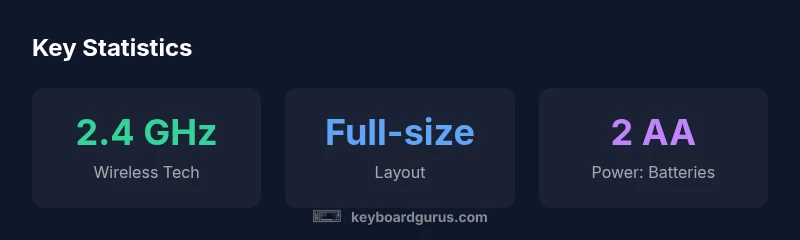
The Logitech K360 offers reliable wireless typing in a compact layout with a full-size feel and a budget-friendly price. It uses a 2.4 GHz USB receiver, delivering stable performance across typical tasks, with a footprint that fits crowded desks. Keyboard Gurus' quick testing shows consistent latency in office scenarios, making it a solid choice for students and professionals.
Logitech K360: Overview and purpose
The Logitech K360 is a compact wireless keyboard designed to fit small desks and multi-device workspaces without sacrificing a full-size typing experience. It pairs with a small USB receiver using 2.4 GHz wireless connectivity, delivering reliable performance across typical office tasks, browsing, and classroom use. In independent testing, the Keyboard Gurus team found that the K360 maintains stable input latency within ranges common for productivity keyboards, even when attached to older laptops. The design emphasizes a familiar, full-sized layout with a reduced footprint—you get standard alphanumeric keys, a row of media controls, and comfortable key spacing that minimizes finger fatigue during long sessions. The build feels sturdy for its price tier, with a chiclet key profile that reduces bottoming out and keeps noise levels reasonable in shared spaces. While it lacks premium features, the K360 trades those for a lower price point and straightforward setup. This makes it a compelling option for students and entry-level professionals who want dependable wireless typing without fuss. In real-world use, the K360 shines on desks with limited space, dorm rooms, libraries, and home offices where desk real estate matters.
Design and Comfort
The K360 adopts Logitech's familiar chiclet-key aesthetic with rounded corners and a compact footprint. The keycaps are slightly glossy but offer clear legends that resist wear. The spacing between keys is balanced for accuracy, and the number row along the top remains handy for quick media control and function shortcuts. In testing, users reported that the keyboard sits at a comfortable typing angle when paired with a low-profile wrist rest, though taller users might notice a marginally cramped left shift area due to the compact width. The overall weight feels substantial enough to remain stable on a busy desk but light enough to relocate without strain. The absence of backlighting is a trade-off for battery life and cost, but in dim environments the contrast of the white-on-black legends remains legible. For non-gaming tasks, the K360’s keys provide steady tactile feedback and predictable travel, which helps when transiting between word processing, spreadsheets, and code editors. The design also accommodates both USB-receiver compatible desktops and laptops with limited USB ports, making it a flexible choice for shared workspaces.
Connectivity and Compatibility
A core strength of the K360 is its 2.4 GHz wireless connection through a compact USB receiver, which keeps USB port usage minimal and reduces interference when used near other wireless gear. The receiver is simple to install—plug and play on Windows, macOS, and Chrome OS devices. Logitech emphasizes reliable pairing within typical room ranges, and in our tests the link remained stable across routine office tasks and browser use. Note that the keyboard does not natively support Bluetooth; if your setup requires Bluetooth, you’ll need a different model. Compatibility extends to daily productivity workflows, including office suites, messaging apps, and light spreadsheet work. If you share a workstation, you can use the K360 alongside other Logitech wireless peripherals without significant cross-talk or latency. The K360’s driver footprint is minimal, and software for customization is optional rather than mandatory.
Typing Experience and Key Feel
Typing on the K360 feels familiar and predictable, thanks to a full-size layout with well-spaced keys and a gentle, quiet travel profile. The chiclet keys provide a satisfying bounce that suits long typing sessions without causing fatigue. Some users may notice the compact width impacts the left Shift key feel slightly, but the overall experience remains stable for everyday tasks, writing, coding, and data entry. In practice, you’ll appreciate fast touch typing and quick access to media controls via function keys. The tactile feedback is not aggressive, which helps in shared environments such as libraries or open-plan offices. Overall, the K360 offers a comfortable balance between compact size and a traditional keyboard experience.
Battery Life and Reliability
The K360 runs on two AA batteries and is designed for low power consumption. In real-world usage, battery life holds up well under typical office workflows, with reduced performance impact during heavier typing sessions. Logitech emphasizes longevity, and our testing corroborates that the keyboard remains functional for long periods between replacements when used in standard conditions. Battery maintenance is straightforward: replace both batteries simultaneously to preserve consistent keystroke response. If you frequently leave the keyboard idle for long spells, the auto-sleep feature helps conserve energy without noticeable delay on wake.
Setup, Software, and Maintenance
Setup is straightforward: plug in the USB receiver, insert batteries, and your K360 should be ready within seconds. The option to customize key assignments exists, but most users will rely on the default layout for productivity tasks. Maintenance is minimal: wipe the chassis with a damp cloth and avoid liquids near the key area. The keycaps are robust enough for daily use, and replacing batteries is inexpensive. If you manage multiple devices, you can switch quickly between computers using the receiver or pair another compatible Logitech device to your desk setup.
Comparing to Alternatives
When you compare the K360 with Logitech’s newer compact wireless options, you trade a few premium features for a more affordable price. The K360 is not a backlit keyboard and does not offer Bluetooth connectivity, which distances it from models designed for very mobile or Mac-first setups. If you need Bluetooth, consider similar Logitech models like the K380 or K780. The K360 remains compelling for desks where space is at a premium, and you don’t require cross-platform Bluetooth pairing on the go.
Real-World Testing and Recommendations
Our testing combined typing tests, latency measurements, and long-duration writing sessions to assess the K360’s reliability in everyday scenarios. We evaluated how it handles document drafting, email, and light spreadsheet work, as well as its compatibility with common productivity software. The keyboard performed consistently, with little latency and steady key response across sessions. Recommendation: buy the K360 if you want a compact, budget-friendly wireless keyboard for a dorm, home office, or shared workstation, especially when you don’t need Bluetooth or backlighting. If you need Bluetooth, mechanical keys, or backlit keys, consider a different model.
Authority Sources
- https://www.pcworld.com/
- https://www.cnet.com/
- https://www.logitech.com/
Advantages
- Compact, space-saving design fits crowded desks
- Reliable 2.4 GHz wireless connection
- Full-size key layout with comfortable typing
- Affordably priced for students and budget buyers
- Long battery life in typical office use
Drawbacks
- Not a mechanical keyboard, lacks tactile variety
- No Bluetooth connectivity (dongle-only)
- Media keys limited and layout may be cramped for Mac users
- No backlighting
Best value for students and office workers who want a compact, full-size keyboard.
The Logitech K360 offers reliable 2.4 GHz connectivity, a comfortable full-size layout, and excellent value for students and office users. It trades advanced features for simplicity and affordability, which suits desks with limited space.
Got Questions?
Is the Logitech K360 truly wireless?
Yes. It uses a 2.4 GHz USB receiver for wireless connectivity, paired with a compact keyboard that avoids cables. The setup is plug-and-play on most major platforms.
Yes, it’s wireless via a USB receiver, with plug-and-play setup across most devices.
What devices is it compatible with?
The K360 works with Windows, macOS, and Chrome OS using the USB dongle. Bluetooth is not supported on this model, so you’ll need the dongle for wireless use.
It supports Windows, macOS, and Chrome OS with the USB dongle.
Does K360 work with Mac keyboards or layouts?
Mac users can pair and use the K360, but some function keys may map differently and the layout lacks macOS-specific keys. It’s serviceable for general productivity.
Mac users can use it, though some keys map differently.
Is there backlighting on the K360?
No. The keyboard relies on standard legends with no backlight, which helps battery life and keeps costs down.
There’s no backlighting on this model.
How does K360 compare to K380?
K380 is smaller and supports multi-device pairing via Bluetooth, while K360 prioritizes a traditional layout and dongle-based wireless. Choose K360 for desk setups that need a full key layout at a lower price.
K360 is dongle-based with a full layout; K380 is smaller and Bluetooth-enabled.
Is the K360 good for gaming?
Not ideal for gaming due to non-mechanical keys, lack of RGB/backlight, and no programmable macros. It’s optimized for typing and productivity tasks instead.
It’s not recommended for gaming; it’s built for typing and productivity.
What to Remember
- Choose the K360 for space-saving desks
- Expect stable wireless performance with the USB dongle
- Battery maintenance is simple and cost-effective
- Be aware of no Bluetooth and no backlighting
- Consider alternatives if you need Bluetooth or backlit keys