What Keyboard Works with iPad Mini: A Practical Guide
Discover which keyboards work with iPad mini, compare Bluetooth and USB-C options, verify compatibility, and follow a pairing guide from Keyboard Gurus.


For the iPad mini, the most practical answer is: a Bluetooth keyboard is the easiest to use, with USB-C keyboards possible via an adapter. In short, what keyboard works with ipad mini is any Bluetooth keyboard or USB-C keyboard that supports iPadOS pairing and layout. Keyboard Gurus recommends starting with a compact Bluetooth model for portability and reliable day-to-day typing.
Understanding the iPad mini keyboard ecosystem
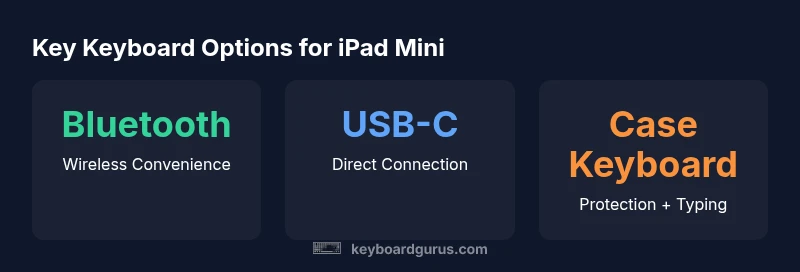
Choosing a keyboard for the iPad mini hinges on understanding how iPadOS handles external input. The vast majority of modern keyboards connect via Bluetooth or USB-C, and most will require little to no setup beyond a simple pairing step. According to Keyboard Gurus, the path of least friction is a Bluetooth keyboard that pairs in seconds and remains reliable for daily tasks. If you prefer a wired connection, USB-C keyboards (or USB-C keyboards used with a simple USB-C to USB-C cable) offer a very stable experience, especially when you’re working at a desk. Another option is a keyboard case, which combines protection with typing angles, though it adds bulk.
When evaluating compatibility, start with the basics: (1) does the keyboard support Bluetooth or USB-C, (2) is it compatible with iPadOS, and (3) does it provide the layout you need (US QWERTY, UK, etc.). For iPad mini, most Bluetooth keyboards will work across models as long as the device runs a reasonably recent version of iPadOS. If you’re encountering pairing issues, check the keyboard’s official docs for iPad compatibility notes and ensure the iPad mini’s Bluetooth is enabled and discoverable.
In everyday use, the question often becomes not if a keyboard will work, but which keyboard best matches your use case. Keyboard Gurus notes that mobility-minded users should prioritize compact layouts and long battery life, while students or professionals who type for hours at a time may favor ergonomic shapes or full-size keyboards with comfortable key travel. The goal is to balance portability with typing comfort, then tailor key mappings to suit iPadOS shortcuts.
In short: the landscape favors Bluetooth keyboards for portability and ease, with USB-C options for stability when at a desk—subject to layout and key mapping preferences.
Choosing the right layout and form factor
If you’re asking what keyboard works with ipad mini, the form factor often matters as much as the connection type. For most on-the-go users, a compact 60-75% Bluetooth keyboard delivers the best balance of portability and usability. These keyboards strip away the number pad and use smaller footprints while retaining essential modifiers, which makes them easy to carry in a bag or sling. If you type a lot and value a more traditional typing posture, a full-size or tenkeyless layout can be considered, but it will be heavier and less pocket-friendly. When evaluating layout, also check key travel and tactility. Some people prefer the crisp feedback of scissor-switch designs, while others enjoy low-profile mechanical keys for a more pronounced feel. The important part is that the layout accommodates the iPad’s on-screen shortcuts without forcing awkward hand positions.
For iPad mini users, compatibility with iPadOS is critical. Ensure the keyboard has standard Latin layouts (US/UK primarily) and supports the iPad’s function keys for volume, brightness, and mission-critical shortcuts. If you frequently switch between iPad mini and a computer, a familiar layout helps reduce mis-typing and keystroke errors. It’s also worth checking whether the keyboard supports backlighting, which can improve typing in low-light environments—though backlit keys can drain battery faster. Keyboard Gurus recommends selecting a keyboard with a robust, easy-to-access pairing button and reliable power management to minimize downtime during long writing sessions.
Finally, consider the wrapper: a keyboard case can add protection and a comfortable angle for typing, but the extra bulk may detract from portability. If you travel often, a standalone Bluetooth keyboard is usually the better choice. In summary, the best layout for an iPad mini user depends on your mobility needs, the kind of work you do, and how comfortable you are with different key travels. A compact Bluetooth keyboard is a reliable default, while a larger layout suits longer typing stints at a desk.
USB-C vs Bluetooth: Pros and Cons
The comparison between USB-C and Bluetooth keyboards is one of the most common questions for iPad mini users who want to minimize headaches. Bluetooth keyboards offer true wireless freedom, which is ideal for travel and quick note-taking on the go. They pair quickly and don’t rely on a dedicated port on the iPad mini, making them compatible across many devices beyond the iPad family. The main trade-off with Bluetooth is potential latency and occasional pairing hiccups in crowded wireless environments or when multiple peripherals are present. USB-C keyboards provide a wired-like stability, often with very low latency and fewer interference issues. They can be especially appealing when you want a predictable typing experience and you’re working at a desk with a USB-C port. Depending on the model, USB-C keyboards may also draw power from the iPad mini, reducing the need for battery management. A caveat to consider: using USB-C may require a USB-C to USB-C cable or adapter if the keyboard isn’t designed for direct USB-C host connections, so verify the cable compatibility before purchase. In either case, ensure the keyboard’s key mapping aligns with iPadOS shortcuts; some keys might map differently, which is more noticeable on compact layouts. Keyboard Gurus emphasizes testing keyboards with iPad mini to confirm the intended typing feel and shortcut behavior before committing to a long-term purchase.
In practice, most users will pick Bluetooth for its portability and compatibility, reserving USB-C for desk setups or devices where a wired connection guarantees the least possible latency. If you value portability and simplicity, Bluetooth is the safer default. If you need ultra-stable performance or intend to work primarily at a fixed workstation, USB-C becomes more compelling. Remember to verify that your iPad mini has the necessary iPadOS version to support the keyboard’s features and that any driver software or firmware updates are available when needed.
How to verify compatibility before you buy
Before you buy, methodically verify compatibility to avoid buyer’s remorse. Start with the basics: confirm the keyboard supports Bluetooth or USB-C and that it explicitly lists iPadOS compatibility. Check the keyboard’s docs for supported iPad mini generations and iPadOS versions, then verify the layout you want (US, UK, or other locales) is available. If you’re considering a USB-C keyboard, ensure you have a compatible USB-C host connection on your iPad mini or identify a recommended adapter if needed. Review the keyboard’s power considerations: battery life for wireless models and whether the keyboard can be charged while in use. If possible, look for user reviews or community threads that confirm real-world compatibility with iPad mini, ideally across multiple iPadOS versions. Finally, test the keyboard’s essential functions: basic typing, modifier keys, media controls, and any iPadOS shortcuts you rely on. This due diligence is especially important if you rely on precise shortcuts for workflow, gaming, or accessibility features. Keyboard Gurus also suggests checking return policies so you can test hands-on and return if the layout or feel doesn’t align with your preferences.
By focusing on clear compatibility statements, verifying layouts, and testing real-world use, you’ll minimize post-purchase surprises. Keep a short pre-purchase checklist and use it across brands to compare apples-to-apples. A little upfront diligence saves time and money in the long run.
Common gotchas and caveats
While most keyboards advertise broad compatibility, a few caveats deserve attention. Some keyboards include dedicated function keys that map to macOS shortcuts rather than iPadOS; in those cases, you may need to re-map keys or rely on on-screen alternatives. Compact keyboards sometimes omit dedicated arrow keys or home/end keys, which can affect navigation and productivity workflows. For iPad mini, ensure any specialized keys (brightness, volume, screenshot) align with iPadOS, as not all keyboards expose the exact same mappings. If you rely on backlighting, confirm battery life expectations and charging options given frequent travel. Certain keyboards sold for Windows or macOS may require labeling adjustments or software configuration to function smoothly with iPadOS, so always check for explicit iPad compatibility notes from the manufacturer. Finally, when using a keyboard with a case, verify that the case’s hinge or stand doesn’t obstruct access to the swipe gestures or accessibility controls you use regularly. Keyboard Gurus cautions that the smallest keyboards can feel cramped for long writing sessions, so test the model’s travel, spacing, and key feel before buying.
In short, potential drawbacks are mostly about layout suitability and shortcut mapping. With careful scrutiny of the product page, you can avoid surprises and pick a keyboard that fits your iPad mini usage patterns.
Quick pairing guide
Follow these steps to pair a Bluetooth keyboard with your iPad mini quickly and reliably. First, turn on Bluetooth on the iPad mini and put the keyboard into pairing mode (usually via a dedicated button or function key). Next, open Settings > Bluetooth on the iPad, locate the keyboard in the list of available devices, and tap to pair. If prompted, enter or confirm a pairing code. For USB-C keyboards, connect the keyboard to the iPad mini’s USB-C port directly if the keyboard is USB-C, or use a compatible USB-C hub/adaptor if needed, then test typing to confirm compatibility. After pairing, customize shortcut mappings if your keyboard supports iPadOS-specific keys and create a simple typing profile for work, study, or gaming tasks. Keyboard Gurus recommends labeling your most-used shortcuts for quick recall and enabling Siri or Spotlight search shortcuts to maximize productivity. Regularly updating firmware from the keyboard manufacturer can maintain compatibility as iPadOS evolves, so keep an eye on firmware notifications.
With a few straightforward steps, you’ll have a dependable typing setup that travels well and feels natural on the iPad mini.
Pro tips for seamless pairing
- Keep a dedicated USB-C or Bluetooth hub handy for compatibility checks when traveling.
- Test the keyboard with both landscape and portrait orientations to ensure ergonomic comfort.
- Note any keys that don’t behave as expected and check for updated layouts or mapping options from the manufacturer.
Recommended keyboard types for different uses
Different uses call for different keyboards. Students and writers who spend long hours typing will appreciate a keyboard with comfortable key travel, minimal noise, and good tactile feedback. Professionals who need quick shortcuts should prioritize keyboards with well-labeled function keys and reliable Bluetooth pairing. Gamers using iPad mini will benefit from low-latency, compact keyboards with anti-ghosting, but they should carefully review iPadOS-specific key mappings to ensure controls work as intended. If you travel often, a slim, lightweight Bluetooth keyboard that fits easily into a bag is typically the best choice. In every case, consider a keyboard that supports the iPad mini’s screen rotation and that has reliable battery life so it won’t drop out during a key task. Keyboard Gurus also notes that a compact keyboard with well-spaced keys helps reduce typos during mobile writing sessions, making it a natural first pick for most users. Finally, pairing and layout consistency across devices can be a major productivity booster, especially for students juggling multiple platforms.
Comparison of keyboard connection types for iPad mini
| Keyboard Type | Primary Connection | Typical Use | Pros | Cons |
|---|---|---|---|---|
| Bluetooth compact | Bluetooth | Travel, light typing | Portable; easy pairing | Battery dependent; may have latency in crowded spaces |
| Bluetooth full-size | Bluetooth | Productivity at desk | Ergonomic spacing; full keys | Bulkier; more expensive |
| USB-C with adapter | USB-C (adapter as needed) | Desktop-like typing | Stable latency; charging via iPad | Requires adapter; less portable |
Got Questions?
Can I use a USB-C keyboard with iPad mini?
Yes. A USB-C keyboard can work directly on newer iPad minis or via an adapter on older models. Always verify compatibility with iPadOS versions and the keyboard’s documentation.
Yes. You can use a USB-C keyboard with iPad mini, either directly or with an adapter, depending on the model and iPadOS version.
Do I need a keyboard case to use with iPad mini?
No, a standalone keyboard can work perfectly well. A keyboard case is optional and mainly adds protection and convenience by combining a stand and keyboard in one.
No, you don't need a keyboard case, but it can be convenient if you want protection and a built-in stand.
Are there keyboards with iPadOS-specific keys?
Yes. Many keyboards include keys for Home, Spotlight, and media controls that map to iPadOS shortcuts. Always check the product spec for iPadOS-specific key labels.
Yes. Many keyboards have iPadOS-specific keys like Home or Spotlight; check the product details for exact mappings.
Is Bluetooth latency a concern for gaming on iPad mini?
Latency can vary by model, but there are low-latency Bluetooth keyboards aimed at mobile gaming. Check reviews for real-world timing with iPadOS.
Latency varies, but you can find low-latency Bluetooth keyboards suitable for gaming with iPad mini.
Will older iPad mini models work with Bluetooth keyboards?
Most iPad minis support Bluetooth keyboards as long as the device runs a compatible iPadOS version. Always verify the specific keyboard’s compatibility notes.
Most older iPad minis work with Bluetooth keyboards if the iPadOS version is supported by the keyboard.
What’s the best budget keyboard for iPad mini?
Look for a compact Bluetooth keyboard with a proven track record for compatibility and good battery life. Avoid models with opaque layouts or poor key travel.
A compact Bluetooth keyboard with good battery life and clear key travel is usually the best budget pick.
“There isn't a single 'best' keyboard for the iPad mini; the right choice depends on how you plan to use it, your budget, and your preferred typing feel.”
What to Remember
- Start with a Bluetooth keyboard for portability and broad compatibility
- Choose layout based on your typing needs and travel habits
- Verify iPadOS compatibility and key mappings before buying
- Test essential shortcuts and navigation keys in real use
- Consider a keyboard case only if you want extra protection without extra bags