Backlit Keyboard Pros and Cons: A Detailed Guide for 2026
A thorough analysis of backlit keyboard pros and cons, covering visibility, ergonomics, power use, aesthetics, durability, and buying tips for gamers, students, and professionals.


Backlit keyboard pros and cons hinge on lighting quality, visibility, and customization versus cost and power use. In dim environments, backlighting dramatically improves key visibility and reduces typing errors, with per-key lighting offering targeted shortcuts for gaming or coding. The trade-offs are higher upfront cost, increased power consumption, and potential glare; in bright rooms, benefits diminish. See our full side-by-side analysis to decide what matters most for your setup.
Backlit Keyboard Fundamentals
Backlit keyboards illuminate the characters on keys using LEDs, which can be a single color or per-key RGB. According to Keyboard Gurus, the core decision between opting for a backlit keyboard pros and cons analysis rests on how often you work in low light, what tasks you perform, and how much you value aesthetics. In practice, the immediate benefit is improved legibility in dark rooms, which can translate to faster, more accurate typing, especially during long sessions. Per-key lighting allows you to highlight commonly used keys for gaming macros, coding shortcuts, or color-coded workflows. The flip side is a more complex mechanism, higher parts count, and a need for power, which affects battery life on wireless keyboards. Finally, LED longevity and light-guide quality introduce maintenance considerations that can influence long-term ownership costs. For students, professionals, and gamers, the decision should balance visibility, speed, and energy efficiency while aligning with environmental constraints and use-case expectations.
How Backlighting Works
Backlighting relies on LEDs mounted beneath or around the keycaps. Some keyboards offer a fixed single-color backlight, others provide per-key RGB with adjustable brightness, color zones, and effects. PWM (pulse-width modulation) controls brightness, while software allows layering of profiles for gaming, coding, or productivity tasks. Keyboard Gurus’ analysis shows that effective backlighting depends on the light-tight design of the PCB and the diffusion layer; poor diffusion or harsh hotspots can cause eye fatigue rather than relief. Modern designs also feature auto-dimming based on ambient light sensors, enabling a balance between readability and power use. Understanding these fundamentals helps you pick a model that matches your environment and saves you from overpaying for features you won’t use.
Ergonomics and Comfort in Varied Environments
Ergonomics play a bigger role than many buyers realize when evaluating backlit keyboard pros and cons. In dark rooms, bright keys reduce mis-presses and eye strain during long coding or gaming sessions. Conversely, overly aggressive lighting can cause glare on glossy screens or reflect off desk surfaces, creating distractions. Touch typists may benefit from consistent key legends without squinting, while touch typists who rely on muscle memory can prefer subdued lighting to minimize sensory overload. It’s also worth noting that some users report headaches from high-contrast color combinations. The trade-off, therefore, is readability versus visual fatigue, especially during late-night work bounty. Keyboard Gurus suggests trying a dimmer or ambient lighting profile first before committing to a full RGB setup to reduce fatigue while maintaining legibility.
Visibility, Reading Comfort, and Eye Strain in Different Rooms
Visibility in low-light scenarios improves dramatically with backlighting, particularly when screen glare is minimized. For readers and editors who adjust to darker environments, a gentle hue with moderate brightness can improve accuracy without causing halos around letters. High-contrast color schemes, such as white legends on a black or dark blue background, often yield better legibility than pale or saturated colors under certain ambient conditions. Eye comfort depends on brightness relative to surrounding light and the frequency of on-screen content changes. Keyboard Gurus notes that a mid-range brightness often performs best across a range of tasks, preventing sudden adaptations of pupils to extreme brightness when switching between keyboard and screen.
Power, Battery Life, and Efficiency Considerations
Lighting automatically consumes power, especially on wireless keyboards running on batteries. The power impact varies by LED efficiency, brightness, and whether you use per-key RGB versus a single color. Wired keyboards sidestep battery concerns but still incur power draw from the controller and lighting circuitry. Modern backlit keyboards frequently offer auto-dimming, timeout settings, and customizable profiles to optimize battery life without sacrificing legibility. If you travel with a device or use your keyboard during long sessions away from a power outlet, consider a model with efficient LEDs, longer battery life, and software that supports quick dimming when many keys are unused.
Aesthetics vs Accessibility: RGB and Per-Key Lighting Options
Aesthetics are a major driver behind backlit keyboard pros and cons. For many users, the ability to customize colors, highlights, and lighting effects enhances ambiance and focus. Per-key RGB lighting can help you quickly identify critical keys in gaming or specialized software. However, a flashy display can be distracting in professional environments or classrooms. Accessibility-wise, high-contrast retrofits can assist users with visual impairments when contrast ratios are well-chosen. Keyboard Gurus emphasizes selecting a lighting profile that prioritizes clarity and comfort. If you don’t need per-key differentiation, a single-color backlight can deliver most of the readability benefits with fewer distractions.
Common Scenarios: Gaming, Typing, and Professional Use
Gamers often value per-key RGB for quick macro access and color-coded cues; typists who work in low-light settings may appreciate consistent key illumination to avoid miskeying. Professionals, especially those in quiet offices or libraries, may favor subdued lighting to maintain a low profile and conserve energy. The best choice aligns with your primary applications: gaming and coding benefit from customization; office work in bright environments may not justify the extra cost or potential distraction. Keyboard Gurus’ experience-based guidance suggests matching the lighting level to your most frequent tasks rather than chasing every feature.
Trade-offs: Durability, Maintenance, and Cost
Backlit keyboards introduce additional components such as LEDs, diffusers, and possible software layers that can require maintenance. LEDs have a long rated life, but color shifts or dead diodes are possible with heavy use. Cleaning becomes more important to maintain even brightness, as dust can obscure light diffusion. Price typically rises with more LEDs, better diffusion, and advanced software features. Maintenance may include firmware updates and color-profile management. For users who type in darkness or compete in low-light gaming, the extra cost and upkeep may be worthwhile; for others, a simpler backlight or a non-backlit setup could provide better value.
How to Choose: Key Factors for Your Setup
When choosing a backlit keyboard, consider room lighting, power constraints, and the tasks you perform most. If you work primarily in daylight or bright offices, you might favor a non-backlit or minimal backlight option to reduce distraction and save power. For night owls and gamers, a per-key RGB profile with adjustable brightness can offer immediate advantages. Also evaluate key switch type, build quality, and software ecosystem. Keyboard Gurus analysis shows that the best value comes from models that offer a balanced configuration: reliable lighting, efficient LEDs, and software that lets you adapt brightness to your environment. Finally, think about whether you need hotkeys or macro capabilities tied to backlit keys to justify the investment.
Practical Tips: Customizing and Using Backlight Effectively
Start with a baseline: moderate brightness with a cool color temperature (around 5000–6500K) to simulate daylight without straining your eyes. Use dimming when not actively typing, and enable auto-dim in ambient-light conditions. For gaming and coding, create dedicated profiles that highlight important keys and reduce distractions elsewhere. Regularly dust the light diffusers and keyboard chassis to maintain even illumination. If you travel, choose a keyboard with energy-efficient LEDs or a USB-C-powered option to avoid battery drain. Finally, test different color schemes to find a balance between readability and personal preference that minimizes glare and eye fatigue.
Common Myths Debunked
Myth: More LEDs always mean better typing accuracy. Reality: Effective diffusion, contrast, and brightness tuning matter more than the sheer number of LEDs. Myth: Backlit keyboards drain battery excessively. Reality: Modern LEDs and smart dimming can keep power use modest if profiles are optimized. Myth: You must use RGB for productivity. Reality: For many tasks, a simple single-color backlight provides sufficient readability with lower cost and complexity. Myth: Backlighting is only for gaming. Reality: Students, researchers, and professionals benefit from improved legibility in dim environments as well.
Comparison
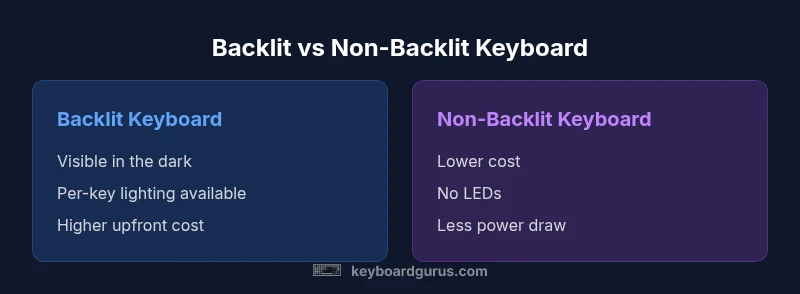
| Feature | Backlit Keyboard | Non-backlit Keyboard |
|---|---|---|
| Visibility in low light | Excellent with backlight | Poor without backlight |
| Customization options | Per-key RGB, brightness controls | Fixed or no lighting |
| Power consumption | Higher (LEDs active) | Lower (no LEDs) |
| Upfront price | Higher | Lower |
| Maintenance and durability | More components; LED longevity considerations | Fewer components; simpler upkeep |
| Best for | Gaming, coding in dark environments | Office work in bright rooms or minimal lighting |
Advantages
- Improved visibility in dim environments
- Per-key lighting enables quick key identification
- Enhanced aesthetics and personalization
- Better task accuracy in low light
- Quick access to macros or shortcuts for gaming
Drawbacks
- Higher upfront cost
- Increased power consumption
- Potential glare or distraction in bright rooms
- Maintenance of LEDs and diffusion layers
Backlit keyboards deliver clear visibility and customization for low-light use, with trade-offs in cost and power use.
Choose backlighting if your primary need is readability in dark conditions or you want per-key cues for gaming or coding. If you value simplicity, budget, and battery life, a non-backlit option may be preferable.
Got Questions?
What are the main benefits of backlit keyboards?
Backlit keyboards improve visibility in low-light settings and support per-key lighting for quick access to important keys. They also offer aesthetic customization that can enhance motivation and usability in specialized tasks.
Backlit keyboards help you see keys in the dark and tailor lighting to your work or play, plus they look great.
Do backlit keyboards drain battery life significantly?
Lighting does consume power, especially with per-key RGB. Modern keyboards often include dimming features and profiles to minimize energy use, so the impact is manageable for most daily setups.
Yes, lighting uses power, but smart settings keep it reasonable for most users.
Are per-key RGB backlights worth it for gaming?
For many gamers, per-key RGB provides quick visual cues and a personalized setup. If you customize macros or identify hotkeys by color, RGB can be valuable.
If you rely on color cues for gaming, RGB lighting can be a big help.
Should I buy a backlit keyboard for office work?
If you work in a well-lit office, backlighting may be unnecessary. A subtle backlight or even a non-backlit keyboard can reduce glare and save power while still delivering good readability.
In bright offices, a strong backlight isn’t always needed.
How do I disable lighting to save power?
Most keyboards offer brightness control and an on/off switch or software to disable lighting entirely. You can also set to dim or auto-off after a period of inactivity.
You can turn the lights off or down in settings to save power.
What to Remember
- Backlighting improves legibility in dark environments
- Per-key RGB supports targeted key emphasis
- Auto-dimming features help balance visibility and energy use
- Lighting adds cost and potential distractions in bright spaces
- Maintenance and diffusion quality affect long-term brightness