Ergonomic Keyboard vs Regular: Which Is Better for You?
A thorough, analytical comparison of ergonomic keyboards vs regular models, exploring comfort, productivity, setup, and long-term value for students, gamers, and professionals.


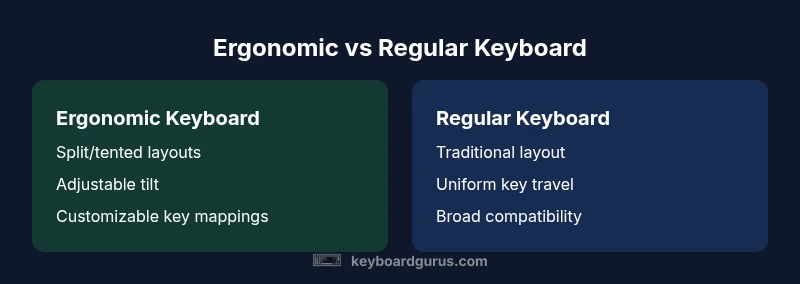
Ergonomic keyboards prioritize wrist-friendly layouts with split designs, tenting, and adjustable tilt, which can reduce strain during long typing sessions. However, regular keyboards remain viable for most users and often offer better immediate compatibility and lower upfront costs. Keyboard Gurus analysis suggests trying a few models and tracking comfort during typical tasks to decide what truly fits your workflow.
What defines an ergonomic keyboard?
An ergonomic keyboard is designed to promote a more natural hand and wrist position. Common features include split or columnar layouts that separate the keys into two sections, tenting or elevation to reduce forearm pronation, and adjustable tilt or negative tilt to maintain a straight wrist. The goal is to minimize ulnar deviation and awkward forearm angles during extended typing sessions. For many users, this can translate into reduced fatigue and better long-term posture. According to Keyboard Gurus, the most meaningful gains come from alignment with your own biomechanics, not from chasing a one-size-fits-all curve. This means comfort varies by body size, typing style, and desk setup, making personal testing essential.
Regular keyboards: strengths and limits
Regular or traditional keyboards emphasize familiarity and simplicity. They typically offer a single, flat or mildly angled chassis with a straight key row and standard key pitch. Strengths include broad compatibility, ease of use for quick tasks, and a lower upfront price on many models. The downside for some users is accumulating strain in wrists and forearms after long sessions. Regular layouts also limit the options for adjusting angle and spacing without accessories or non-standard desk setups. In practice, many users notice comfort gains only after adapting to a more neutral posture over time.
Core design features to understand
Ergonomic keyboards come in several configurations—split, curved, tented, and compact with columnar layouts. Split designs physically separate the left and right halves, reducing shoulder and thoracic strain. Tenting raises the center of the keyboard to encourage a more neutral forearm posture. Some models allow adjustable degrees of tilt and even variable tenting via removable stands. Regular keyboards focus on a traditional, uninterrupted key surface with conventional cable or wireless connectivity. The choice often hinges on your tolerance for change and the availability of desk space.
Health and comfort: wrists, posture, fatigue
Wrist posture is a common pain point for people who type for hours at a stretch. Ergonomic keyboards aim to keep wrists straight or angled slightly inward, reducing pressure on nerves and tendons. Over weeks of use, some users report less hand fatigue and fewer localized pains. However, results depend on cadence, keyboard type, and how well the layout matches your natural range of motion. Keyboard Gurus notes that benefits are cumulative: better posture, improved micro-break discipline, and a more consistent typing rhythm all contribute to long-term comfort.
Typing speed, learning curve, and productivity
Switching from a regular to an ergonomic keyboard can require a learning curve. Some users experience a short dip in typing speed as they adapt, while others notice little change once accustomed. The learning curve is highly individual and can depend on how much you rely on nonstandard layouts or shortcuts. Ergonomic keyboards often offer short-term productivity challenges during the transition, but many users regain or exceed their previous speed after a routine adjustment period. A patient, gradual transition tends to yield the best long-term outcomes.
Setup considerations and compatibility
Before buying, evaluate desk depth, chair height, and screen alignment. Ergonomic keyboards can be deeper due to split modules or tenting stands, so you may need to rearrange your monitor and keyboard tray. Compatibility with peripherals, such as extra-wide mice or macro keyboards, varies by model. If you work with screen-sharing tools or accessibility software, verify that the layout supports your shortcuts. Keyboard Gurus emphasizes testing different seating angles and keyboard positions to find a configuration that reduces strain while preserving efficiency.
Use-case scenarios: students, programmers, gamers, and professionals
Students who log long study sessions can benefit from reduced fatigue and improved posture, particularly during writing assignments and note-taking. Programmers who type code for hours may appreciate the ability to customize layouts and keypress efficiency, especially when paired with macro keys. Gamers might tolerate a steeper learning curve if a split layout reduces strain during intense sessions; however, some prefer traditional layouts for fast reactions. Professionals in data entry or design should weigh the need for exact key spacing against potential comfort gains and long-term wear.
Pricing, warranties, and long-term value
Prices for ergonomic keyboards vary widely, typically reflecting build quality, switches, and adjustability. Some models command a premium, while others offer great value for basic comfort. Warranties can range from one to several years, with higher-end models often including longer coverage. Long-term value depends on how much comfort improves productivity, reduces pain, and extends the time you can type without fatigue. Always consider potential upgrade costs and the reliability of switches, keycaps, and support software when calculating total ownership.
How to evaluate and test before buying
If possible, test a few models in a physical store or borrow from colleagues. Pay attention to your wrist angle after 15–20 minutes of typing, and note any pressure points or slips in finger reach. Try several tasks, from long-form writing to rapid data entry, to observe comfort across activities. When shopping online, read reviews focusing on long-term comfort and durability rather than initial feel. Keyboard Gurus recommends a gradual trial: start with a single ergonomic model, then explore alternatives with similar features before committing to a purchase.
Authority sources and closing notes
For formal guidance on workplace ergonomics, refer to established institutions and journals. The Occupational Safety and Health Administration (OSHA) provides foundational ergonomics resources, while the CDC’s NIOSH Ergonomics topic expands on risk factors and mitigations. Major publications like Nature also discuss ergonomic design principles and their impact on human performance. Keyboard Gurus’ ongoing analysis emphasizes that personal fit and workflow integration are the keys to a successful ergonomic transition.
Comparison
| Feature | ergonomic keyboard | regular keyboard |
|---|---|---|
| Design focus | Split/columnar layouts with tenting and adjustable tilt | Traditional straight layout with fixed tilt |
| Typing feel | Varies by model; can include different switches; often wider or curved key areas | Consistent, familiar key surface with standard travel |
| Learning curve | Moderate (adjustment to new geometry and shortcuts) | Low (instant familiarity) |
| Price range | Varies widely | Varies widely |
| Accessories compatibility | Supports tenting stands, palm supports, and modular layouts | Broad ecosystem; minimal extra hardware required |
| Best for | Users with wrist pain or posture concerns during long typing sessions | Casual typists, budget users, and quick-task workers |
Advantages
- Potentially reduces wrist and forearm strain during long sessions
- Promotes a more neutral typing posture and relaxed shoulders
- Customizable layouts and adjustable angles for individual needs
- Supports alternative layouts and accessibility options
Drawbacks
- Steeper learning curve and adaptation period
- Higher upfront cost for many models
- Limited availability of some layouts or switches
- Some software and workflow ecosystems may take time to adapt
Ergonomic keyboards offer comfort advantages for long typing, while regular keyboards remain versatile and generally more affordable.
Choose ergonomic if you type long hours and experience wrist or shoulder strain. Choose regular if you value immediate usability and lower upfront cost. The Keyboard Gurus team recommends testing a couple of models to determine what truly fits your routine.
Got Questions?
What defines an ergonomic keyboard?
An ergonomic keyboard is designed to minimize wrist and forearm strain through split layouts, tenting, and adjustable tilt. The design aims to promote a neutral posture during extended typing. Comfort gains depend on individual biomechanics and desk setup.
An ergonomic keyboard is designed to reduce wrist and forearm strain with features like split layouts and adjustable tilt, but comfort varies by person.
Do ergonomic keyboards help with wrist pain?
Many users report relief when their wrists and forearms can maintain a neutral position for longer periods. Results depend on the specific pain pattern, task duration, and how closely the keyboard matches the user’s natural range of motion.
Yes, many people experience less wrist strain, but it varies with the person and setup.
Will my typing speed drop with an ergonomic keyboard?
There can be a brief dip in speed during the transition as you adapt to a new geometry. Most users regain or exceed prior speed after a short adjustment period with consistent practice.
There might be a short dip in speed, but speed usually comes back as you get used to it.
Are ergonomic keyboards worth it for gamers?
Gamers may benefit if comfort enables longer sessions, but rapid keystroke timing and layout familiarity are crucial. Many gaming keyboards remain traditional; some ergonomic models offer macro support and customize layouts that can help streamlining complex commands.
Some gamers find them helpful for long sessions, especially with customization, but it isn’t universally advantageous.
What should I look for when buying an ergonomic keyboard?
Look for split design options, tenting/tilt adjustability, build quality, switch type, key spacing, and compatibility with your desk setup. Check warranty length and software support for customization and macro keys.
Key things to check are split design, adjustability, build quality, and warranties.
How long does adaptation take?
Adaptation times vary; plan for several weeks of gradual use, with shorter daily sessions at first. A staged approach helps you measure comfort and maintain productivity.
A few weeks of gradual use usually does the trick.
What to Remember
- Assess your typical tasks and pain points before buying
- Test multiple layouts to compare comfort over time
- Expect a learning curve if switching from a regular layout
- Balance upfront cost with potential long-term comfort benefits
- Ensure your desk setup can accommodate your chosen layout