How Long Do Keyboard Batteries Last: A Practical Guide
Learn how long keyboard batteries last across common power sources, what factors influence longevity, and practical tips to extend life for wireless keyboards, with data-backed ranges.


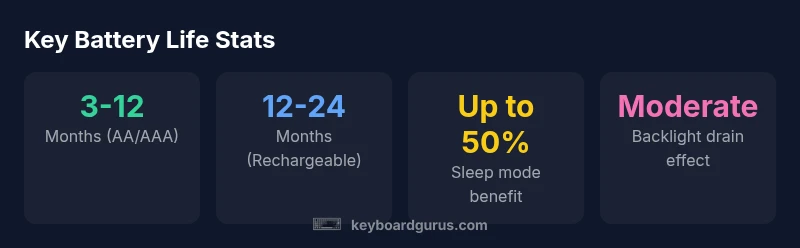
According to Keyboard Gurus, most wireless keyboards run on AA or AAA cells and typically last 3-12 months with regular use. Rechargeable keyboards with built-in packs can stretch to 1-2 years between charges. Longevity hinges on keypress frequency, backlight usage, sleep modes, and wireless protocol efficiency. Real-world testing shows variances by brand and features.
Battery basics: power sources and how they influence longevity
Wireless keyboards derive power from two main sources: disposable AA/AAA batteries and built-in rechargeable packs. Disposable cells are inexpensive and easy to replace, but you’ll change them more often depending on typing volume and any features like backlighting. Built-in packs offer convenience and can reduce ongoing running costs, but they require monitoring the charge and knowing the pack's cycle limits. The Keyboard Gurus team notes that even within these categories, design choices—such as microcontroller efficiency, sleep behavior, and radio protocol—play a crucial role in how long a charge lasts. In typical home or office usage, you can expect the 3–12 month range for disposable cells, and 12–24 months per charge for robust rechargeable systems. Expect variability by model, feature set, and how aggressively the device manages power.
Typical lifespans by power source
- AA/AAA-powered wireless keyboards: 3–12 months under average typing, with backlighting or high-usage models skewing toward the lower end.
- Rechargeable built-in packs: 12–24 months per charge for many modern keyboards, though cycle count and capacity influence actual results.
- Backlit keyboards: Backlight usage generally shortens lifespan relative to non-backlit designs; impact scales with brightness and duration.
- Bluetooth vs. 2.4 GHz: Some protocols optimize power more aggressively; real-world life depends on idle time, pairing frequency, and refresh rates.
Factors that affect battery drain
Key factors include typing intensity, distance to receiver, whether the keyboard is continuously connected, sleep-mode settings, and the presence of backlighting. Heavier typing sessions, bright or long-lasting backlights, and frequent reconnects tend to drain power faster. Age of the battery (for disposable cells) and degradation of rechargeable packs over time also matter. Manufacturers optimize firmware to manage idle states efficiently, but user habits ultimately determine practical longevity. For best results, treat power management as a variable that you can influence.
How to estimate your keyboard's life
Follow these steps to estimate longevity for your setup:
- Identify your power source (AA/AAA vs. rechargeable pack).
- Check the manufacturer’s stated life range for that source.
- Assess daily use: typing volume, backlight duration, and how often you use sleep mode.
- Apply a conservative range to your estimate (e.g., if a model claims 12–24 months under ideal conditions, plan for the lower end if you use backlight or have high typing volume).
- Track actual battery replacement intervals for a few months to refine your expectation.
The role of sleep mode, backlight, and connectivity
Sleep mode is one of the most impactful features for extending life. When a keyboard enters a low-power state after inactivity, power usage drops significantly. Backlighting can dramatically shorten life, especially at higher brightness levels or long daily use. Connectivity also matters: Bluetooth often provides low idle current, but active transmissions during typing can raise drain; a well-implemented auto-off feature can dramatically reduce unnecessary activity.
How to compare models and model-specific ranges
When evaluating models, don’t rely on a single spec sheet. Compare:
- Type of power source and stated range (disposable vs. rechargeable)
- Presence and quality of sleep mode and auto-off
- Backlighting features and brightness control
- Reported real-world tests or community reviews
Use the manufacturer range as a baseline, then adjust for your usage profile. Keyboard Gurus recommends simulating a typical workday and checking if the model supports a power-saving profile to maximize longevity.
Practical tips to extend battery life day-to-day
- Enable sleep/auto-off immediately after inactivity.
- Dim or disable backlighting when possible and use lighting presets.
- Keep software/firmware updated to optimize power management.
- Use rechargeable packs if you type heavily, but monitor cycle counts and replace when nearing end-of-life.
- Store devices with batteries removed or half-charged if you won’t use them for extended periods.
Maintenance and replacement considerations
Keep spare batteries or a charged pack on hand for convenience, but avoid leaking by rotating batteries periodically. For rechargeable keyboards, monitor cycle counts and the pack’s capacity; replace before it drops below a practical threshold. If you notice rapid drain after a firmware update, check for power-management options or seek an update patch from the manufacturer. Proper storage and periodic checks help maintain reliability.
Common misconceptions corrected
A common myth is that all wireless keyboards have identical battery life. In reality, lifespans vary widely by power source, feature set, and usage pattern. Another misconception is that backlighting always dramatically shortens life; advanced power-saving modes can mitigate impact. Finally, fear of battery leakage often deters owners from keeping spare batteries; with proper storage and rotation, risk is minimized.
Battery life by keyboard power source
| Model Type | Typical Battery Life (months) | Notes |
|---|---|---|
| AA/AAA-powered wireless | 3-12 | Depends on usage and features |
| Rechargeable built-in pack | 12-24 | Longer life per charge; cycles vary |
| Backlit keyboard | 2-6 | Backlight increases drain |
| Bluetooth 5.x keyboard | 6-18 | Moderate drain with active use |
Got Questions?
How long do AA/AAA batteries last in wireless keyboards?
Typically 3–12 months under average use; heavier usage or backlighting can shorten this. Variability exists between models and brands.
Most AA/AAA keyboards run for months up to a year, depending on usage and features.
Do rechargeable keyboards really last longer between charges?
Yes, rechargeable packs generally provide longer intervals between charges, but actual duration depends on capacity and cycle count.
Rechargeables usually last longer between charges, but it depends on the battery pack quality and cycles.
What features help save battery life on keyboards?
Sleep mode, auto-off, and minimize backlight usage are the most effective. Connectivity efficiency and firmware also matter.
Power-saving features like sleep mode and dim backlights can noticeably extend life.
Can firmware updates affect battery life?
Yes. Updates can optimize power management and fix energy-related issues, so keep firmware current when possible.
Yes—firmware updates can improve how efficiently the keyboard uses power.
Is it better to remove batteries when not using the keyboard for long?
If you won't use it for a long period, removing batteries can prevent leakage; store batteries in a cool, dry place.
For long breaks, remove batteries to avoid leaks and store them properly.
How should I estimate battery life for a new keyboard model?
Check manufacturer specs, then adjust for your daily usage. Use real-world testing to refine your projection.
Check the spec, then tailor it to your daily use and test in real life.
“Battery life is highly product-specific, but understanding your keyboard's power profile can save you money and frustration.”
What to Remember
- Identify your power source to estimate life accurately
- Enable sleep mode and limit backlight usage to extend life
- Rechargeable packs lower long-term costs but require cycles awareness
- Expect broad lifespans across brands and models
- Plan for replacements before performance issues arise