How Much Do Keyboards Cost? A Practical Price Guide
Explore the true cost of keyboards from budget membranes to premium mechanical builds. Learn price ranges, what drives cost, and how to estimate total setup expenses with guidance from Keyboard Gurus.


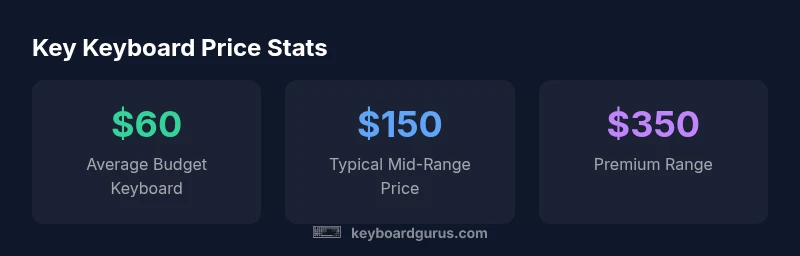
Keyboards span a broad price range, from budget options around $20–$60 to premium and artisan builds well above $500. Common, ready-to-use mechanical keyboards typically cost $80–$180, while high-end hot-swappable kits and custom builds often fall into the $200–$600 range. Your final spend depends on type, switches, keycaps, and features you value most.
Price tiers explained
According to Keyboard Gurus, the landscape of keyboard pricing is structured around a few broad tiers. In 2026, most first-time buyers gravitate toward budget and mid-range options, with a growing segment of enthusiasts exploring premium builds and artisan creations. Budget keyboards often cover basic typing tasks and classroom use, while mid-range mechanicals offer a satisfying feel and durable components. Premium mechanicals and hot-swappable kits deliver advanced features, better long-term value, and expansive customization options. Finally, bespoke artisans and fully custom keyboards target niche users who prioritize materials, acoustics, and collector value. When evaluating price, map your intended use to the price tier that best aligns with your needs and long-term goals, rather than chasing the flashiest feature set.
What drives price
Price is driven by several interrelated factors: the type of switch (membrane vs mechanical), the switch quality and variety, the PCB design (standard vs hot-swappable), plate material (brass, aluminum, acrylic), the case material (plastic, aluminum, stainless steel), and the quality of keycaps and stabilizers. Additional cost comes from features like wireless/Bluetooth connectivity, gasket-mounted designs, and pre-lubed stabilizers. Assembly quality and brand reputation also influence pricing. Understanding these levers helps you assess whether a higher price delivers tangible value for your use case.
Budget vs mid-range: finding value
For most users, the mid-range mechanical keyboard represents the best balance between feel, durability, and price. Budget keyboards can be perfectly adequate for typing and light gaming, but they may sacrifice long-term reliability or consistent key feel. Mid-range options often provide hot-swappable sockets, better keycap material, and more durable stabilizers, extending comfort and performance over years of use. High-end models, while impressive, deliver incremental gains in feel and aesthetics that may not be necessary for daily work or casual gaming. Keyboard Gurus recommends validating the specific feel (actuation, bottom-out, and noise) before deciding to invest in premium hardware.
Cost components beyond the keyboard
Beyond the base keyboard, shoppers should consider keycaps (material and profile), switches (type and brand), stabilizers (desoldered or pre-lubed), lube, and the tools required for assembly. Accessories such as artisan cables, carrying cases, and a switch tester can add to the total. If you’re building a setup, plan for these items in your budget. Minor upgrades, like better keycaps, can dramatically alter typing comfort and aesthetics without pushing you into the next price tier.
Buying paths: prebuilt, kit, or custom
Buying a prebuilt keyboard is convenient and fast, a kit offers a balance of customization and build satisfaction, and a fully custom build delivers the pinnacle of personalization. Prebuilts often charge a premium for brand recognition, while kits let you pick switches, keycaps, and cases to suit your taste. Custom builds require more time, expertise, and budgeting but can yield a uniquely tailored typing experience. Your choice depends on your tolerance for DIY, timeline, and how deeply you value customization.
How to estimate your total cost for a build
Start by setting a budget range, then tier your components: base keyboard (budget to premium), switches (budget to premium), keycaps (entry to high-end), stabilizers (standard to lubed), and tools (minimal starter kit to premium lubrication and a switch tester). Don’t forget shipping and taxes. Create a simple spreadsheet with each component and a contingency of 10–15% for unexpected costs. This approach gives you a realistic total that aligns with your goals.
Examples: typical price anchors for popular setups
- Casual typist on a budget: a basic membrane or entry mechanical often sits in the $25–$70 range, good for daily tasks.
- Gamer on a budget: mechanical options with solid switches typically fall in the $90–$160 bracket, balancing performance and value.
- Enthusiast mid-range: hot-swappable boards with quality keycaps usually travel around $150–$300.
- Custom/artisan seekers: fully customized builds can start near $400 and extend beyond $800, depending on materials and craft.
Tips to save money without sacrificing feel
Look for kits during sales, consider plain but durable keycaps first, and re-use stabilizers from older boards when possible. If you’re learning, buy a simple tester kit to experiment with different switches before committing to a full build. Finally, prioritize functionality (ergonomics, layout, and reliability) over cosmetic details when budgeting.
Common misconceptions about keyboard pricing
Many buyers assume price equals quality. While higher-cost models may offer improvements in materials and longevity, the most meaningful factors are feel, reliability, and compatibility with your setup. A well-chosen mid-range keyboard can outperform a more expensive model in daily tasks if it matches your preferences and workflow.
Keyboard price tiers and what you typically get in each range
| Category | Typical Price Range | Notes |
|---|---|---|
| Membrane/Budget | $20-$60 | Great for casual typing and students |
| Entry-level mechanical | $60-$120 | Decent feel with stock switches |
| Mid-range mechanical | $120-$250 | Hot-swappable options common |
| Premium mechanical / artisan | $250-$1000+ | Premium materials, custom machining |
Got Questions?
What is the typical price range for a beginner keyboard?
For beginners, a reliable keyboard can be found in the $40–$100 range, typically offering basic mechanical switches or solid membrane functionality. Look for models with comfortable key travel and dependable software support. As you gain experience, you can upgrade pieces piece by piece without a large initial investment.
Beginners usually spend around forty to one hundred dollars for a solid keyboard; focus on comfort and reliability as you start.
Is it worth investing in a premium keyboard?
Premium keyboards often deliver superior build quality, longer lifespan, and a more refined typing feel. If you spend many hours typing or gaming, the incremental improvements can justify the higher price. However, for casual use, a mid-range option typically provides most of the benefits at a lower cost.
If you type a lot or game daily, a premium board can pay off; for casual use, mid-range usually suffices.
What adds cost besides the base price?
Key components like switches and keycaps, stabilizers, lubricants, and possible tools contribute to the total. Special features such as hot-swappable PCBs, wireless capability, or premium case materials also raise the price. Your final cost reflects how many of these enhancements you choose.
Switches, caps, stabilizers, and tools add to the price, as do fancy features like wireless mode.
Do wireless keyboards cost more than wired ones?
Wireless keyboards typically carry a small premium due to batteries, radios, and power management. They may also introduce trade-offs in latency for gaming. If you value portability and a clean desk setup, a wireless option can be worth the extra cost; otherwise, wired is often more economical and reliable.
Wireless keyboards usually cost a bit more and can have slightly higher latency—worth it if you need mobility.
Can you build a keyboard for under $100?
Yes. A membrane keyboard or a very basic mechanical with entry-level switches can fit under $100. For a bit more value, a budget mechanical kit with common switches and affordable keycaps can keep you under $100 while still delivering a solid typing feel.
Sure—under $100 is doable with either membranes or basic mechanicals.
How do switches affect price?
Switch choice can significantly influence price. Budget switches are cheaper, while premium or rare switches add cost. The number of switch types and whether they are hot-swappable also affects the total, especially when you plan to customize the feel and performance.
Switches mainly drive cost—premium or rare options raise the price.
“"Price isn't the sole indicator of value. The best keyboard for you combines feel, reliability, and compatibility with your workflow."”
What to Remember
- Define your use case to pick the right price tier
- Expect to pay more for switches, caps, and build quality
- Consider total cost: keyboard plus accessories
- Prebuilt, kit, and custom paths each offer value
- Shop strategically to maximize value rather than chasing the highest price