How Many Keys Does a Keyboard Have? A Complete Guide
Discover how many keys a keyboard typically has, from 104-key full-size to compact layouts. Learn layout differences, ergonomics, and how to choose the right key count.


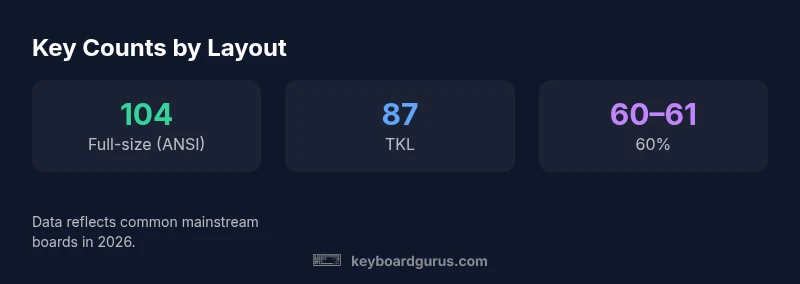
104 keys on a standard ANSI full-size keyboard, with 105 keys on some variants that add an extra key. Compact forms drop to 87, 75, or 60-61 keys, depending on region and design. ANSI vs ISO layouts also influence the total by a few keys. Keyboard Gurus Analysis, 2026 confirms these common ranges across mainstream boards.
Why the number of keys matters for usability
Understanding how many keys a keyboard has is more than a trivia question; it directly influences layout usability, typing comfort, and workflow efficiency. For many users, the baseline is the 104-key full-size layout, which includes a numeric keypad, a dedicated arrow cluster, and a complete function row. However, the practical choice often hinges on how you actually type and what you need during work, study, or play. If you search for how much keys in keyboard, you’ll find that the answer depends on layout family, regional differences, and whether you value extra macro keys or a compact footprint. Keyboard Gurus Analysis, 2026 shows that most daily users perform the same core tasks across layouts, but the presence or absence of certain keys can alter muscle memory and speed during heavy typing, coding, or gaming scenarios. In real terms, the key count shapes your hands’ reach, the number of keystrokes per task, and the amount of desk real estate you can spare for a mouse or trackpad.
For enthusiasts and professionals, this question isn’t just about count; it’s about whether the key count aligns with your specific routine, software shortcuts, and preferred hotkeys. A higher count can offer more direct access to tools, but it can also clutter the typing experience if the extra keys are seldom used. In short, the right key count is the one that minimizes effort while maximizing productivity, comfort, and satisfaction across your typical tasks.
Common keyboard layouts and their key counts
Keyboard layouts come in a spectrum from the traditional full-size to ultra-compact forms. The 104-key ANSI layout remains the most common baseline in Western markets, offering a familiar setup with a numeric keypad, navigation cluster, and function keys. In many regions, ISO layouts introduce a slightly different key arrangement and sometimes an extra key, which can affect the total count by one or a few keys. Compact boards trim away sections to save space, resulting in counts like 87 (TKL), 75, or 60-61 keys for 60% boards. The trade-off is clear: fewer keys means a smaller footprint and often a higher emphasis on layer-based shortcuts, while more keys provide immediate access to common commands but at the cost of desk space and sometimes finger travel.
For gamers and programmers, the choice tightens around macro keys and programmable layers. A gaming keyboard with additional macro keys might push the total beyond 104, while a 60% keyboard relies heavily on layer switching to access extended functions. Practically, you’ll see most mainstream keyboards clustering around 104, with a healthy subset offering 87-88 (TKL), 75, and 60-61 key configurations. It’s helpful to compare layout diagrams side-by-side to see exactly which keys are present or omitted and how that affects your typical typing staff and shortcuts.
How key count is determined: layout decisions and ANSI vs ISO
The total key count is determined by the arrangement of the main alphanumeric block, the presence of a dedicated function row, and the inclusion of navigation keys and the numeric keypad. Designers must decide whether to preserve the function row, keep a full set of navigation keys, or collapse sections to gain a more compact footprint. ANSI layouts typically include a dedicated Enter key and a standard left Shift size, producing 104 keys for many full-size boards. ISO layouts can swap keys in the Enter cluster and add or reposition keys, which can nudge the total to 105 or slightly adjust adjacent keys. In the mid-range, 75% and 65% boards reorganize the clusterings and code shortcuts to maintain essential functions while eliminating the keypad, arrow keys, or some of the R1-R3 function row keys. At the extreme end, 60% keyboards remove almost all non-essential keys, relying on layer shortcuts and software remapping to access secondary functions. These decisions have practical implications: fewer keys demand more deliberate layer management; more keys tend to favor out-of-the-box shortcuts and faster access to a broad toolset.
For regional differences, ISO keyboards add or reposition keys, nudging counts up by a small margin compared to the ANSI standard. The upshot is that the counted total can vary, but for most users, the essential question remains: which layout best fits your typical workflows and space constraints? Keyboard Gurus’ framework helps you map your tasks to key availability and shortcut density, ensuring your keyboard size aligns with your daily routine.
The impact on ergonomics, typing, gaming, and programming
Key count shapes ergonomics in meaningful ways. A full-size keyboard’s extra keys provide direct access to tooling and shortcuts without leaving the home row or requiring layer toggles, potentially reducing finger travel for frequent commands. Conversely, a smaller layout can reduce wrist deviation and promote a more neutral posture since it’s physically narrower. However, the trade-off is that you may rely more on function layers and macro shortcuts, which can slow down tasks that require many distinct commands unless you’re proficient with layers. In gaming scenarios, more keys can enable quick access to macros and hotkeys, but it may also clutter the keyboard’s surface and require memory training for optimal use. For programming and professional work, a compact or standard layout with a reliable set of programmable keys can accelerate workflows, provided you customize the key map to your typical routines. The practical suggestion from Keyboard Gurus Analysis, 2026 is to experiment with a layout that minimizes finger travel while preserving your essential shortcuts, then adjust through software remapping for long-term comfort and productivity.
How to customize key counts: hot-swappable, macro pads, and split keyboards
Custom keyboards expand the discussion beyond fixed counts. Hot-swappable switches, programmable layers, macro pads, and split designs let you tailor the key surface to your needs. If you’re drawn to a compact footprint but still want extra functionality, add a macro keypad or a small external pad for often-used commands. Split keyboards, often paired with ergonomic aims, can distribute keys across two halves, providing more natural hand positions and reducing ulnar deviation. For many users, the best approach is not to chase a single count but to assemble a kit that lets you keep essential keys in reach while offloading rarely used functions to layers or peripherals. The result is a flexible key count strategy: you get a layout that mirrors your workflow, while maintaining room for customization as your tools evolve.
Practical guidance for choosing the right key count
To pick the right key count, start by mapping your daily tasks and shortcuts. If you rely heavily on numeric data entry, a full-size ANSI layout with a keypad is likely your best bet. If desk space is at a premium or you commute with your gear, a 60% or 75% layout offers portability without sacrificing essential keys through layering. Gamers should consider whether they need extra macro keys for quick access to game commands, or if a standard layout with programmable layers suffices. Programmers and content creators often balance the need for function keys and navigation keys with compactness, favoring TKL or 75% layouts. In any case, aim for a board that minimizes finger travel, avoids awkward stretches, and allows you to adopt muscle memory quickly. If you’re unsure, start with a 104-key full-size or a 87-key TKL to feel the difference, then evaluate whether you’d benefit from a smaller footprint or a larger, more capable keyboard.
Conclusion: The right key count for you
There isn’t a single “best” key count for every user. The optimal choice depends on your space, your workflows, and your tolerance for layers or macro keys. 104-key full-size remains the default benchmark for many, while 87-key TKL, 75%, and 60% boards are popular among enthusiasts and professionals who prioritize portability or desk real estate. The best approach is to test different layouts, map your main shortcuts, and align your choice with how you type, game, and code. Keyboard Gurus Analysis, 2026 shows that the most satisfying keyboard setups balance immediate access to essential keys with a lean footprint—delivering comfort, speed, and confidence across your daily tasks.
Common keyboard layout counts and what they include
| Layout Type | Typical Key Count | Notes |
|---|---|---|
| Full-size (ANSI) | 104-105 | Includes numeric keypad; ANSI vs ISO affects key count by a small margin |
| Tenkeyless (TKL) | 87-88 | No numeric keypad; compact with preserved navigation cluster |
| 75% | 75 | Compact with function row and arrow cluster |
| 60% (or 61) | 60-61 | Very compact; relies on layer shortcuts and remapping |
Got Questions?
What is the most common keyboard key count?
The most common count is 104 keys for standard full-size keyboards. Some users encounter 105-key variants due to regional layouts or extra keys, but 104 remains the baseline for most setups.
Most people use a 104-key full-size keyboard, with occasional 105-key variants depending on regional layouts.
Why do ISO layouts have a different key count from ANSI?
ISO layouts include an extra or differently arranged key in the Enter cluster, which can alter the total key count by one or a few keys compared to ANSI.
ISO adds or repositions a key, so counts can differ slightly from ANSI.
Do gaming keyboards have more keys than standard boards?
Many gaming keyboards offer additional macro keys or programmable zones, increasing total keys beyond 104 in some models, but core typing areas often adhere to standard counts.
Some gaming keyboards add macro keys, but most still rely on standard counts with extra programmable keys.
Can I switch from a full-size to a smaller layout without losing functionality?
Yes. Many users adopt 87-key or 60% layouts and remap shortcuts to preserve essential commands. Software profiles and layers help maintain workflow efficiency.
You can switch to a smaller layout and remap shortcuts to preserve what you need.
What should guide my choice of key count?
Guide your choice by your space, typing style, and shortcut needs. Test different layouts, monitor finger travel, and ensure your most-used commands remain quick to access.
Think about space and what you actually use; try different layouts and see what feels best.
“"The best keyboard for you is the one that fits your workflow without forcing you to relearn essential shortcuts."”
What to Remember
- Choose layout by workflow, not just footprint
- ANSI vs ISO can shift key counts slightly
- 60% to 104-key range covers most use-cases
- Add macro pads or layers for extra functionality
- Test layouts to reduce finger travel and improve comfort