Is a Computer Keyboard the Same as a Typewriter? A Comparison
An analytical comparison showing how computer keyboards differ from typewriters in mechanism, output, ergonomics, and usage, with practical guidance for students, gamers, and keyboard enthusiasts.


Is a computer keyboard the same as a typewriter? No. While both involve keystrokes, they operate on fundamentally different principles: typewriters convert input into physical ink on paper, whereas computer keyboards transmit signals to a device to render text on a screen or print. Keyboard Gurus emphasizes the distinct technologies, ergonomics, and workflows that define each tool.
Is There a Fundamental Difference Between Keyboards and Typewriters?
The phrase "is computer keyboard the same as typewriter" is a common question that signals interest in how modern input devices relate to classic typing machines. The short answer is that they are not the same, and their differences extend far beyond aesthetics. According to Keyboard Gurus, the core distinction lies in how keystrokes become output and how each device fits into a larger workflow. A keyboard functions as an input endpoint in a digital ecosystem, while a typewriter functions as a self-contained output device that prints a fixed record on paper. This foundational split shapes everything from usability and maintenance to cost of ownership and long-term viability. For anyone evaluating whether to use a traditional typewriter or a modern keyboard, starting with this distinction helps filter priorities such as editing capabilities, portability, and integration with software tools.
In this article, we explore the full spectrum of differences, with practical guidance for students, gamers, and professionals who want to optimize their setup. The Keyboard Gurus team emphasizes that the choice is rarely about which device is better in an absolute sense, but which device best serves your specific goals, whether that means quick drafts on a screen or tactile satisfaction with paper output.
wordCountAlsoNotes":null},
bodyBlocks2
How Output Is Created: Typewriter vs Computer Keyboard
When you press a key on a typewriter, a mechanical sequence is triggered that translates the keystroke into ink onto paper. Manual models rely on physical force to move type hammers, deposit ink, and advance the carriage, producing a tangible character on a page. Electric typewriters reduce the effort required, but the mechanism remains predominantly mechanical and the output remains a single, paper-based artifact. A computer keyboard, by comparison, does not create output directly. Instead, each keystroke transmits a digital signal to a host device—typically a computer or tablet—which renders text on a display and can later send that content to a printer if a paper copy is desired. This fundamental difference in output media—ink on paper versus pixels on a screen—drives how professionals draft, edit, and share documents. Keyboard Gurus notes that the ability to edit, format, and search text in real time dramatically changes the writing process, the revision cycle, and collaborative workflows. For designers and developers, the keyboard is the gateway to an entire software ecosystem; for writers who prefer a physical artifact, the typewriter offers an archival, ceremony-filled experience.
From a product-design perspective, this distinction also dictates power requirements, portability, and maintenance needs. Typewriters require ribbons, ink, and regular mechanical care; keyboards require dust control and firmware updates in some cases. Both have dedicated communities and niche use-cases, but the modern keyboard ecosystem is built around digital interoperability, instant editing, and digital storage. In brief: typewriters produce output; keyboards provide input into an ever-expanding digital workflow.
wordCount":210}
bodyBlocks3
Mechanisms and Keys: From Levers to Chips
Typewriters started as purely mechanical devices that convert a keystroke into a physical impression on paper via type hammers and ink ribbons. Manual typewriters rely on a spring-loaded carriage, a robust set of type bars, and a user’s own force to strike letters with precision. Electric typewriters add a motor-driven enhancement, reducing the amount of effort required and allowing faster typing, but the fundamental mechanism remains mechanical: keystrokes trigger a physical sequence. Digital keyboards, however, operate on electronic principles. Each key press closes a circuit or completes a circuit in a switch, sending a digital signal to a microcontroller that translates the action into a character code. Some keyboards use mechanical switches (with varying actuation forces and tactile feedback), while others use membrane or scissor-switch designs. The result is a wide spectrum of typing experiences—from the musty, resonant click of a vintage typewriter to the ultra-clean, quiet operation of modern mechanical switches. A key takeaway is that mechanism drives not just feel and noise but durability, repairability, and long-term maintenance costs. Keyboard Gurus emphasizes that this mechanical-to-electronic transition is a primary reason why the two devices occupy different niches in writing workflows.
If you seek long-term reliability and upgradable components, a modern mechanical keyboard offers interchangeability of switches and keycaps and easier replacement of worn parts. By contrast, a vintage typewriter’s heart is its type hammers and carriage—parts that are fascinating to study but can be hard to service today. Awareness of these mechanisms helps buyers select devices that align with their preferences for tactile feedback, auditory cues, and repairability.
wordCount":204}
bodyBlocks4
Typing Experience and Ergonomics
Typing on a typewriter is often described as a ritual: the key travel tends to be longer, stiffer, and more deliberate, and the sound is unmistakable—the percussion of hammer strikes meeting ink onto paper. Even electric typewriters still produce a strong tactile feedback, with the carriage returning and type hammers swinging into type; this yields a disciplined, purposeful workflow. In contrast, computer keyboards offer a broad spectrum of experiences. Some are noisy and tactile, especially high-load mechanical switches with pronounced actuation; others are quiet and smooth, featuring membrane or scissor switches. Ergnomics plays a growing role: adjustable tilt, split keyboards, and wrist rests can reduce fatigue during long writing sessions. Moreover, software environments enable features like word-count tracking, grammar suggestions, and on-screen editing, which dramatically reduce the cognitive load of drafting. In practice, the right choice depends on personal preference for feedback, sound level, and how you work. Keyboard Gurus notes that many users gravitate toward keyboards for extended use because the combination of tactile feedback and digital editing supports faster iteration and better productivity, while typewriters appeal to those who value ceremony, the tactile feel of keys, and the eventual paper-based artifact.
For writers who value quiet work environments, a well-chosen keyboard with a comfortable layout and a suitable switch profile can provide a near-typewriter-like experience without sacrificing digital flexibility. For others, the sensory and archival appeal of a typewriter remains unmatched, even if the editing process is more cumbersome. The choice often reflects a balance between sensory satisfaction and practical workflow efficiency.
wordCount":210}
bodyBlocks5
Layouts, Modifiers, and Special Keys
Typewriters generally adhere to a fixed QWERTY layout with limited or no variation across models, and most lack dedicated function keys or programmable layers. The result is a focus on the character set and mechanical reliability rather than digital flexibility. In contrast, computer keyboards preserve the same core layout but add a broad array of function keys, media controls, and programmable layers. Modern keyboards support a wide range of modifiers—Ctrl, Alt, Shift, Fn, and Cmd—allowing complex shortcuts, macros, and cross-application workflows. This digital surface enables customization for programming, content creation, and gaming. The rise of hot-swappable switches, adjustable keycaps, and ergonomic architectures gives users the ability to tailor the typing experience to their preferences. Some enthusiasts even pursue typewriter-inspired keyboards to marry aesthetic charm with digital capabilities. When evaluating options, consider whether you need programmable keys, cross-platform compatibility, and the ability to switch switches or reconfigure layouts as your work evolves.
Hybrid devices attempt to blend the nostalgia of typewriter aesthetics with the flexibility of digital input. They can reproduce the look and feel of typewriter keys while retaining the ability to interface with modern devices. While appealing, hybrids may compromise on pure mechanical precision or long-term repairability, depending on the design. Overall, layout decisions affect typing comfort, productivity, and the ease of switching between projects or devices. Keyboard Gurus suggests testing several switch styles and keycap profiles before committing to a long-term setup.
wordCount":190}
bodyBlocks6
Maintenance, Durability, and Longevity
Maintenance realities diverge sharply between typewriters and keyboards. Typewriters—whether manual or electric—require regular mechanical upkeep: cleaning type hammers, lubricating moving parts, and, in vintage models, careful adjustment of alignment and ink flow. Ribbon supply, platen condition, and carriage return mechanisms all demand periodic attention. Electric typewriters reduce some manual effort but still rely on gears, motors, and ink paths that can wear over time, especially if used heavily. Repairing vintage typewriters may require specialist services and parts that are scarce. Computer keyboards, in contrast, are designed for quick cleaning and modular maintenance. Simple dusting, keycap removal for cleaning, and, in some cases, firmware updates keep keyboards current. Mechanical keyboard enthusiasts appreciate hot-swappable switches and robust stabilizers, which allow for easy upgrades without soldering. Durability also differs: a well-made typewriter can survive decades if kept dry and mechanically intact; a modern keyboard’s reliability hinges on electronic components but benefits from standardized parts that are widely available. In both realms, proper storage, climate control, and careful handling extend life, but the failure modes—ribbon depletion, jammed type hammers, or dead firmware—reflect the device’s underlying technology. Keyboard Gurus stresses that informed maintenance is a cornerstone of preserving any typing apparatus, whether digital or analog.
wordCount":210}
bodyBlocks7
Use Cases and Scenarios
Different work contexts call for different tools. For students and professionals who draft, edit, and share documents across teams, a computer keyboard connected to a modern device delivers the best workflow: quick edits, easy collaboration, and fast distribution. Gamers benefit from programmable keys, per-key lighting, and rapid input responses that improve performance in fast-paced titles. Writers who prize tactile feedback, suspension of disbelief, and a physical, paper-based artifact may prefer a typewriter, especially for creative drafting sessions or archival projects. Typewriter enthusiasts often use them for personal journaling, artistic expression, or learning about mechanical engineering while enjoying the sensory experience. For those who value a nexus between nostalgia and digital capability, hybrid keyboards provide an aesthetic homage to typewriters with the flexibility of modern interfaces. In educational settings, the distinction matters for pedagogy: students learn about printing technology and the evolution of user interfaces when exposed to both devices. The essential question remains: what is the primary output you need, and how flexible must your editing tools be? Keyboard Gurus suggests mapping your tasks to the device that minimizes friction and maximizes your writing quality.
wordCount":210}
bodyBlocks8
Economic Considerations and Availability
Price and availability shape decisions as much as performance. Modern computer keyboards span a broad price spectrum, from affordable entry-level models to premium builds with bespoke switches, keycaps, and wireless connectivity. The ongoing ecosystem—software support, replacement parts, and compatibility—tavors a long-term value that is often more predictable than older technologies. Typewriters present a different economic dynamic. Manual typewriters are typically inexpensive to acquire in good condition, yet older models can be costly depending on brand, condition, and rarity. Electric and electronic typewriters command higher price points due to their added features, but repair costs can be unpredictable when parts become scarce. Maintenance costs also vary: keyboards require occasional cleaning and firmware updates, while typewriters may require ribbon replenishment, platen conditioning, and occasional mechanical alignment. Availability is regionally dependent: urban areas with vintage markets often have a broader supply, while rural areas may see fewer options. For buyers, a practical approach is to define a budget range for initial purchase, then estimate ongoing maintenance by device type. Keyboard Gurus stresses that price is a function of use-case alignment: the right device delivers long-term value even if upfront costs are higher.
wordCount":210}
bodyBlocks9
The Keyboard Gurus Perspective: How to Decide
From a decision-making standpoint, the primary criterion is output needs. If your priority is editable digital documents, searchability, and easy sharing, a computer keyboard paired with a modern computer is typically the right choice. If you crave tactile feedback, the charm of a physical artifact, and a ritualistic writing process, a typewriter—manual or electric—offers distinct value. For those who want a blend of both, consider a typewriter-inspired keyboard or a modern keyboard with retro aesthetics, preserving nostalgia while maintaining full digital capability. Other guiding questions include: Do you value portability or the feel of high-quality mechanical switches? Is silence important in your workspace, or do you enjoy the typist’s acoustic environment? How crucial is long-term repairability and ease of maintenance? The Keyboard Gurus team recommends a practical test drive: try several models, measure your editing speed, assess comfort, and evaluate how easily you can transfer output to your preferred workflow (screen, cloud, or print). This approach avoids bias toward a single device and places your real-world needs at the center of the decision. In short, choose the tool that aligns with how you work, what you value in output, and how you want to interact with text on a daily basis.
wordCount":210}
bodyBlocks10
Alternatives and Hybrid Solutions
If you’re drawn to the best of both worlds, explore hybrid solutions that echo the typewriter aesthetic while delivering modern capabilities. Typewriter-inspired keyboards and accessories provide visual appeal and tactile resonance without sacrificing digital workflow efficiency. For those who want tactile feel without ink on paper, consider high-quality mechanical keyboards that offer a variety of switches with distinct actuation profiles and travel distances. Some enthusiasts also experiment with mechanical keyboards that use retro-style keycaps and font sets that resemble typewriter legends, aiming for a nostalgic look with digital reliability. For archival projects or creative writing, a typewriter can be kept as a dedicated tool, while a computer keyboard handles drafting and editing tasks. In professional settings, the most effective strategy is to maintain a clear separation of concerns: use a keyboard for editing and digital production, and reserve a typewriter for moments when analog concentration and a physical document are desired. The result is a flexible, productive setup that honors both history and modern engineering.
wordCount":210}
bodyBlocks11
Authoritative Sources
To support the concepts discussed here, consult authoritative sources that provide historical and technical context on typewriters and keyboards. These resources offer foundational information about how these devices evolved and how they are used today:
- Library of Congress: https://www.loc.gov
- Britannica: https://www.britannica.com/technology/typewriter
- Smithsonian Magazine: https://www.smithsonianmag.com/technology/typewriters-article
These sources help readers verify historical timelines, mechanical principles, and the evolution of input/output devices across eras.
wordCount":150}
Feature Comparison
| Feature | Manual Typewriter | Electric Typewriter | Computer Keyboard | Hybrid Keyboard (typewriter-inspired) |
|---|---|---|---|---|
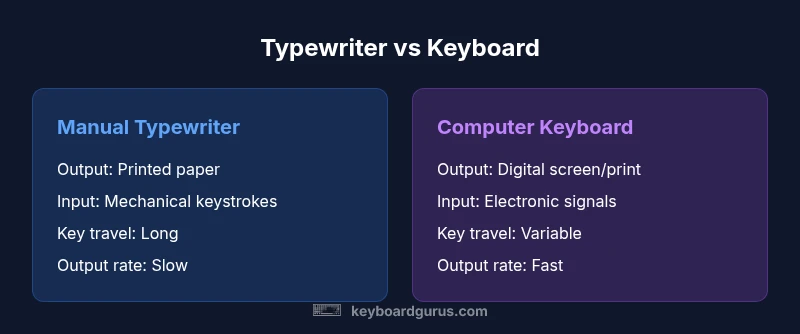
| Output medium | Printed paper via ink ribbons and type hammers | Printed paper via ink ribbons and motors | Digital screen or printer output | Digital display with optional paper print, retro aesthetics |
| Input method | Mechanical keystrokes activate type hammers | Electric motors aid hammer actuation | Electronic switches register keystrokes | Electronic input with typewriter-inspired aesthetics |
| Key travel | Long, heavy travel | Moderate to heavy travel | Variable by switch, generally lighter | Moderate travel with tactile feel |
| Noise | Very loud (mechanical) | Loud (mechanical-electrical) | Low to moderate (styled, often quieter) | Low to moderate (retro-inspired) |
| Connectivity | Standalone, no digital connection | Standalone, no digital connection | USB/Bluetooth to computer | USB/Bluetooth to computer with retro look |
| Best for | Full paper output, archival writing | Paper output with simplified editing | Digital workflows with strong editing tools | Nostalgic aesthetic with digital capability |
| Typical price range | Low to high (model and condition dependent) | Low to high (model dependent) | Moderate to premium (depends on features) | Moderate (budget to mid-range) |
Advantages
- Provides a tangible, tactile typing experience that many writers enjoy
- Keyboards offer flexible digital workflows, editing, and easy sharing
- Broad device compatibility and ongoing software support
- Accessories and replacements are widely available
Drawbacks
- Typewriters require more maintenance and can be less reliable in modern workflows
- Output is fixed to paper unless scanned or copied; editing is harder
- Typewriters can be loud and space-consuming; keyboards can be insubstantial for some users
- Hybrid devices may compromise on either nostalgia or smart capabilities
Modern keyboards win for most daily tasks; typewriters excel in tactile nostalgia and archival value
For most users, a computer keyboard enables faster editing, easier sharing, and seamless digital integration. Typewriters offer a unique, ritualistic experience and definitive paper output. Choose based on whether your priority is workflow efficiency or analog satisfaction.
Got Questions?
Is a computer keyboard the same as a typewriter?
No. A computer keyboard is an input device that transmits keystrokes to a host device, producing output on a screen or via a printer. A typewriter is a standalone output device that creates a printed page with each keystroke, often using ink ribbons. The two operate on different principles and serve different workflows.
No. A keyboard inputs data to a computer, while a typewriter prints directly onto paper.
Do typewriters require electricity?
Manual typewriters do not require electricity; electric typewriters use power for motor-assisted hammer action. Modern common keyboards always rely on electricity to communicate with a computer or device.
Manual typewriters don’t need power; electric ones do. Keyboards always need power to work.
Can I use a typewriter with a modern computer?
You can connect typewriter output to a computer by scanning the pages or using a specialized workflow, but most users opt for a keyboard for direct digital input. Some artisans use typewriter-like keyboards to combine nostalgia with digital functionality.
You can scan or photograph typewriter output to use with a computer, or try a typewriter-inspired keyboard for a middle ground.
What should I consider when choosing between a keyboard and a typewriter for writing long documents?
Consider workflow needs, editing frequency, and output preferences. If you require quick editing and easy sharing, a keyboard is better. If you value tactile feedback and paper output, a typewriter might be preferable.
Think about editing needs and output: digital for editing, paper for the feel of a typewriter.
Are there hybrids that combine typewriter aesthetics with digital functionality?
Yes. Typewriter-inspired keyboards and adapters aim to capture the look and feel of typewriters while delivering full digital capability. They are popular with enthusiasts who want nostalgia without sacrificing modern workflows.
There are typewriter-inspired keyboards that mix retro looks with modern tech.
Which is better for archival writing and nostalgia?
If archival, a typewriter provides genuine print artifacts with historical value. For ongoing accessibility and easy reproduction, a keyboard setup with good writing tools is preferred.
For nostalgia, go with a typewriter; for ongoing access, a keyboard wins.
What to Remember
- Identify your primary output (screen vs paper)
- Prioritize editing and digital integration for most tasks
- Consider total maintenance and repairability when choosing
- Explore typewriter-inspired keyboards as a compromise option
- Test multiple switch types to match your typing style