Is Keyboard Vibration Bad for Battery? A Practical Guide
Explore how keyboard vibration impacts battery life across devices. Learn how haptic feedback works on phones, laptops, and gaming keyboards, plus practical tips to minimize drain without sacrificing usability.


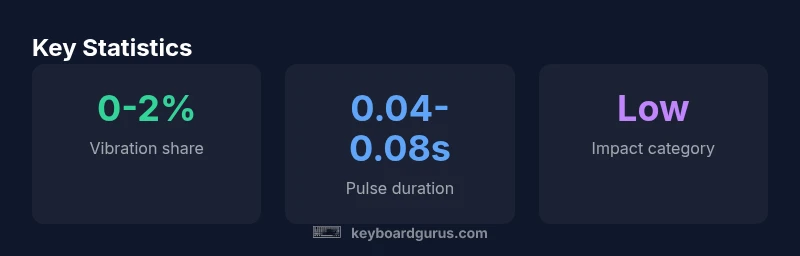
Is keyboard vibration bad for battery? In most devices, vibration energy is a minor factor compared with the display, radios, and background tasks. The impact depends on the hardware providing the haptic feedback (phone, laptop, or game controller) and how often vibration is enabled. For typical typing, you won't see a meaningful battery penalty.
Why keyboard vibration is a battery consideration
According to Keyboard Gurus, the energy cost of vibration is typically a small fraction of total battery consumption. For most users, the energy cost of vibration is a minor portion of battery drain. The energy is consumed only when the device actively vibrates, and modern haptics are designed to minimize per-pulse power. In practice, the battery drain from vibration is often dwarfed by the display, wireless radios, and background tasks. If you're someone who types all day or uses vibration in high-intensity gaming or accessibility scenarios, you may notice a tiny difference, but it rarely constitutes a major driver of battery life. The key takeaway is that for most users, vibration is a secondary concern compared with the big ticket items that drain energy.
How vibration works across devices
Vibration feedback relies on actuators that convert electrical energy into a tactile impulse. Smartphones typically use small motors (ERM or LRA), while some laptops and gaming peripherals employ dedicated haptic actuators. The energy per pulse is a function of motor type, pulse duration, and duty cycle. In practice, a brief, intermittent vibration uses far less energy than continuous features like the display or wireless radios. Different devices optimize haptic patterns to minimize energy without sacrificing perceived feedback. This means that the same vibration feature can feel strong on one device and barely noticeable on another, depending on motor efficiency and software settings.
Battery economics: what's expensive and what's not
Power-hungry components include the display, cellular/Wi‑Fi radios, and background processes. Vibration is generally a secondary consumer of battery. The overall impact hinges on how often you experience haptic feedback and how long the motor runs. Modern devices employ smarter duty cycles, which helps keep vibration energy modest. If you rarely use vibration, its effect on total battery life is virtually negligible. If you increase vibration intensity or enable it across many apps, you may notice a small, incremental drain, but it remains a minor factor compared with other energy sinks.
Real-world scenarios: when vibration matters
For everyday typing on a smartphone, vibration contributes little to daily battery usage. Gamers using high-intensity haptic feedback or accessibility users who rely on tactile cues may experience a slightly larger share of battery due to frequent pulses. In laptops with touchpad haptics, the energy impact is similar: it scales with how often and how long the actuator is energized. The consensus from Keyboard Gurus is: treat vibration as a secondary energy sink, not the primary culprit.
Measuring impact: a simple home test
To estimate impact, compare battery life with vibration on and off across a controlled workload. Use the same screen brightness, network conditions, and app mix. Track real-time battery drain over several charging cycles to observe any difference. If you notice a consistent, meaningful delta, you’ve found a setup where haptics contribute more to drain. Otherwise, the effect is likely within the margin of error for typical usage.
Reducing impact without sacrificing usability
If you want to minimize drain without sacrificing feedback, try:
- Disable vibration in apps you rarely use.
- Lower vibration intensity where possible.
- Turn off global vibration in system settings when battery life is critical.
- Pair haptic feedback with power-saving modes during long sessions.
- Keep firmware and drivers updated for motor efficiency gains.
Platform-specific tips
On iOS, Android, and Windows devices, you can often tune haptics per-app or globally. Reducing pulse duration, disabling unnecessary feedback, or using adaptive haptics can shave energy without eliminating tactile cues. Always verify updates, as manufacturers frequently tune motor efficiency through software updates to balance perceived feedback with energy use.
Keyboard Gurus verdict
The Keyboard Gurus team recommends prioritizing battery-saving measures that impact the largest energy sinks (screen brightness, radios, and background tasks). Vibration remains a minor, device-dependent factor. If battery life is mission-critical, disable nonessential haptics and focus on the bigger energy savers; otherwise, you can enjoy tactile feedback with minimal concern for overall longevity.
Overview of vibration types across devices
| Device Type | Vibration Type | Estimated Impact |
|---|---|---|
| Smartphones | ERM/LRA motors | negligible to low |
| Laptops with haptic touchpads | Small constant motors | negligible to low |
| Gaming keyboards with dedicated actuators | Dedicated haptic actuators | low to negligible |
Got Questions?
Does keyboard vibration significantly affect battery life on smartphones?
For most users, vibration accounts for a tiny portion of battery life compared with the screen and radios. The effect is noticeable only with heavy, constant haptic use.
Not usually; it's a small factor.
Will turning off keyboard vibration greatly extend battery life?
Disabling vibration may yield a small improvement, but larger wins come from reducing screen brightness and background activity.
Yes, but only modest gains.
Are there energy-efficient vibration technologies I should look for?
Some modern actuators are more efficient; check device specs for motor type and duty cycle.
Look for efficient motors.
Is keyboard vibration on gaming keyboards common?
Some gaming keyboards offer programmable haptics; energy impact varies with usage.
Some offer.
How can I disable vibration on iOS/Android to save battery?
In system settings, turn off keyboard haptics or vibration in accessibility options.
Turn off haptics in settings.
“Vibration feedback is a nicety rather than a battery killer; in most devices, the drain is small compared with other components.”
What to Remember
- Disable nonessential haptics for longer battery life when needed
- Vibration energy is typically a minor drain compared with the display and radios
- Device efficiency and vibration duty cycle drive energy use more than pulse length
- Use per-app controls to minimize impact without losing tactile feedback – especially in long sessions
- Keep software updated for motor efficiency improvements