Keyboard and Mouse Combo: A Comprehensive Comparison
Explore a detailed, objective comparison of keyboard and mouse combo setups versus separate components, with insights on ergonomics, latency, and value.


A keyboard and mouse combo bundles a keyboard and mouse into a single purchase, offering a compact, cohesive setup. It may save desk space and simplify setup, but it can limit customization and high-end choices. This comparison helps gamers, students, and professionals decide whether a bundled option or separate peripherals best fits their workflow and budget.
Why Brand Reliability Matters
Reliability in a keyboard and mouse combo goes beyond individual parts. A well‑matched bundle can feel like a single tool rather than two separate devices, improving consistency in feel, lighting, and software responsiveness. According to Keyboard Gurus, reliability isn’t just about the switch type or sensor quality; it’s about how well the two devices in a bundle are designed to work together—from firmware updates to chassis alignment. The Keyboard Gurus team found that synergy between keys, tracking, and software often translates to a smoother daily experience and fewer driver quirks across common applications. This is especially noticeable for students and professionals who spend long sessions typing and navigating with the same layout daily. When you read a spec list, look for alignment in polling rate, keycap stability, and sensor fidelity between the two devices. A cohesive pair reduces the mental load of adjusting to two devices that behave differently, which matters for consistency in both work and play.
In practice, reliability also means predictable behavior during long tasks and minimal drift in the cursor or key response over time. The goal is to find a pairing where both devices meet your expectations for key travel, tactile feedback, scroll behavior, and cursor precision, while still fitting your work or gaming environment. While bundles can deliver this harmony, the quality varies by price tier and brand, so it’s essential to compare not just advertised features but measurable performance in real-world use.
Top Factors to Compare in Keyboard and Mouse Combos
When evaluating a keyboard and mouse combo versus separate peripherals, focus on factors that matter in daily use and specific tasks. The most impactful criteria are latency, ergonomics, software and customization, durability, and value. Latency and polling rate determine how quickly your inputs translate to screen action; ergonomic fit influences comfort during long sessions; software determines how easily you create macros or rebind keys; durability reflects build quality under daily wear; and value considers the overall cost relative to performance and longevity. Bundles that pair well usually feature synchronized software, consistent key geometry, and balanced weight distribution. Keyboard Gurus analysis shows that well-executed bundles often deliver smoother plug‑and‑play experiences and coherent lighting ecosystems, especially when both devices share a single driver suite. In addition, verify compatibility across your OS and ensure there’s a straightforward return policy if you encounter driver conflicts or quality concerns. Finally, examine warranty terms—bundles may come with combined coverage that simplifies service after a fault.
Wired vs Wireless: Trade-offs for different setups
The choice between wired and wireless inputs remains one of the biggest decisions in a keyboard and mouse combo. Wired configurations typically win on latency, stability, and immediate plug‑in usability, which is why many esports players and professionals lean toward wired bundles for precision tasks. Wireless options have evolved to offer competitive latency and robust interference resistance, delivering cleaner desks and greater freedom from cables. The trade-off is battery management, potential occasional USB dongle conflicts, and, in some cases, slightly higher input lag under heavy workloads. When evaluating a bundle, consider your desk layout, the likelihood of multi‑device Bluetooth interference, and whether you frequently swap between computers. If you need a seamless, low‑maintenance setup, a robust wired bundle is the safer baseline; if you crave flexibility and a cleaner workspace, a well‑engineered wireless bundle can deliver excellent performance without compromising reliability. Keyboard Gurus’s perspective emphasizes testing both modes in your actual environment to confirm which path feels more natural for your workflow.
Mechanical vs Membrane: Feel, durability, and noise
Keyboard and mouse combos come in mechanical and membrane varieties, and the choice has a direct impact on typing comfort, noise, and long‑term durability. Mechanical switches offer tactile feedback and satisfying audible cues, but they can be louder and more prone to wear on noisy office floors. Membrane switches tend to be quieter and softer, which suits open offices and late‑night sessions. When bundled, the feel of the keys must harmonize with the mouse’s surface texture and grip comfort to avoid an inconsistent typing‑to‑navigating transition. Consider the switch type if you type all day and value repetition accuracy, or if you game and need fast, predictable keystroke responses. The auditory footprint matters too in shared spaces; some bundles include silent or quiet‑tactile options that balance feedback with discretion. In all cases, verify switch longevity ratings and how the entire duo responds to heavy typing bursts and extended gaming sequences. A cohesive pair improves long‑term satisfaction and reduces the need for frequent replacements.
Software, Customization, and Macro Profiles
Software ecosystems surrounding a keyboard and mouse combo can be the deciding factor for power users. Bundles often ship with a unified software suite that handles per‑device lighting, macro profiles, and cross‑device gaming settings. A cohesive suite improves usability by applying consistent key mappings and behavior across both devices, reducing the cognitive load when switching tasks. However, some bundles rely on lighter software that lacks depth, or they force you into a single cloud‑dependent account with limited offline access. For students and professionals who rely on macros for repetitive workflow tasks, a bundle that supports robust macro recording, per‑profile keys, and easy export/import of profiles can save time and improve accuracy. Keyboard Gurus notes that the strength of a bundle’s software often correlates with how well the two devices share a common configuration language and how easily the setup can be replicated on another computer.
Ergonomics and Desk Space: How to optimize with a Bundle
Desk footprint, hand position, and wrist comfort are critical when you’re choosing a keyboard and mouse combo for long hours of use. Bundles are often designed to provide a balanced footprint, aligning keyboard height and mouse shape to support a natural forearm angle. However, not all bundles account for diverse hand sizes or desk configurations. If you’re tall or have wide shoulders, look for a keyboard with adjustable tilt and a mouse that accommodates larger grips. A compact numeric keypad, a curved keyboard, or a vertically oriented mouse can influence your posture and reduce reach. Ergonomic potential also depends on the chair height, monitor alignment, and the ability to position the devices to minimize wrist deviation. The goal is to achieve a comfortable, quiet, and supportive posture across your typical tasks, whether you’re writing code, drafting reports, or playing fast‑paced games.
Budget, Value, and Longevity Considerations
Budget plays a central role in choosing between a keyboard and mouse combo and separately sourced peripherals. Bundles often promise a single purchase with bundled perks and‑ occasionally‑ a lower upfront cost than buying two premium devices separately. Yet, the long‑term value depends on durability and how well the pair holds up over time. If you plan to upgrade parts gradually, a bundle might feel restrictive, whereas separate purchases allow targeted improvements—such as a mechanical keyboard with a high‑end switch and a gaming mouse with a different sensor. Warranty coverage is another important factor: bundles may offer combined protection, but if one device fails early, you may be tempted to replace the entire bundle rather than swap a single component. Keyboard Gurus emphasizes that a clear assessment of expected lifespan, replacement costs, and maintenance needs is essential before deciding on a bundle or mixed approach.
Real-World Scenarios: Gaming, Productivity, and Students
Different use cases stress different aspects of a keyboard and mouse combo. Gamers typically prioritize latency, precision, and rapid macro access, where a well‑matched kit can reduce input lag and provide consistent cursor behavior. Students and professionals often value comfort, typography feel, and straightforward software integration; a cohesive bundle simplifies daily routines and reduces cable clutter. In shared living or office spaces, aesthetics and quiet operation can be decisive—many bundles offer uniform lighting and subdued mechanical noises that fit quiet environments. Keyboard Gurus’s guidance is to map your everyday tasks against the specifics of the bundle: are you typing long documents, or do you navigate complex spreadsheets and design software? The right pairing supports your workflow, minimizes distractions, and feels natural from the first use.
Comparison
| Feature | Keyboard and Mouse Combo | Separate Keyboard + Mouse Setup |
|---|---|---|
| Connection type options | Bundled: wired or wireless variants | Separate: independent choices for each device |
| Latency/Responsiveness | Typically optimized in wired bundles | Wireless latency varies by model and interference |
| Customization/Software | Cohesive suite, limited per‑device depth | Deep per‑device customization possible |
| Desk footprint | Coordinated dimensions save space | More real estate if devices differ in size |
| Price/Value | Bundled value often favorable with discounts | Premium components can raise upfront cost |
| Build quality/Durability | Unified design with matched materials | Ability to pick high‑end parts for each |
| OS/Platform compatibility | Broad cross‑platform support designed for the bundle | Greater flexibility for mixed ecosystems |
| Upgradeability/Repairs | Often less modular; upgrades limited to the bundle | Easy targeted swaps for individual devices |
Advantages
- Simplified setup with fewer cables
- Cohesive aesthetics and lighting
- Often lower upfront cost when bundled
- Aligned warranty and support
- Predictable compatibility between devices
Drawbacks
- Limited customization and high‑end options
- Potentially lower build quality if bundle uses budget parts
- Less upgradeability for future components
- If one device fails, you may replace the whole bundle
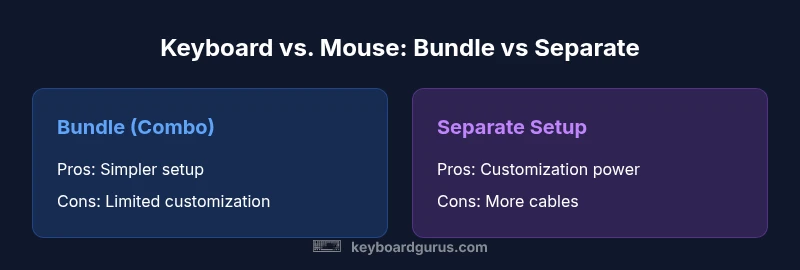
Bundle options offer simplicity and a clean desk; separate peripherals win on customization and upgradability.
For most users, a well‑chosen keyboard and mouse combo provides reliable everyday use with minimal setup. If you crave customization, higher‑end performance, or future upgrade paths, separate peripherals are usually the better path, even if it costs more upfront.
Got Questions?
What is a keyboard and mouse combo?
A keyboard and mouse combo is a bundled pair sold together, designed to work cohesively as a single input solution. It streamlines setup, reduces cables, and often shares software for lighting and macros. The trade‑off can be limited customization compared to purchasing components separately.
A bundled keyboard and mouse are sold together to work as a single setup, simplifying setup and often sharing software for easier customization.
What are the advantages of a bundled combo?
Bundled options typically offer a simpler purchase path, cohesive design, and often better value when discounts apply. They can also ensure compatibility between devices and a unified software experience, which reduces setup time and potential driver conflicts.
Bundles are simple to buy and set up, with cohesive design and usually good value when discounted.
Are wireless bundles reliable for gaming?
Many wireless bundles provide excellent latency and stability for casual to mid‑level gaming. In competitive gaming, wired options still tend to deliver the most consistent latency. Always check battery life and dongle performance in your setup.
Wireless bundles can be very reliable for gaming, but wired setups often offer the lowest latency for competition.
Can I mix a bundled keyboard with a non‑bundled mouse?
In many cases you can mix devices from different brands, but you may lose some software benefits and lighting synchronization. Compatibility depends on the drivers and OS support for both devices.
Yes, you can mix devices, but you might miss the full software and lighting synergy.
How do I choose a bundle for ergonomics?
Look for a keyboard with comfortable key layout and a mouse that fits your hand size and grip style. Consider wrist support, stand height, and palm rest. If possible, test the bundle for a full typing and scrolling session.
Focus on how the keyboard and mouse feel in your hands and wrists during long use.
Is a keyboard and mouse combo better for travel?
Bundles can be more compact and easier to pack, but ensure the devices are still comfortable in travel scenarios. Consider weight, dimensions, and whether you’ll need extra cables or adapters.
Bundles can be travel‑friendly, but verify size and weight before packing.
What to Remember
- Prioritize your desk space and workflow when choosing a bundle.
- Test latency in your own environment before committing.
- Choose bundles with cohesive software for easier macro management.
- Consider upgradeability if you expect to refresh components later.
- Balance ergonomics with budget to maximize long‑term comfort.