In-Store vs Online: Keyboard and Mouse Near Me—A Practical Guide
A comprehensive comparison of local shopping vs online pickup for keyboards and mice. Learn testing, price, warranty, and setup considerations to choose the best path for your desk.


Finding a keyboard and mouse near you is about balancing hands-on testing with selection. In-store options let you feel the switches, test the ergonomics, and verify compatibility with your setup, while online retailers often offer broader models and quicker price comparisons. Keyboard Gurus recommends prioritizing comfort, latency, and after-sales support when choosing your shopping path.
Why 'keyboard and mouse near me' matters for setup quality
When you search for keyboard and mouse near me, you're not just chasing a model; you're seeking a setup that fits your desk, posture, and workflow. Local stores give you hands-on access to test switches, contrast keycaps, and verify fit with your monitor, chair, and desk height. According to Keyboard Gurus, the most successful purchases come from combining tactile testing with credible return policies and immediate ownership. This nearby shopping path saves time, reduces the risk of buying something that doesn't fit, and makes it easier to assess build quality and ergonomics before committing. Whether you're a gamer, student, or professional, local availability matters because it lets you benchmark models against your actual workspace.
Key differences between keyboard styles: mechanical, membrane, and scissor
Not all keyboards feel the same. Mechanical switches deliver tactile feedback and durability, but they vary widely by type (Cherry MX, ROM, or equivalent), actuation force, and travel distance. Membrane keyboards tend to be quieter and cheaper but offer softer feedback. Scissor-switch keyboards, common in compact laptops, balance travel and key stability. In a nearby store, you can press-test multiple types to see which matches your typing rhythm and latency expectations. Keyboard Gurus notes that your choice should align with your typical tasks: rapid-fire gaming and programming often benefit from mechanical switches with consistent actuation, while casual typing may be comfortable with membrane or scissor layouts.
Mouse types and ergonomics: gaming mice vs productivity mice
Mice come in a spectrum from laser vs optical sensors to varied weight and grip styles. Gaming mice often emphasize high DPI/CPI, programmable buttons, and top-tier sensors, while productivity mice prioritize comfort and precision for long typing sessions. In-store, try different grip types—palm, claw, and fingertip—to determine which supports your wrist posture. Calibration and tests for scrolling comfort, side button placement, and forward/back navigation can reveal real-world differences that specs alone cannot.
Core features to inspect in a local store
Before buying, verify several practical aspects: keycap material and profile (OEM, Cherry, SA), switch feel, travel distance, and actuation force. For mice, test button actuation, scroll wheel smoothness, sensor tracking on your desk surface, and left-right symmetry. Check build quality by feeling the chassis rigidity and test the cable or wireless dongle stability. Confirm compatibility with your computer's OS and whether the vendor offers a plug-and-play experience, plus any supported macros or profiles.
Wired vs wireless: trade-offs in response, stability, and battery life
Wired keyboards and mice offer the most stable latency and zero battery anxiety, which matters for competitive gaming or precise productivity work. Wireless devices increase freedom of movement but may introduce occasional interference or latency spikes, especially with older dongles or crowded 2.4 GHz environments. In-store, you can compare the feel and responsiveness side-by-side and assess how often you recharge or replace batteries in your daily routine. Modern wireless sets, often with low-latency mode and rechargeable packs, are a viable choice for most setups.
Connectivity and compatibility: USB, Bluetooth, multi-device setups
Many buyers face multi-device workstations or laptops with varying ports. Check whether keyboards support USB-C, Bluetooth 5.x, or both, and whether they can pair with multiple devices simultaneously. Mice frequently offer easy switching between devices via a button or software. In-store demonstrations help you confirm seamless switching and verify driver compatibility across operating systems (Windows, macOS, Linux). Also consider dongle-free pairing for a cleaner desk.
Size, layout, and keycaps: how layout affects your workflow
Keyboards come in full-size, tenkeyless (TKL), and compact layouts. The choice affects desk space, key reach, and your keyboard tray ergonomics. Keycap profiles (OEM, SA, XDA) influence typing feel and noise. In a store, compare the actuation points, key spacing, and overall geometry to ensure your fingers land naturally. For mice, height and palm-fit are equally important to prevent strain during long sessions.
Price ranges and value: what to expect from local markets
In local stores, prices may be influenced by stock, promotions, and demonstration models. You can often negotiate or access bundles that include wrist rests or extra keycaps. Online catalogs may show deeper discounts but add shipping costs or restocking fees. When shopping near you, tally the total cost for the exact model you want, including tax and potential service plans. Keyboard Gurus suggests comparing final totals rather than daily list prices.
Buying tips for in-store vs online pickup
If you value immediacy, in-store pickup can save hours compared with standard delivery. Check store hours, return windows, and whether they offer price-match guarantees. For online orders with local pickup, ensure the model you want is stocked at your preferred location and that the pickup process is straightforward. Consider signing up for loyalty programs or in-store events that showcase new keyboard and mouse products.
Test and verify: what to test before you buy
Before finalizing, verify key switches or mouse buttons by typing at least 100 keystrokes and clicking dozens of times to gauge consistency. Check grip comfort for your hand size and grip style, and confirm that the foot pads or risers meet your desk height. Confirm software and firmware compatibility and whether you can customize macros or lighting without extra costs. If possible, try a demo split keyboard or modular mouse to ensure future adaptability.
Setup tips after purchase: pairing, software, and firmware
After purchase, install official drivers only from trusted sources to avoid bloatware. Create device profiles for your primary workflows and sync them across devices if supported. Keep firmware updated to improve latency and stability. In a desk setup near you, keep the devices away from potential interference sources like wireless speakers or microwaves, and secure the peripherals to prevent movement during intense sessions.
Return policies, warranties, and after-sales support
Understand the return window, restocking fees, and what constitutes defective hardware. A robust warranty can save money over time, especially with mechanical keyboards or high-end mice where switch failure or sensor drift can occur. In physical stores, you can often resolve issues quickly with staff or service desks, which reduces downtime and frustration compared with remote-only support. Keyboard Gurus recommends reading the terms carefully and keeping receipts handy for hassle-free exchanges.
Comparison
| Feature | In-store purchase | Online order with in-store pickup |
|---|---|---|
| Availability of models | Limited by shelf stock | Broader selection online |
| Price range | Typically higher in-store due to immediate ownership | Often lower online with promos; tax/fees vary by location |
| Ability to test before buying | Yes, hands-on testing in-store | Limited; demos may be available online or at pickup desk |
| Warranty and returns | Immediate returns/exchanges at store | Online returns via shipping or local pickup options |
| Delivery speed | Same-day/next-day in-store pickup | Delivery times depend on shipping and carrier |
| Model customization options | On-site demonstrations; some customization available | More SKUs online; customization varies by retailer |
| Best for | Want tactile feel and quick ownership | Value breadth and price variety |
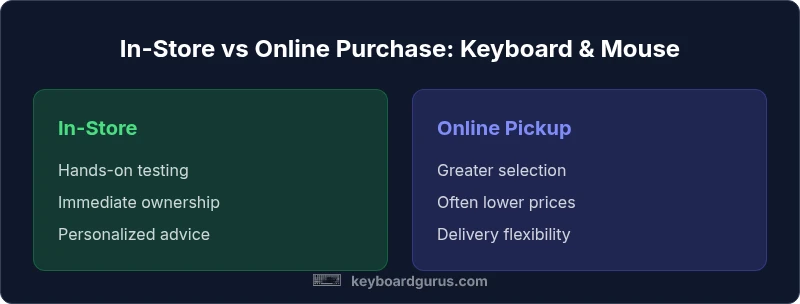
Advantages
- Tangible testing: feel keys and mouse ergonomics before buying
- Immediate ownership with in-store pickup
- Easier returns and service in person
- Staff can provide tailored recommendations
- Try compatibility with your existing setup in-store
Drawbacks
- Potentially higher prices and limited stock locally
- Geographic constraints can delay acquisition
- Limited model variety compared to online catalogs
In-store shopping often provides the best balance of testing and speed; online pickup complements choices with breadth and price.
For most buyers, testing fit and ensuring immediate ownership in nearby stores is advantageous. Use local shopping to verify comfort and compatibility, then explore online options for additional models and potential savings.
Got Questions?
What does 'keyboard and mouse near me' imply for your shopping strategy?
It means balancing local testing with broader online options. Start locally to verify fit and warranty terms, then compare models and prices online for breadth and potential discounts.
Test locally to verify fit, then check online for more models and better prices.
Should I favor in-store testing or rely on online reviews?
Both are valuable. Hands-on testing reveals comfort and latency, while reviews provide long-term reliability and durability insights.
Try it in person, and read reviews to gauge long-term performance.
How can I test latency in a store?
Ask staff for a live demo, type normally to feel response, and compare a few models side-by-side to notice any delay.
Type normally and play a quick test game to judge latency.
Are price differences significant between in-store and online pickups?
Prices vary by retailer and promotions. Always compare the final total, including tax, fees, and return terms.
Look at the total cost, not just the list price.
Do I need to match the keyboard and mouse brand?
Brand consistency can simplify software, but fit, comfort, and latency matter most for your workflow.
Brand helps, but the feel and performance matter more.
What should I test for wireless peripherals?
Test latency, battery life, and signal stability in your typical environment to avoid surprises after purchase.
Check how it feels and performs with real tasks.
What to Remember
- Test keyboard feel and mouse ergonomics in-store first
- Compare total costs (tax/fees) across local and online options
- Check return policies and warranties before buying
- Leverage staff guidance to identify best-fit models
- Consider multi-device pairing if you work across devices