Logitech Illuminated Keyboard K740: Review and Setup
A detailed guide to the Logitech illuminated keyboard K740, covering design, backlighting, typing feel, compatibility, and setup tips from Keyboard Gurus.


The Logitech illuminated keyboard K740 is a full-size, backlit USB keyboard designed for long typing sessions with adjustable lighting and a comfortable, standard layout. It aims to deliver reliable performance in dim or bright environments, making it suitable for study, work, and casual gaming. Keyboard Gurus notes its broad compatibility but recommends evaluating brightness and ergonomics for daily use.
What the logitech illuminated keyboard k740 is and who it suits
According to Keyboard Gurus, the logitech illuminated keyboard k740 sits at the crossroads of practicality and comfort. This full-size, backlit keyboard prioritises visibility in dim rooms while maintaining a familiar, non-mechanical typing experience. The K740 is designed for people who spend long hours at a desk—students writing essays, professionals drafting reports, and gamers taking casual breaks—who want reliable performance without the noise or complexity of high-end mechanical keyboards. In this guide, we dissect its core design decisions, who benefits most, and how the keyboard fits into different setups. We will discuss the construction, key layout, and the balance between minimalism and utility that Logitech targets with the K740. Our goal is to help you determine whether this illumination-focused option matches your workflow, budget, and desk footprint. It also serves as a starting point for evaluating whether a backlit, desk-centric layout fits your daily routine.
Design and build quality
The K740 adopts a traditional full-size footprint with a matte plastic chassis and a slightly rounded profile. Its chiclet-style keycaps are slim, offering a low-profile feel that reduces finger fatigue on long typing sessions. The keyboard uses a standard ANSI layout with a 104/105-key arrangement, which many users recognize instantly and pair well with existing keycaps or shortcut schemes. The construction emphasises stability—feet provide two tilt options, and the overall weight keeps the board steady during heavy typing or gaming bursts. Because it is not a mechanical keyboard, the sound profile remains subdued, which can be a plus in shared spaces or late-night work. If you value a familiar, low-noise experience and a slim profile that can slide into a tight desk, the K740's build quality is a solid match. The finish resists smudges and the keycaps maintain legibility over time, a practical benefit in everyday use.
Backlighting design and controls
The K740 provides adjustable backlighting across multiple levels. The lighting is sufficient for dim rooms without overwhelming your eyes, and brightness levels can be changed using hardware function keys for quick tweaks during work or study sessions. There is no fancy RGB gimmick here, just a steady, even illumination that ensures legibility of the key legends. Since the keyboard is powered by USB, backlighting consumes a portion of your bus power, but modern machines typically handle this without issue. Keyboard Gurus highlights that predictable lighting behavior reduces eye strain when typing late at night or during late shifts, and the absence of software dependencies keeps the setup clean and reliable.
Typing feel and ergonomics
Typing on the K740 feels familiar thanks to its low-profile chiclet keys and standard spacing. The key travel is moderate, delivering tactile feedback without the loud clacks associated with many mechanical keyboards. The keycaps resist shine and remain legible after extended use, and the two-step adjustable tilt feet help align wrists for comfortable posture. For users transitioning from older membrane keyboards, the K740 offers a pleasant bridge between comfort and performance. The layout remains stable under extended sessions, and the overall weight helps keep the keyboard anchored on busy desks—an important factor for gamers or heavy typists who crave consistency.
Connectivity, compatibility, and software
As a wired USB keyboard, the K740 offers straightforward plug-and-play compatibility with most modern desktops and laptops. It supports common operating systems via USB, with minimal setup required beyond plugging it in. There is no dedicated software suite to install, which some users prefer for stress-free configuration; brightness, layout, and other behaviors are controlled via hardware keys. The absence of wireless connectivity makes it a reliable option for desks where latency or interference might be a concern. For cross-platform users, the K740 remains usable with Windows and macOS out of the box, though some key remapping may improve macOS usability.
Durability, maintenance, and lifespan
Maintenance for the K740 is straightforward. The slim profile and matte finish help hide fingerprints, while key legends stay legible with routine cleaning. Periodic dusting and light surface cleaning are sufficient to keep the keyboard looking and typing well. If a spill occurs, the keyboard’s simple construction makes it easier to dry out and continue using after a quick cleaning cycle. Removing caps for a gentle wipe is possible if you want to refresh the surface or replace worn keycaps (where applicable in your setup). Regular care will preserve the look and feel of the keyboard over years of daily use.
Use cases and comparing with alternatives
The K740 excels as a desk-focused option for students, professionals, and casual gamers who value a quiet, full-size, backlit typing experience. It is not designed for enthusiasts who demand tactile, high-profile mechanical switches; for them, alternatives with different feels and features might be a better fit. If you need a compact footprint or wireless freedom, look at other Logitech lines or third-party keyboards. For multi-monitor workstations or coding projects, the K740’s familiar layout and reliable illumination make long sessions more comfortable without adding noise or unnecessary complexity.
Practical tips to optimize your setup
To get the most from the logitech illuminated keyboard k740, place it at a comfortable height aligned with your forearms and keep a clean desk for better access to the keyboard and mouse. Use the backlight to reduce eye strain when lighting is poor, but avoid keeping it at maximum for extended periods. Consider a simple desk mat or wrist rest to improve ergonomics, especially during coding or typing marathons. If you switch between study, work, and gaming, create a light-duty profile using the hardware brightness controls to switch quickly between bright daytime tasks and dim, late-night sessions. Finally, pair the K740 with a monitor angle that reduces glare and supports a natural neck posture for long sessions.
K740 at a glance: backlight, layout, connectivity
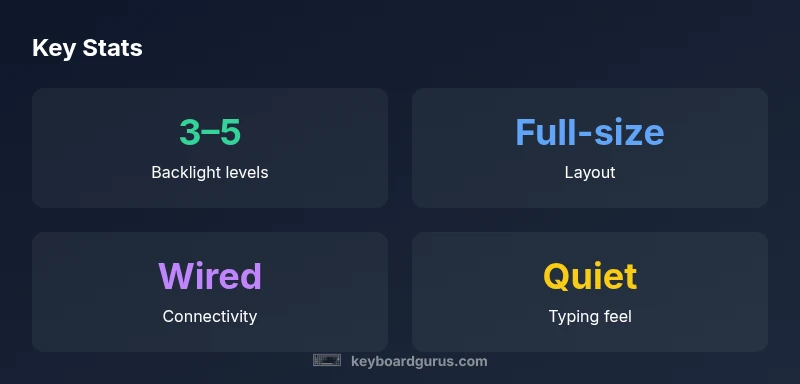
| Attribute | K740 overview | Notes |
|---|---|---|
| Backlight | 3–5 levels, adjustable | Hardware controls only |
| Layout | Full-size ANSI layout | Standard key spacing |
| Connectivity | Wired USB | No wireless option |
| Software | No dedicated software | Plug-and-play |
Got Questions?
Is the Logitech K740 mechanical or membrane?
The K740 uses a standard chiclet-style membrane keyboard with low-profile keys, offering quiet operation and a familiar feel. It isn’t built around mechanical switches.
It's a membrane keyboard with a low-profile, quiet typing experience.
Does K740 work with Mac computers?
Yes, the K740 works with macOS via USB, though some keys may be remapped for full macOS keyboard shortcuts.
Yes, it works with Macs, though you might remap some keys.
Is there software to customize the backlighting?
Backlight levels are accessible via hardware function keys; there isn’t a dedicated software suite for deep customization.
You use hardware keys; there isn’t much software for lighting tweaks.
What use cases suit the K740 best?
Ideal for students and professionals who want a quiet, backlit full-size keyboard for late-night work and casual gaming.
Great for study, coding, and light gaming in dim light.
How does backlighting affect power on a wired keyboard?
Because the K740 is USB-powered, backlighting draws from the USB bus but does not rely on batteries, keeping the setup simple.
The keyboard is powered by USB, so lighting draws from the USB port.
“The K740 demonstrates how practical backlighting and a standard layout can boost comfort and efficiency in daily typing, especially in low-light environments.”
What to Remember
- Choose K740 for a full-size, backlit keyboard.
- Expect a quiet typing experience with familiar layout.
- Rely on wired USB for stable performance.
- Adjust lighting to balance visibility and eye comfort.