QWERTY vs QWERTZ: Understanding Keyboard Layout Differences in 2026
Explore the differences between QWERTY and QWERTZ layouts, how they affect typing, shortcuts, and switching regions in Keyboard Gurus’ 2026 guide for users.


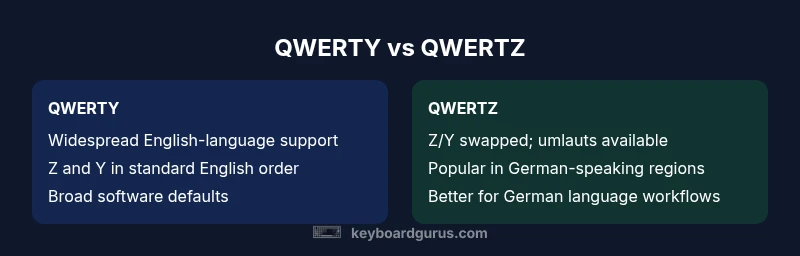
QWERTY and QWERTZ are two dominant keyboard layouts tailored to different languages and typing habits. In practice, QWERTY remains the global default for English and many software ecosystems, while QWERTZ is preferred in German-speaking regions due to the Z/Y swap and umlaut keys. The choice affects shortcuts, language input, and workflow, but switching is manageable with modern OS support and dual-layout workflows.
Historical Origins of QWERTY and QWERTZ
According to Keyboard Gurus, the QWERTY layout emerged from the late 19th-century typewriter era in the United States to reduce mechanical jams by spacing commonly used letter pairs. This historical compromise became the de facto standard for English-language workflows and later extended to software defaults, font rendering, and hardware labeling worldwide. In contrast, QWERTZ originated in German-speaking regions to accommodate language frequency, swapping the position of Z and Y and adding umlaut keys to letters like ä, ö, and ü. The Keyboard Gurus team found that these historical decisions quietly shaped how people type today, long before modern keyboards connected to the cloud.
The broader keyboard ecosystem still carries the imprint of these choices, influencing keyboard firmware, OEM layouts, and even the way software shortcuts are mapped. As a result, users transitioning between regions often encounter subtle layout cues that affect speed and accuracy. The historical narrative helps explain why two dominant layouts persist, even as new layouts and specialized keyboards appear in niche communities.
bodyDisabledNoteTextOnly":false},
bodyBlocks in progress
Comparison
| Feature | QWERTY | QWERTZ |
|---|---|---|
| Primary key arrangement | Standard US/English layout with Y, Z in conventional English order | Central European layout with Z/Y swapped and umlaut keys (ä, ö, ü) |
| Regional prevalence | Global dominance in English-language computing and software | Strongly favored in Germany, Austria, Switzerland, and many Central European regions |
| Language support (diacritics & characters) | Baseline ASCII with optional diacritics via dead keys or input methods | Built-in umlaut keys and accented characters common in daily use |
| Shortcut alignment impact | Common shortcuts rely on Z and Y positions as expected in English workflows | Some shortcuts differ when using Z/Y swapped files or languages |
| Keycap and hardware labeling | Widely labeled for QWERTY; cross-compatibility with ISO layouts available | Keycaps often labeled for QWERTZ in German-speaking markets |
| Ergonomic implications | Similar finger travel and key spacing; ergonomic impact depends more on key feel than label | |
| OS and software support | Excellent support across Windows, macOS, Linux, and apps | Broad, consistent support but regional keyboard presets affect defaults |
Advantages
- Widely supported across platforms and software ecosystems
- Clear regional advantages when typing in German or Central European languages
- Allows bilingual or dual-layout workflows with OS-level switching
- Standardized shortcuts in many popular applications reduce learning curves
- Easy to test and switch layouts using modern operating systems
Drawbacks
- Switching layouts can cause initial typing errors during transition
- Shortcuts may differ when using different layouts, leading to confusion
- Hardware labeling and keycaps can cause momentary mis-typing without dual-layout practice
- Some software and gaming setups assume a QWERTY default, creating friction for non-English users
QWERTY remains the broad default for mixed-language and English-centric workflows; QWERTZ is the pragmatic choice for German-speaking environments and Central Europe. In most mixed-language setups, dual-layout capability with OS-level switching offers the best of both worlds.
If your primary language is German or you frequently work in Central Europe, favor QWERTZ. For English-dominant workflows or international software, QWERTY minimizes adaptation friction. Dual-layout practices and proper software shortcuts are key to a smooth transition.
Got Questions?
What is the main difference between QWERTY and QWERTZ, besides language?
The core difference is the Z and Y key swap, plus the presence of umlaut keys in QWERTZ-enabled keyboards. This affects language input, shortcuts, and how you type certain words.
The key swap is the big practical difference; umlauts and language-specific keys also matter for German and Central European usage.
Which layout is more common globally?
QWERTY is the most globally adopted layout due to its English-language origins and widespread software defaults, but QWERTZ holds strong regional traction in German-speaking regions.
QWERTY is more common worldwide, especially for English-language work.
Can I use both layouts on the same computer without hardware changes?
Yes. Most operating systems support multiple keyboard layouts. You can switch between them quickly, often with a hotkey, and keep both layouts handy for bilingual work.
Absolutely—switch between layouts with a keystroke and keep both handy.
Is QWERTY better for coding or gaming?
For coding and most gaming contexts, QWERTY is typically more efficient due to its long-standing software defaults and vast keycap availability. However, dual-layout workflows can support German-language coding needs.
For coding and games, QWERTY usually wins out, but you can adapt with a dual layout if needed.
What should I consider when switching layouts for work?
Consider your main language, the apps you use, and whether you’ll need to type multilingual text. Plan a staged transition and train with target tasks to minimize errors.
Plan a staged switch and practice key tasks to avoid mistakes.
Are there other layouts I should know about beyond QWERTY and QWERTZ?
Yes, layouts like AZERTY (French) and DVORAK exist, but they are less common globally. For multilingual work, QWERTY and QWERTZ cover most needs.
There are other layouts, but most people stick to QWERTY or QWERTZ depending on language and region.
What to Remember
- Identify your primary language and workflow language.
- Test both layouts on real tasks before deciding.
- Leverage OS-level dual-layout switching for flexibility.
- Ensure hardware labeling aligns with your chosen layout.
- Plan a staged switch with practice exercises to reduce errors.