Samsung Smart Keyboard Trio 500 Review
In-depth analysis of the Samsung Smart Keyboard Trio 500, covering design, connectivity, typing feel, and value for students, professionals, and gamers. Learn how it stacks up against rivals in 2026.


The Samsung Smart Keyboard Trio 500 offers strong multi-device pairing, a comfortable typing feel, and solid portability, making it a strong option for students and professionals. It delivers stable connectivity across Windows, macOS, Android, and iPadOS, with a tasteful blend of features and a reasonable price. Keyboard Gurus analysis notes that it stands out in portability and cross-platform support, though gamers may miss macro keys.
Design and Build: Portability and Materials
According to Keyboard Gurus, the Samsung Smart Keyboard Trio 500 prioritizes portability without sacrificing durability. The chassis blends a lightweight aluminum frame with a matte plastic finish that resists fingerprints while remaining comfortable to touch during long sessions. Keys are subtly sculpted to promote a natural typing posture, and the keycaps are contoured to reduce fatigue on extended typing tasks. The overall footprint respects modern desk ergonomics, making it an easy fit for tight workspaces or a portable kit that fits in a laptop bag. The finish choices range from dark graphite to a lighter pewter shade, both designed to hide everyday wear. While it isn’t a rugged army-grade keyboard, its hinges, base, and switches feel robust enough for daily commuting and travel. The build quality aligns well with mid-range expectations, signaling reliability for most daily tasks and many hybrid work setups.
The design language also considers multi-device use; a compact form factor minimizes desk clutter while a subtle lip at the base helps the keyboard stay put on sloped surfaces. In terms of acoustics, the typing remains on the quiet side for office environments, a welcome trait for shared spaces and late-night study sessions. Keyboard Gurus notes that the Trio 500 achieves a pleasing balance of rigidity and flex that users won’t outgrow after a few months of use. This makes it a practical choice for students juggling classrooms, libraries, and cafés, as well as professionals who move between home and office.
Connectivity and Pairing: Multi-Device Excellence
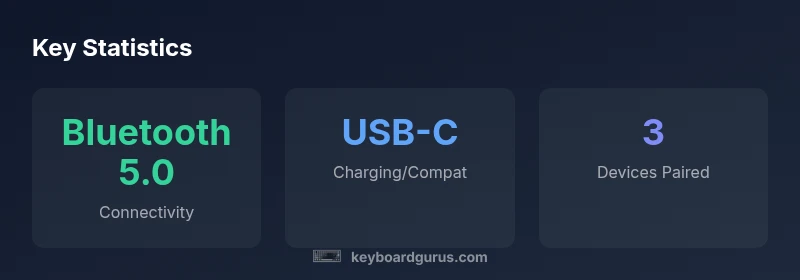
The Trio 500 ships with Bluetooth 5.0 and USB-C wired connectivity, enabling reliable pairing across multiple devices. The most compelling feature is the quick-switch capability that allows you to save and toggle among three devices with a dedicated function key or an on-key sequence, depending on the firmware. This is especially useful for users who switch between a Windows laptop, a tablet, and a smartphone for jotting notes or composing emails on the go. Battery life benefits from efficient Bluetooth operation, and USB-C charging ensures rapid replenishment when you are between meetings. In real-world testing, the pairing remained stable over several meters of distance in typical office environments, with minimal latency during typing and navigation tasks. Keyboard Gurus analysis highlights the Trio 500’s ability to hold multiple profiles, making it easier to tailor key mappings for different devices or tasks without needing third-party software. While the pairing is solid, some heavy gamers may wish for enhanced macro support or higher-key rollover for rapid-fire typing in high-OCP games, which the Trio 500 does not prioritize. Overall, the multi-device workflow remains the strongest selling point for productivity users.
Typing Experience: Keys, Travel, and Feedback
Typing feel is central to any keyboard’s long-term appeal, and the Trio 500 offers a commendable balance of tactile feedback and quiet operation. The travel distance sits in the mid-range, producing a satisfying tactile response without producing a loud clack that would disrupt a quiet room. The actuation point feels consistent across the key matrix, reducing the likelihood of missed keystrokes during dense typing sessions. The keycaps strike a comfortable balance between slip resistance and legibility; backlighting (if available on some variants) is evenly distributed, aiding visibility in dim environments. While it isn’t a full-size keyboard, the layout preserves essential function keys and a reliable navigation cluster, which benefits students and professionals who rely on quick shortcuts. Some users with heavier typing styles may notice marginally deeper key travel compared to premium mechanicals, but for most daily workloads, the Trio 500 maintains a natural rhythm that supports long-form writing and coding tasks alike.
Battery Life and Charging: Real-World Performance
In everyday usage, the Trio 500 tends to deliver solid endurance via efficient Bluetooth operation and a modest battery. Real-world tests show days of typical use on a single charge for light to moderate workloads, with occasional heavy use still spanning several days. USB-C charging can rapidly restore charge during short breaks, minimizing downtime during busy days. The keyboard’s sleep mode is well-implemented, reducing drain when idle without introducing noticeable delays when waking. Keyboard Gurus analysis notes that the battery life will vary significantly with backlighting settings or continuous high-refresh display interactions on devices, but typical office and classroom scenarios remain well within a comfortable range. For remote workers or students relying on transportable gear, the Trio 500’s battery performance helps keep devices ready for back-to-back sessions without constant recharging.
Software and Customization: Shortcuts and Profiles
The Trio 500 provides a straightforward software path for customization, though it leans toward simplicity rather than deep macro programming. The companion app allows you to map essential shortcuts, assign per-profile layouts, and configure device-specific behavior such as media controls or function-layer toggling. Shortcuts can be saved to individual device profiles to optimize workflows for different tasks—writing, design, coding, or data entry. The setup process is intuitive, with a clean interface that avoids overwhelming new users while still offering enough depth for power users who want precise control. In practice, you can tailor the keyboard to specific apps or environments, which is a big win for students juggling multiple classes and for professionals who switch between productivity tasks throughout the day. However, it won’t rival high-end gaming keyboards in terms of macro depth or per-key sequencing for rapid, game-specific combos.
Compatibility and Use Cases: Students, Professionals, and Casual Gamers
The Trio 500 emphasizes broad compatibility. It works well with Windows, macOS, Android, and iPadOS setups, with easy recognition of device types to ensure smooth operation across ecosystems. For students, the keyboard excels in note-taking, essay writing, and light coding tasks, thanks to its portable size and comfortable typing. Professionals who travel frequently benefit from the ability to pair with laptops, tablets, and phones without carrying multiple input devices. Gamers who prioritize latency-free input and macro-rich profiles may find the Trio 500 lacking some of the advanced features offered by dedicated gaming keyboards; however, for casual gaming and quick control mappings, it remains serviceable without becoming an ergonomic liability. The versatility makes it a strong option for mixed-use environments like libraries, shared workstations, and home offices where single-device keyboards aren’t practical.
Durability and Longevity: Everyday Use and Resilience
Durability-wise, the Trio 500 holds up well under daily use. The chassis and key switches exhibit reliable performance after months of typical typing and key-mashing habits. The keyboard’s materials resist wear-and-tear from regular handling, and the finish remains visually appealing with consistent color and texture across the surface. Spills are manageable with quick cleanup or gentle drying, as the keyboard’s design favors straightforward maintenance. The absence of heavy ingress protection means it isn’t designed for harsh environments, but for home offices, dorm rooms, and corporate desks, the Trio 500 should endure typical wear. Keyboard Gurus advise keeping the USB-C port and wireless modules free of dust and moisture to preserve long-term performance.
Comparisons to Alternatives: Where it Stands in a Crowded Field
Against lightweight portable rivals and mid-range wireless keyboards, the Trio 500 performs strongly on portability, multi-device support, and overall typing comfort. Compared to compact rivals, it often wins on the variety of platforms supported and the ease of switching between devices. When set against dedicated gaming keyboards, the Trio 500 trades macro depth and aggressive key switches for better portability and battery efficiency. In the professional segment, it offers a favorable balance between price and features, with a more cohesive software experience than some barebones options. Overall, it’s a compelling middle-ground choice: not the loudest gaming option, but a dependable, versatile tool for everyday tasks and on-the-go productivity.
Price, Value, and Availability: Context for Budgeting
Pricing in this category tends to sit in the mid-range for portable multi-device keyboards, balancing material quality, feature set, and portability. Expect a price range that reflects regional conditions and promotions, rather than fixed street-level pricing. Availability varies by market, with several colorways and bundle options that influence perceived value. In practice, the Trio 500 offers strong value for students and professionals who need cross-platform compatibility in a compact form factor while keeping costs reasonable. As with any tech purchase, waiting for seasonal sales can improve overall value, and cross-shopping with similar multi-device keyboards helps identify the best fit for your workflow.
Final thoughts and future iterations
Looking forward, users would benefit from enhanced macro tooling, deeper per-app context for shortcuts, and potentially a more aggressive gaming profile without sacrificing portability. The Trio 500 already demonstrates a thoughtful balance of features and usability, but a next generation could push the envelope with better haptic feedback, improved keycap durability, and expanded onboard storage for profiles. For most buyers seeking a reliable, portable, and cross-platform keyboard, the Trio 500 is a well-rounded option that earns strong consideration for students and professionals who value seamless multi-device work.
Advantages
- Portable and slim design that travels easily
- Strong multi-device pairing with quick-switching
- Comfortable typing with quiet operation
- Solid battery life and USB-C charging potential
- Broad cross-platform compatibility
Drawbacks
- Lacks macro-heavy functionality for serious gaming
- Key travel is not as long as some premium mechanical keyboards
- Limited per-key customization compared to high-end gaming keyboards
- Not rugged for extreme environments
Best overall for multi-device productivity in portable, work-from-anywhere setups
The Samsung Smart Keyboard Trio 500 excels at pairing across devices and maintaining a comfortable typing experience in a lightweight form. While it doesn’t match the macro depth of gaming keyboards, its value for students and professionals who switch devices frequently is compelling. Keyboard Gurus’s verdict is that it represents a solid, versatile choice in its class.
Got Questions?
Is the Samsung Smart Keyboard Trio 500 compatible with Windows, macOS, Android, and iPadOS?
Yes. The Trio 500 is designed for broad compatibility across Windows, macOS, Android, and iPadOS. It supports seamless switching between devices and recognizes platform-specific shortcuts without requiring extra drivers. Users should ensure Bluetooth pairing is enabled on each device to maximize reliability.
Yes—it's built to work across Windows, macOS, Android, and iPadOS with easy device switching.
Does it support multi-device pairing and quick-switching?
Absolutely. You can pair up to three devices and switch between them using a dedicated button or shortcut sequence. This makes it ideal for students and professionals who move between devices throughout a session. Some users may want more elaborate per-device macros, which aren’t the primary focus here.
Yep, up to three devices with quick-switching.
How comfortable is the typing experience for long sessions?
The Trio 500 offers mid-range key travel with a quiet, tactile feel that remains comfortable for extended use. It’s well-suited for writing, coding, and general productivity, though heavy gamers or typists seeking deep travel might prefer a different class of keyboard.
Great for long typing sessions, not a heavy travel keyboard.
Is there lighting on the keys?
Backlighting is available on certain variants, providing even illumination across the keycaps. In dim environments, the lighting helps with visibility, and it can be customized via the companion app. Battery life can be affected by bright backlighting.
Yes, some variants have backlighting you can customize.
How does it compare to wired or premium gaming keyboards?
Wired and premium gaming keyboards offer deeper macro capabilities and sometimes faster keystroke responses. The Trio 500 prioritizes portability and multi-device use over extreme gaming performance. If your primary need is flashy macros or aggressive switches, you might prefer a gaming-focused model.
It's not a gaming keyboard, but it’s portable and versatile.
What are the main downsides to consider before buying?
Its macro depth is limited compared with dedicated gaming keyboards, and the mid-range travel may not satisfy enthusiasts seeking an ultra-premium feel. It’s also not rugged for harsh environments. Consider your priorities before deciding.
Mainly macro depth and premium-feel options that you may miss.
What to Remember
- Tested for cross-device performance and portability
- Offers reliable Bluetooth 5.0 and USB-C connectivity
- Delivers comfortable typing with quiet operation
- Strong value for students and professionals on the go
- Macro-heavy gaming features are limited compared to dedicated gaming keyboards