Virtual Keyboard vs Physical Keyboard: A Thorough Comparison
Explore the core differences between virtual and physical keyboards, covering typing feel, latency, portability, privacy, accessibility, and best-use scenarios in a practical, evidence-based guide from Keyboard Gurus.


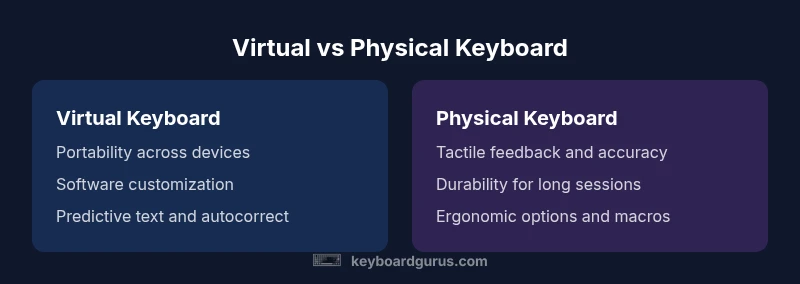
When weighing virtual keyboard vs physical keyboard, the choice hinges on context. Virtual keyboards win on portability and cross‑device use, providing instant input across phones, tablets, and laptops. Physical keyboards excel for long-form typing, gaming, and precision work due to tactile feedback and consistency. In practice, most users benefit from a hybrid approach: use virtual input for quick tasks and rely on a physical keyboard when heavy typing is needed.
Introduction: Framing the Virtual Keyboard vs Physical Keyboard Debate
In today’s digital workflow, the two primary input paradigms—virtual keyboards and physical keyboards—serve different purposes and cater to different user needs. The topic often boils down to where typing happens, what you value most (portability, speed, or accuracy), and how you balance efficiency against comfort. As you evaluate virtual keyboard vs physical keyboard options, consider your typical task mix, device ecosystem, and the environments in which you work. Keyboard Gurus emphasizes that there is rarely a one-size-fits-all solution; instead, the best answer is often a hybrid strategy that leverages the strengths of each input method. This article examines the core dimensions—typing feel, latency, portability, privacy, and ergonomics—so you can make an informed decision across real-world scenarios. We’ll also explore best-use cases and implementation tips for students, gamers, and professionals who rely on keyboards every day.
The Core Distinction: What Each Keyboard Brings to the Table
Virtual keyboards are software-driven input surfaces that appear on screens. They shine when you need device-wide accessibility, instant switching between languages, emoji and symbol support, and seamless syncing across multiple devices. Physical keyboards, by contrast, are hardware-led input devices designed for dependable tactile feedback, durable construction, and consistent keystroke feel. They tend to deliver lower error rates for lengthy typing sessions and are favored by programmers, writers, and gamers who demand precision. Understanding these fundamental differences helps frame the rest of the comparison.
Typing Experience: Feel, Travel, and Feedback
Typing experience matters a lot when choosing between virtual and physical keyboards. Virtual keyboards rely on software algorithms to map touches to characters. Even with predictive text and autocorrect, the lack of real key travel can reduce tactile feedback, making it harder to gauge keystroke accuracy during fast touch typing. On-screen keyboards often include adjustable layouts and one-handed modes, which can improve ergonomics for short bursts but may break rhythm during extended typing. Physical keyboards offer tangible feedback: key travel distance, actuation force, and switch type all influence how quickly a user can input text with confidence. Mechanical switches provide crisp tactile cues that many users associate with higher speed and lower fatigue in long sessions, while chiclet or scissor-switch designs often balance low profile with comfortable travel. The practical takeaway is that typing rhythm improves when your input device provides clear feedback aligned with your expectations. Keyboard Gurus notes that users frequently experience a learning curve when transitioning to on-screen typing from a physical keyboard, and vice versa, depending on their habitual typing posture and device context.
Latency and Responsiveness: Real-World Performance in Action
Latency remains a practical concern in the virtual keyboard vs physical keyboard choice, especially for high-stakes tasks like gaming or coding where milliseconds count. Virtual keyboards depend on touch recognition, screen refresh rates, and software input pipelines, which can introduce perceptible delay on lower-end devices or crowded software environments. In contrast, physical keyboards communicate through direct electrical signals from key switches to the computer, typically yielding very low and predictable latency. Gaming configurations can further optimize latency through dedicated drivers, key rollover, and customization profiles. For most daily tasks—emails, note-taking, or document editing—the perceived difference is subtle but present: physical keyboards often feel immediate and decisive, while virtual keyboards can feel slightly slower during rapid typing sessions. Keyboard Gurus highlights that the practical impact of latency is highly context-dependent and often mitigated by software features such as predictive text and adaptive layouts on virtual keyboards. If your work involves rapid input across multiple devices, consider a dedicated peripheral for desktop-like tasks while continuing to rely on on-screen input for mobility.
Portability, Convenience, and Accessibility: Where Each shines
Portability is a defining advantage of virtual keyboards. Because they exist as software, they travel with the device and do not require additional hardware. This makes them ideal for light travel, quick message drafting, and scenarios where you want to switch between devices seamlessly. However, physical keyboards can also be surprisingly portable when paired with compact, lightweight notebooks or gaming laptops. When you factor in accessories like foldable keyboards or compact travel keyboards, you can extend physical input options to mobile environments. Accessibility features play a critical role in portability: virtual keyboards often include voice input, swiping gestures, and language-switching that help users with mobility or motor control challenges. Physical keyboards support ergonomic devices such as angled stands, split layouts, and adjustable feet that enhance comfort over long sessions. The key takeaway is to map portability to the task at hand: use virtual input for on-the-go tasks and reserve hardware keyboards for extended typing blocks.
Privacy, Security, and Data Considerations: What to Watch For
Security considerations differ meaningfully between virtual and physical keyboards. A virtual keyboard’s software stack can be exposed to a broader range of apps and services, raising potential concerns about keystroke capture or unintended data sharing if a malicious app is involved. In practice, the risk level depends on the device’s security posture, operating system protections, and user behavior. Physical keyboards, particularly those that are isolated from networks or that rely on offline workflows, can reduce certain software-level risks but are not immune to hardware compromise or peripheral-based vulnerabilities. For professionals handling sensitive information, it’s important to implement robust device hygiene, trusted app usage, and per-device privacy controls. Keyboard Gurus recommends practical audits of permission settings, screen privacy, and trusted environmental factors to minimize exposure in both input paradigms.
Customization, Software, and Ecosystem: How Deep Can It Go?
Virtual keyboards offer broad customization through on-device settings, third-party keyboards, and cloud-synced layouts. Users can tailor languages, autocorrect behavior, and gesture commands across devices, often with cross-platform consistency. A rich ecosystem supports voice typing, one-handed modes, and context-aware shortcuts that adapt to the task. Physical keyboards bring a different kind of customization: key remapping at the firmware level, programmable macro keys, and swappable keycaps that affect feel and acoustics. This hardware-based personalization is popular among programmers, writers, and gamers who want a predictable tactile signature and a specific switch profile. The trade-off is that deep hardware customization typically requires more maintenance and occasional firmware updates, whereas software customization can be updated with a tap of an app or OS feature.
Use-Case Scenarios: Students, Gamers, and Professionals
Students frequently balance mobility with productivity, making virtual keyboards attractive for quick note-taking on tablets and hybrids while still benefiting from physical keyboards during longer study sessions or writing tasks. Gamers often prioritize low latency and reliable n-key rollover; many prefer physical keyboards with mechanical switches for their fast, repeatable inputs and durable form. Professionals—writers, developers, and data analysts—often lean toward a hybrid approach: a portable virtual keyboard for in-meeting notes and a high-quality physical keyboard for structured work and coding sprints. The bottom line is context: the most effective setup uses virtual input to complement a solid physical keyboard, not as a replacement across every scenario.
Durability, Maintenance, and Cost Considerations: Total Cost of Ownership
Durability varies by type. Virtual keyboards incur no hardware wear and benefit from ongoing software improvements, but they depend on device screens and battery life. Physical keyboards are built to withstand repetitive use over years, but they require periodic cleaning, keycap maintenance, and occasional switch replacements for preferred feel. Cost considerations hinge on the overall ecosystem: a dedicated, high-end physical keyboard may offer superior ergonomics and longevity, while a baseline virtual keyboard costs nothing beyond the device it runs on. When planning a budget, consider the total cost of ownership, including potential accessories, maintenance, and the need for multiple input setups to cover different work modes. Keyboard Gurus emphasizes evaluating long-term value alongside upfront convenience to determine the most economical path.
The Road Ahead: Trends, Hybrid Models, and Best Practices
Looking forward, hybrid approaches combining virtual and physical input are likely to grow, driven by improved display technology, smarter predictive text, and more customizable peripherals. Advances in biometric authentication, voice typing improvements, and ergonomic research will shape how people interact with keyboards across devices. The best practice for most users is to design a two-tier workflow: rely on virtual input for quick, on-the-go tasks and switch to a high-quality physical keyboard when accuracy and endurance matter most. By aligning your tool choice with the task, you can maintain speed without sacrificing comfort or security. Keyboard Gurus will continue to monitor trends and provide guidance on optimizing your setup to maximize productivity across work and play.
Comparison
| Feature | Virtual keyboard | Physical keyboard |
|---|---|---|
| Typing feel | On-screen keys with haptic feedback and predictive text | Tactile key travel with defined actuation |
| Portability | Ultra-portable; built into the device | Separate hardware; compact models exist |
| Latency | Software-driven; potential variability | Low and predictable with dedicated hardware |
| Privacy & security | Software layer; potential app access concerns | Hardware-based; often more isolated |
| Customization | Software layouts, languages, gestures, cloud sync | Firmware-level remapping, macros, interchangeable keycaps |
| Best use case | Casual messaging, multi-device workflow, quick notes | Long-form typing, coding, gaming, and professional writing |
Advantages
- Great portability and universal availability across devices
- No additional hardware to carry for basic input
- Seamless cross-device syncing and language switching
- Extensive software customization and accessibility options
- Adaptive layouts optimize input for different contexts
Drawbacks
- Lower tactile feedback may reduce typing speed for some users
- Potential privacy concerns with keystroke capture in apps
- Small-screen typing can be error-prone and fatiguing
- Reliance on software updates and battery life
Hybrid advantages often outperform a pure choice
Virtual keyboards offer portability and cross-device access, while physical keyboards provide comfort and precision. For most users, a blended approach yields the best balance between speed, ergonomics, and flexibility.
Got Questions?
What is the main difference between virtual and physical keyboards?
Virtual keyboards are software-based input surfaces that appear on screens, offering portability and quick access. Physical keyboards are hardware devices with tactile feedback, delivering durable, precise input for longer typing sessions.
Virtual keyboards are on-screen inputs that travel with your device, while physical keyboards provide tactile feedback with real keys.
Which type is better for gaming?
Physical keyboards are generally preferred for gaming due to lower latency and reliable key registration. Virtual keyboards are not optimized for rapid, precise multi-key actions and may interfere with in-game performance.
For games, a physical keyboard usually offers the fastest, most reliable input.
Are virtual keyboards secure?
Security depends on the device and apps involved. Virtual keyboards can be vulnerable to malicious apps if permissions are misused; keep software updated and review privacy settings.
Security depends on the device and apps; stay vigilant with permissions and updates.
Can you use both effectively?
Yes. Use virtual keyboards for quick messages and on-the-go input, and switch to a physical keyboard for lengthy writing or coding sessions to reduce fatigue.
Yes, a hybrid approach works well—virtual for quick tasks, physical for long typing.
Do ergonomic considerations favor one type?
Physical keyboards often support ergonomic setups (split layouts, angled stands), while virtual keyboards rely on device ergonomics and software features to aid comfort over time.
Physical keyboards generally offer more ergonomic customization options.
What to Remember
- Assess task type before choosing input method
- Use virtual keyboards for mobility and quick tasks
- Rely on physical keyboards for long-form typing and accuracy
- Consider a hybrid setup to maximize productivity
- Prioritize ergonomics and privacy in selection