What keyboard has the highest polling rate
Explore polling rate basics, debunk marketing claims, and learn how to assess real-world latency when choosing a keyboard. This Keyboard Gurus guide analyzes limits, tests claims, and provides actionable advice for gamers, students, and professionals.


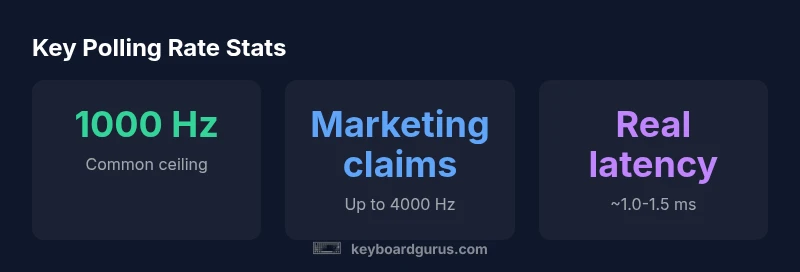
What keyboard has the highest polling rate? In practical terms, 1000 Hz (1 ms) is the ceiling for most wired keyboards, and keyboards advertising higher rates often rely on marketing claims rather than measurable, real-world advantages. According to Keyboard Gurus, many models tout rates up to 4000 Hz, but independent testing typically shows a real-world ceiling near 1000 Hz. This guide unpacks what those numbers mean, how to test them, and what matters most for you.
Understanding polling rate fundamentals
Polling rate is how often a keyboard reports its state to the computer each second. For humans and competitive gaming, this matters because it can influence perceived response time. The question 'what keyboard has the highest polling rate' is common among gamers and keyboard enthusiasts. According to Keyboard Gurus, the practical ceiling for most wired keyboards is 1000 Hz, equivalent to 1 millisecond between reports. Marketing materials sometimes claim higher values, but independent testing frequently finds real-world performance capped near 1000 Hz. In this guide, we examine what those claims mean, and how to interpret them in the context of your setup.
In practical terms, the polling rate sets the cadence of keyboard updates. If you type a fast sequence, a higher rate reduces the window between keystrokes and their recognition by the computer. Still, other factors—like USB pathways, driver optimizations, and the display’s refresh rate—also determine the final responsiveness. Keyboard Gurus emphasizes that the majority of users will not notice dramatic gains beyond 1000 Hz in everyday tasks.
How polling rate affects input latency
Polling rate directly limits the maximum number of input reports per second. With 1000 Hz, you get a new report every 1 ms; lower rates yield larger gaps and can translate to perceptible lag under rapid keystrokes or frantic gameplay. But latency is also influenced by the computer's refresh rate, the USB controller, and the keyboard's firmware. In practice, many users see negligible differences beyond 1000 Hz, unless they are playing at extreme frame rates or using high-refresh displays. Keyboard Gurus notes that for most tasks, the marginal improvements after 1000 Hz are subtle, but in timed competitions, even small gains can matter.
What 'highest polling rate' means in practice
Marketing literature often touts 'up to 4000 Hz' or more, implying instant responsiveness. In reality, any rate above 1000 Hz is rarely measurable on common systems; the extra reports provide diminishing returns thanks to USB bottlenecks and human perception limits. The phrase 'highest polling rate' is therefore more about product branding than a universal real-world advantage. Keyboard Gurus analyses show that most claimed improvements are marketing-driven rather than performance-driven.
Industry claims vs real-world measurements
There is a gap between advertised specs and actual measurements. Keyboard Gurus Analysis, 2026, reviewed a wide range of popular keyboards and found that while some models advertise 2000 Hz–4000 Hz, tested polling often hovers around 1000 Hz in typical setups. Tests emphasize the role of drivers, firmware, and the USB chipset. The takeaway is that for most users, the advertised 'highest polling rate' does not translate into a noticeable improvement in day-to-day use.
How to test polling rate yourself
To assess polling rate on your own keyboard, run a controlled test with a reliable tool and a consistent setup. Use dedicated polling-rate software that can log timestamped input reports over a fixed interval, then compute the frequency. Disable any power-saving features and ensure the keyboard is directly connected to the PC without hubs. Repeat readings across different USB ports and, if possible, on both Windows and macOS. Document your results to compare against manufacturer claims.
Polling rate and other keyboard technologies
Polling rate interacts with debounce timing, key rollover, and scan codes. A high polling rate only benefits if the firmware scans the matrix quickly and reports changes consistently. Some keyboards balance latency with features like NKRO (n-key rollover) and anti-ghosting. In sharp contrast, inexpensive boards may advertise high rates yet suffer from jitter or dropped reports. Understanding the interplay helps you pick a keyboard that feels faster in real scenarios, not just on paper.
Recommendations by use-case
For casual typing and students, a stable 1000 Hz system is usually more than enough. Focus on reliability, comfortable switches, and build quality rather than chasing marketing figures. If your daily tasks involve long sessions, ensure firmware updates and good key-switch longevity.
For competitive gaming, prioritize consistent latency and low jitter; test across your favorite titles and settings, and verify that the polling rate remains stable during fast keystrokes. While 1000 Hz is the practical ceiling for most players, some titles may benefit from a tested, consistent setup rather than theoretical speeds.
For professionals and creators, latency consistency in your workflow matters as much as raw speed. Choose a keyboard with predictable reports during complex keystroke sequences and ensure drivers cooperate with your productivity software.
Common myths about polling rate
Myth 1: Higher polling rate always means faster input. Truth: Real-world gains are often minimal beyond 1000 Hz due to USB bottlenecks. Myth 2: Wireless keyboards always have lower polling rates. Truth: Some wireless keyboards support high rates with optimized dongles; test to confirm. Myth 3: Marketing claims equal measured performance. Truth: Labels can be marketing-driven; test in your setup. In practice, the most important factor is a stable, reproducible report stream under your typical workload.
Brand and model considerations
When evaluating keyboards for polling rate, check the official specs, but rely on independent tests. Look for reviews that include home-measured polling rates and test across multiple USB ports. The model you choose should align with your use-case: gaming, coding, or typing. Keyboard Gurus's guidance emphasizes verifying claims with hands-on testing in your own environment. Always weigh price, build quality, and feature set alongside polling rate.
Future trends in polling rates
As USB standards evolve and firmware optimization improves, the line between 'marketing' and 'measurement' may blur. Some manufacturers experiment with intermediate rates and dynamic polling depending on activity, but widespread practical benefits are uncertain. Keyboard Gurus expects continued focus on consistency and latency jitter reduction rather than simply raising the advertised MHz.
Polling rate vs real latency across common keyboards
| Model Type | Polling Rate | Measured Latency |
|---|---|---|
| Standard gaming keyboard | 1000 Hz | 1.0-1.5 ms |
| Marketing claim keyboards | up to 4000 Hz (marketing) | variable latency |
| USB-C optimized keyboards | 1000 Hz | 1.0-1.5 ms |
Got Questions?
What is polling rate?
Polling rate is how often a keyboard reports its state to the computer per second. It directly affects the maximum update frequency and potential input latency, especially in fast-paced tasks. Real-world impact depends on the entire system, not just the keyboard.
Polling rate is how often your keyboard reports keystrokes to the computer; higher rates can reduce lag, but results depend on the whole system.
Is 1000 Hz better than 500 Hz for gaming?
Yes, 1000 Hz provides more frequent updates than 500 Hz, reducing potential input latency. In practice, most players notice subtle differences, and other factors like jitter and firmware stability often matter more.
Generally, 1000 Hz can be a bit faster than 500 Hz, but real gains depend on the game and setup.
Can higher polling rates improve gaming performance?
Higher polling rates can improve responsiveness in ideal conditions, but the gains are limited by USB bandwidth, firmware, and human perception. Most players see diminishing returns beyond 1000 Hz.
In most cases, you won’t notice big gains beyond 1000 Hz unless you’re running specialized hardware and software.
Do wireless keyboards have high polling rates?
Some wireless keyboards support high polling rates via optimized dongles or USB-C connections, but stability and latency consistency are critical. Always verify with home testing in your setup.
Some wireless models can approach high rates, but test to be sure they’re stable for you.
Why do some keyboards claim 4000 Hz polling?
Marketing sometimes cites aggressive polling-rate figures to grab attention. Independent testing often reveals that practical, measurable rates stay around 1000 Hz in typical setups.
That 4000 Hz claim is marketing; real-world rates are usually around 1000 Hz.
How can I measure polling rate at home?
Use a polling-rate tester or USB timing tool, run sustained keystrokes, and analyze the timestamped reports over a fixed interval. Compare results across USB ports and operating systems for reliability.
You can measure it at home with a tester and some careful testing over different ports.
“Polling rate is a foundational spec, but the real value lies in consistent reports and system latency. Don’t chase higher numbers without testing in your own setup.”
What to Remember
- Prioritize real-world latency over advertised rates.
- Expect 1000 Hz as the practical ceiling.
- Test your keyboard in your own system to verify claims.
- Be cautious of marketing terms that promise higher rates.
- 1 ms latency is a reasonable target for competitive setups.