What Keyboard to Buy for Music: A Practical Guide
Discover how to pick a keyboard for music production and performance. Compare MIDI controllers, piano keyboards, and keybeds with a step-by-step process from Keyboard Gurus to suit your workflow and budget.


If you’re wondering what keyboard to buy music practitioners should start with, identify your primary use (composition, production, or live performance), your preferred keybed, and your DAW compatibility. According to Keyboard Gurus, a clear use-case and a scalable path matter more than chasing every feature. Start with a 49–61 key USB MIDI controller for portability, then progress to 88-key weighted options as your needs grow, while prioritizing reliable software integration and ergonomic design.
Why the right keyboard matters for music
Choosing the right keyboard matters for music because it shapes your performance dynamics, your ability to control virtual instruments, and your long‑term learning path. If you're asking what keyboard to buy music, you want a setup that fits your genre, your DAW, and your practice routines. According to Keyboard Gurus, the best starting place is a clear use‑case: do you need portable control for a laptop‑based studio, or a weighted keyboard that feels like an acoustic piano? Keyboard Gurus analysis shows that most musicians benefit from modularity and growth paths. By selecting a keyboard that matches your typical sessions, you reduce friction, speed up programming, and improve musical expression. In 2026, the market offers a wide range from compact controllers to full‑size weighted keyboards; your choice should emphasize ergonomics, reliability, and compatibility with your software environment.
Keyboard types used in music production
There are several backbone options for music creators, each with a distinct role. MIDI keyboards/controllers are lightweight, USB‑powered devices that map your playing to software instruments; they excel for sketching ideas, programming beats, and controlling virtual synths. Digital pianos / stage keyboards provide true piano feel and built‑in sounds, ideal for keyboardists who perform or practice piano pieces. Semi‑weighted or weighted keybeds deliver varying levels of resistance; they impact expressiveness and technique longevity. Keyboard Gurus analysis shows that many beginners start with compact 49–61 key controllers to learn layout and muscle memory, then upgrade as their projects demand. Finally, consider standalone synth keyboards for specific sounds, though these can complicate the workflow if you rely heavily on a DAW. Always check compatibility with your DAW, plugins, and audio interface before buying.
Core features to evaluate
Before you commit, audit core features that directly affect playability and integration. Key count and keybed type determine reach and feel: 49 or 61 keys are portable, 76 keys balance reach, and 88 keys replicate piano action. Velocity sensitivity should be smooth across ranges; aftertouch adds expressive control. Check polyphonic aftertouch if you plan advanced tactile modulation. Connectivity matters: USB‑C or USB‑A, MIDI DIN, Bluetooth (for simple control), and power options. A robust chassis, reliable knobs/pads, and a sturdy sustain pedal add long‑term value. Ensure your keyboard can map to your DAW with minimal latency, supports common virtual instruments, and offers firmware updates. Your choices affect how quickly you can translate ideas into sound, so test both the action and the software workflow. Keyboard Gurus emphasizes avoiding feature bloat—buy what you’ll actually use in daily sessions.
Understanding keybeds: synth-action, semi-weighted, weighted
Keybed describes how the keys feel when pressed. Synth‑action keyboards use light, snappy springs; they're great for rapid playing, leads, and portability, but can feel less expressive for dynamic piano pieces. Semi‑weighted keys offer more resistance than synth action, better for general playing and groove work. Weighted or hammer‑action keys emulate an acoustic piano; they’re ideal for pianists and composers who want realistic touch for performance and composition. If you mainly sequence in a DAW with virtual pianos, a semi‑weighted 61–88‑key option often hits the sweet spot. If portability is king, a 49‑key synth‑action controller may suffice. Remember: test action across several octaves; small inconsistencies can undermine your technique over time.
Size, layout, and ergonomics
Size matters for both muscle memory and desk space. A 49‑key setup travels easily and reduces reach, but longer pieces may require 61–88 keys. Layout matters: some controllers place transport controls and pads at convenient positions; others feel cramped. Ergonomics matter: adjust chair height, keep wrists neutral, and consider a stand that allows optimal tilt. If you rotate between laptop sessions and a home rig, look for modular stands and cable management. For live use, a lighter controller with strap‑friendly weight simplifies stage setups. Keyboard Gurus notes that ergonomics often gets overlooked in the rush to compare features; a comfortable layout pays off in faster workflow and fewer fatigue issues during long sessions.
How to match keyboards to music workflows
Your DAW, software synths, and performance context should dictate the keyboard choice. Map tracks quickly using MIDI channels, drum racks, and highly programmable banks. If you produce beats or electronic music, prioritize velocity sensitivity, aftertouch, and pad integration for clip launching. If you compose piano‑centric pieces, place emphasis on 88‑key weighted keyboards or high quality semi‑weighted boards. For live performance, reliability and battery/power options become critical. In all cases, verify driver compatibility (class compliant vs vendor‑specific) and confirm that your keyboard’s MIDI messages translate cleanly into your host software. Keyboard Gurus suggests testing a few popular DAWs side‑by‑side to ensure a smooth workflow across plugins, virtual instruments, and sample libraries.
Buying guide by use-case
Student/musician on a budget — 49–61 keys, synth‑action, USB MIDI only. Price range typically around $100–$250. Good for learning and basic sequencing.
Home studio producer — 61–76 keys, semi‑weighted or synth‑action with aftertouch. Price range roughly $250–$700. Balanced features for composition and light recording.
Pianist or composer performing live — 88 weighted hammer action, high build quality, aftertouch on some models; price range around $800–$2500+. This path prioritizes realistic feel and robust duties.
Consider upgrade path — plan to move from entry‑level to mid/high‑end over 1–3 years as your needs evolve. Look for modular hardware that scales with your setup and stays compatible with future software.
audition and test plan
Test in person: play scales across the keyboard to feel the weight and action; check for keybed inconsistencies; test aftertouch and velocity response across the full range. Simulate a real session: map a few tracks in your DAW, load a couple of plugins, and verify latency, driver stability, and plugin compatibility. Carry a mental checklist: build quality, weight, portability, ease of patch switching. If possible, audition multiple brands side by side to gauge consistency in feel and response. Bring a short project or a few samples to stress test integration with your preferred software.
Authority sources & further reading
For ergonomics and keyboard usability, explore reputable resources and research from government and academic institutions:
- OSHA ergonomics guidelines: https://www.osha.gov/ergonomics
- NIOSH ergonomics topics: https://www.cdc.gov/niosh/topics/ergonomics/default.html
- NIH information and related research: https://www.nih.gov
Quick-start checklist
- Define your primary use-case (composition, production, live performance).
- Decide on key count (49–61 vs. 88) and keybed type (synth, semi-weighted, weighted).
- Confirm DAW and plugin compatibility; verify driver stability.
- Test action, aftertouch, and control layout in-store or via demos.
- Set a realistic budget and plan a future upgrade path for growth.
Tools & Materials
- MIDI keyboard/controller(Choose size (49-88 keys) based on need; consider integrating pads/knobs if you rely on control surfaces)
- DAW software(Ensure MIDI and plugin hosting capabilities align with your workflow)
- USB cable(Prefer USB-C or USB-A; verify compatibility with your computer)
- Computer or laptop(Sufficient CPU, RAM, and a stable USB port for low-latency operation)
- Sustain pedal(Optional for piano-style control and expressive phrasing)
- Audio interface(Recommended for higher fidelity monitoring or external audio routing)
- Headphones or studio monitors(Crucial for accurate monitoring during production and mixing)
- Keyboard stand(Improves ergonomics and access during long sessions)
Steps
Estimated time: 30-60 minutes
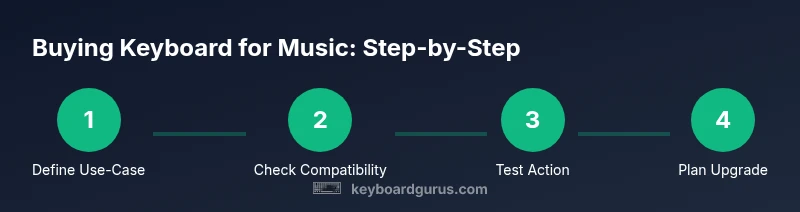
- 1
Define your use-case
Decide whether you primarily compose, produce, or perform live. This determines key count, action, and connectivity needs. A clear use-case reduces feature overload and guides your budget.
Tip: Write down your top three typical sessions to anchor your decision. - 2
Check compatibility
Verify that the keyboard works smoothly with your chosen DAW, plugins, and audio interface. Look for class-compliant drivers and broad plugin support to minimize setup time.
Tip: Test with a small project to assess latency and stability. - 3
Choose key count and keybed
Pick 49–61 keys for portability or 88 keys for full piano feel. Decide between synth-action, semi-weighted, or weighted based on your playing style and goals.
Tip: If you’re transitioning from learning piano, lean toward weighted or semi-weighted for accuracy. - 4
Assess build quality and ergonomics
Inspect the chassis, weight, and pad/knob layout. A well-built unit reduces fatigue and lasts longer in studio or on stage.
Tip: Test the feel of keys across the entire keybed to avoid dead zones. - 5
Plan the upgrade path
Outline how you’ll grow from a beginner controller to a more capable instrument over 12–36 months. Ensure compatibility remains intact during upgrades.
Tip: Choose models with firmware support and modular features that scale with your setup. - 6
audition and finalize
If possible, audition several models in-store, compare action, latency, and software integration. Make notes and revisit your shortlist after a day.
Tip: Bring a short project and test real-world tasks like scale runs and plugin loading.
Got Questions?
What is a MIDI keyboard?
A MIDI keyboard is a controller that sends MIDI data to your computer or sound module; it does not generate sound on its own. You use it to play software instruments or control other devices.
A MIDI keyboard is a controller that sends MIDI signals to software or hardware sound modules, letting you play virtual instruments.
Do I really need weighted keys?
Weighted keys mimic an acoustic piano's feel, which helps with piano technique and expression. If you mainly produce or sequence with virtual pianos, weighted keys are beneficial, but not mandatory for all music creators.
Weighted keys give a real piano feel, which is ideal if you’re focusing on piano technique and performance.
How many keys should I buy?
For beginners, 49–61 keys offer a practical balance of range and portability. If you frequently perform piano pieces or compose extensively, 88 keys provide the full range.
Most beginners start with 49 to 61 keys; 88 keys are better if you play full piano parts regularly.
Is USB connectivity enough for most setups?
Yes for many home studios. Ensure the device is class‑compliant or has solid driver support, and verify MIDI mapping with your DAW.
USB is usually enough for a home studio, but check driver support and MIDI mapping with your software.
Used vs new keyboard, what should I consider?
New keyboards come with warranties and updater support; used gear can save money but may hide wear or fatigue. If buying used, test thoroughly and confirm return options.
Used gear can be cheaper, but test it well and consider warranty or return options.
Watch Video
What to Remember
- Identify your primary use-case and budget first
- Prioritize keybed and action over flashy features
- Test compatibility with your DAW and plugins
- Choose a scalable option to grow with your skills
- Ergonomics and build quality drive long-term success