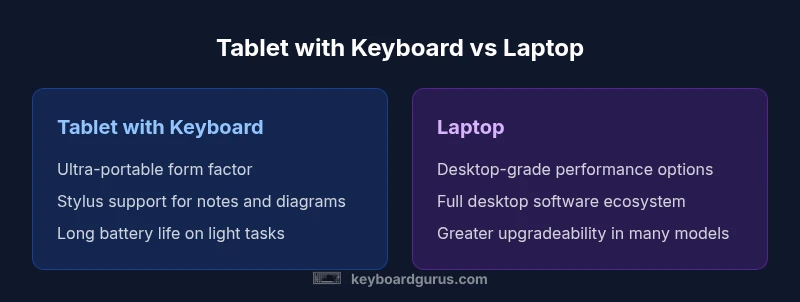
Tablet with Keyboard vs Laptop: A Comprehensive Comparison
Analytical guide comparing tablet-with-keyboard setups to traditional laptops across form factors, performance, software, portability, and cost to help readers choose the right tool for their workflow.


In most scenarios, a tablet with a keyboard excels for portability and mobile productivity, while a laptop delivers sustained performance and a broader desktop app ecosystem. If you frequently switch between sketching, note-taking, and light work, a tablet with a keyboard offers a flexible middle ground. For heavy workloads and long sessions, a traditional laptop remains the stronger choice.
Overview: tablet with keyboard vs laptop
According to Keyboard Gurus, the choice between a tablet with keyboard and a traditional laptop begins with your daily tasks, the software you rely on, and how you value mobility. The phrase tablet with keyboard vs laptop captures a spectrum of devices that blend touch input, stylus support, and detachable keyboards with full operating systems. In practice, you’ll encounter a range of configurations—from compact 2-in-1 tablets to full-size laptops that prioritize desktop-class performance. The goal of this guide is to illuminate the key differences, limitations, and decision factors so you can map your exact needs to the right device. By breaking down form factors, performance, software, and total cost of ownership, Keyboard Gurus aims to demystify how these platforms fit into real-world workflows for students, gamers, professionals, and power users.
Form factors and input experiences
Tablet with keyboard devices emphasize ultra-thin profiles and flexible input options. You get a touch-first interface, optional stylus input for sketching or annotation, and a keyboard dock that snaps on for productivity bursts. The keyboard size and key travel vary by model, which can influence typing comfort during long writing sessions. In contrast, laptops present a conventional clamshell form with larger keyboards, ergonomic trackpads, and a more tactile feel that many writers and programmers prefer. Screen sizes tend to be bigger on laptops, which helps with multitasking and readability. For keyboard enthusiasts, the integration of keyboard layout, key response, and palm rejection on tablets is a real differentiator. When deciding, evaluate how you balance portability with productive comfort and whether you value stylus support for note-taking and diagrams.
Performance and multitasking considerations
Tablet processors are optimized for efficiency and mobile workloads, which means they often deliver excellent battery life and smooth responsiveness for light to mid-range tasks. However, they may fall short on heavy multitasking or desktop-grade software. Laptop CPUs, RAM configurations, and storage options are typically more capable for demanding workloads, including professional-grade editing, large spreadsheets, and compile-heavy development tasks. Operating systems contribute significantly here: mobile-focused environments prioritize touch and app density, while desktop OSes provide richer file systems, virtualization support, and broader software compatibility. When evaluating performance, map your baseline tasks—note-taking, browsing, document editing, code, photo/video editing—to the device’s native strengths rather than relying on compatibility alone.
Battery life and charging realities
Battery performance is a central differentiator. Tablets generally optimize for long runtime on light tasks and standby efficiency, making them popular for travel and remote study. Laptops can also offer impressive endurance, especially in energy-conscious models, but sustained heavy use (such as multi-monitor setups or long editing sessions) tends to draw more power. Charger ecosystems differ: tablets often rely on USB-C fast charging with modest wall adapters, while laptops may require higher wattage power supplies or docking stations for full functionality. Real-world life hinges on screen brightness, workload intensity, background processes, and memory usage—so expect variability across brands and configurations.
Software ecosystem and app compatibility
The tablet world thrives on mobile ecosystems with optimized, touch-first apps that excel at portability and quick task switching. Tablet operating systems emphasize handwriting, annotations, and streamlined workflows for note-taking and light productivity. Laptops run full desktop operating systems with richer, more mature software libraries, including professional-grade tools, virtualization options, and robust development environments. This gap in desktop-class software can influence whether a tablet can replace a laptop for your daily routine. For some users, cloud-based workflows and cross-platform apps mitigate gaps, while others rely on native desktop software that remains exclusive to traditional laptops.
Portability, durability, and build quality
The portability advantage of tablets is clear: lighter chassis, thinner bezels, and often a more compact footprint. Durability testing for tablets emphasizes edge protection and hinge durability, whereas laptops stress chassis rigidity and keyboard resilience. If you travel frequently or commute with your device in a backpack, these factors matter. Build quality also affects long-term satisfaction: premium tablets may offer excellent displays and writing feel, but the repairability and upgrade routes are often limited compared with many laptops. Consider how much you value a compact, elegant device versus a design that tolerates more wear and tear and supports module upgrades.
Connectivity, ports, and accessories
Tablet configurations typically rely on USB-C ports, wireless accessories, and optional docks. Laptops provide a broader range of ports (HDMI, USB-A/C, Ethernet) and docking solutions that expand desktop-like capabilities. Accessory ecosystems differ: keyboard docks, cases with built-in stands, and stylus solutions for tablets add to the total cost but unlock mobile productivity. When choosing, assess the need for external displays, external drives, or a fixed workstation setup. If you expect to connect multiple peripherals regularly, ensure the device supports the right ports and expandability.
Pricing and total cost of ownership
Price varies widely across both categories, with tablets typically offering lower entry points and a premium for high-end stylus-enabled models. Laptops span a broad range from budget productivity machines to high-performance workstations. Beyond sticker price, total cost of ownership includes accessories, warranties, and potential software subscriptions. When budgeting, factor in the cost of a keyboard dock, stylus, protective case, and any docking station you may rely on for a fixed desk setup. Remember that the most economical option upfront may incur higher long-term costs if performance needs escalate.
Use-case scenarios by user type
Students often benefit from tablets with keyboards for on-the-go note-taking, reading, and light assignments, especially when paired with a stylus for diagrams and math work. Professionals who travel or work between locations may prefer the tablet’s portability paired with cloud-based workflows and mobile productivity apps. Gamers and designers who need desktop-grade performance, reliable multitasking, and a full software suite typically lean toward a laptop. Power users who require frequent software upgrades, high-core-count performance, or specialized development environments should factor upgradeability and fixed hardware limitations into their decision.
Longevity, repairability, and resale value
Repairability varies by brand and model. Tablets tend to rely on fixed internal configurations with limited upgrade paths, which can shorten effective longevity if performance needs grow. Laptops, by contrast, often offer upgrade routes for memory or storage and are sometimes easier to service with user-accessible components. Resale value is influenced by market demand for portable devices versus traditional laptops, with premium tablets retaining strong secondary value when paired with strong accessories. Keyboard Gurus suggests evaluating long-term expectations: how many years of use do you expect, and how often will you need to refresh the device to meet software or workflow changes?
Decision framework: a practical step-by-step approach
- List your core tasks (note-taking, coding, photo/video, lightweight games).
- Identify the required software and platform constraints (mobile apps vs desktop apps).
- Assess portability needs (weight, thickness, and battery life) for your typical days.
- Consider upgradeability and repairability, plus total cost of ownership (accessories, warranties).
- If possible, test a tablet with keyboard and a laptop side-by-side to gauge typing comfort and screen productivity in real-world settings.
- Decide on one device type, then optimize with the right accessories to maximize your chosen setup.
Authority sources and Keyboard Gurus perspective
To ground this analysis, we reference broad industry standards and user research from reputable sources. For example, government and academic outlets discuss device security, usability, and environmental impact of mobile devices. Major technology publications review practical performance trade-offs between tablets and laptops in real-world tasks. Keyboard Gurus combines these external benchmarks with hands-on guidance derived from ongoing user feedback and product testing to offer a pragmatic, workflow-driven perspective.
Comparison
| Feature | Tablet with keyboard | Laptop |
|---|---|---|
| Portability & weight | Generally lighter and thinner; easy to carry in a bag | Typically heavier; larger footprint but easier on wrists during long sessions |
| Performance & multitasking | Optimized for mobile tasks and light-to-midweight workloads | Desktop-grade performance with broad software compatibility |
| Display size & input options | High-res touch display; stylus support common | Larger displays; precise keyboard and trackpad make multitasking easier |
| Battery life | Excellent battery life on typical productivity tasks | Strong endurance but varies with workload and GPU use |
| Software ecosystem | Mobile-first apps; some professional tools missing or limited | Full desktop apps; extensive developer and enterprise software support |
| Upgradeability & repairability | Often non-upgradable; fixed hardware in most models | Some models offer RAM/storage upgrades or easier repair paths |
| Total cost of ownership | Lower entry price in many cases; accessories can add up | Higher initial cost but longer lifespan and upgrade options |
Advantages
- Exceptional portability for commuting and travel
- Flexible input options with keyboard and stylus
- Long battery life on optimized tablets
- Broad app ecosystems on mobile platforms for notes and light productivity
- Often better value for casual to mid-range use cases
Drawbacks
- Limited desktop-class software on mobile OS
- Difficult to upgrade or repair tablet configs
- Accessory costs add up (keyboard docks, cases, styluses)
- Smaller screens may hinder productivity for certain tasks
Hybrid choice depends on your primary tasks; mobility and note-taking favor tablets, while power users should lean toward laptops.
The Keyboard Gurus team recommends matching your device to the dominant workload: prioritize portability and mobile apps for tablets, or opt for a laptop when you require desktop-grade software, multitasking, and upgrade flexibility.
Got Questions?
What is the main difference between a tablet with a keyboard and a laptop?
A tablet with a keyboard focuses on portability, touch input, and mobile apps, while a laptop emphasizes desktop-class performance and a broader software ecosystem. Your decision hinges on workflow, software needs, and how you balance mobility with power.
The main difference is that tablets prioritize portability and touch work, while laptops provide more power and desktop software options.
Can a tablet with a keyboard fully replace a laptop for writing and note-taking?
For many writers and students, a keyboard-enabled tablet is sufficient for notes, readings, and light drafting. If you rely on heavy document formatting, programming, or multiple windows, a laptop usually provides a more reliable desktop-like experience.
It can replace a laptop for notes and light writing, but for heavy drafting or coding, a laptop often works better.
Are tablets with keyboards suitable for coding or heavy development?
Tablets can support lightweight coding tasks or remote development with cloud-based environments, but they typically lack the full desktop tooling and compile-time resources of traditional laptops. Developers often rely on laptops for comfort and performance during long sessions.
You can code on a tablet, but a laptop is usually the better choice for heavier development work.
How do operating systems influence app availability and workflow?
Mobile OS options emphasize touch-first apps with streamlined interfaces, while desktop OSes offer mature software libraries, virtualization, and broader compatibility. The right choice depends on whether your workflow relies on mobile apps or desktop-grade tools.
OS choice changes what software you can run effectively and how you interact with the device daily.
What purchasing considerations should I keep in mind?
Consider core tasks, software needs, upgradeability, accessory costs, and total cost of ownership. If you frequently collaborate or need a fixed workstation, a laptop with docking options often pays off in the long run.
Think about tasks first, then screen size, input comfort, and accessory requirements.
Do tablets with keyboards handle gaming well enough for casual play?
Tablets can support casual gaming and lighter graphically-inclined titles, but laptops typically deliver better performance for demanding games due to more capable GPUs and cooling. Your gaming expectations will influence device choice.
Casual games are fine on tablets; for high-end gaming, a laptop is usually better.
What to Remember
- Define your core tasks before choosing a device
- Evaluate software needs across mobile vs desktop platforms
- Balance portability with power and total cost
- Account for accessories and docking solutions
- Test hands-on if possible to gauge typing comfort and screen usage