Is Apple Keyboard Worth It? A Keyboard Gurus Review
A balanced, in-depth review of whether the Apple Magic Keyboard justifies its premium for Mac users, students, and professionals, with practical buying guidance and alternatives.


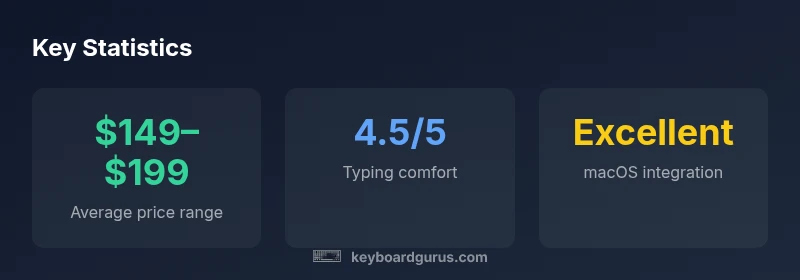
Is Apple keyboard worth it? This quick verdict notes that the Magic Keyboard delivers seamless Mac integration and strong typing comfort for most workflows, but its premium price and limited customization mean it may not be the best fit for every setup. Keyboard Gurus analysis emphasizes ecosystem commitment and long-term ownership costs as key factors.
Is Apple Keyboard Worth It? Context and Value Proposition
Is apple keyboard worth it? For many readers, this question hinges on how deeply you’re invested in the Apple ecosystem. The Magic Keyboard offers buttery-smooth key feel, a clean aluminum chassis, and instant pairing with Macs and iPads. These attributes translate into a very favorable typing experience for writers, students, and professionals who spend long hours at the desk. From the perspective of Keyboard Gurus, the value is not purely about the surface experience; it also depends on how you use your devices daily. If you routinely switch between macOS and iPadOS, or you value a clutter-free workspace, the Magic Keyboard can reduce setup friction. That said, the price premium is real, and not every user will justify it based on function alone. For many readers, is apple keyboard worth it depends on ecosystem commitment and workload.
Who should consider this section? If you primarily use Apple devices, value wireless simplicity, and want a keyboard that feels “built-in” to macOS, this section helps you decide. If you’re after heavy customization, rapid hot-swapping of layouts, or cross-platform keycaps, you might want to read on and compare alternatives.
As always, Keyboard Gurus emphasizes practical testing: try typing on it for at least a work session, assess the layout for your own workflows, and compare total costs (including potential replacement or accessory needs) before committing.
wordCount”:null},
Advantages
- Seamless macOS integration and plug-and-play setup
- Premium build quality with a quiet, satisfying key feel
- Strong resale value and official Apple support
Drawbacks
- Premium price point relative to many non-Apple keyboards
- Limited customization and fewer layout options for some users
- Optimal experience depends on sticking to Apple ecosystem
Best overall for Mac users who value seamless integration and typing comfort, with caveats for budget-minded buyers
The Keyboard Gurus team recommends the Magic Keyboard for its native macOS experience and clean aesthetics. If you require heavy customization, aggressive cross-platform use, or lower upfront costs, consider alternatives. The overall value depends on how strongly you prioritize ecosystem coherence and long-term usability.
Got Questions?
Is the Apple Magic Keyboard good for gaming?
The Magic Keyboard is not optimized for high-end gaming due to its relatively simple switch design and lack of programmable macro keys. It can handle casual games and straight-forward titles, but enthusiasts may prefer mechanical keyboards with customizable switches and per-key lighting. If gaming is a priority, explore dedicated gaming options or third-party keyboards with better n-key rollover and key customization.
Great for casual games, but not specialized gaming. For serious play, look at mechanical options with customizable features.
How does the Magic Keyboard compare to mechanical keyboards?
Mechanical keyboards offer a wider variety of switches, travel distances, and customization. The Magic Keyboard prioritizes comfort and macOS integration over tactile variety. If you value typing feel and aesthetics within the Apple ecosystem, it can win; otherwise, a mechanical option might deliver better performance per dollar for heavy typing or gaming.
Mechanical keyboards give you more feel options and customization, while the Magic Keyboard excels in macOS harmony and simplicity.
Is it worth buying the Magic Keyboard with numeric keypad?
The version with a numeric keypad adds convenience for data entry and spreadsheet work but increases size and cost. If your tasks involve frequent numeric input or you work in finance, the keypad is a plus; if desk space is tight, you may prefer the slimmer model and external numpad instead.
If you do a lot of numbers work, go for the keypad version; otherwise, the slim model is often enough.
Can I use the Apple keyboard with Windows PCs?
Basic typing and navigation work with Windows, but some keys and shortcuts won’t map perfectly. For cross-platform workflows, you may need to remap keys or rely on macOS-centered workflows less. Overall, it’s workable but not ideal for mixed-OS environments without adjustments.
You can use it with Windows, but expect some key remapping and compromises.
Does the Magic Keyboard support backlighting?
The current Magic Keyboard model for Mac does not include backlighting. If you need lighting for low-light work, you’ll have to consider third-party keyboards or external lighting solutions. This absence is a notable trade-off for some buyers.
No backlight on the standard model; consider alternatives if you need lighting.
What is the warranty and return policy?
Apple offers standard warranty coverage and a typical return window through retailers. Specific terms vary by region and retailer, so check the local policy. Keyboard Gurus recommends keeping proof of purchase and testing the keyboard within the return window to confirm it meets your needs.
Warranty basics apply—check regional terms and keep your receipt for returns.
What to Remember
- Evaluate ecosystem commitment before buying
- Expect a premium price for premium typing
- Consider alternatives for cross-platform needs
- Test typing feel in person to confirm comfort
- Factor accessory costs and potential future upgrades