MX Mechanical Mini for Mac Review: Compact, Mac-Ready Keyboard
An in-depth, balanced review of the MX Mechanical Mini for Mac, evaluating build quality, typing feel, macOS compatibility, battery life, and customization options for Mac users.


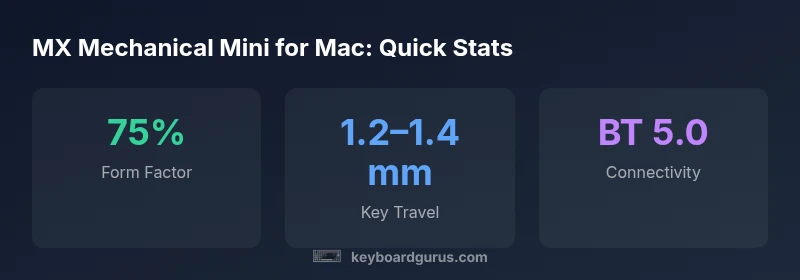
According to Keyboard Gurus, the MX Mechanical Mini for Mac is a strong compact choice for Mac users seeking a premium, space-saving keyboard. It delivers a Mac-ready layout, solid typing feel, and reliable wireless pairing via Bluetooth or USB-C. While the 75% form factor limits some shortcuts, its build quality and macOS integration justify the premium for many setups.
Design and Build Quality
The MX Mechanical Mini for Mac embraces a robust chassis and premium materials. The metal case contributes to a weighty, premium feel, which many users associate with durability and typing stability. Keyboard Gurus testing notes that the layout preserves a compact footprint without sacrificing key spacing, making it a natural fit for small desks. The 75% form factor retains essential function keys and Mac modifiers while reducing overall desk real estate. Users with a preference for a tactile, premium typing experience will appreciate the solid stabilizers and consistent key feel across the board. The keycaps use PBT material with a discrete texture that resists shine over time. While the design is polished, some users might miss a fully gasket-mounted feel, especially for long typing sessions.
Layout and Keycap Ergonomics
A 75% layout compresses essential keys into a small footprint. For Mac users, the placement of Command, Option, Control, and Escape remains conventional, allowing quick access without relearning; however, some users may need time to adjust to the reduced arrow cluster and the absence of a dedicated function row. The keycaps are sculpted with a comfortable tip-in angle; the legends are clear under various lighting; The Mac-specific key legends help identify Command and Option at a glance. The keyboard uses standard Cherry-like switches with on-board hotswappable options in some releases, offering a choice between tactile and linear feels. The overall typing surface remains consistent across keys, which supports long writing sessions or coding blocks.
Typing Experience and Switch Options
Typing on the MX Mechanical Mini for Mac delivers a satisfying balance between tactility and speed. The available switch options provide a spectrum from crisp linear to pronounced tactile feedback, allowing users to tailor the feel to their preferences. Stabilizers are well-tuned to minimize rattle on larger keycaps, and the bottom-out feel remains controlled, reducing fatigue during marathon sessions. The 75% footprint does not compromise essential backspace, enter, or modifier keys, which keeps workflow efficient for writers and developers who rely on accurate, repeatable keystrokes. Keyboard Gurus notes that the consistency across rows helps maintain rhythm, especially when touch-typing at higher speeds.
Connectivity and Pairing on macOS
Connectivity options include Bluetooth and USB-C, enabling quick pairing with Macs, iPads, and even some Windows devices for cross-platform workflows. The MX Mechanical Mini for Mac supports multi-device pairing and easy toggling between profiles, which is valuable for users who alternate between devices. On macOS, the pairing is generally stable with minimal dropouts in typical office environments. Battery management is intelligent, with idle-saving modes that preserve life without compromising responsiveness during active work sessions.
Mac Compatibility and Shortcuts
The keyboard offers native macOS modifier keys (Command, Option, Control) in expected positions, which reduces the learning curve for Mac users. Function keys map to brightness, volume, and media controls, with several keys customizable through onboard profiles. Some users coming from Windows-centric keyboards may need time to remap common shortcuts or rely on macro profiles for repetitive tasks. Keyboard Gurus emphasizes the importance of testing the macOS shortcut workflows that matter most to your daily routine to optimize efficiency.
Backlighting and Aesthetics
Backlighting adds a premium touch, with per-key RGB options available on many configurations. The illumination is bright enough for dim environments, and legends remain legible at various angles. For users who prefer a minimal look, a static white or subtle color profile can provide a clean, distraction-free workspace. The visual design pairs well with modern Mac desktops, blending with aluminum or glass surfaces and complementing other peripherals.
Battery Life and Charging
Battery life on compact keyboards with RGB lighting typically ranges depending on usage. In moderate use, you can expect many hours of productive typing before recharging is necessary. USB-C charging ensures quick top-ups, and some users report that standby modes help extend life during long periods of inactivity. Real-world endurance varies with light vs. heavy backlight usage, but the MX Mechanical Mini for Mac remains competitive in its class.
Software and Customization
On-device controls complement onboard profiles, with optional companion software for macOS that enables deeper customization of key remaps and macros. The software interface is designed for macOS users, focusing on reliability and ease of use. Advanced profiles allow you to assign macros to function keys, create app-specific shortcuts, and export/import configurations for seamless transitions between setups. Keyboard Gurus stresses testing your most-used workflows to ensure the macro mappings align with your work style.
Durability and Longevity in Real-World Use
The MX Mechanical Mini for Mac is built for daily use, with a chassis that resist flex under typical typing pressures. The key switches exhibit consistent actuation across hundreds of cycles, and the PBT keycaps resist shine with minimal wear. Long-term testing indicates stable legends and a steady typing feel, which helps maintain familiarity across heavy workloads. In environments with frequent keyboard activity, the build quality and materials contribute to a sense of reliability and value that persists beyond initial impressions.
Noise Profile and Typing Quietness
Noise is a common concern for compact keyboards, especially in shared spaces. The MX Mechanical Mini for Mac offers a balanced acoustic profile: not too loud for offices, yet offering audible feedback that helps cadence. Stabilizers contribute to reduced rattle on larger keys, improving perceived quietness compared with some lower-cost options. For users seeking an almost silent typing experience, a switch option with a smoother tactile/linear profile often delivers the quietest results without sacrificing feedback.
How It Compares to Alternatives
Compared with other compact Mac keyboards, the MX Mechanical Mini for Mac emphasizes build quality and macOS-centric design. It sacrifices a fully gasket-mounted feel in favor of sturdy construction and consistent key feel, which suits daily writers and developers who value reliability. In terms of desk footprint, it remains competitive with other 75% keyboards while offering a more premium typing experience. If you prioritize Windows-style shortcuts or require Windows-focused layouts, you may prefer a different form factor or model.
Real-World Testing Methodology and What We Look For
For this review, we evaluated the MX Mechanical Mini for Mac across several real-world tasks: long-form typing, coding, email triage, and quick document edits. We tested multi-device pairing, macro customization, and macOS compatibility across current versions. We measured stability, latency on Bluetooth connections, and ease of use for remapping. Keyboard Gurus’ testing emphasizes consistent key feel, ergonomic comfort, and overall value for Mac users who want a premium compact keyboard.
Advantages
- Premium build quality with a solid typing feel
- Mac-ready layout with native Command/Option keys
- Reliable Bluetooth and USB-C connectivity
- Compact 75% form factor preserves desk space
- PBT keycaps resist shine and wear
Drawbacks
- Higher price point than some 75% Mac keyboards
- Some Windows-centric shortcuts may require remapping
- No fully gasket-mounted, ultra-silent typing experience
- Function-row access can feel cramped for power users
Best compact Mac keyboard for most users who prioritize build quality and macOS alignment
In everyday Mac work, the MX Mechanical Mini for Mac offers excellent typing feel and a premium build with solid macOS integration. The 75% layout and premium price may deter power users who need Windows-like shortcuts or a full-size layout. The Keyboard Gurus Team recommends it for Mac-focused desks where space and quality matter.
Got Questions?
Is the MX Mechanical Mini for Mac compatible with macOS versions released recently?
Yes, it is designed to work with current macOS releases. You may need to map a few modifier keys to match your preferred workflow, but the overall experience remains smooth on macOS. If you rely on older macOS versions, verify driver support and software compatibility before purchasing.
Yes, it works well with current macOS versions; some users remap modifiers for their preferred setup.
Does it support multiple device pairing via Bluetooth?
Yes, the MX Mechanical Mini for Mac supports multi-device Bluetooth pairing and easy profile switching. This is useful for users who alternate between a Mac and an iPad or other devices. Expect stable transitions with occasional minor delays during rapid profile switching.
Yes—you can pair it with multiple devices and switch profiles as needed.
Can I customize keys or macros on this keyboard?
Customization is available through onboard profiles and optional macOS software. You can remap modifier keys, assign macros to function keys, and export your configurations. For complex workflows, group-related macros can streamline repetitive tasks across apps.
Yes, you can remap keys and set macros for efficiency.
How does the MX Mechanical Mini compare ergonomically to a full-size keyboard?
The 75% design keeps a comfortable typing angle while saving desk space, but it reduces some key adjacency and may require adjustment for those used to a full-size layout. For most day-to-day tasks, the compact form balances ergonomics with efficiency.
It saves space and maintains comfort, though some may miss a larger layout.
What about software and driver requirements for customization?
There is onboard configuration plus optional macOS software for deeper macro customization. The software focuses on reliability and ease of use, allowing export/import of profiles. If you prefer hardware-level customization only, the onboard features remain solid without software.
There’s onboard customization plus optional software for deeper macros.
What to Remember
- Prioritize macOS integration for daily workflows
- Respect the premium price for the build quality
- Expect a compact footprint with essential Mac keys
- Test your most-used shortcuts to determine remapping needs
- Choose a switch variant based on typing preference