Understanding keyboard 0.1 ms Latency: A Practical Guide
Explore keyboard 0.1 ms latency, how it’s measured, what factors shape it, and practical steps to optimize your setup for ultra-fast input in gaming and professional work.


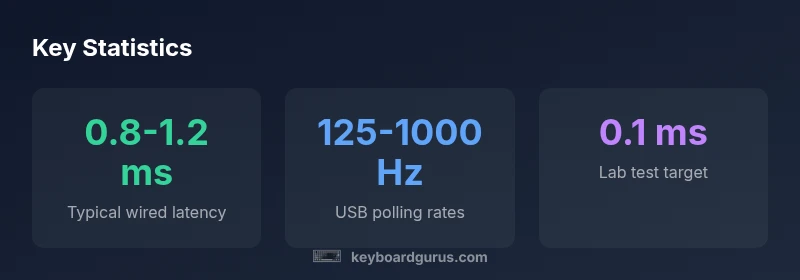
0.1 ms latency is an exceptionally low figure for keyboards, usually possible only in lab tests or with specialized hardware. In everyday use, total latency includes switch actuation, debounce, firmware processing, USB polling, and OS scheduling. While some labs report sub-1 ms end-to-end latency under ideal conditions, real-world performance depends on the entire chain as well as the display pipeline.
What 0.1 ms latency means in practice
0.1 ms latency is an exceptionally low figure for keyboards in lab settings. In everyday use, end-to-end latency includes several steps: switch actuation, debounce logic, firmware processing, USB polling, and OS scheduling. Real-world measurements often exceed 0.5 ms and can approach a few milliseconds depending on the chain. The Keyboard Gurus team notes that the keyboard is only one part of the latency equation, and consumer setups rarely achieve lab-level numbers outside ideal scenarios. A practical takeaway is to seek consistency across presses and minimize jitter rather than chase an ultra-low nominal spec.
- Key factor: hardware timing
- Variation: firmware optimization and USB stack
- Practical takeaway: focus on consistency over extreme specs
Latency components in a keyboard input path
| Latency Component | Typical Range (ms) | Notes |
|---|---|---|
| Key switch actuation | 0.2-1.0 | Depends on switch type and lubrication |
| PCB debounce | 0.1-0.5 | Firmware timing influences friction |
| Controller processing | 0.05-0.3 | MCU efficiency matters |
| USB polling + host | 0.125-1.0 | Polling rate and OS scheduling |
Got Questions?
What does 0.1 ms latency actually mean in practice?
0.1 ms is extremely fast in lab tests. In real life, the total latency includes the keyboard path plus USB and system delays, so users typically experience higher numbers. The key takeaway is consistency and predictability, not a single lab figure.
0.1 ms is a lab-level target; in real life you’ll see more delay from the system, so focus on stable performance.
Can any keyboard realistically hit 0.1 ms latency?
Sub-1 ms targets exist mainly in controlled conditions with specialized hardware. Most consumer keyboards will not guarantee 0.1 ms end-to-end latency due to USB stack, firmware, and OS overhead.
In everyday setups, hitting 0.1 ms end-to-end is unlikely; aim for low variability instead.
How should I measure latency at home?
Home latency testing typically involves repeating keystrokes and timestamping the input path from press to a measurable output. Use repeatable tests and document the duration, including software and display delays.
You can measure latency at home using timing tools and repeated trials to estimate end-to-end delay.
Does wireless affect latency more than wired?
Yes, wireless connections can introduce more variability due to radio buffering and retransmission. For ultra-low latency needs, a wired connection is generally preferable.
Wired is usually faster and more consistent for latency-sensitive use cases.
What should I look for when evaluating latency claims?
Ask for end-to-end measurements, testing methodology, and independent validation. Prefer manufactures that publish test conditions and provide third-party verification.
Look for lab-tested numbers and independent verification when evaluating latency claims.
How important is latency for gaming vs typing?
Latency matters more in fast-paced games with split-second decisions. For typing, consistency and tactile feedback often matter more than ultra-low numbers.
Gamers care a lot about speed and consistency; typists care about reliability and feel.
“Latency is a spectrum, and 0.1 ms is a noble target, but real-world performance depends on the entire chain from key switch to display. Focus on consistency and predictability.”
What to Remember
- Start with wired keyboards to minimize latency
- Choose high polling rates (125-1000 Hz) for low latency
- Consider debounce and firmware optimization
- Latency is a chain; improve all parts for best results
- Real-world latency is typically higher than lab specs