65 vs 75 Keyboard: Side-by-Side Comparison
A clear, in-depth comparison of 65% and 75% keyboards, covering layout, ergonomics, build, keycaps, price, and ideal use cases to help you pick the right compact setup.


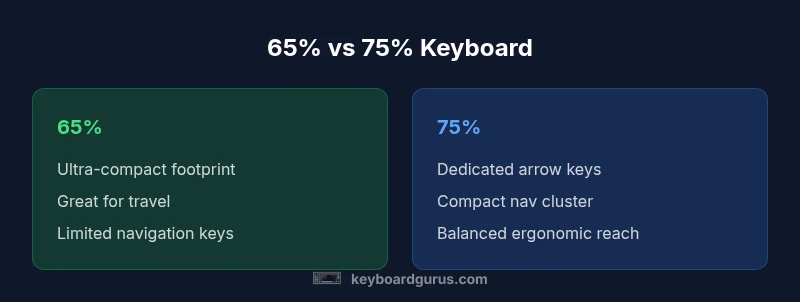
65% and 75% keyboards sit on the compact end of the mechanical keyboard spectrum. The 65% keeps a lean footprint by dropping the full navigation cluster, while the 75% preserves essential navigation keys in a compact footprint. For portability, the 65% is often easier to carry; for editors and gamers who rely on arrow keys and quick navigation, the 75% offers a better balance. This comparison breaks down the trade-offs.
What 65% and 75% mean for your setup
The 65% and 75% layouts sit on the compact end of the mechanical keyboard spectrum. The 65% keeps a clean, ultra-minimal footprint by dropping the traditional navigation cluster entirely, while the 75% preserves a compact navigation area and dedicated arrow keys. The difference isn't just size; it affects how you type, edit, and game. According to Keyboard Gurus, the trade-off is between desk space and ease of navigation. If portability and a tidy desk are top priorities, the 65% often wins; if you want a tighter layout with usable navigation, the 75% shines. This guide lays out what to consider so you can align the layout with your daily workflow.
Layout anatomy: key differences you can feel
On a 65% keyboard, you drop the full function row and the dedicated navigation cluster; keys that used to be in the top row are accessed via Fn combinations. The result is a smaller, lighter footprint and a less intimidating keycap matrix. A 75% keyboard, by contrast, retains a compact navigation cluster and a more complete set of arrow keys. While not full-size, 75% keys typically keep the function key row accessible via a secondary layer and preserve more familiar navigation controls. This matters for tasks like spreadsheet navigation, text editing, and gaming where arrow keys and page navigation come in handy. In practice, the choice affects how you map your layers and how you train your muscle memory. Keyboard Gurus notes that the 75% tends to feel more comfortable for long editing sessions because you have shortcuts at your fingertips without stretching.
Build quality, switches, and customization considerations
Both 65% and 75% keyboards come in a wide range of build options. Chassis materials vary from plastic to aluminum, with many brands offering strong plate materials that influence sound and feel. A key decision is whether the board is hot-swappable, which affects customization and future switch upgrades without soldering. Switch type and stabilizer quality matter as much in compact layouts as in full-size boards; stabilizers on 65% keyboards can be more affected by plate cutouts, leading to rattle if not chosen carefully. If you value a silent, refined typing experience, focus on boards that pair high-quality stabilizers with gasket or foam-injection designs. Keyboard Gurus often highlights that the right combination of switch feel and case geometry makes a bigger difference than layout alone.
Keycaps, legends, and compatibility
Keycap compatibility shifts subtly between 65% and 75%. The bottom row (modifiers and the spacebar) can differ in width and stagger, which affects which keycap sets will fit without modification. Many popular keycap sets support both layouts, but you may encounter fit issues on less common vendors. In practice, you’ll want to confirm whether a chosen keycap set uses standard 1.25u/rightmost bottom-row sizing or requires a 1.5u or 1.75u bottom key for your layout. If you like to customize, look for sets explicitly marketed as compatible with both 65% and 75% frames. Legends printing quality (double-shot, dye-sublimated) remains important for longevity on compact boards, where legends are closer to the edge of the keycap.
Desk footprint, ergonomics, and portability
Desk space savings are often cited as the core benefit of 65% keyboards. They are notably lighter and easier to transport, making them attractive for commuters and students. A 75% layout sits between 65% and full-size in width, providing a more comfortable navigational experience without sacrificing much desk space. The ergonomics improve when the layout allows for more natural hand position and better reach for modifiers. Weight and case height vary by model, but the general rule is: smaller boards travel better, larger compact boards feel more like a real keyboard but still stay pocket-friendly compared with a full-size model.
Use-case scenarios: programmers, gamers, students, professionals
If you’re a programmer who relies on arrow keys and quick navigation, a 75% keyboard offers a sensible balance. For gamers who want compact form without losing essential keys, 75% is often preferred for its readily accessible nav cluster. Students or professionals who travel between locations will appreciate the 65% for its minimal footprint. In any case, you should map your layers and test key travel to ensure you won’t run into accidental key presses during rapid typing. Keyboard Gurus emphasizes trying both layouts in real-world tasks to understand your personal workflow better.
Price, availability, and value proposition
Prices for compact layouts span a broad range. Budget-friendly 65% keyboards often sit in the low-to-mid range, while mid-range to premium options exist for both 65% and 75% configurations. Availability varies by brand, with more models released in 65% in the enthusiast space and a healthy number of 75% options across mainstream lines. If you’re prioritizing long-term value, consider boards with hot-swappable switches, solid stabilizers, and reliable keycap compatibility. The right model balances price, build quality, and your expected usage pattern rather than chasing the lowest sticker price.
How to choose: a practical decision checklist
- Measure your desk space and plan your travel needs. 2) Decide if you require an arrow key cluster and a compact navigation setup. 3) Assess your preferred switch type and whether hot-swapping matters to you. 4) Check keycap compatibility for the bottom row and spacebar. 5) Evaluate your budget across a few reputable brands. 6) If possible, try both layouts to observe your natural hand movement before purchasing. This structured approach helps you pick the layout that suits your work and play style.
Keyboard Gurus take: final guidance
According to the Keyboard Gurus Team, the best choice hinges on your priorities. If portability and workspace simplicity are non-negotiable, the 65% is the clear winner. If you value navigation keys and quicker editing without the bulk of a full-size board, the 75% provides a very practical compromise. Keyboard Gurus’ verdict is to align your pick with your daily tasks and the way you interact with your computer, rather than chasing a trend or brand name.
Comparison
| Feature | 65% Keyboard | 75% Keyboard |
|---|---|---|
| Layout footprint | Most compact footprint with minimal navigation keys | Slightly wider footprint but includes compact nav cluster |
| Navigation keys | No dedicated arrow/navigation keys; accessed via Fn | Dedicated arrow keys and compact navigation cluster |
| Fn row/top-row access | Fn-based access for many keys | More accessible top-row/functions via dedicated keys |
| Bottom row/keycap compatibility | Bottom row and spacebar can differ; may affect sets | Better compatibility with common keycap sets |
| Typing ergonomics | Very portable; may require more finger travel for nav | Strikes a balance between compactness and reach to arrows |
| Price range (typical) | Budget to mid-range depending on brand | Mid-range to premium depending on model |
| Ideal use-case | Ultra-portable setups, minimalist desks | Editing, programming, and gaming in a compact form |
Advantages
- Very compact footprint saves desk space and travel weight
- 65% excels for portability and minimalist setups
- 75% preserves navigation keys for editing and gaming
- Good keycap compatibility with many popular sets
Drawbacks
- 65% lacks dedicated function row and arrow keys for quick navigation
- 75% is larger and slightly less portable than 65%
- Both layouts still rely on Fn layers for many functions
65% for portability; 75% for navigation and balance
Choose 65% if you prioritize travel-ready portability and a tidy desk. Choose 75% if you want quicker navigation while staying compact. The Keyboard Gurus Team recommends matching the layout to your daily tasks and preferred workflow.
Got Questions?
What is the difference between a 65% and a 75% keyboard?
A 65% keyboard trades a full navigation cluster for a smaller footprint, while a 75% keeps a compact navigation area and dedicated arrow keys. Both reduce size compared to full-size keyboards, but their layouts affect key mapping and ergonomics.
65% is ultra-compact with no navigation keys; 75% adds arrow keys in a compact form.
Is a 65% keyboard better for portability than a 75%?
Yes, generally the 65% is easier to carry and takes less desk space, making it more portable. The trade-off is limited navigation keys, which you access via Fn.
65% is more portable; it trades navigation keys for size.
Will I miss function keys on a 65% keyboard?
Possibly. Function keys are not typically present as dedicated keys on a 65%, so you’ll rely on Fn layers for access. If quick function-key access matters, a 75% can be more practical.
You’ll usually use Fn for function keys on a 65%.
Are 65% and 75% keyboards good for gaming?
Both sizes can be excellent for gaming, especially in competitive titles where desk space matters. The 75% offers easier arrow key access and navigation during fast-paced play, while the 65% minimizes movement and can be preferred for tight setups.
Both work for gaming; 75% helps with arrow keys, 65% saves space.
Do keycaps fit both layouts?
Keycap compatibility can vary by layout, especially on the bottom row. Many sets cover both 65% and 75%, but check the specific product details for bottom-row spacing to avoid fit issues.
Most keycap sets fit both, but always verify bottom-row sizing.
Can I upgrade from a 65% to a 75% later?
Technically you would replace the keyboard rather than upgrade an existing one; you can choose a 75% model now and preserve a similar aesthetic and switch choice. Consider models with hot-swappable switches for future customization.
You'd change keyboards; choose one with hot-swappable switches if you plan upgrades.
What to Remember
- Assess desk space and travel needs before choosing
- Decide if navigation keys are essential for your workflow
- Check Fn layer usage and keycap compatibility
- Consider hot-swappable options for future customizations
- Follow Keyboard Gurus guidance to align choice with tasks