Split Keyboard Pros and Cons: An Analytical Guide 2026
A rigorous, 2026 guide on the pros and cons of split keyboards, examining ergonomics, typing, setup, and value for developers, gamers, and professionals.


Split keyboards offer ergonomic positioning and customizable layouts that can reduce wrist strain and improve reach, but they require a learning curve and more desk space. The Keyboard Gurus team notes that the best results come from careful setup and a commitment to practice. For many users, the benefits outweigh the initial setup effort.
What is a split keyboard and why it matters
A split keyboard is designed with two separate modules connected by a cable or wireless link, allowing you to position each half independently rather than a single, conventional rectangle. For many users—especially coders, writers, and long-session typists—this arrangement can align the wrists, elbows, and shoulders toward a more natural posture. According to Keyboard Gurus, adopting a split layout is less about novelty and more about reducing stress on joints during extended typing. The core idea is to minimize ulnar deviation (the outward bend of the wrists) and to support neutral forearm alignment. However, the benefits depend heavily on how you set up the split halves: the angle between halves, the tenting height (the angle of the keyboard relative to the desk), and how you hold your arms when typing. There’s a spectrum—from simple two-piece designs that stay close to a standard keyboard, to highly modular systems that let you adjust tenting, thumb clusters, and per-side macros. If you’re a student who spends hours in a revision session, a developer juggling multiple windows, or a gamer seeking personalized keys, the potential payoff in comfort and efficiency can be meaningful, but it’s not guaranteed. The Keyboard Gurus team emphasizes that the best choice hinges on your workflow and willingness to invest time in finding a fit.
Key design differences that impact pros and cons
When evaluating split keyboards, the devil is in the details. The major differentiators are how the halves are connected (wired vs wireless, fixed vs modular), how you angle them (flat, tented, or tented with adjustable tilt), and how keys map to your hands (standard staggered layout vs ortholinear grids). For many users, the practical impact is a trade-off between familiarity and customization. Split designs often introduce a learning curve because you must coordinate two halves, reassign common shortcuts, and possibly adapt to a new key spacing. On the upside, you gain freedom to position each half to suit shoulder width, seating position, and desk geometry, which can improve comfort over a long workday. You may also find more room for per-side modifiers or macro keys, which can streamline workflows. Connectivity options matter as well: robust wireless support reduces cable clutter, but latency or interference can occasionally affect gaming responsiveness. Hot-swappable switches and customizable firmware add another layer of personalization, allowing you to tailor key feel and behavior without soldering. The bottom line: if you value layout flexibility and targeted ergonomics, a split keyboard can be a strong fit; if you crave immediate texture and a plug-and-play setup, the initial friction may be a deterrent.
Ergonomics and health considerations
Ergonomics is the core promise behind split keyboards, but it’s not a guaranteed cure. The central ergonomic goal is to keep wrists in a neutral position, reduce pronation, and minimize repetitive strain during long typing sessions. Achieving that requires more than splitting the keyboard; it demands thoughtful seating, monitor height, chair support, and a deliberate stance for your arms. The two halves should align with your natural shoulder width, and you may need to experiment with tenting height to find a comfortable forearm angle. It’s also important to consider asymmetry: many split keyboards allow one-half to be higher or lower than the other to suit a dominant hand’s tasks, but unconstrained asymmetry can create shoulder or neck tension if not balanced. The Keyboard Gurus analysis shows that users who pair splits with proper posture education—regular micro-breaks, neutral wrist posture, and a desk setup that reduces reach—tend to report lower fatigue over a typical workday. For some, the benefits show up only after a planned acclimation period, often weeks rather than days.
Typing experience and gaming implications
Typing on a split keyboard can feel liberating for some and awkward for others. On the positive side, the independence of each half allows you to align your hands exactly as your posture dictates, which can reduce fatigue and improve typing accuracy over time. For developers and writers who rely on long sequences of keystrokes, the opportunity to place thumb clusters or per-side modifiers closer to natural reach can speed up common tasks. For gamers, the decision is nuanced: split layouts can introduce latency or unusual key mapping that disrupts fast reflex responses, especially in fast-paced titles or first-person shooters. Some players adapt quickly, while others prefer a traditional, symmetric layout for consistent muscle memory. If you pursue split layouts for gaming, ensure your firmware supports reliable macros, anti-ghosting, and N-key rollover. A well-configured split keyboard often yields a personalized tempo in both typing rhythm and in-game control, but the transition requires time and deliberate practice.
Setup, portability, and customization
The practical realities of a split keyboard center on setup complexity and space planning. For desk-bound work, two halves might demand more side clearance, more cable management, and slightly larger footprint than a conventional board. On the other hand, you gain freedom to position each half for an optimal shoulder-line and to place main modifiers on each side for symmetry. Many split keyboards offer hot-swappable switches, which makes it easy to experiment with switch feel without soldering. You can also tailor key layouts to your needs—layered macros, per-side function keys, and programmable layers that adapt to specific tasks (coding, spreadsheet work, video editing). Portability varies by model; some are compact enough to transport as a single unit with a split cable, while others require careful packing of two modules. Software ecosystems differ: some keyboards ship with user-friendly GUI configurators, others rely on open firmware (QMK/Vial) for deeper customization. In short, this is where your workflow and travel habits meet hardware design.
Price, value, and long-term costs
Price is one of the most tangible filters when considering split keyboards. The cost typically reflects mechanical quality, build materials, and the breadth of customization options (tented designs, per-side macros, hot-swappable switches). Since there isn’t a single standard, prices vary widely across brands and configurations, and you should expect mid-range to higher-end models to carry proportionally greater value if ergonomic benefits align with your usage. Long-term costs extend beyond the initial purchase: consider maintenance, potential replacement of switches, and the time investment required to learn and optimize layouts. While some users report signing up for a premium system that lasts many years, others shift layouts or abandon splits after a few months if the ergonomic benefits don’t justify the effort. Keyboard Gurus echoes this nuance: the best value comes from setting realistic expectations, choosing a model that fits your desk and workflow, and budgeting time for a deliberate adaptation period.
Comparison
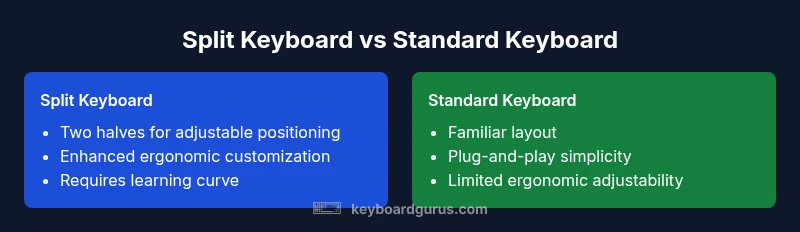
| Feature | Standard Keyboard | Split Keyboard |
|---|---|---|
| Ergonomic focus | Moderate improvement with standard layout | Higher potential improvement with proper split positioning |
| Learning curve | Low; familiar shortcuts | Moderate; relearning layouts |
| Setup complexity | Plug-and-play | Config and positioning required |
| Space and portability | Compact single unit | Two halves may require more desk space |
| Connectivity | Wired or wireless | Flexible wireless and firmware options |
| Customizability | Limited layouts | High; layers, macros, per-side keys |
| Price range | Lower to mid-range | Mid-range to high |
Advantages
- Potential for better neutral posture and reduced fatigue
- Extensive customization options for layout and macros
- Flexible workspace arrangement and dual-handed ergonomics
- Personalized thumb clusters and per-side modifiers
Drawbacks
- Steeper learning curve and longer acclimation
- Unfamiliar shortcut mappings and software quirks
- Higher upfront cost and more desk space needed
- Occasional compatibility issues with certain software
Split keyboards are a strong ergonomic investment for users who can tolerate an adaptation period
If you prioritize long-term comfort and customization, a split keyboard often pays off. For casual users who value immediate setup and familiarity, a traditional keyboard may be the simpler choice.
Got Questions?
What is a split keyboard and how does it work?
A split keyboard consists of two keyboard halves that can be positioned independently. This arrangement aims to align wrists and shoulders for better ergonomics, especially during long typing sessions. The setup varies by model, but most splits support adjustable tenting and per-side customization.
A split keyboard is two keyboard halves you can place apart or close together to improve posture and comfort, though it takes time to learn the layout.
Are split keyboards good for programming and typing long hours?
Many programmers benefit from the ability to place the halves to match shoulder width and reach. The layout can reduce strain during long sessions, but success depends on personal fit and a willingness to adapt shortcuts and workflows.
They're great for long typing sessions if you want a more relaxed posture, but you’ll need to adjust your workflows.
Do split keyboards require special software or firmware?
Most split keyboards offer configurable firmware or software to map keys and create macros. Some models use open ecosystems like QMK or Vial, which can require a learning curve but offer deep customization.
Yes, most need some software or firmware to customize keys and layers.
Are split keyboards portable or bulky?
Portability varies by model. Some splits are compact and easy to travel with; others are larger and need more careful packing, especially if they use thicker halves or multiple cables.
Some are easy to take with you, others are bulkier to pack.
How long does it take to adapt to a split keyboard?
Adaptation typically takes weeks rather than days. Consistent practice and deliberate micro-breaks help speed the learning curve and reduce initial fatigue.
Usually a few weeks of practice to feel fully comfortable.
What should I consider before buying a split keyboard?
Consider desk space, typing tasks, preferred angle (tenting), wireless reliability, and whether you value per-side macro keys. Check compatibility with your operating system and whether the firmware allows the level of customization you need.
Think about space, tasks, and how deep you want to customize the layout.
What to Remember
- Assess your desk space and posture goals before buying
- Expect an acclimation period and plan for trial-and-error setup
- Leverage hardware features like tenting and hot-swappable switches
- Balance ergonomic benefits with learning curve and cost
- Consider your primary tasks to decide if per-side macros help