Keyboard and MIDI Controller: A Comprehensive Comparison for Musicians
Explore the differences between a MIDI keyboard controller and a standalone keyboard. This side-by-side guide covers DAW integration, sound sources, portability, and pricing to help musicians decide.


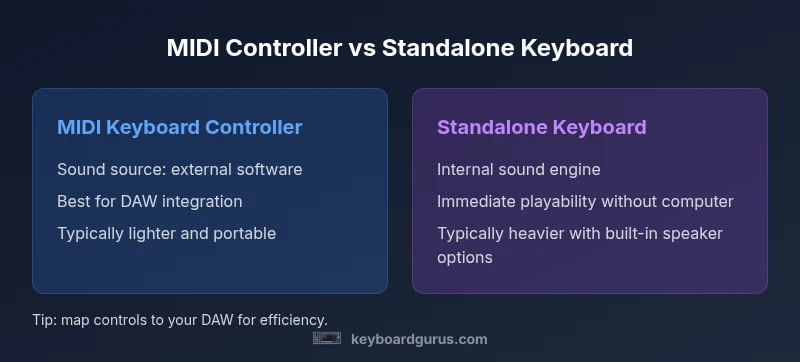
MIDI keyboard controllers offer flexible DAW control and portability, while standalone keyboards provide built-in sounds and immediate playability. The right choice depends on whether you prioritize software integration or self-contained sound. See our detailed comparison chart.
What are MIDI keyboard controllers and a keyboard-based setup?
For many musicians, a keyboard and midi controller is the central tool for composition and performance. A MIDI keyboard controller is a device that transmits note and control data to software or hardware, typically without generating its own sounds. A standalone keyboard or synthesizer houses an internal sound engine and can produce tones on its own. According to Keyboard Gurus, understanding this distinction helps you optimize both your learning curve and your studio workflow. The Keyboard Gurus team found that beginners often focus on the number of keys or price, but experienced players care more about how the surface maps to their software and how reliably it translates expressive playing into notes, parameters, and automation. In practice, the choice shapes whether you prioritize seamless software control or immediate sonic results. In this guide we compare the two paths and explain how each aligns with common musical goals, from home studios to on-stage rigs.
Core capabilities: keys, controllers, and surfaces
Key decision points start with the physical interface. MIDI keyboard controllers come with a variety of keyboard actions—semi-weighted, synth-action, and sometimes weighted keys—plus control surfaces such as knobs, faders, and pads. Some models emphasize alphanumeric pads for drum programming; others focus on pitch/mod wheels or ribbon controls. Standalone keyboards bring a range of built-in sound engines, from piano samples to elaborate orchestral patches, and they often ship with preset effects and rhythm tracks. When Keyboard Gurus analyzes surfaces, the emphasis is on ergonomic layouts, mapability, and how easily players can route physical controls to DAW parameters or plug-ins. The best choice often depends on your preferred playing feel and the type of control you expect during composition, mixing, or live performance.
Sound sources: built-in vs software-based
A central divergence is where the sound originates. A MIDI keyboard controller typically acts as a conduit for software instruments—VSTs, sample libraries, and virtual synths—running inside a computer or hardware rack. By contrast, standalone keyboards generate tones through internal samplers and synthesis engines, sometimes with onboard effects and speakers. Keyboard Gurus notes that this distinction affects portability, power requirements, and setup time. If you primarily compose in a DAW, a MIDI controller offers expansive software compatibility and depth of control; if you want plug-and-play sounds without a computer, a standalone keyboard provides immediacy and independence. Hybrid solutions exist: some devices combine both worlds, enabling internal sounds while still offering MIDI outputs.
Integration with DAWs and VSTs
The practical value of either option often hinges on DAW integration. MIDI controllers frequently expose transport controls, macro mappings, and transport transport, enabling hands-on editing, fader automation, and easy session recall. VST and AU plugins can be controlled via mapped knobs, pads, and sliders, creating a tactile workflow that speeds up arrangement and mixing. Standalone keyboards can also be used with DAWs, but their integration is typically more modest and focused on sequencing or live performance rather than deep plugin control. Keyboard Gurus emphasizes choosing a device with robust software support, proven driver stability, and intuitive mapping presets that reduce the setup friction when moving from project to project.
Expressivity and control surfaces
Expressivity is about how accurately the instrument translates your playing into sound, and how you can shape that sound in real time. Velocity sensitivity and aftertouch are common on many MIDI controllers, helping you control dynamics and timbre in virtual instruments. Some controllers offer per-note aftertouch or polyphonic aftertouch, which can significantly enhance realism for pads and strings. Standalone keyboards often include expressive controls such as aftertouch, velocity curves, and built-in effects that respond directly to your touch without routing through software. The key question is what you need for your genre: live electronic textures may reward a wide pad control surface; classical piano work may prioritize key feel and sustain over extra modulation options.
Portability and power options
Portability plays a major role in choosing between these tools. MIDI controllers are typically lighter, rely on USB bus power, and can be easily packed for gigs or travel. Standalone keyboards range from compact models to heavy workstation-grade boards; they usually run on AC power and may include built-in speakers, amplifying their footprint but simplifying gear for certain environments. Battery-powered variants exist but are less common in professional settings. If you travel or perform in tight spaces, a compact MIDI controller is often the practical choice. If you need to perform without a computer or require a self-contained stage rig, a compact to mid-size standalone keyboard can be a strong fit. Keyboard Gurus notes that weighing trade-offs against your travel schedule helps avoid overpacking or missing essential sounds.
Connectivity and compatibility
Both options rely on modern digital ecosystems, but the specifics matter. MIDI controllers typically use USB MIDI, with optional traditional 5-pinDIN MIDI outputs for older gear. They may support Bluetooth MIDI on select models, though reliability can vary. Standalone keyboards commonly offer USB, MIDI, and sometimes audio outputs, plus optional line-in or sync ports for external hardware. The integration quality—driver support, firmware updates, and seamless plug-and-play with major DAWs—drives long-term satisfaction. Keyboard Gurus suggests checking host compatibility with your computer OS, DAW version, and any required drivers before purchasing, as this reduces post-purchase friction and ensures you can start playing quickly.
Cost, value, and budgeting considerations
Budgeting for a keyboard vs a MIDI controller involves evaluating what you gain at each price tier. Entry-level MIDI controllers tend to offer essential surfaces with solid build quality and expanding pad/knob options; mid-range models add more assignable controls and better key action. Standalone keyboards range from affordable synth-action boards with basic sounds to premium instruments with expansive libraries and robust effects. Keyboard Gurus analysis shows that long-term value is often tied to how well the device grows with your studio: a controller that maps cleanly to your plugins can save hours of workflow friction, while a capable standalone keyboard can remain usable even as software evolves.
Live performance considerations
On stage, reliability and simplicity often trump complexity. MIDI controllers are compact and quick to set up, letting performers trigger software-based sounds or control mixers from a single surface. Standalone keyboards can deliver immediate sound without laptop power, but they may require a larger footprint and more cabling. For some performers, a hybrid approach—using a lightweight MIDI controller for DAW control while routing a compact keyboard for live tones—offers a practical balance. The Keyboard Gurus team recommends testing in live conditions, checking for power stability, and rehearsing your signal chain to avoid mid-performance glitches.
Education, learning curve, and ergonomics
Learning curves differ: MIDI controllers reward experimentation and mapping, while standalone keyboards emphasize keyboard technique and sound sculpting. Beginners often underestimate how much time is needed to map controllers to preferred software, adjust velocity curves, and calibrate aftertouch to their playing style. Ergonomics, especially in long practice sessions, matters for both device types. Keyboard Gurus emphasizes choosing a model with a comfortable key setup, intuitive mappings, and a clear path to expanding to more advanced features as your skills grow.
Getting started: practical setup steps
To begin with clarity, follow a practical sequence: determine whether you need software-centric control or immediate sound; pick the device that aligns with that goal; connect via USB (or MIDI) and install any required drivers; configure your DAW to recognize the device, then map essential controls to your go-to plugins; finally, test with a simple project to ensure the signals, controllers, and sound sources respond as expected. Remember to save presets, organize your control maps by project type, and maintain clean cabling for reliable live performance.
How to choose: a quick decision framework
Use this framework to guide your purchase:
- Identify your primary goal: software control vs. built-in sounds.
- Consider your workflow: do you work primarily in a DAW, or do you perform live with hardware sounds?
- Assess portability and space: are you touring or working from a small studio?
- Evaluate future-proofing: will you expand your setup with new plugins or external gear?
- Set a sensible budget across tiers and balance features against your needs.
Comparison
| Feature | MIDI Keyboard Controller | Standalone Keyboard/Synth |
|---|---|---|
| Primary purpose | Software control and DAW integration | Self-contained sounds and live performance |
| Sound generation | Relies on external software/sound modules | Internal sound engine with built-in tones |
| Key action options | Semi-weighted, synth-action, or weighted options depending on model | Range from synth-action to weighted depending on keyboard class |
| Expressivity controls | Velocity, modulation, aftertouch on many models | Velocity, aftertouch, built-in effects for immediate sound shaping |
| Portability | Lightweight, USB-powered, highly portable | Heavier, sometimes with speakers; portable options exist |
| Connectivity | USB MIDI, optional 5-pin MIDI, sometimes Bluetooth | USB, MIDI, line outputs, and sometimes audio in/out |
| Price range | Lower upfront cost for basic controllers | Wide range; can be expensive at premium builds |
| Best for | DAW-based production, plugin-heavy workflows | Self-contained instrument for quick jams and live play |
Advantages
- Flexible software control and integration
- Portable and budget-friendly for beginners
- Wide compatibility with modern DAWs and plugins
- Expandable with external gear and synths
- Lightweight setups facilitate travel and gigging
Drawbacks
- Requires computer or sound module for audio
- Mapping and setup can be time-consuming
- Audio latency depends on system and software
- Standalone keyboards may be heavier and pricier
MIDI controller wins for workflow flexibility; standalone keyboard wins for self-contained play.
Choose a MIDI controller if you want deep software control and future expansion. Choose a standalone keyboard if you need immediate, portable tones without relying on a computer.
Got Questions?
What is a MIDI keyboard controller?
A MIDI keyboard controller is a keyboard-like device that sends MIDI data—notes and control messages—to software or hardware. It generally does not generate its own sounds. The main value is tactile control over plugins, virtual instruments, and DAWs.
A MIDI keyboard controller sends notes and control signals to software; it doesn’t make sounds by itself.
Do I need a computer to use a MIDI keyboard controller?
Most MIDI controllers require a computer or host device to generate sound, because they act as controllers rather than sound sources. Some hybrid devices offer basic built-in sounds, but for full functionality you typically pair the controller with DAW software or a sound module.
Usually yes—connect to a computer and use a DAW or software synth to hear sounds.
Can a MIDI controller also play built-in sounds?
Most MIDI controllers do not come with substantial built-in sounds; they are designed to control software. Some hybrid keyboards provide limited internal sounds, but the primary role remains control. Always check product specs for built-in engines.
Most don’t play built-in sounds; check if the model is a hybrid with limited internal tones.
How do I map controls to my DAW?
Mapping involves assigning knobs, pads, and faders to DAW parameters. Use your DAW’s learning mode or manufacturer software to create presets. Many controllers include pre-made mappings for popular plugins, speeding setup.
Map knobs and pads in your DAW to control plugins and tracks.
When should I choose a standalone keyboard over a MIDI controller?
Choose a standalone keyboard if you want self-contained sounds and instant playability without a computer. If you value flexible software control, plugin integration, and expansion options, a MIDI controller is the better long-term choice.
If you need built-in sounds, pick standalone; if you want software control, pick MIDI controller.
What to Remember
- Assess your workflow before purchasing
- Prioritize software control vs built-in sounds
- Test for portability if you travel frequently
- Plan future upgrades and integrations