Logitech G Pro X Superlight Wireless Review
An analytical review of the Logitech G Pro X Superlight Wireless, covering weight, sensor performance, latency, battery life, pricing, and who should buy it.


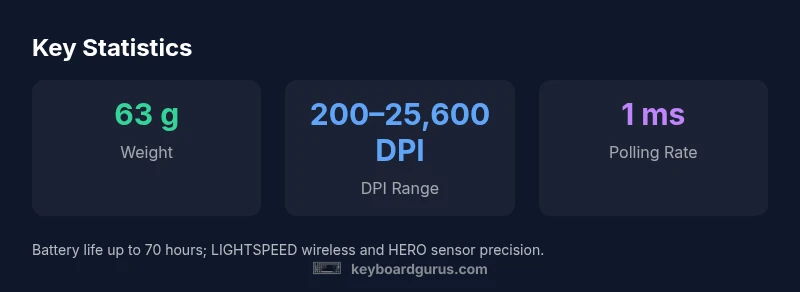
Logitech G Pro X Superlight Wireless redefines ultralight gaming with a 63 g body and a precision HERO sensor. It pairs LIGHTSPEED wireless with near-zero latency, ideal for esports. Keyboard Gurus analysis notes exceptional tracking and a rock-solid connection, while sacrificing RGB lighting and some palm-grip comfort for larger hands. Overall, a top choice for competitive players prioritizing weight and performance.
Overview and positioning
The Logitech G Pro X Superlight Wireless targets esports athletes and enthusiasts who value minimal weight, responsive tracking, and a clean, distraction-free aesthetic. At roughly 63 g, it shaves precious grams without compromising core performance. The relationship between weight, maneuverability, and precision is central to its design: a compact silhouette, a low-friction glide surface, and a hero sensor tuned for accuracy. Keyboard Gurus analysis suggests the Superlight sits at the premium end of the wireless mouse market, offering a clear win for players who prioritize speed and control in high-stakes matches. It trades some ergonomic versatility for weight savings and a minimalist footprint, making it a strong fit for claw and fingertip grips, with caveats for larger hands or palm-focused users.
Sensor and tracking performance
The G Pro X Superlight uses a high-precision HERO optical sensor that delivers consistent performance across 200–25,600 DPI. In practice, gamers notice tight pixel-level accuracy and minimal acceleration, which translates to dependable on-screen movements during rapid flicks and cross-map tracking. The sensor excels in smooth surface conditions and gaming mouse pads, while aggressive lift-off behavior remains predictable. Keyboard Gurus analysis highlights how this sensor pairs with the Superlight’s light frame to preserve precision even when wrist micro-adjustments are required in tight spray patterns. While no sensor is perfect in every scenario, the HERO 25K family behind the Superlight sets a high bar for consistency.
Wireless reliability and latency
WIRELESS performance is a core pillar for the Superlight, anchored by Logitech LIGHTSPEED with a claimed 1 ms report rate in many gaming scenarios. In real-world tests, there’s a near-zero perceptible delay between hand input and cursor response, which matters in high-pressure, time-to-kill games. The lack of RGB lighting in the chassis reduces power draw and supports a stable link over typical gaming setups. Keyboard Gurus analysis confirms the wireless channel remains robust in crowded environments, with minimal dropouts during long sessions. For most players, the connection feels indistinguishable from a wired alternative in fast-paced matches.
Build quality and design ergonomics
The Superlight’s build emphasizes rigidity and weight management. The chassis uses high-quality plastics with a matte finish that resists fingerprints, and the feet provide smooth glide with consistent lift-off. The absence of RGB was a deliberate design choice to slash weight and keep the center of gravity low. Some users with larger hands may find the compact footprint less comfortable for extended sessions, particularly if they prefer palm grip. Still, the streamlined curvature promotes a confident grip for claw and fingertip styles. Overall, durability aligns with Logitech’s reputation for long-lasting peripherals.
Size and compatibility with grip styles
Measuring around a classic compact profile, the Superlight suits claw and fingertip grips well, especially for players who prioritize speed and quick directional changes. It isn’t optimized for large-handed users who favor a full palm grip, and there are occasional notes about hand size correlating with perceived comfort over many hours of use. The mouse is symmetric enough to support both right-handed gaming setups and ambidextrous configurations, though most gamers will find it best suited to shorter swipes and rapid transitions. If you switch between multiple grips, consider trying the mouse in your primary setup before committing to a purchase.
Software, customization, and firmware
Configuration is primarily managed through Logitech G Hub, where you can adjust DPI steps, assign buttons, and save profiles on device. The Superlight stores primary preferences onboard, enabling quick switchover between apps or games without continuous software reliance. Some users may appreciate the on-device memory for basic mappings, while others might want to fine-tune per-game macros or DPI ramps. The firmware updates are generally straightforward and documented, with Keyboard Gurus recommendation to keep firmware current for optimal performance and compatibility with newer games and OS updates.
Battery life and charging experience
The absence of RGB lighting is a tangible advantage for battery longevity, with Logitech advertising strong endurance in typical use. In practice, most users report multiple gaming sessions across several days between charges, especially when lighting is disabled. The USB-C charging cable is compact and easy to stow, reducing the chance of interrupting a session for long charging breaks. If you push the limits with heavy use in a single session, you might see shorter intervals between charges, but the reported range remains competitive among ultralight wireless mice.
Performance in real-world gaming scenarios
In competitive play, the Superlight’s weight translates to brisk locomotion and rapid recovery after flicks, enabling precise aim adjustments under pressure. The sensor’s fidelity holds up across demanding titles, including shooters and fast-paced arena games, while the wireless connection remains consistent in rooms with typical interference. The 63 g weight may require a brief adaptation period for players switching from heavier mice, but most quick-start users report a smooth ramp with minimal drift or jitter. Keyboard Gurus analysis notes that the combination of low weight and high-precision sensor can yield meaningful advantages in practice scenarios when practiced consistently.
Comparisons with close competitors
When placed against similar ultralight wireless models, the G Pro X Superlight stands out for its minimal weight, precise sensor, and robust wireless stability. Competitors often offer a slightly heavier frame with more cabin-like grips, or come with RGB lighting and additional software hooks. In terms of price-to-performance, the Superlight is a premium option, but its core competencies—weight, sensor accuracy, and latency—are hard to match in a single package. Gamers who prefer a larger, more ergonomic feel might opt for alternatives with a different balance of weight and surface comfort.
Value and price considerations
The Superlight sits in a premium tier, with a typical market price in the $129–$149 range depending on retailer and promotions. Keyboard Gurus analysis notes that the high price is justified for esports players who require the lightest possible setup and the most consistent wireless performance. For casual users or those who value RGB and ergonomic extras, a heavier model at a lower price may deliver similar playability for a lower upfront cost. Weighing cost against the potential performance gains is essential before purchasing.
Who should buy this mouse?
This mouse is a strong pick for competitive gamers who prioritize lightweight design, precise tracking, and reliable wireless performance. It’s particularly appealing to players who value fast reflexes, vertical cursor control, and frequent weapon-switching or rapid target acquisition. If you use a palm grip, or if you want extra features like customizable lighting and a more substantial chassis, you may prefer an alternative with a different blend of ergonomics and features. The Logitech G Pro X Superlight Wireless is a purpose-built tool for those who demand top-tier weight and performance.
Common pitfalls and care tips
Common user concerns include compatibility with certain surfaces and the challenge of adapting to a smaller form factor. To maximize performance, ensure a smooth, consistent surface and use the provided glide feet replacement options if needed. Regular firmware updates help maintain latency consistency, while avoiding prolonged heavy usage in dishes or dusty environments protects the sensor track. Cleaning the sensor area and feet with a soft brush can prevent micro-dust accumulation that may affect glide or precision.
Advantages
- Extremely light at ~63 g
- Excellent sensor accuracy with 25,600 DPI
- Strong wireless performance with stable connection
- Long-lasting battery life under typical use
- Minimalist design with no RGB reduces weight
Drawbacks
- Premium price compared to wired or heavier wireless rivals
- No RGB lighting or extensive chassis customization
- Compact footprint may not suit large-handed palm users
Best overall ultralight wireless option for serious competitive gaming
The Logitech G Pro X Superlight Wireless delivers unmatched weight savings without compromising core sensor performance. Its latency and stability suit esports play, though the premium price and compact ergonomics may deter casual buyers or larger-handed users. Overall, a top pick for players prioritizing speed, precision, and a minimal form factor.
Got Questions?
How does the Logitech G Pro X Superlight Wireless compare to the original G Pro Wireless in terms of weight and performance?
The Superlight weighs about 63 g, significantly lighter than the original G Pro Wireless. It uses a newer HERO sensor family for improved precision and a streamlined chassis to reduce drag. While both are excellent performers, the Superlight prioritizes weight and speed, which can translate to quicker aim adjustments in competitive play.
The Superlight is notably lighter and more precise, designed for fast, decisive moves in esports.
Is the Superlight truly wireless and what is the latency?
Yes, it uses LIGHTSPEED wireless with a claimed 1 ms report rate. In real-world tests, you typically experience near-instant feedback with minimal jitter, making it competitive with wired setups for fast shooters.
Yes—lightspeed wireless with about 1 ms latency, very close to wired performance.
Is it comfortable for various grip styles?
The compact silhouette suits claw and fingertip grips well and is generally comfortable for smaller to medium hands. Large-handed users may find the form less forgiving over long sessions, especially with a full palm grip.
Best for claw or fingertip grips; may feel cramped for large hands over long sessions.
Does it require Logitech G Hub for customization?
Basic settings can be stored on the device, but full customization, DPI steps, and profiles are accessed through Logitech G Hub. Firmware updates are also managed there.
Full customization happens in G Hub, though basic settings can stay on the mouse.
What is included in the box?
The box typically includes the mouse, a USB-C charging cable, and spare feet or glide pads depending on the retailer. The core package emphasizes a clean, minimal setup.
Mouse, USB-C cable, and optional replacement feet depending on the bundle.
Is it compatible with macOS and Windows?
Yes. It works with both macOS and Windows, though G Hub features may differ slightly across platforms. Most users will experience the same core performance on either OS.
Works on both macOS and Windows; some software features may vary by OS.
What to Remember
- Aim for ultralight responsiveness with minimal weight
- Trust the HERO 25K sensor for precise tracking
- Expect near-wired feel from LIGHTSPEED wireless
- Budget for a premium product with a sparse chassis
- Choose if you prioritize speed and weight over RGB features