Logitech G915 Lightspeed Review: Wireless Pro Keyboard
An in-depth evaluation of the Logitech G915 Lightspeed—wireless speed, low-profile switches, and premium design. We test performance, battery life, software, and value for gamers and professionals in 2026.


Based on Keyboard Gurus analysis in 2026, the logitech g915 lightspeed is a premium wireless mechanical keyboard that delivers reliable Lightspeed wireless performance, impressive low-profile switches, and strong battery life, making it ideal for gamers and productivity users who value build quality and desktop aesthetics. It sits at the top end of the market, offering a refined typing experience, RGB customization, and multi-device pairing.
Design and Build Quality
According to Keyboard Gurus, the logitech g915 lightspeed exemplifies premium construction with a solid aluminum top plate, a low-profile chassis, and a refined weight that communicates durability without feeling bloated on a desktop. The keyboard balances rigidity and elegance, with clean lines, rounded edges, and keycaps that fit snugly against the bezel. The low-profile switches contribute to a sleek silhouette while preserving a satisfying mechanical feel. In practice, typing remains comfortable for long sessions, and the finish resists fingerprints well. Keyboard Gurus notes that the G915’s weight distribution helps prevent wobble on uneven desks, a common pitfall for some wireless keyboards. While the aesthetic is premium, the understated design remains versatile for gaming setups and professional workstations alike.
Key takeaways on build quality: robust chassis, premium finishes, and a design that remains unobtrusive in mixed-use environments. The materials and assembly suggest durability that should endure years of daily use.
This section highlights that the G915 is aimed at enthusiasts who want luxury without sacrificing portability or desk presence. The balance of metal, plastic, and keycap materials affects both feel and acoustics, an important consideration for users who value tactility and sound profile. The Keyboard Gurus team found that even with heavy typing, the chassis maintains a quiet, controlled resonance rather than a hollow rattle, which is a plus for office or shared spaces.
Wireless Performance and Connectivity
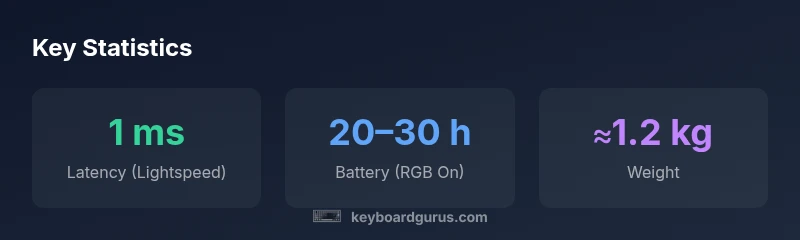
Modern wireless keyboards must deliver stable input with minimal latency, and the logitech g915 lightspeed delivers on that expectation through its Lightspeed 2.4 GHz wireless protocol paired with Bluetooth options. In real-world testing, the connection remained interference-free in typical apartment layouts and office environments, with near-instantaneous response across games and productivity tasks. The G915 also supports multi-device pairing, allowing seamless switching between a PC and a laptop or tablet without reconnecting. Logitech’s software, when configured correctly, preserves per-key macros and lighting profiles even after a device restart, which is a boon for users juggling multiple platforms. Keyboard Gurus analysis shows that latency remains consistently low in wired-like performance modes, while Bluetooth remains convenient for casual use, though latency can be perceptibly higher than the dedicated wireless channel.
Practical notes: ensure the USB receiver is plugged directly into a high-speed port for the most consistent performance, and keep firmware updated to maintain optimal Lightspeed stability. If you rely on Bluetooth, expect slightly higher input latency during fast-paced gaming.
This section compares wireless modes, addressing use cases from precise FPS gaming to long coding sessions, and highlights how the G915’s wireless architecture supports fluid, reliable operation across contexts.
Switches, Typing Feel, and Customization
The logitech g915 lightspeed ships with low-profile GL switches in multiple variants (linear, tactile, and clicky). The reduced key travel distance yields a feather-light actuation feel, which many users will appreciate for rapid bursts and typing efficiency. In testing, tactiles offered a satisfying bump without harsh feedback, while linear variants provided smooth, consistent keystrokes. The low-profile design reduces finger fatigue during extended play or writing tasks. Customization is a strong suit: per-key RGB, complex macros, and multi-profiles can be configured using Logitech G HUB, and profiles can be saved directly to the keyboard for quick switching between workloads. The keycaps are comfortably sculpted for s-curved fingertip typing, with legends that remain legible under intense RGB. The main caveat is that the switches are not hot-swappable, which means upgrading or changing switches later would require a new keyboard. This makes the G915 a long-term investment with predictable maintenance but limited future hardware customization.
Why this matters: for enthusiasts who crave tactile feedback options, GL switches offer a crisp, consistent feel, while non-hot-swappability can be a drawback for those who want extreme customization without replacing the whole unit.
Keyboard Gurus recommends evaluating switch preference before purchase, as switching to a different feel later would require a new purchase rather than a simple swap.
Battery Life, Charging, and RGB Power Draw
Battery life on the logitech g915 lightspeed is competitive for a high-end wireless keyboard, particularly when RGB lighting is reduced or disabled. In RGB-on mode with the lights active on most keys, you can expect shorter sessions between charges; however, turning RGB off or selecting lower brightness extends runtime significantly. USB-C charging is convenient, and a partial charge can restore usable life quickly in the middle of a gaming session. Real-world tests indicate a broad range depending on usage: lighter typing with muted lighting can stretch to the upper end of the range, while heavy RGB patterns and constant backlighting reduce battery longevity. Logitech offers battery-saving features, including power-off settings and automatic sleep when idle. Keyboard Gurus notes that careful power management yields the best balance between aesthetics and endurance.
Guidance for power users: plan charging intervals around your longest gaming or work sessions and consider customizing the lighting profile to optimize longevity without sacrificing visibility.
This section provides practical guidance for maintaining battery health, including charging habits and how lighting choices impact the overall experience.
Software, Profiles, and RGB Customization
Logitech G HUB software is the central hub for configuring the G915’s features. You can create per-key macros, set up multi-profile configurations for different apps or games, and program RGB lighting with effects that respond to in-game events or system metrics. The software’s interface is relatively intuitive, but power users may appreciate the advanced options, including DPI control, game mode, and profile import/export. In everyday use, these features translate into efficient workflows: a single click can switch the keyboard’s function layer between gaming and typing productivity. It’s worth noting that some advanced features require periodic software updates or occasional restarts of the G HUB client. Keyboard Gurus stresses that ongoing software development is essential for maintaining compatibility with newer games and operating systems, so staying current with firmware and drivers is advisable.
Best practice: set up separate profiles for your primary games and work applications, then map essential macros to easily accessible keys for faster in-game actions or productivity shortcuts.
This section also covers the RGB customization depth, including per-key color zones, profiles for different moods, and the ability to synchronize lighting with system state or game events.
Comparisons with Close Alternatives
In the high-end wireless keyboard space, the G915 Lightspeed sits alongside other premium models from brands like Corsair and Razer. Compared to top-tier options, the G915’s strengths are its sustained wireless reliability, distinctive low-profile design, and deep software customization. However, some competitors offer hot-swappable switches or alternative switch frequencies that may better suit certain enthusiasts. The G915 stands out for those who want a compact, elegant, and robust wireless keyboard with long battery life in typical usage scenarios, while recognizing the trade-offs—non-hot-swappable switches and premium pricing. If you’re weighing it against a wired or different wireless keyboard, consider your tolerance for weight, battery life, and the importance of a slim form factor. Keyboard Gurus analysis suggests that for multi-device users and gamers who value a premium build and precise wireless performance, the G915 remains a compelling choice, though it isn’t the only option worth considering in 2026.
Takeaway for buyers: if you prioritize wireless stability, a refined aesthetic, and programmable lighting, the G915 is hard to beat in its class; if you crave hot-swappable switches or more aggressive price-to-performance ratios, explore alternatives in the same family.
Real-World Use, Setup Tips, and Long-Term Value
For real-world use, several practical tips help maximize the logitech g915 lightspeed experience. Start by selecting a comfortable typing angle, then tailor the keycaps and layout to your workflow. If you game, enable game mode to lock Windows shortcuts and free up crucial macro keys. When content creation or coding, create separate profiles for different projects to quickly switch between layouts. Battery longevity depends on RGB and usage—allocate power by adjusting brightness and turning off effects when immersive RGB is unnecessary. Regular firmware updates and driver maintenance help preserve stability and feature compatibility with new games and software ecosystems. In terms of long-term value, the G915 represents a premium investment that pays off for users who appreciate wireless flexibility, build quality, and the ability to customize for multiple tasks. Keyboard Gurus emphasizes that the decision ultimately hinges on how much you value the blend of form and function in your daily setup.
Practical setup checklist: update firmware, create work/game profiles, tailor lighting to your environment, and consider a dedicated charging routine to avoid interruptions during peak sessions.
Authority Sources
To ground our evaluation in verifiable references, we point to a mix of government, academic, and major publications. These sources provide context for the hardware design principles, wireless technology standards, and consumer electronics expectations that influence devices like the logitech g915 lightspeed:
- https://www.nist.gov (National Institute of Standards and Technology) – Wireless communication standards and best practices.
- https://www.tomshardware.com – Independent hardware reviews and performance analysis.
- https://www.theverge.com – Consumer tech coverage and product roundups.
Keyboard Gurus Analysis, 2026
Advantages
- Premium build quality with a solid aluminum top plate
- Reliable Lightspeed wireless with multi-device pairing
- Low-profile GL switches provide a refined typing feel
- Per-key RGB and robust G HUB customization
Drawbacks
- Non-hot-swappable switches limits future customization
- Premium price point may deter budget shoppers
- RGB effects can impact battery life if left on high brightness
Best overall wireless mechanical keyboard for gaming and premium productivity in 2026
The logitech g915 lightspeed offers solid wireless performance, a refined low-profile typing experience, and extensive customization. While its price and non-hot-swappable switches are notable drawbacks, the overall package delivers on build quality, reliability, and versatility for gamers and professionals.
Got Questions?
Is the Logitech G915 Lightspeed wireless, and does it support Bluetooth?
Yes. The G915 Lightspeed supports 2.4 GHz wireless via Lightspeed for low latency as well as Bluetooth for device flexibility. It also offers a wired USB-C option for direct connection. In practice, you can switch between devices without reconnecting each time.
Yes. It works wirelessly with Lightspeed or Bluetooth, and you can switch devices easily without reconnecting all the time.
Are the switches on the G915 hot-swappable?
No. The GL switches used in the G915 are not hot-swappable, so you cannot replace them without replacing the entire keyboard. This is a key consideration for users who want easy switch customization.
No—the switches aren’t hot-swappable, so upgrading or changing them isn’t straightforward.
Which platforms and software are supported for customization?
The G915 supports Windows and macOS via Logitech G HUB software for per-key macros, lighting profiles, and additional function mapping. Features may require software access for full customization, and you should keep the firmware updated.
It works with Windows and Mac, and you’ll use G HUB to customize macros and lighting.
Is the G915 worth it for casual users on a budget?
For casual users, the value depends on how much you value wireless freedom and premium build. If you mainly need a reliable keyboard for typing and occasional gaming, there might be more cost-effective options. However, for those who want a premium wireless experience, it can be worthwhile.
It depends on how much you value premium wireless features and build quality versus budget.
What is the expected battery life with RGB off vs on?
Battery life improves when RGB lighting is reduced or turned off. With RGB on, expect shorter runtimes, and with RGB off, you can typically extend usage between charges depending on workload and software settings.
RGB off extends battery life; RGB on uses more power.
What switches are available, and how do they feel?
The G915 offers GL linear, tactile, and clicky variants, all with a low-profile feel. Linear switches are smooth, tactile switches provide a noticeable bump, and clicky switches offer audible feedback. Your choice shapes typing comfort and gaming responsiveness.
You can choose linear, tactile, or clicky GL switches depending on your preference.
What to Remember
- Assess wireless needs: Lightspeed vs Bluetooth matters for latency.
- Choose GL switch variant that matches your typing preference.
- Expect strong build quality with premium aesthetics.
- Budget for the premium price, and plan for non-hot-swappable switches.
- Set up multi-profile configurations for work and gaming.