Logitech G613 Review: Wireless Mechanical Keyboard for Gamers
In-depth review of the Logitech G613 wireless mechanical keyboard, examining design, performance, battery life, and value for gamers and typists.


The Logitech G613 delivers solid wireless performance with Romer-G switches and long battery life, making it a strong pick for gamers who want a full-size, cable-free setup. It lags behind modern low-profile keyboards in aesthetics and RGB lighting, but its reliability and battery longevity justify a solid value score for many users.
Overview and positioning
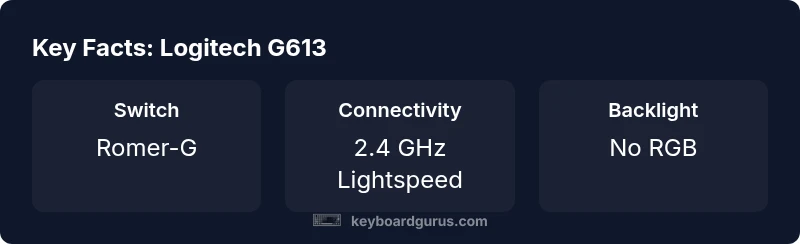
According to Keyboard Gurus, the Logitech G613 occupies a pragmatic niche: a full-size wireless mechanical keyboard designed for users who want to minimize desk clutter without sacrificing tactile feedback. Built around Romer-G switches and Logitech’s Lightspeed wireless technology, the G613 prioritizes battery longevity and stable performance over flashy RGB lighting or ultra-slim form factors. The result is a durable, no-nonsense keyboard that appeals to gamers, students, and professionals who value reliability and runtime more than aesthetics. When evaluated against common wireless options, the G613 stands out for its simplicity, long battery life thanks to AA cells, and a straightforward feature set that makes it easy to adopt in real-world setups.
Keyboard Gurus analysis shows that the G613’s strength lies in consistent wireless behavior and a predictable typing feel, especially for long sessions. If you prefer a classic, substantial keyboard with excellent keyboard-to-screen latency in competitive titles, the G613 can be a sensible addition to your battlestation. It’s not a vibe-first purchase; it’s a workhorse that gets the job done with minimal fuss.
Design and build quality
The G613 follows a traditional, rugged aesthetic typical of Logitech’s higher-end keyboards. The chassis blends a matte plastic frame with a sturdy weight, which helps reduce desk wobble during intense gaming or rapid typing sessions. The keycaps are comfortable to the touch, and the key spacing is generous enough to reduce mispresses during fast action moments. A notable design choice is the absence of RGB lighting, replaced by a clean, uniform keycap surface that emphasizes readability in dim environments. Overall, the build feels durable enough to withstand daily use in a shared dorm room, office, or gaming setup, with a design that remains unobtrusive on a cluttered desk.
From a maintenance perspective, the simple layout and accessible components make routine cleaning straightforward. The detachable USB receiver and accessible battery access areas are thoughtful touches that reduce downtime when replacing batteries or re-pairing the device.
Typing experience and gaming performance
Typing on the G613 offers a distinct tactile response from Romer-G switches, with a satisfactory actuation feel that sits between a light linear and a tactile click. For long typing sessions, the key travel and resistance are comfortable, reducing fatigue compared to some lighter, low-profile boards. In gaming, the wireless connection exhibits low latency and stable performance with the Lightspeed protocol, which helps maintain responsiveness in fast-paced titles. The lack of per-key RGB or flashy animations means less distraction during gameplay, allowing players to focus on the moment-to-moment actions. While not a mechanical keyboard built for silent operation, the noise level remains reasonable for a full-size board in shared spaces.
Some users may notice slightly deeper key travel and a more pronounced tactile bump than with ultra-slim alternatives, which can influence reaction times in high-APM scenarios. For writers and programmers, the G613’s layout supports efficient touch-typing and reliable macro support via Logitech software, though the absence of a dedicated macro cluster on the main area might deter heavy macro users. Overall, the keyboard balances comfort, reliability, and performance without venturing into niche customization.
Connectivity, compatibility, and ecosystem
The G613’s standout feature is its wireless versatility. It relies on Lightspeed 2.4 GHz wireless for a responsive, lag-free experience when connected through the USB receiver. This makes it a strong choice for desktop setups where a stable USB dongle is preferred over Bluetooth for consistency. Some users may expect Bluetooth for mobile or quieter operation; however, the G613 focuses on a dedicated gaming wireless channel to minimize interference. Compatibility with major operating systems (Windows, macOS) is straightforward, and Logitech’s G HUB software enables per-key remapping, profile switching, and macro setup, which can enhance productivity and accessibility.
Battery life is the other pillar of the G613’s design. Using AA batteries, it can run for extended periods between replacements, especially when RGB lighting is disabled. The trade-off for this longevity is the inability to customize lighting per key, which is a common feature in more contemporary, RGB-enabled keyboards. When comparing ecosystem integration, users who already rely on Logitech peripherals will benefit from seamless profile syncing and cross-device switching, creating a cohesive workspace. If you value a simple, dependable wireless keyboard with a straightforward software layer, the G613 is a compelling option.
Software, macro support, and customization
Logitech’s G HUB software provides the essential customization surface for the G613. You can remap keys, assign macros, and save multiple profiles for different use cases—gaming, typing, or mixed workloads. The macro editor is accessible and flexible, though the absence of a dedicated macro row means you’ll use the main function keys for efficiency tasks or macro keys grouped elsewhere. This is a pragmatic choice for a full-size keyboard that prioritizes reliability and battery life over high-degree customization. For professional workflows that rely on repeatable keystrokes, the G HUB integration is sufficient to streamline repetitive actions without overwhelming the user with advanced settings.
In terms of compatibility, the G613 performs well with major PC ecosystems and most productivity software. It’s worth noting that users seeking RGB-centric aesthetics will want to temper expectations, as the keyboard intentionally eschews per-key lighting in favor of a clean, distraction-free surface. The software experience is clean and stable, which is valuable for users who want to minimize setup friction.
Overall, the combination of a sturdy build, reliable wireless connectivity, and functional software makes the G613 a sensible purchase for those who prioritize practicality over flash. Keyboard Gurus suggests weighing the value proposition for long typing sessions and gaming when deciding whether to invest in this classic wireless mechanical keyboard.
Value, price, and alternatives
From a value perspective, the G613 targets buyers who want a dependable, wire-free experience without the premium of RGB-laden, ultra-slim keyboards. Its price is competitive within the mechanical wireless category, but buyers should consider whether they need the full-size footprint and the absence of RGB lighting. Alternatives like modern low-profile wireless keyboards or different switches (e.g., tactile vs. linear) may offer improved aesthetics or a different typing feel. If you prioritize a sizable, durable keyboard with long battery life and stable wireless performance, the G613 remains a strong contender.
In practice, the G613 shines in multi-purpose setups where desk space is at a premium and battery longevity is a priority. For players who want adjustable lighting and an ultra-clean aesthetic, there are more recent options; for those who want steadiness, straightforward software, and easy maintenance, the G613 delivers. Keyboard Gurus’ takeaway is to align your purchase with your daily workflow and gaming expectations before committing to a full-size wireless mechanical keyboard.
Practical setup tips and buyer guidance
To maximize the G613 experience, start by updating to the latest G HUB profile and ensure that the receiver is plugged into a USB 2.0 or higher port with minimal interference from other wireless devices. If you rely on long battery life, keep RGB off or use a conservative brightness setting to extend runtimes. Keyboard layout familiarity matters—take some time to remap commonly used keys if you switch from a compact layout to the full-size form factor. For mixed-use work and gaming, create separate profiles to ensure the most frequently used actions are accessible through simple key sequences.
Finally, assess your desk setup. The size and weight of the G613 mean it anchors a workstation; pairing it with an ergonomic chair, a proper monitor height, and an appropriate desk mat can improve posture and typing comfort. In short, a thoughtful setup and appropriate software use will unlock the most value from this keyboard over the long term.
Final considerations and who should buy (compact buyer’s guide)
If you want a dependable wireless mechanical keyboard with long battery life and a traditional layout, the Logitech G613 is a solid fit. It’s particularly attractive for gamers and professionals who don’t need RGB lighting or a compact footprint. However, if you crave a modern aesthetic, per-key lighting, or ultra-low-profile switches, you may prefer newer, feature-rich options. Keyboard Gurus recommends evaluating how important battery life, desk space, and software integration are to your daily tasks before buying. For long typing sessions, stable wireless performance, and a classic mechanical feel, the G613 remains a reliable workhorse in a crowded market.
Advantages
- Solid wireless stability with Lightspeed technology
- Long battery life due to AA cells
- Full-size layout with comfortable key spacing
- Reliable software for macro customization
- Durable build with straightforward maintenance
Drawbacks
- No RGB lighting or per-key customization
- Relatively bulky footprint compared to modern compact boards
- Rom er-G switches may feel dated to some users
- Lacks Bluetooth connectivity for mobile use
Best for players and typists who want reliability and long battery life over RGB flair
The G613 offers dependable wireless performance, a solid typing feel, and long runtimes, making it a strong value for a traditional full-size wireless mechanical keyboard. If RGB and ultra-slim form factors matter more, consider alternatives.
Got Questions?
Does the Logitech G613 support Bluetooth or only 2.4 GHz wireless?
The G613 uses 2.4 GHz wireless via a USB receiver for low-latency performance. It does not support Bluetooth, so mobile use without a compatible dongle is limited. If Bluetooth is essential, you’ll want a different model.
The G613 uses a USB receiver for its wireless connection and doesn’t support Bluetooth, so you’ll need the dongle for wireless use.
Are Romer-G switches still a good choice compared to newer switch generations?
Romer-G switches offer a solid tactile feel and reliable actuation, but newer switches can provide smoother or quieter performances. If you prioritize familiarity and proven reliability, Romer-G remains a reasonable choice; if you want the latest feel, explore newer options or different switches.
Romer-G is reliable and familiar, but newer switches may offer different textures or quieter action.
Is the G613 good for travel or small desks?
The G613’s full-size footprint makes it less ideal for small desks or travel setups. If portability and compactness are priorities, a smaller wireless keyboard would be a better fit, though you would lose the full-size layout and macro options.
It’s a bit bulky for travel, so consider a smaller keyboard if you move a lot.
How does battery life compare when RGB is off?
With RGB off, the G613 can extend runtime substantially due to the reduced power draw. Expect longer periods between battery changes, especially in desk setups where USB power isn’t constantly used for lighting.
Turn off RGB to squeeze more battery life.
What kind of user should avoid the G613?
If you require RGB lighting, a compact footprint, or Bluetooth connectivity for mobile use, the G613 isn’t the best fit. It’s better suited for users who value reliability, a traditional layout, and longer battery life over modern aesthetics.
If you want RGB or Bluetooth, look elsewhere.
What to Remember
- Choose if you want wireless stability and long battery life
- Prefer full-size layout with comfortable key spacing
- Expect no RGB lighting or ultra-slim form factor
- Use G HUB for macro customization and profiles
- Pair with other Logitech devices for seamless ecosystem benefits