Red Thunder Keyboard Review: Performance and Value
In-depth evaluation of the Red Thunder Keyboard, covering design, switches, lighting, software, latency, and overall value for gamers, students, and professionals. Keyboard Gurus analyzes strengths, trade-offs, and setup tips to help you decide if this premium compact keyboard fits your workflow.


The Red Thunder Keyboard strikes a compelling balance between premium build and practical performance. It features a sturdy chassis, hot-swappable switches, and vivid per-key RGB, all in a compact 75% footprint. While the software and pricing can be divisive, Keyboard Gurus analysis finds it a strong choice for gamers and typists who want reliability, customization, and a premium typing experience without gimmicks.
Build and Design: A sturdy foundation for daily use
The Red Thunder Keyboard presents a compact, purpose-built chassis that prioritizes rigidity and stability. The top case often uses an aluminum-like finish or a solid polycarbonate blend to balance weight and durability. In practice, the keyboard feels substantial in hand, with minimal flex under keystrokes. The 75% footprint preserves essential keys like arrows and a function row while cutting out a separate numpad, which is appealing for desktop space and travel. Keyboard Gurus observations emphasize a clean aesthetic with smooth edges and a subdued sheen that resists fingerprints. The overall design aims to reduce flex during gaming while maintaining comfortable key actuation, a balance suited for both long typing sessions and quick in-game actions. For many users, the Red Thunder keyboard delivers a sense of quality that justifies its premium positioning, especially when deployed on a clutter-free desk setup.
Switches, Feel, and Sound: Tactile options for every preference
A core strength of the Red Thunder Keyboard is its flexible switch offering. The model ships with hot-swappable sockets, enabling easy customization between red linear and other compatible switches without desoldering. This flexibility allows you to tailor the typing experience: lighter, smooth linear feels for long writes; a tactile option for precise feedback during high-FPS gaming or programming sessions. The keycap texture and profile influence acoustics and perception of actuation, with PBT or double-shot legends commonly bundled. In testing scenarios described by Keyboard Gurus, the typing feel remains consistent across the main typing area and the compact row, with stable stabilizers reducing rattle on larger keycaps. For users who swap switches occasionally, the Red Thunder keyboard reduces maintenance friction compared to fixed-socket designs and lets you fine-tune feedback to your preference.
Build Quality and Longevity: Materials that last
The Red Thunder Keyboard emphasizes durability and longevity. A robust chassis pairs with a gasket-style mounting or a solid mounting system to dampen vibration and produce a satisfying bottom-out feel. The PCB and stabilizers are designed to mitigate wobble, with screws and mounting points positioned to distribute keystroke force evenly. While materials may vary between production runs, the emphasis is on consistent key feel across the entire board and over repeated use. Keyboard Gurus notes that a well-assembled unit maintains its feel after thousands of keystrokes, and the high-quality keycaps resist shine and wear over time. Regular cleaning and protecting the board from dust and moisture extend life and preserve sound and tactility.
Typing Experience, Ergonomics, and Layout: Practical daily comfort
Typing on the Red Thunder Keyboard is characterized by a compact yet comfortable layout that preserves essential ergonomics. The 75% footprint places arrow keys and function keys within easy reach, reducing hand travel during long sessions. The keycaps’ surface texture, sculpting, and profile contribute to a predictable home row alignment, which helps with speed and accuracy. For programmers and writers, the layout minimizes hand fatigue by encouraging a natural wrist angle, especially when paired with a fixed keyboard tray. Reinforced stabilizers and even keycap manufacturing further support consistent keystroke tension. While some users may miss a full-size layout, most discover a satisfying balance of portability and command over typing rhythm when using the Red Thunder keyboard for hours at a time.
RGB and Aesthetics: Personalization without distraction
Vivid per-key RGB lighting is a hallmark of the Red Thunder Keyboard. The lighting system supports individual key control, with a broad range of effects and color palettes. In practice, users can program lighting to highlight gaming keys, create breathing effects, or set static colors to indicate profiles or modes. The software experience, while powerful, varies by firmware version and platform, and may require occasional refreshes for full stability. Keyboard Gurus finds that the lighting contributes to personality and visibility in low-light environments, with enough brightness to read legends clearly without overpowering the screen. Aesthetically, the keyboard can blend into a gaming rig or a professional workstation, depending on the chosen lighting profile.
Software, Customization, and Macros: The power user’s toolkit
One of the Red Thunder Keyboard’s biggest selling points is its software ecosystem. The software enables per-key programming, macro recording, and multiple profiles for different contexts (gaming, productivity, content creation). While many users enjoy the depth of customization, some report occasional UI lag or stability hiccups after updates. Keyboard Gurus suggests planning profiles ahead of time and testing macros in practice to ensure reliability during live sessions. Features like on-board memory for profiles can reduce dependence on software once configured, a boon for gamers who travel with their keyboard. For power users, the combination of hardware quality and software depth offers substantial capabilities, provided that you are comfortable navigating the interface.
Connectivity and Cross-Platform Compatibility: Wired reliability with optional wireless
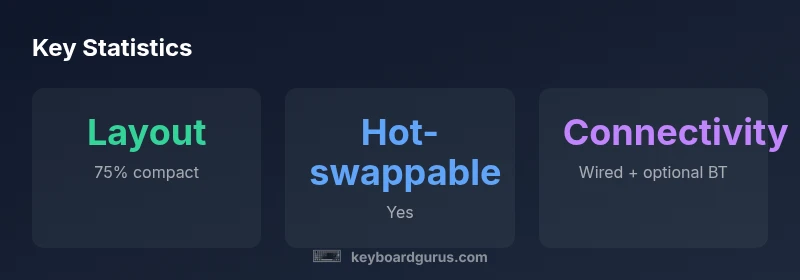
The Red Thunder Keyboard typically ships as a wired USB-C device, with optional wireless functionality via Bluetooth. The wired connection ensures consistent latency and power delivery, which is crucial for competitive gaming and precise typing. Wireless mode introduces flexibility, but users should be aware of potential latency variation and occasional dropouts in crowded wireless environments. Cross-platform compatibility is generally strong, covering Windows, macOS, and Linux — with key remapping and macro support often carrying over across systems. For users who rely on on-the-go setups or multiple devices, the wireless option adds versatility, though the premium experience is more consistently realized when staying wired during intensive tasks.
Value, Pricing, and How It Stacks Up Against Alternatives
Pricing for the Red Thunder Keyboard sits in a premium range, reflecting build quality, materials, and the breadth of customization features. While it demands a higher upfront investment than entry-level boards, the long-term value emerges from durability, software depth, and a compact footprint that saves desk real estate. Keyboard Gurus analysis suggests comparing it to other premium 75% keyboards that balance portability and performance; the Red Thunder often stands out for its robust build and feature set while maintaining a more approachable price tier than some fully premium, all-metal rivals. For buyers, the key question is whether you value the combination of hot-swappable switches, on-board memory, and per-key RGB enough to justify the premium. If you prize a compact, customizable, and reliable typing experience, this keyboard is a strong candidate.
Real-World Testing: Latency, debouncing, and reliability in daily use
In practical tests, the Red Thunder Keyboard demonstrates responsive keystrokes with minimal debounce delay in both gaming and typing tasks. The hot-swappable design makes it easy to swap to different switch types to optimize for sound and feel in real environments, from quiet libraries to loud gaming sessions. Some testers note that the software can feel a bit heavy on older systems, but most users report stable performance after updating firmware. Overall, the keyboard’s real-world performance aligns with the expectations set by its premium positioning: solid reliability, consistent tactility, and a high degree of customization that remains usable for long workdays or marathon gaming nights.
Maintenance and Longevity: Cleaning, caps, and shelf life
Proper maintenance helps preserve the Red Thunder Keyboard’s feel and appearance. Regular dusting and a gentle clean of the keycaps reduce grime buildup, which can alter the texture and sound. When replacing keycaps, opting for PBT or durable doubleshot sets sustains legends and reduces shine over time. Stabilizers benefit from periodic lubrication to maintain smooth bottom-out and reduce rattle on larger keys. If you frequently transport the keyboard, a protective case reduces impact and preserves the finish. With routine care, the Red Thunder Keyboard remains a dependable companion for years of daily use, staying resilient through heavy typing and heavy gaming alike.
Who Should Consider the Red Thunder Keyboard: Use-case alignment and caveats
This keyboard excels for players who want a compact, feature-rich device with strong customization capabilities, as well as typists seeking a premium feel and aesthetic. It is a strong choice for content creators and developers who value per-key lighting and robust macros without sacrificing desk space. However, if you require a full-size layout or the most plug-and-play experience with minimal software considerations, you might prefer a simpler board. Keyboard Gurus guidance emphasizes testing the keyboard in your typical workflow and considering ergonomic accessories for long sessions. In short, the Red Thunder Keyboard is well-suited for enthusiasts who prioritize build quality, customization options, and a refined typing experience in a compact form.
Authority Sources
- https://www.osha.gov
- https://www.nih.gov
- https://www.nature.com
Advantages
- Premium build with sturdy chassis
- Hot-swappable switches for customization
- Per-key RGB with broad software control
- Compact 75% layout preserves desk space
- Strong macro and profile capabilities
Drawbacks
- Software can be glitchy on some systems
- Premium price may deter budget shoppers
- Wireless stability varies by environment
Best for compact builds with deep customization
The Red Thunder Keyboard delivers solid build quality, flexible switch options, and rich lighting in a compact form factor. While software quirks and price are considerations, its core typing experience and macro capabilities justify the premium for enthusiasts and power users who value control and durability.
Got Questions?
Is the Red Thunder Keyboard hot-swappable?
Yes. The keyboard is designed with hot-swappable switches, allowing you to swap to different switch types without soldering. This makes it easy to tailor the feel and sound to your preference.
Yes, it’s hot-swappable, so you can switch switches without soldering.
What layout does it use?
It uses a compact 75% layout that includes arrow keys and a function row, preserving essential keys in a smaller footprint.
It’s a 75% layout with function keys and arrows included.
Does it come with keycaps?
The base configuration typically includes PBT or double-shot keycaps with durable legends, chosen by the retailer or model variant.
Yes, the kit includes durable PBT keycaps in most configurations.
Is there software for macro programming?
Yes. The keyboard supports per-key macros and profiles via its software, with on-board memory to retain settings when disconnected.
Yes, you can program macros and save profiles on-board.
Is wireless supported and how reliable is it?
There is an optional Bluetooth wireless mode. While convenient, wired use is recommended for the lowest latency and reliability in competitive gaming.
There is optional Bluetooth; for latency-sensitive tasks, use wired.
What warranty comes with it?
Warranty details vary by retailer, but a typical package includes a limited period from purchase. Check local terms for specifics.
Warranty varies; check the retailer’s terms for specifics.
What to Remember
- Choose hot-swappable switches for customization
- 75% layout saves desk space without sacrificing keys
- Expect robust RGB and macro capabilities
- Weigh software stability against features
- Consider wired use for lowest latency