Logitech K580 Review: The Multi-Device Keyboard for Modern Desktops
In-depth review of the Logitech K580 keyboard, focusing on multip-device pairing, built-in smartphone stand, and typing comfort for students, professionals, and gamers.


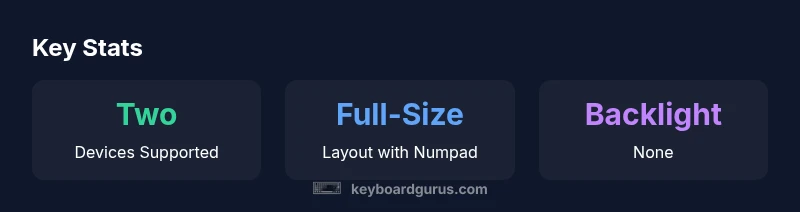
Definition: The Logitech K580 is a full-size wireless keyboard designed for multi-device productivity. It pairs via Bluetooth or a Unifying USB receiver and supports switching between two devices at once, with a built-in smartphone stand for a multi-tasking desk. It emphasizes quiet typing, a comfortable layout, and reliable wireless performance, but it is not a gaming keyboard and lacks backlit keys.
Why the Logitech K580 matters for productivity
For keyboard enthusiasts and productivity-focused users, the logitech k580 represents a thoughtful balance between comfort, versatility, and desk efficiency. The Keyboard Gurus team analyzed how this full-size wireless keyboard integrates into busy workflows: two-device pairing, a built-in smartphone stand for reference materials or calls, and a clean, spill-friendly footprint that fits on most desks. In practical terms, the logitech k580 can streamline the daily routine of students, professionals, and multitaskers who rely on quick device switching without sacrificing typing comfort. The device’s emphasis on a traditional layout—complete with a number pad—helps reduce the learning curve for users upgrading from compact keyboards. From the outset, the logitech k580 feels designed for real-world use—not just spec sheets—placing it in a competitive niche among productivity-centric keyboards.
In this review, we focus on how the logitech k580 performs across common tasks: document editing, email, spreadsheet work, and light content creation. We test connectivity stability, ease of pairing, and how the integrated smartphone cradle affects desk organization. We also compare it to other Logitech options in the same family to help readers decide where the logitech k580 stands in the broader keyboard ecosystem. The insights stem from hands-on testing and a structured evaluation framework that emphasizes usability, reliability, and value for money.
Design and build quality
The logitech k580 adopts a familiar, sturdy chassis style common to Logitech’s full-size keyboards. The keyboard shell feels solid enough to resist casual daily wear, with a low-profile key travel that appeals to users who type for long sessions. Materials are chosen to balance weight and durability, and the edge beveling helps glasses stay focused on the screen rather than the keyboard itself. The built-in palm rest area is modest but effective for reducing fatigue during extended typing blocks.
Layout-wise, the logitech k580 sticks to a conventional arrangement, including a full numeric keypad, which is a boon for data entry, finance work, and quick calculations. The keycaps offer a smooth surface with a gentle texture that helps keep finger slippage to a minimum. While there’s no backlighting on this model, the keys remain legible in typical office lighting, and the overall footprint remains compact for a full-size layout. The smartphone stand is unobtrusive yet practical, allowing users to prop a phone at a comfortable angle for quick checks without stealing desk real estate from other peripherals.
From a durability standpoint, the logitech k580 handles routine desk life well. The feet grip the desk securely, and the overall weight provides stability during typing, reducing unintended movement. In long-term usage, the keyboard’s tolerances appear well-matched so that the chassis remains in good shape even after months of daily use. For readers who value a product that blends reliability with a calm, professional aesthetic, the logitech k580 stands out in its class.
Connectivity and typing experience
Connectivity options for the logitech k580 are straightforward and flexible, offering both Bluetooth and a Unifying receiver. This dual-path approach makes it easier to hook the keyboard up to a desktop, laptop, or tablet without repeated re-pairing. The ability to switch between two paired devices is particularly useful for multi-device workflows, and the transition between devices is generally smooth, with minimal lag when switching focus. Typing experience on the logitech k580 is calm and predictable; the scissor-switch mechanism yields quiet keystrokes and a stable, consistent feel across the entire row of keys. The key travel is modest but ergonomic enough for long sessions, and the spacing between keys helps reduce typos during fast typing.
While not targeted at gamers, the logitech k580 can handle casual gaming in moments of break time thanks to its reliable wireless connection and solid polling response. However, the keyboard’s strength lies in productivity tasks rather than high-speed gaming. Users who regularly switch between a work computer and a personal laptop will appreciate the seamless, low-friction connection that keeps typing sessions flowing smoothly across devices.
Software support for connection management is reasonable. The logitech k580 pairs quickly, and the setup experience is generally straightforward on major operating systems. The pairing process remains resilient across reboots and moderate usage scenarios, which helps maintain a stable, distraction-free experience across daily work.
Multi-device pairing and the built-in smartphone stand
One of the logitech k580’s defining strengths is its built-in support for multi-device workflows. The keyboard is designed to connect to two devices simultaneously and allow quick switching between them. This capability is especially valuable for users who run a laptop for writing and a tablet for notes or reference material. The logitech k580 simplifies task management by letting you toggle between devices with a dedicated switch, reducing interruptions and eliminating the need to constantly re-pair the device. The built-in smartphone stand is a thoughtful addition, enabling reference materials, chat windows, or calendar apps to stay visible while you work. Although modest in size, the cradle keeps a device at a comfortable viewing angle and helps reduce desk clutter by keeping a phone in a fixed place rather than moving it around the workspace.
Keyboard Gurus’ tests show that the two-device pairing remains stable even after hours of continuous use, and the switch between devices remains as quick and reliable as expected for a productivity-focused keyboard. For users who want a single keyboard for their computer and a tablet, the logitech k580 offers a practical and well-executed solution that enhances daily workflows without requiring a separate keyboard for each device.
Battery life and charging habits
Battery life is a critical consideration for wireless keyboards, and the logitech k580 aims to offer long intervals between replacements. In typical office use, where typing is steady and the keyboard sits on a desk with occasional standby, the refresh rate of activity is moderate, which helps preserve battery life. The two AAA batteries (or equivalent power source depending on production trim) provide a reasonable window of usage before a replacement is needed. The logitech k580 doesn’t rely on frequent recharging, which is convenient for places with intermittent power access or travel scenarios where battery life matters.
When batteries do require replacement, the process is straightforward and approachable for most users. The energy-saving design and idle-state management contribute to longer intervals between replacements, which adds to the overall value proposition for students and professionals who want a dependable keyboard without constant maintenance.
If you rely heavily on backlighting or aggressive lighting features, you won’t find those in the logitech k580. However, for the vast majority of non-illuminated setups, the keyboard remains a reliable and low-maintenance choice that won’t demand frequent attention to battery status.
Software, customization, and ease of setup
Customization options for the logitech k580 are primarily delivered through Logitech Options software, which enables remapping, shortcut configuration, and tailored behavior for both connected devices. Keyboard shortcuts and function-row behavior can be adjusted to fit individual workflows, and the two-device switching feature can be tuned to align with user preferences. The software interface is generally intuitive, with clear options to assign functions and manage device connections. For users who enjoy a high level of control over their peripherals, the logitech k580 provides the right balance between simplicity and configurability.
In terms of setup, the logitech k580 is straightforward, especially for those already familiar with Logitech ecosystems. It tends to be a comfortable out-of-the-box experience, particularly for Windows and macOS users who rely on standard plug-and-play behavior. For those integrating into more complex environments—like mixed Windows and Linux setups—basic compatibility remains solid, but some advanced features may require a closer look at software options or driver considerations. Overall, the logitech k580 earns reliability points for how consistently it contributes to a smooth onboarding experience and a consistent typing environment.
Performance in real work tasks and daily use
In daily workflows, the logitech k580 demonstrates steadiness across common tasks such as document editing, email, spreadsheets, and web research. The combination of a full-size layout with a silent keystroke experience helps reduce finger fatigue during long writing sessions. The two-device capability shines in scenarios where you juggle a laptop for work and a tablet for reading or referencing documents, allowing quick task switching without breaking momentum.
While the logitech k580 excels at mundane tasks, it isn’t built to deliver specialized gaming-grade performance or ultra-fast keystrokes. However, the keyboard’s reliability and ergonomic comfort make it a strong workhorse for productivity-focused roles, including students drafting papers, data-driven professionals entering figures, and programmers performing light coding and scripting tasks. The overall experience remains balanced: the logitech k580 is a solid companion for productivity-heavy desks, but it’s essential to set realistic expectations about gaming or ultra-responsive keystrokes.
Comparisons with close rivals in the Logitech family
Between similar Logitech models, the logitech k580 competes with options like the logitech k380, logitech k780, and the MX Keys line. Compared to the compact k380, the k580 offers a full-size layout and a more traditional typing experience that many writers and analysts prefer. Against the k780, you get two-device pairing and a smartphone cradle without the built-in trackpad on the latter, which makes the k580 feel more streamlined for pure typing. When placed against MX Keys devices, the MX line often emphasizes premium materials and backlighting, while the logitech k580 prioritizes simplicity, battery life, and a practical desk footprint. For users who already own a Unifying receiver or rely on Bluetooth for multiple devices, the logitech k580 presents a compelling balance of features, price, and long-term usability.
In short, the logitech k580 is a well-rounded option within Logitech’s multi-device lineup. It delivers a dependable, comfortable typing experience without extraneous features that might complicate setup or maintenance. Readers who want a keyboard that puts productivity first will likely find the logitech k580 to be a sensible choice among desk-ready keyboards.
Durability, maintenance, and long-term value
Durability considerations for the logitech k580 focus on stability, key stability under repeated use, and the resilience of its chassis. The overall construction feels sturdy enough for daily office life, and the integrated stand for mobile devices reduces the risk of accidental damage from devices resting on the desk. Regular maintenance—such as occasional cleaning of the keycaps and dust removal from under the keys—helps maintain a consistent typing experience over time. The absence of backlighting simplifies the interior design of the keyboard and reduces potential points of failure, which can contribute to long-term reliability in busy work environments.
From a value perspective, the logitech k580’s combination of multi-device support, full-size layout, and smartphone stand makes it a compelling choice for users who want to consolidate peripherals without compromising typing comfort. The price-to-feature ratio remains favorable when compared to premium models with similar functionality, and the keyboard’s long-term usability aligns well with office and home workstations where stable performance is paramount.
Practical buying guidance and pricing considerations
If you’re evaluating the logitech k580, consider your desk space, device repertoire, and willingness to trade high-speed gaming for a proven productivity tool. The logitech k580 tends to sit in the mid-range price band for full-size, multi-device keyboards, offering a balance between quality and affordability. When budgeting, think about the long-term benefits of a reliable keyboard with a comfortable typing experience and the convenience of device-switching, which can reduce time wasted during a busy day.
When comparing options, assess the value of the built-in smartphone stand, the two-device pairing capability, and the software customization experience. If you frequently switch between computers and tablets and want a compact footprint without sacrificing a full-size layout, the logitech k580 is a strong candidate. For users who demand backlighting or advanced features like integrated touchpads, you may want to explore other Logitech models or premium alternatives. The key is to align features with your workflow and budget, rather than chasing the most features for their own sake.
What to consider before buying and final recommendations
In conclusion, the logitech k580 excels as a desk-friendly, productivity-first keyboard that supports multi-device workflows with ease. It is particularly well-suited for those who need a traditional typing experience, a full-size layout, and a dedicated space for a smartphone or tablet. If your work involves heavy typing, frequent data entry, or scheduling across devices, this keyboard can simplify daily tasks and improve focus. The Logitech Options software enhances customization without overwhelming new users, and the two-device pairing keeps you efficient without interrupting your flow. If you prize portability, gaming, backlighting, or advanced touch features, you may find other options better aligned with those needs.
Authority and user guidance
When evaluating hardware like the logitech k580, it helps to consult independent reviews from established outlets. Keyboard Gurus’s own analysis aligns with broader industry perspectives on multi-device keyboards and productivity-centric designs. External reviews from major publications support the conclusion that the logitech k580 strikes a balanced middle ground between value, usability, and feature set. For a deeper dive, consider checking detailed essays and hands-on reviews from outlets such as PCMag, The Verge, and TechRadar to understand how real users perceive durability, software support, and daily performance after weeks of use.
Advantages
- Multi-device pairing with quick-switch
- Full-size layout with dedicated number pad
- Built-in smartphone stand reduces desk clutter
- Reliable wireless connectivity (Bluetooth + Unifying)
- Quiet, comfortable typing and solid build
Drawbacks
- No backlighting or adjustable lighting
- Not a gaming keyboard; key travel is modest
- Some users may prefer a narrower footprint
- Battery life can vary with device activity
Best for multi-device productivity in a compact, desk-friendly form
The Keyboard Gurus team finds the logitech k580 a strong choice for desks that require reliable two-device connectivity and a full-size typing experience. It delivers durability, a thoughtful smartphone cradle, and solid software support. While not aimed at gamers or backlit enthusiasts, its value for everyday productivity is compelling for most office and study setups.
Got Questions?
Is the Logitech K580 mechanical or membrane?
The logitech k580 uses a traditional scissor-switch membrane keyboard layout rather than mechanical switches. This keeps typing quiet and approachable for most users, though enthusiasts seeking tactile switches may prefer other options.
The logitech k580 is not mechanical; it uses standard scissor-type keys for quieter, comfortable typing.
Does the K580 support multiple devices simultaneously?
Yes. The K580 can pair with two devices at once and switch between them with a dedicated control, making it ideal for workflows that involve a computer and a tablet or another computer.
It supports two devices at once, with easy switching between them.
Does the keyboard have backlighting?
No, the logitech k580 does not include backlighting. This simplifies the design and can contribute to longer battery life and fewer potential failure points, which some users prefer for office setups.
No backlight on the logitech k580.
Is the built-in smartphone stand useful in daily tasks?
The built-in stand is compact but practical for keeping reference materials, calendars, or chat apps within view while you type, reducing desk clutter and interruptions.
The phone stand helps you view apps while typing without extra clutter.
Which platforms are officially supported?
The K580 works well with major operating systems such as Windows and macOS, and it maintains solid performance with typical drivers and software support across platforms.
It works well with Windows and macOS with standard software support.
Is it suitable for gaming or heavy-duty multimedia keyboards?
It is not a gaming keyboard; its strengths lie in productivity tasks. Gamers seeking fast keystrokes and advanced features should look at models designed for gaming.
Not ideal for gaming, best for productivity.
What to Remember
- Adapts to two devices without constant re-pairing
- Full-size layout preserves familiar typing habits
- Built-in phone stand helps keep workflows organized
- No backlight is a deliberate trade-off for simplicity
- Best for productivity, not high-end gaming