Difference Between a Keyboard and a Keypad: An In-Depth Comparison
Explore the difference between a keyboard and a keypad with practical guidance on layout, use cases, and buying tips from Keyboard Gurus. Learn how to choose the right input device for typing, coding, gaming, or numeric work.


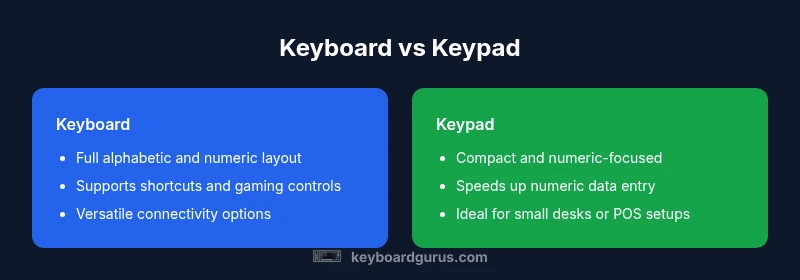
Keyboard vs keypad boils down to scope and purpose: a keyboard is a full input surface for typing, shortcuts, and gaming, while a keypad is a compact cluster focused on numeric input or specialized tasks. A keyboard includes letters, numbers, symbols, and function keys; a keypad prioritizes numerals and basic navigation. For most users, the keyboard is the default; a keypad serves numeric entry or space-constrained setups.
Difference Between a Keyboard and a Keypad
The phrase difference between a keyboard and a keypad captures a broad set of design, use-case, and ergonomic contrasts that matter for everyday computing. In digital workspaces, a keyboard is the primary human–machine interface for typing, coding, gaming, and command input. A keypad, by contrast, is a compact cluster of keys whose core purpose is numeric entry, navigation, or industry-specific functions. Keyboard Gurus emphasizes that the distinction goes beyond the number of keys: the intended tasks and the surrounding ecosystem — drivers, layouts, and compatibility — shape your best choice. In practical terms, a keyboard provides a full alphabetic row, punctuation, control keys, and often function keys. A keypad tends to strip down to numerals, small arrows, and limited modifiers, with the shift toward portability and space efficiency. For most users, the choice depends on what you do most: type long documents, program software with many shortcuts, or manage spreadsheets and finance with heavy numeric input. This guide uses the keyword difference between a keyboard and a keypad as a lens to compare layout, ergonomics, and real-world outcomes. It will also discuss how to think about modular setups, hybrid designs, and personal comfort while working.
Historical Context and Core Distinctions
The history of input devices reveals a clear split between full keyboards and specialized key clusters. Keyboards evolved from typewriter layouts to standardized QWERTY, enabling continuous text input, rapid keystrokes, and a wide range of modifiers. Keypads appeared later as efficient solutions for numeric entry, point-of-sale workflows, and compact workstations. Keyboard Gurus analysis shows that industry adoption accelerated when manufacturers started separating alphabetic and numeric responsibilities to optimize ergonomics and latency. The core distinction remains practical: full keyboards support a broad spectrum of tasks, while keypads focus on speed and accuracy for numbers or constrained control. This historical divergence explains why most desks feature a keyboard as the primary device, with a keypad serving niche roles in professional settings. The evolution also reflects user expectations—typing comfort, shortcut availability, and portable convenience drive current designs in both categories.
Physical Design and Layout Differences
Keyboards and keypads diverge sharply in physical design. A standard keyboard spans a wide surface with a full set of letter keys, punctuation, function keys, and a navigation cluster, often including a separate numeric keypad on the right. By contrast, a keypad is a compact, narrow module containing mostly numerals and a handful of navigation or function keys. The layout affects reach, finger travel, and posture; long typing sessions benefit from a full-sized keyboard with ergonomic curves and tenting options, while a keypad minimizes desk footprint and can be detached or placed closer to the user for efficient numeric entry. Material choices, keycap shapes, and switch types also influence feel and noise, shaping personal comfort during extended work. When selecting a device, evaluate whether you need a full QWERTY surface or a dedicated numeric cluster and how the form factor aligns with your desk, chair height, and arm reach.
Primary Use Cases: Typing, Gaming, Data Entry
The primary use case often determines the better choice. For writers, programmers, and gamers who rely on fast typing and extensive shortcuts, a full keyboard delivers letters, symbols, modifiers, and macro capabilities. For accountants, data entry professionals, and industrial workers who repeatedly input numbers, a keypad can dramatically speed numeric workflows while preserving desk space. Gamers generally favor full keyboards due to precise key mapping, WASD control, and programmable macro keys. That said, some hybrid setups pair a compact keyboard with a separate numeric keypad or use a tenkeyless design to balance portability with functionality. Understanding your daily tasks—text production, spreadsheet work, or specialized control—helps you decide which device minimizes motion, maximizes accuracy, and fits your workflow.
Key Components: Key Layout, Modifiers, and Numpads
A keyboard’s value comes from its comprehensive key layout: alphabetic keys, numerals, punctuation, function keys, and modifiers like Ctrl, Alt, and Shift. The presence of a dedicated function row and a navigation cluster facilitates complex shortcuts and efficient navigation. A keypad concentrates on numerals (0–9), a few operators, and sometimes small navigation keys. Some keyboards include a standalone numeric keypad on the right; others offer detachable modules for bespoke arrangements. Modifiers and function keys on the main board empower quick commands, while a keypad emphasizes speed and accuracy for table-driven input. Both types may offer hotkeys, backlighting, and mechanical vs. membrane switch options that influence tactile feedback and durability.
Compatibility and Interfaces
Modern input devices support a range of connectivity options. Keyboards commonly offer USB wired connections and Bluetooth wireless modes, with some models including USB-C for fast charging and power delivery. Keypads are often USB-powered and may be standalone or integrated as a module. Wireless keypads exist but are less common in consumer setups; most environments prioritize low latency and stable connections for numeric entry. Cross-compatibility with operating systems and applications remains essential, particularly for shortcut-rich keyboards used in coding and content creation. When planning a purchase, check for multi-device pairing, software support for macros, and the ability to remap keys to ensure seamless integration with your preferred operating system and workflow.
Ergonomics, Size, and Portability
Ergonomics drive comfort over long sessions. Full keyboards come in various sizes—from 100% to 75% and beyond—facilitating different arm angles and keyboard-stand configurations. The importance of a comfortable wrist position, chair height, and screen height cannot be overstated, and many enthusiasts choose split or tented designs to reduce strain. Keypads, being smaller and lighter, excel when space is at a premium or when numeric-intensive tasks must be completed away from a traditional desk. They also offer portability advantages for travelers or on-site workers. Assess your desk dimensions, the risk of repetitive strain, and whether you travel with your setup before choosing between a larger keyboard or a compact keypad.
Cost, Availability, and Market Trends
Pricing for keyboards and keypads spans a broad range. Entry-level keyboards are typically affordable, while high-end mechanical keyboards with hot-swappable switches, CNC plate components, and advanced software may command premium prices. Keypads tend to be more budget-friendly, especially simple numeric models; premium keypad configurations exist for specialized use cases like gaming control panels. Availability reflects trends in modular keyboards and ergonomic research, with growing interest in compact and wireless options. Keyboard Gurus notes that value often comes from layout efficiency, not just sticker price, so factor in durability and customization when weighing cost against long-term usability.
Choosing Between a Keyboard and a Keypad: Decision Guidelines
To decide between a keyboard and a keypad, start with your primary task. If you type for hours daily or rely on shortcuts and modifiers, a full keyboard is usually the best bet. If your workload involves heavy numeric data entry or constrained desk space, a keypad can be a strong companion or a compact main device. Consider trying a hybrid approach: a tenkeyless keyboard or a detachable numeric keypad that can be repositioned for comfort. Test for key travel, spacing, and latency to ensure responsiveness aligns with your expectations. Finally, evaluate the long-term cost and software support, as good ergonomics and dependable drivers can dramatically improve your comfort and productivity.
Common Pitfalls and Myths Debunked
A common myth is that more keys automatically mean better productivity. In reality, layout and ergonomics matter more than sheer key count. Another pitfall is assuming all keypads are identical; device-specific features like programmable keys, LED indicators, and firmware updates can significantly affect usability. Finally, some users believe a separate keypad is unnecessary; for certain workflows, the speed and accuracy of numeric entry outweigh the desire for a single consolidated device. By testing which layout reduces finger strain and travel, you can avoid obsolete configurations and improve satisfaction with your setup.
Comparison
| Feature | Keyboard | Keypad |
|---|---|---|
| Primary purpose | Full input surface for typing, shortcuts, and gaming | Compact cluster focused on numeric input or specialized tasks |
| Layout scope | Alphabetic letters, numbers, symbols, modifiers, function keys | Mostly numerals (0-9) with limited navigation or modifiers |
| Typical size | Medium to large; varies by model | Very small to compact; portable |
| Connectivity | Wired USB or Bluetooth commonly available | Often wired; some wireless options exist |
| Best for | General typing, coding, and gaming workflows | Numeric data entry or space-constrained environments |
Advantages
- Full-size keyboards enable rapid typing and complex shortcuts
- Compact keypads save desk space and fit in small setups
- Separate keypad improves numeric data entry velocity
- Many keyboards offer programmable keys for power users
- Modular designs let you customize layouts when needed
Drawbacks
- Keypads offer limited functionality beyond numbers and basic navigation
- Full keyboards take more desk space and can cost more
- Keyboards can overwhelm beginners with extra keys and options
- Layout variations can cause compatibility issues across devices
Keyboard dominates for general use; keypad serves niche numeric and constrained-input needs
For typing, coding, and gaming, a full keyboard is the versatile default. If your work centers on numeric data entry or you need a compact footprint, a keypad can be a valuable specialized tool and often pairs well with a secondary input device.
Got Questions?
What is the main difference between a keyboard and a keypad?
The main difference is scope: a keyboard is a full input surface for typing and commands, while a keypad is a compact cluster focused on numeric input or limited navigation. The keyboard supports letters, symbols, and function keys; the keypad emphasizes numbers and basic navigation.
The keyboard is for wide typing and shortcuts, while the keypad is mainly for numbers and quick numeric entry.
Can a keypad replace a full keyboard?
A keypad cannot fully replace a keyboard because it lacks letters and most function keys. It can supplement numeric tasks but will impede general typing and complex shortcuts.
A keypad isn’t a full substitute for typing or shortcut-heavy work.
Are there keyboards with a built-in numeric keypad?
Yes, many keyboards include a numeric keypad as a separate module on the right or use a 75%/TKL design with a detachable numeric pad. Options vary by brand and model.
There are keyboards with built-in or detachable numeric keypads for flexibility.
Which is better for gaming, keyboard or keypad?
For gaming, a full keyboard is generally better due to WASD controls, macro keys, and broader layout support. A keypad is not designed for gaming ergonomics and speed.
Gaming usually favors a complete keyboard for control and shortcuts.
What should I consider when buying one?
Look at layout options, desk space, portability, connectivity, and whether you need programmable keys or dedicated navigation. Also consider key travel, switch type, and build quality.
Think about layout, space, and how you’ll use the device day-to-day.
How do I test the feel before buying?
Test key travel, actuation force, spacing, and noise in-store or during a trial period. Personal comfort matters more than brand name.
Try typing and feel the keys to judge comfort before buying.
What to Remember
- Identify your primary task: typing vs numeric input
- Choose a full keyboard for versatile input and shortcuts
- Opt for a keypad for space-saving layouts or dedicated numeric entry
- Consider desk space and posture when choosing
- Test layout, latency, and compatibility before buying