Difference in Keyboards: A Thorough Comparison Guide
Explore the difference in keyboards across layout, switch, size, and connectivity choices. This Keyboard Gurus guide compares ANSI vs ISO, mechanical vs membrane, and wired vs wireless to help you choose confidently.


At a glance, the difference in keyboards centers on layout options (ANSI vs ISO), switch types (mechanical vs membrane; linear, tactile, clicky), size and form factor (full-size, tenkeyless, 75%, 60%), and connectivity (wired, wireless, Bluetooth). Other factors include keycap profiles, ergonomics, and programmability. Your choice hinges on typing feel, gaming performance, portability, and desk space.
What the Difference in Keyboards Really Means
According to Keyboard Gurus, the difference in keyboards is not a single feature but a cluster of interdependent choices that shape how you type and play. At its core, a keyboard is a modular system: layout, switch, form factor, and connectivity each contribute to a unique typing experience. When someone asks about the difference in keyboards, they are often comparing how these elements affect everyday tasks, from long writing sessions to competitive gaming. In practice, the most noticeable gaps are in layout compatibility (ANSI vs ISO), the feel of the key switches (linear, tactile, or clicky), the keyboard’s size and how it fits your desk, and the way it connects to devices (cable or wireless). The Keyboard Gurus team emphasizes that your priorities—speed, accuracy, ergonomics, portability—will determine which differences matter most. This article uses concrete criteria and real-world examples to help you assess those differences without science-fiction promises. The goal is clarity, not hype, so you can choose confidently.
Core Variables That Differentiate Keyboards
Within any given difference in keyboards, four variables dominate: layout, switch, form factor, and connectivity, plus ancillary factors like keycaps and ergonomics. Layout affects typing comfort, key placement, and compatibility with software and macros. Switch technology determines the tactile or audible feedback and actuation force. Form factor influences desk footprint, reach to modifiers, and portability. Connectivity affects latency, battery life, and reliability in shared workspaces. Brand ecosystems and firmware (QMK, VIA) further color how easily you customize. The interplay between these factors creates distinct typing experiences, and understanding them helps you tailor a setup for your workflows. When evaluating options, consider how each variable aligns with your primary activities and space constraints.
Layouts: ANSI vs ISO vs Other Arrangements
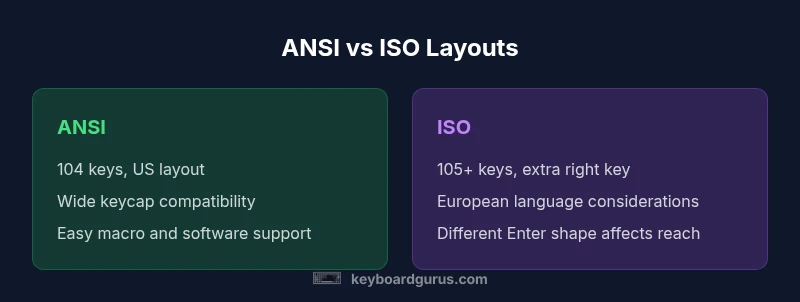
The most visible difference in keyboards is layout. ANSI is dominant in the United States and most gaming keyboards ship with ANSI, offering a familiar 104-key grid and a straightforward left-hand cluster. ISO layouts are standard in much of Europe and feature an extra key on the right side and a slightly different Enter key shape, which can influence how you reach modifiers during long sessions. If you rely on hotkeys or frequent macros, ANSI keyboards often provide easier muscle memory and broad keycap compatibility. ISO can be preferred by users who favor European language input or who appreciate the slightly different thumb reach. The broader ecosystem—keycaps, stabilizers, and software support—tivots on which layout you choose, underscoring the practical differences in keyboard design and daily use.
Switch Technologies: Mechanical vs Membrane vs Hybrid
Switch choice is a core differentiator in keyboards. Mechanical switches deliver distinct tactile, audible, and actuating characteristics, with popular families like linear, tactile, and clicky variants. Membrane keyboards provide a softer feel and quieter operation, often at a lower price and with generally less robust durability. Hybrids attempt to blend the two worlds, offering some mechanical feel with membrane internals. The choice influences typing speed, accuracy, and fatigue over long sessions. The durability and maintenance profile also differ: mechanical switches are typically rated for tens of millions of actuations and are easier to swap, while membrane switches tend to wear faster and are harder to repair. If you type long-form content or rely on precise keystrokes for gaming, the switch class will be a primary differentiator.
Form Factors and Size Classes
Form factor determines how much desk space your keyboard occupies and how easily you transport it. Full-size boards include dedicated Numpad zones; tenkeyless (TKL) boards omit the numpad to save space; compact formats such as 75%, 60%, and 40% further reduce footprint by condensing the layout. The difference in keyboards at this level isn’t just aesthetics—compact boards can improve ergonomics by shortening reach to frequently used keys and reducing shoulder strain, but they require more layer switching for functions that typical full-size boards map to dedicated keys. Your decision should weigh desk dimensions, posture comfort, and how often you use macros or multimedia keys. If portability matters, a 60% or 75% might win; if you rely on numeric input, a full-size or TKL could be the better fit.
Connectivity: Wired, Wireless, and Hybrid Options
Wired keyboards offer latency predictability and consistent power, which many gamers and professionals value. Wireless options (Bluetooth or 2.4 GHz) enhance desk cleanliness and mobility but can introduce latency or battery concerns, especially in busy wireless environments. Some keyboards support hybrid modes, allowing quick switching between wired and wireless, or using USB-C for charging while maintaining uninterrupted operation. The difference in keyboards in terms of connectivity is not just about convenience; it influences performance and reliability in shared workspaces, where interference and device diversity can affect performance. When evaluating options, consider your primary setup: stationary work with a desktop or a mobile workflow that benefits from a compact, wireless solution.
Keycaps, Profiles, Stabilizers, and Ergonomics
Keycap design and profile influence both feel and legibility. Common profiles range from sculpted sets (SA, DS) to uniform profiles (XDA, OEM). Keycap height and shape alter typing angle and finger travel, affecting comfort during long sessions. Stabilizers on larger keys (Spacebar, Enter, Shift) impact wobble and accuracy, a frequent source of frustration if poorly tuned. Ergonomics extend beyond key shapes to include tenting stands, split designs, slope adjustments, and even hand rest integrations. The difference in keyboards becomes tangible when you test a few profiles side by side: some people notice a smoother arc of motion with sculpted caps, while others prefer minimalism and uniformity for faster acquisition of keystrokes. Keyboard Gurus emphasizes trying different options to identify what reduces fatigue and improves precision.
Customization: Programmability, Firmware, and Community Support
Modern keyboards increasingly offer extensive programmability via firmware ecosystems like QMK or VIA. This capability allows you to remap keys, create macros, and build layers to suit specific workflows—gaming macros, coding shortcuts, or accessibility options. Hot-swappable switches add another layer of flexibility, enabling you to swap switches without soldering when you want to experiment with different tactile feedback or actuation forces. The difference in keyboards becomes significant for power users who rely on complex workflows or who enjoy tinkering. A strong community and regular firmware updates can extend the life of a board, so consider the size of the user base and the availability of compatible keycaps and tooling when evaluating options.
Durability, Maintenance, and Longevity
Durability is a practical concern behind the difference in keyboards. Mechanical switches typically boast higher lifecycle ratings than membrane alternatives, and quality keycaps resist wear from legends and rubbing. Maintenance includes regular cleaning to keep switches, stabilizers, and keycaps performing optimally. Remapping and firmware tools can complicate maintenance, but good practices—regular dusting, keycap swaps, and firmware updates—prolong life and preserve resale value. The Keyboard Gurus analysis shows that boards with hot-swappable switches and widely supported firmware tend to retain performance longer, even as aesthetics evolve. When planning a purchase, factor in materials, keycap quality, stabilizer design, and user-support ecosystems to maximize longevity.
Budget, Value, and Total Cost of Ownership
Price is a major determinant in the difference in keyboards, but total cost of ownership matters more. You may see entry-level membrane keyboards offering solid value, but long-term investments often reward mechanical switches, hot-swappability, and robust firmware. A well-chosen keyboard may pay for itself through durability, improved typing comfort, and preserved resale value. Keyboard Gurus analysis indicates that the best value often lies in mid-range mechanical boards with stable firmware and a reasonable keycap set, rather than ultra-cheap models that require frequent replacements. Consider initial cost, replacement keycaps, potential switch upgrades, and any maintenance requirements when calculating the total cost of ownership.
Use-case Scenarios: Gamers, Typists, Professionals
Different roles reveal different differences in keyboards. Gamers often prioritize low latency, stable wireless connections, and rapid macro access; typists prioritize comfort, key travel, and stable keycaps for long sessions; professionals may value reliability, programmability, and ergonomic options for all-day use. The difference in keyboards here is not only in hardware but in how you map your workflows. A gamer might choose a compact, low-latency board with programmable layers, while a writer could favor an ergonomic split keyboard with a gentle tent and sculpted keycaps. A professional who spends hours coding may prefer a board with hot-swappable switches and fully customizable macros. Understanding your primary tasks helps you navigate the differences and personalize a setup that feels natural.
How to Decide: A Practical 6-Step Checklist
To apply the difference in keyboards to a decision, follow these steps: 1) List tasks you perform most (typing, coding, gaming, media control). 2) Choose a baseline layout (ANSI for general use, ISO if you need the extra key). 3) Pick a form factor that fits your desk and mobility needs. 4) Select a switch type based on your preferred feel and sound. 5) Assess keycap profiles and stabilizers for comfort and durability. 6) Test latency, battery life, and firmware support if you choose wireless or programmable options. This checklist helps you align hardware choices with your daily routines, turning a broad topic into a practical, individualized decision.
Comparison
| Feature | ANSI Keyboard | ISO Keyboard |
|---|---|---|
| Key Count | 104 keys (ANSI) | 105+ keys (ISO) |
| Keycap Availability | Broad US-standard sets | European-style sets with extra key |
| Typing Ergonomics | Familiar left-hand cluster | Additional right-side key affects reach |
| Stabilizers & Legibility | Widespread compatibility | ISO-specific stabilizers in some boards |
| Best For | General use, gaming, and customization |
Advantages
- Widely supported layouts with strong accessory ecosystems
- Easy keycap replacement and customization
- Broad firmware support (QMK/VIA) for advanced users
- Good resale value due to familiarity
- Clearer path for troubleshooting and replacement parts
Drawbacks
- ISO can introduce an extra right-side key that feels awkward for some users
- Transitioning between layouts requires adjustment
- Some software and macros assume ANSI mappings
- Keycap compatibility can be challenging across layouts
ANSI generally wins for compatibility; ISO wins for regional key layouts and extra right-side key
Choose ANSI if you need broad compatibility and easy keycap upgrades. Choose ISO if you require the European layout with its extra key and regional specifics.
Got Questions?
What is the main difference between ANSI and ISO layouts?
The ANSI layout is common in the US with a large Enter key and a standardized 104-key grid. ISO adds an extra key on the right and a differently shaped Enter, which can change the reach to modifiers. The choice affects keycap compatibility and typing rhythm.
ANSI has the standard US layout; ISO adds an extra key on the right and a different Enter shape, which changes how you reach certain keys.
Do all keyboards support hot-swapping switches?
No. Hot-swapping requires a board designed to accept removable switches. If you plan to experiment with different feels, look for hot-swappable sockets and compatible switch tooling. Not all keyboards offer this, especially budget models.
Some keyboards let you swap switches, but many don't. Look for hot-swappable models if you want to experiment.
Are mechanical switches worth it for everyday typing?
Many users find mechanical switches offer better tactile feedback and longevity for daily typing, with a wide range of feels. For light typists or budget constraints, membranes can be adequate but may wear faster and feel less precise over time.
Mechanical switches often feel nicer and last longer for typing, but membranes can be fine if you’re on a tight budget.
How does form factor impact ergonomics and portability?
Smaller form factors reduce reach to modifiers and improve desk mobility but require more shortcut layers. Larger boards offer dedicated keys and easier keystroke patterns but take more desk space and weigh more to carry.
Smaller boards save space but need more shortcuts; larger boards are comfortable but heavier and bulkier.
What budget should I allocate for a reliable keyboard setup?
A reliable setup typically balances initial cost with long-term value—mid-range mechanical keyboards with good firmware support often offer the best return. Factor potential keycap replacements and switch upgrades into your budget.
Plan for a mid-range mechanical keyboard with good firmware support; think about future keycaps and possible switch swaps.
What to Remember
- Identify your primary use to prioritize layout and form factor.
- Test both ANSI and ISO if possible; preference varies by region and typing style.
- Consider form factor early to balance portability and functionality.
- Prioritize switches and keycaps based on feel and durability.
- Factor total cost of ownership, not just sticker price.