What is a Mechanical Keyboard vs Regular? A Comprehensive Guide
Explore the differences between mechanical and regular keyboards, focusing on switches, feel, durability, pricing, and use-cases with expert guidance from Keyboard Gurus.


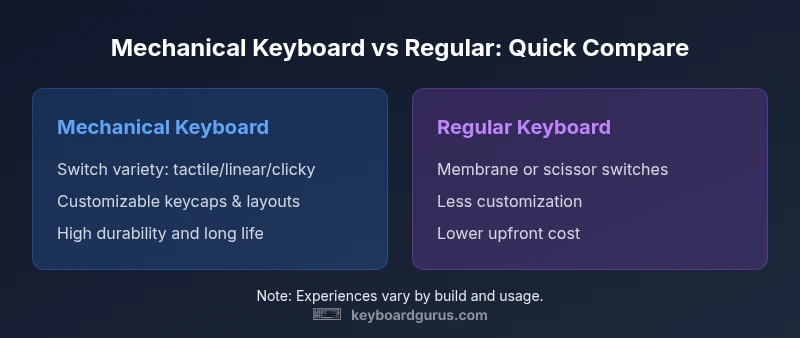
Mechanical keyboards use individual switches under each key for distinct tactile or audible feedback, durability, and vast customization options. Regular keyboards rely on membranes or scissor mechanisms, offering lower upfront cost and simplicity. For heavy typists, gamers, or anyone who values long-term reliability, a mechanical keyboard is typically the better investment; for casual typing and tight budgets, a regular keyboard can suffice. Keyboard Gurus recommends weighing feel, maintenance, and total cost of ownership to decide which path fits your setup.
What defines a mechanical keyboard?
A mechanical keyboard is defined by its individual mechanical switches beneath each key. Each switch is a separate component with its own stem, spring, and housing, producing distinct actuation points, tactile feedback, and, in many cases, audible clicks. This modular approach makes switches swappable and tunable—enabling enthusiasts to tailor travel distance, resistance, and sound. According to Keyboard Gurus, the defining feature is the ability to replace or customize these switches without replacing the entire board, which drives long-term durability and personal feel. The keyboard's overall build—case material, plate, and stabilizers—also influences stability and acoustic signature, contributing to a typing experience that can range from whisper-quiet to satisfyingly loud. The community widely uses hot-swappable sockets, which let users swap switches without soldering, accelerating experiments with different feels and sounds.
In contrast, regular keyboards typically rely on membranes or scissor mechanisms. Membrane keyboards compress a conductive layer under a silicone dome, while chiclet-style scissor keys use a stabilizing mechanism under a flatter key. These designs are usually cheaper to manufacture, lighter, and quieter by default. They often come with standardized keycaps that are easy to replace, but the underlying switch architecture limits customization and long-term durability. The decision to choose mechanical or regular hinges on how much you value tactile feedback, maintenance effort, noise tolerance, and long-term ownership costs.
Regular keyboards explained: membrane, scissor, and more
Regular keyboards cover several non-mechanical approaches. Membrane keyboards use a rubber or silicone sheet that completes a circuit when pressed; these are common in budget devices and laptops due to low cost and quiet operation. Scissor-switch keyboards, a refinement used in many laptops and some desktops, feature a mechanism that stabilizes the key cap and shortens travel, delivering a slim profile and a softer bottom-out. A subset of regular keyboards employ low-profile switches designed to blend the feel of a traditional keyboard with a compact form factor, trading some tactile feedback for portability. While these designs can offer dependable performance for everyday tasks, they typically lack the longevity and extensive customization found in mechanical builds. The takeaway is that regular keyboards prioritize convenience, portability, and price, whereas mechanical keyboards emphasize tactile variety, durability, and upgradeability. Keyboard Gurus analysis suggests that many users gradually transition to mechanical keyboards as they seek a more personalized typing experience and a longer-lasting hardware platform.
Why the distinction matters: typing feel, durability, and maintenance
The distinction between mechanical and regular keyboards affects several practical dimensions. Typing feel is the most obvious difference: mechanical switches provide a wide spectrum of actuation forces, travel distances, and feedback types, enabling users to match their preferred profile. Durability is another major factor: quality mechanical switches are designed for millions of keystrokes, whereas membrane or scissor switches degrade more quickly with heavy use. Maintenance needs differ as well; mechanical boards often benefit from periodic cleaning, switching lubes, and occasional switch swaps, which can extend life and customize feel. Regular keyboards typically require less hands-on maintenance because of their unified switch design, but repairs or replacements can be more involved if a key stops registering. Keyboard Gurus notes that the total cost of ownership can tilt in favor of mechanical systems for high-usage scenarios, though the initial outlay is higher. When evaluating your workflow, consider typing volume, noise tolerance, and whether you value modular upgrades over a straightforward setup.
Key components: switches, PCB, case, keycaps
Mechanical keyboards rely on several core parts: switches, a printed circuit board (PCB) with a suitable plate, a chassis or case, and keycaps. The switch type—linear, tactile, or clicky—determines feel and sound; the PCB can be hot-swappable, allowing quick switch changes without soldering. The case contributes to weight, rigidity, and resonance, influencing the overall acoustic signature and stability during heavy typing or gaming. Keycaps affect typing comfort and aesthetics; sculpted profiles can alter finger travel and accuracy, while material (abs, PBT) and legends influence durability and feel. In regular keyboards, the switches are not easily swapped, and the keycaps may be more generic in shape and profile. This difference underpins customization potential and long-term satisfaction, especially for users who enjoy tailoring their keyboard to specific tasks or games. Keyboard Gurus highlights that understanding these components helps you forecast maintenance needs and upgrade paths.
Typing experience: feel, sound, actuation force
Typing experience on a mechanical keyboard is shaped by switch design and keyboard build. Linear switches deliver smooth keystrokes with minimal tactile feedback; tactile switches provide a noticeable bump without loud noise; clicky switches add a pronounced audible cue. Travel distance and actuation force influence typing speed and fatigue, especially during long sessions. Sound varies from muted to audible, depending on switch type, lubricants, and case design. In contrast, regular keyboards often emphasize a uniform, quiet keystroke with less variation in force or feedback. The lack of individual switch options means you won’t have the same degree of customization for touch and sound. For many users, the mechanical experience reduces typing fatigue and increases accuracy, while others may prefer the cleaner, quieter, and simpler experience of a regular keyboard. Keyboard Gurus observes that the best choice aligns with user goals: performance, comfort, or simplicity.
This block continues by addressing how different use-cases—writing, programming, gaming—affect perceived value and satisfaction.
Gaming considerations: latency, rollover, and stability
Gaming performance hinges on several factors beyond simply switch type. Input latency is influenced by the keyboard’s wiring, PCB quality, and firmware; high-quality keyboards can report very low latency and consistent polling rates. NKRO (n-key rollover) or high-key rollover guarantees that multiple simultaneous key presses register correctly, which matters in fast-paced games or complex combos. Mechanical keyboards often offer more precise, repeatable keystrokes and better anti-ghosting performance. However, not all mechanical boards are created equal; the quality of the PCB, key matrix, and debounce logic affects responsiveness and reliability. Regular keyboards generally provide reliable input for casual gaming but may lag behind in high-precision or macro-heavy scenarios. Keyboard Gurus suggests evaluating latency, debounce settings, and firmware updates when comparing options for competitive gaming versus casual play.
Ergonomics and layout considerations
Ergonomics play a critical role in long-term comfort. Mechanical keyboards come in various form factors—full-size, TKL, 75%, and more—affecting reach, wrist angle, and desk space. Some users benefit from split designs, tenting, or columnar layouts to reduce strain. Regular keyboards often emphasize compactness and portability, sometimes at the expense of ergonomic options. The key to comfort is a layout that matches your posture and typing style, a suitable chair height, and a proper desk setup. Keyboard Gurus notes that even small changes, such as an angled wrist rest and a slight tilt of the keyboard, can meaningfully reduce fatigue during extended sessions.
This block explores how layout decisions impact typing efficiency and long-term comfort, especially for students and professionals who spend hours at a keyboard.
Price and total cost of ownership
Price is one of the most tangible differences. Mechanical keyboards typically start higher but offer longevity and a broad ecosystem of switches, keycaps, and accessories. The total cost of ownership, including potential upgrades, lubrication, or switch swaps, can often surpass the initial price, yet many users feel the long-term value justifies the investment. Regular keyboards have lower upfront costs and simpler maintenance, which can be appealing for students or casual users. Over time, if a switch or keycap fails on a regular keyboard, replacement parts may be harder to source or more expensive than swapping a single mechanical switch. Keyboard Gurus emphasizes that budgeting should consider long-term reliability, customization desire, and expected usage when choosing between these paths.
How to choose: use-case scenarios
For writers who type for hours daily, mechanical keyboards are usually favored for their responsive feel and fatigue reduction. Programmers value the consistent keystroke and potential for customizing layouts and macros. Gamers may prefer mechanical keyboards for latency, NKRO, and switch variety, though some competitive players opt for compact form factors for better desk space and portability. Students and office workers who prioritize quiet operation and portability may lean toward regular keyboards to minimize distraction and cost. Keyboard Gurus suggests mapping your primary tasks, travel needs, and tolerance for noise before selecting a keyboard. Try before you buy—tap a few different switch types at a local store or borrow from a friend to gauge your preference.
This section offers practical decision criteria and a framework to compare models based on your routine.
Maintenance and care
Maintenance for mechanical keyboards involves periodic cleaning, switch replacement, or lubrication to sustain optimal feel and prolong life. A simple wipe-down, keycap removal for deep cleaning, and occasional switch lubrication can significantly affect performance and noise. Regular keyboards require less intrusive upkeep but can accumulate dust and crumb buildup under the keys, impacting performance over time. If you rely on heavy typing or gaming, a plan for cleaning every few months is prudent. Keyboard Gurus recommends setting a simple maintenance schedule and using a keycap puller, compressed air, and light lubricants for easy upkeep. This proactive approach keeps your keyboard performing consistently and can preserve its resale value.
Decision framework: deciding between the two setups
- Define your primary use: typing, coding, or gaming.
- Consider budget and willingness to upgrade or customize over time.
- Assess the importance of tactile feedback and sound.
- Evaluate desk space, portability, and ergonomics.
- Check compatibility with keycap profiles and layouts you prefer.
- Try multiple options if possible to gauge personal preference.
Using this framework, you can make a grounded, experience-based decision that aligns with your goals and environment. The key is to balance tangible needs with long-term satisfaction.
Comparison
| Feature | Mechanical keyboard | Regular keyboard |
|---|---|---|
| Key switch type | Individual mechanical switches (various feel: linear/tactile/clicky) | Membrane or scissor switches |
| Typing feel | Tactile or audible feedback; highly customizable | Flat, uniform feel; generally quieter |
| Durability / lifespan | Designed for long life; switches can last many millions of keystrokes | Typically shorter lifespan due to membrane/scissor wear |
| Price range | Moderate to premium ($60-$350+ depending on features) | Budget to mid-range ($15-$60+) |
| Maintenance | Higher maintenance potential (lubing, cleaning, switch swaps) | Lower maintenance by design |
| Best for | Typing enthusiasts, programmers, gamers seeking customization | Casual users, students, cost-conscious buyers |
| Noise level | Variable; can be loud or dampened with mods | Generally quieter by default |
Advantages
- Enhanced typing feel and feedback for many users
- Excellent durability and long-term value for high usage
- Extensive customization options (switches, keycaps, layouts)
- Better gaming potential with macro support and NKRO
- Strong resale value for premium builds
Drawbacks
- Higher upfront cost and potential upgrade path required
- Larger size/loudness can be disruptive in quiet spaces
- Maintenance can be time-consuming for mods
- Not always portable; heavier and bulkier than some reg keyboards
Mechanical keyboards excel in feel, durability, and customization; regular keyboards win on budget, portability, and simplicity.
Choose mechanical for long-term value and tactile control. Choose regular for lower cost and easy setup; consider your environment and usage to decide.
Got Questions?
What is the main difference between a mechanical keyboard and a regular keyboard?
The main difference is how each key is activated. Mechanical keyboards use individual switches, offering customizable feels and longer lifespans, while regular keyboards rely on membranes or scissor mechanisms with less customization and durability.
The big difference is the switch under each key. Mechanical keyboards have replaceable switches, which lets you pick your feel and lasts longer. Regular keyboards use membranes or scissor switches and are simpler and cheaper.
Are mechanical keyboards louder than regular ones?
Loudness varies by switch type; clicky switches can be audible, while linear switches are quieter. Dampening and case design can reduce noise, but in general, mechanical keyboards offer more audible feedback than most regular keyboards.
Yes, some mechanical switches can be louder than regular keyboards, especially clicky ones. You can reduce noise with dampening or choosing quieter switches.
Is a mechanical keyboard worth it for students or casual users?
For casual use, regular keyboards are often sufficient and more budget-friendly. Mechanical keyboards can be worth it for students or casual users who value typing feel, ergonomics, and future upgrade potential, but the cost-to-benefit depends on personal preference and budget.
If you type a lot or want a better feel, it can be worth it. If you just need basics, a regular keyboard might be the smarter choice.
Can I convert a regular keyboard to mechanical?
Converting a regular keyboard to mechanical is not straightforward. It typically requires a compatible PCB, switches, and potentially a new case. In many cases, a purpose-built mechanical keyboard with hot-swappable options is a better route.
Converting isn’t simple. You usually need a new board or a hot-swappable mechanical keyboard built to accept switches.
Do mechanical keyboards require special keycaps?
Many mechanical keyboards use standard switch stems, making a wide range of third-party keycaps compatible. Some hot-swappable boards may have compatibility quirks, but most profiles like SA, DSA, and Cherry MX-style keycaps fit widely.
Not always, but most mechanical boards work with a wide variety of keycaps from third-party makers.
What should I look for when buying a mechanical keyboard?
Consider switch type (feel and noise), layout, build quality, firmware support, hot-swappability, and keycap compatibility. Also assess the availability of replacement parts and accessories like dampening or lubing kits.
Look at the switch type, build, layout, and whether it’s easy to upgrade or customize.
What to Remember
- Mechanical keyboards offer customization and longevity
- Regular keyboards are cheaper and more portable
- Choose based on your primary use and budget
- Consider maintenance needs before upgrading