Why Mechanical Keyboards Are Better for Typing
An analytical guide comparing mechanical and membrane keyboards, focusing on why mechanical keyboards improve typing comfort, speed, and accuracy for writers, students, and professionals.


So, why are mechanical keyboards better for typing? They deliver tactile feedback, consistent keystrokes, and reduced finger fatigue, compared with membrane keyboards. This quick comparison highlights core factors like switch variety, durability, and long-term value for typists. For writers, programmers, and students who log long sessions, the choice matters not just for comfort but also for consistency in keystrokes and reduced variance during long-form tasks.
Why mechanical keyboards are better for typing
According to Keyboard Gurus, the key reasons people choose mechanical keyboards for typing revolve around tactile feedback, consistent keystroke feel, and long-term durability. For many writers, students, and professionals who spend hours at the keyboard, the difference is not about novelty but about measurable comfort and accuracy. Mechanical switches resist the mushy plateau that often comes with membrane keyboards and provide a repeatable actuation profile across thousands of keystrokes. In practical terms, this translates to less finger fatigue during long sessions and a lower rate of missed or mistyped characters as your cadence and speed increase.
Beyond raw feel, the ability to customize actuation force and travel distance lets typists tailor the keyboard to their hand size, typing posture, and tasks—be it drafting, coding, or data entry. The result is a more natural transition from one key to the next, which reduces cognitive load and helps maintain rhythm. This block sets the stage for deeper exploration of typing comfort, including how switch types influence feedback, sound, and perceived responsiveness.
The science behind typing comfort
Typing comfort is influenced by how a key press unfolds from rest to actuation. Mechanical switches are designed with a defined actuation force and a precise travel distance, producing a crisp feedback loop between finger and key. This means your fingers encounter a predictable resistance as you press, which helps you maintain rhythm and reduces overcompensation. Ergonomic benefits extend beyond feel: because keystrokes are easier to register consistently, you can sustain higher typing cadence with fewer corrections.
In practice, typists notice less finger fatigue when long sessions are required because the workload is distributed more evenly across each keystroke. This can be particularly beneficial for tasks that require repeated characters, such as coding or transcribing. The result is improved accuracy and a steadier overall performance, which translates into fewer errors and less cognitive strain as the work compounds. Keyboard Gurus research emphasizes that the combination of tactile or auditory feedback with stable key travel creates a feedback loop that supports focus and flow during writing tasks.
Mechanical vs membrane: a direct comparison
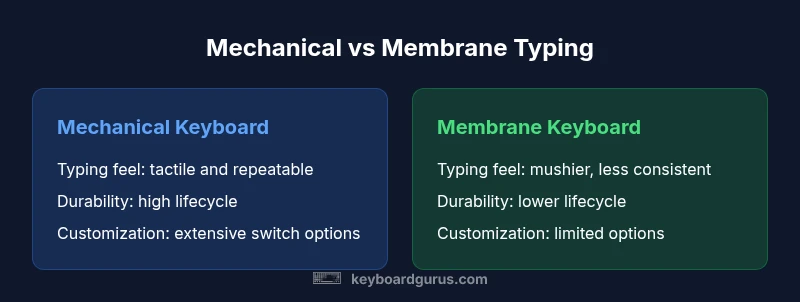
Membrane keyboards rely on a rubber dome under a conductive layer, which yields a soft, uniform press with less distinct feedback. Mechanical keyboards use discrete switches under each key, delivering a more tangible actuation feel and a longer-lasting structure. For typing, this typically means greater consistency in keystroke registration and less inadvertent misspunches as your speed increases. Durability is another differentiator: mechanical keyboards are built to endure tens of millions of keystrokes, while membranes may wear down faster in high-volume use. Maintenance needs differ too: membranes benefit from being low-maintenance, but repairs can be costly; mechanical keyboards reward periodic cleaning and occasional customization to preserve performance over years.
In addition to feel and durability, the broader ecosystem matters. Mechanical keyboards offer a wide range of switch types, keycap profiles, and form factors, enabling a personalized typing experience that can adapt to different tasks and environments. This flexibility supports long-term satisfaction as you refine your setup to match your workflow and posture.
Key switch options and typing feel
Switch design defines the core typing experience. Mechanical switches come in three broad categories: linear, tactile, and clicky. Linear switches offer smooth, uninterrupted travel with no tactile bump; tactile switches provide a noticeable bump indicating actuation; clicky switches couple a tactile bump with an audible click. Each category can be tuned further by actuation force, travel distance, and stem design, allowing typists to choose light, medium, or heavy-feel options depending on preference and task duration. Because there is no one-size-fits-all switch, many typists experiment with several options before settling on a favorite, while some select swappable keyboards to swap switches on the fly for different tasks.
The actuation force interacts with typing speed and finger fatigue: lighter switches may feel effortless for short bursts, but heavier switches can reduce accidental keystrokes during fast typing. The sense of control you gain from selecting a switch that aligns with your cadence often translates into higher accuracy and longer, more comfortable sessions. Keyboard Gurus notes that the ergonomic payoff grows as you type more minutes per day, making the initial switch choice a critical long-term decision.
Layouts, keycaps, and ergonomic considerations
Beyond the switch, layout and keycap design shape how your hands move across the board. Standard ANSI layouts are familiar, but many typists explore ISO, ortho-linear, or split designs to improve wrist posture and reduce extension. Keycap profiles influence finger travel and comfort; sculpted profiles like SA or XDA change how your fingers land on each row, affecting precision and fatigue. If you type with multiple finger positions, a uniform profile might feel flatter; if you value a pronounced tactile sense, a sculpted profile can enhance accuracy. Ergonomic accessories—such as tenting kits, angled stands, and wrist rests—play a role in maintaining a natural neutral posture during long sessions and can mitigate repetitive strain.
Customization options are a hallmark of mechanical keyboards. You can tailor keycaps for grip, texture, and legibility, and you can choose layouts that reduce awkward hand movements for common tasks. This flexibility helps typists fine-tune their setup for maximum comfort and performance over time.
Real-world typing performance and productivity
In real-world use, mechanical keyboards often translate to noticeable improvements in typing comfort and consistency for long sessions—whether you’re drafting reports, coding, or taking notes during lectures. The predictability of actuation and the tangible feedback you receive at each keystroke reduce the cognitive load required to execute a sequence of keys. Many users report faster ramp-ups to their typical typing speed because the keyboard reinforces muscle memory through repeatable feedback. Even small gains in accuracy compound over hours of daily typing, contributing to reduced fatigue and fewer errors that disrupt momentum. While results vary by individual preferences and task type, the consensus among keyboard enthusiasts is that the tilt toward a mechanical platform yields tangible productivity benefits for heavy typists.
Managing noise and shared spaces
Noise is a common concern in shared work or dorm environments. Mechanical keyboards can be louder, especially with certain tactile or clicky switches, but there are strategies to mitigate disruption. Choosing quieter switch variants, applying dampening rings, lubing stabilizers, and using sound-dampening desk mats can considerably reduce noise without sacrificing feedback. If silence is paramount, consider linear or dampened switches, or even opt for a keyboard with an integrated silent design. The goal is to preserve the typing benefits while minimizing disturbance to others around you.
How to choose your first mechanical keyboard for typing
Begin with a practical decision tree: set a budget, identify preferred feel, determine size and layout, and test a few options if possible. Start with the feel category—light, medium, or heavy actuation—and pick a switch type that matches your cadence. Decide on a layout that minimizes awkward hand reach and aligns with your desk space, then select a keycap profile that suits your finger size and typing posture. If you’re unsure about fit, seek a keyboard with hot-swappable switches so you can experiment without committing to a fixed setup. Finally, evaluate build quality, stabilizer performance, and warranty—these factors influence long-term satisfaction and maintenance needs.
Maintenance and long-term care
Mechanical keyboards reward periodic maintenance to preserve performance. Regular dusting and cleaning keep internals free of debris that can affect smooth key travel. If you customize, be prepared to lubricate stabilizers and switches occasionally to reduce rattle and improve consistency. Over time, some users replace switches or re-lube to refresh feel; others may refresh keycaps to maintain legibility and grip. A good habit is to check for uneven key travel, dirty stabilizers, or loose screws and address them promptly. With thoughtful care, a mechanical keyboard can remain dependable for many years of heavy use.
Comparison
| Feature | Mechanical Keyboard | Membrane Keyboard |
|---|---|---|
| Typing feel | Tactile/linear/clicky options with consistent travel | Mushier, softer feedback with uniform sheet beneath keys |
| Durability / life cycle | Higher durability; designed for millions of keystrokes | Lower durability; rubber domes wear with heavy use |
| Maintenance needs | Occasional cleaning; possible lubrication for stabilizers or switches | Lower maintenance; replacements common when worn |
| Switch variety | Wide range of switch types and actuation profiles | Limited or fixed switch options |
| Sound level | Can be louder (with certain switches) but dampening helps | Generally quieter due to lack of discrete switches |
| Price range | Higher upfront, potential long-term value | Lower upfront cost, potential higher long-term costs |
| Best for | Typing-heavy work, coding, long study sessions | Casual typing, simple errands, budget-focused tasks |
Advantages
- Enhanced typing comfort and accuracy over long sessions
- Greater durability and long-term value
- Extensive customization options for switches and keycaps
- Better resale value and long-term ownership
Drawbacks
- Higher upfront cost compared to membranes
- Performance depends on switch preference; not universal
- Maintenance and occasional lubrication may be intimidating for beginners
- Noise can be an issue in quiet environments
Mechanical keyboards are the better choice for typing in most cases.
If you type for long sessions, you gain comfort and consistency. For coding and writing, the investment pays off through durability and customization.
Got Questions?
Are mechanical keyboards worth it for typing?
For most typists, yes; mechanical keyboards offer better tactile feedback, precision, and durability. The upfront cost is higher, but the long-term comfort and productivity gains often justify it.
Yes—mechanical keyboards typically feel more responsive and comfortable for long typing sessions.
What is the main advantage of mechanical keyboards for typing?
The primary advantage is improved tactile feedback and consistent keystroke feel, which reduces fatigue and errors over long sessions.
The main advantage is better feedback and consistency.
Are mechanical keyboards louder than membrane keyboards?
Some switches are louder, but there are quiet options and dampening methods to reduce noise. If you share a workspace, consider quieter switches or sound dampening.
Some are loud, but you can dampen or pick quiet switches.
How do I choose my first mechanical keyboard for typing?
Start with switch type, layout, and keycap profile; test in-store or via swappable kits; prioritize typing comfort and ergonomics.
Start with the switch and layout that feels best.
What maintenance does a mechanical keyboard require?
Occasional cleaning, possible lubrication for stabilizers, and replacing switches if needed; regular dust removal helps longevity.
Clean regularly and lubricate stabilizers if you customize.
What to Remember
- Test different switch types to find your preferred feel
- Expect better durability and reduced fatigue during long typing sessions
- Consider dampening or quieter switches for shared spaces
- Plan for long-term value; upfront cost pays off over time
- Choose compatible keycaps and layout for comfort