Why Old Keyboards Are Better: A Mechanical Perspective
Explore why are old keyboards better in terms of durability, repairability, and typing feel. This analytical comparison separates classic mechanical boards from modern builds, highlighting value, longevity, and practical buying guidance.


TL;DR: In many setups, older keyboards—especially sturdy mechanical models—offer superior typing feel, durability, and repairability compared with most modern membranes. They tend to be easier to clean, upgrade, and service, with standardized layouts and robust construction. This comparison breaks down reliability, ergonomics, acoustics, and long-term value to explain when older keyboards are the better choice.
Why are old keyboards better: a historical perspective
If you’re asking why are old keyboards better, you’re likely weighing durability, maintainability, and tactile satisfaction against the conveniences of contemporary designs. Older keyboards built around robust chassis and modular switch mechanisms deliver a sense of ownership that many users miss today. These boards were designed to be repaired, repaired components were accessible, and serviceability was a feature rather than an afterthought. In practice, this means longer lifespans, easier part replacement, and a culture of customization that keeps aging keyboards relevant in 2026. Keyboard Gurus analysis shows that enthusiasts often cite known switch availability, simple PCB layouts, and abundant third‑party parts as core reasons to prefer vintage keyboards.
What counts as old in 2026: scope and definitions
Defining “old” helps frame the discussion. In keyboard circles, the 1980s through the early 2000s produced many boards with through‑hole PCBs, metal plates, and easily serviced switches. Some later models used soldered components but retained modular keycaps and common form factors. What matters is not just age but maintainability: swap‑able switches, hot‑swappable or replaceable keycaps, and open cases. By this standard, a keyboard from the late 1990s or early 2000s often sits in the sweet spot of “old but repairable.” This section also considers how operating systems, USB/PS‑2 adapters, and DIP switch configurations influence practical use today.
Mechanical vs membrane: feel, durability, and repairability
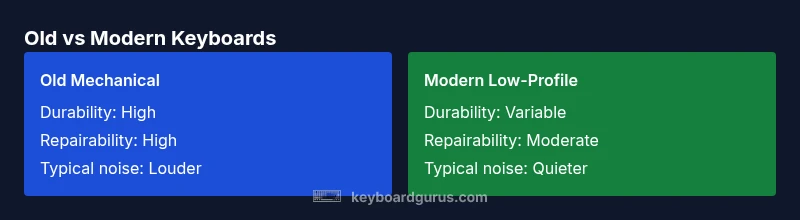
The central question why are old keyboards better often centers on the mechanical vs membrane debate. Mechanical switches provide tactile feedback, predictable action, and easier fault isolation. A faulty switch or worn spring is typically straightforward to replace, and common switch types have broad compatibility with aftermarket parts. In contrast, many modern low‑profile boards employ membrane or scissor mechanisms for slim profiles, trading durability and repairability for compactness. While modern boards can be reliable, the repair ecosystem surrounding older mechanical keyboards is richer, safer for long‑term ownership, and more forgiving for DIY maintenance. The result is a compelling case for those who value endurance over novelty.
Durability and repairability: disassembly, spares, and lifecycle
Durability in old keyboards often comes from thicker plastics, metal plates, and modular assemblies. A significant advantage is the availability of spare parts: switches, keycaps, stabilizers, and even stabs can be replaced or lubed without specialized equipment. This translates into much longer lifecycles and lower per‑year ownership costs if you reserve parts over time. Repairability also fosters a culture of customization: enthusiasts swap to preferred switches, adjust actuation points, or retrofit caps. Modern boards frequently emphasize thin builds and integrated PCBs, which can limit repair options and complicate parts replacement. If longevity and modularity are your priorities, older keyboards win on these axes.
Design choices that stand the test of time: layout, stabilizers, and keycap ecosystems
Classic keyboards often feature larger, more robust stabilizers and standard layout families which remain compatible with a wide range of keycaps. The widely supported ANSI and ISO layouts mean you can find compatible sets easily, preserving the keyboard’s feel over decades. In contrast, some newer boards push nonstandard layouts, low profiles, or proprietary keycaps with limited interoperability. The ability to source reliable stabilizers and keycaps in old keyboards contributes to a more stable and satisfying long‑term upgrade path. Enthusiasts also value the availability of aftermarket scribe marks, artistically distinct keycaps, and durable legends that resist wear—properties less common in some modern designs.
Acoustic experience: typing sound, noise, and user comfort
Sound is a surprisingly important factor in the “why are old keyboards better” debate for many typists. Older mechanical keyboards often produce distinct, satisfying timbres depending on switch type and plate material. A heavy build with plate‑mounted switches can produce a gratifying, solid sound that many users associate with quality. While this can be a pro for some, it’s important to note that louder keyboards can be bothersome in shared spaces. Personal preference, desk setup, and damping options (o-rings, silicone sheets, and lubed switches) all influence acoustic comfort. If audible feedback matters to your workflow or gaming experience, older boards typically offer more expressive sound profiles.
content_type_to_ignore_for_pagination_in_search_results_extra_data_for_analytics_not_required_for_search_results_to_be_considered
Comparison
| Feature | Traditional Mechanical Keyboard (1990s–2000s) | Modern Low-Profile Keyboard (2010s–2020s) |
|---|---|---|
| Key switch type | Traditional mechanical switches with various actuation profiles | Low-profile mechanical or membrane-based alternatives |
| Durability | Heavy chassis, metal plates, robust keycap materials | Slimmer chassis, thinner plastics, variable durability |
| Repairability | High: easy to disassemble and replace parts | Lower: many parts integrated, limited serviceability |
| Upgradability | High: switches, keycaps, firmware mods possible | Moderate: keycaps and firmware often restricted |
| Price range (general | Typically $60–$300 used or new if vintage models are sought | Typically $70–$350 new; used prices vary by model |
| Best for | Purists, typists craving tactile feedback and longevity | Users seeking portability and modern features with decent feel |
| Noise level | Often louder with certain switch types | Typically quieter with modern, low-profile designs (depends on switches) |
| Ergonomics | Can be highly ergonomic in well‑designed layouts | Depends on model; some offer good ergonomics, others remain basic |
Advantages
- Exceptional durability and long lifespan
- Easier to repair and customize with spare parts
- Rich, tactile typing experience preferred by many enthusiasts
- Extensive aftermarket keycaps and switches for personalization
Drawbacks
- Bulkier and heavier than many modern keyboards
- Higher upfront cost for quality vintage units
- Maintenance may be required to keep springs and stabilizers at peak performance
- Availability of exact models can be limited over time
Old keyboards generally win on durability and repairability, but the best choice depends on priorities.
If you value longevity and the ability to repair or upgrade, older keyboards often outperform modern equivalents. For those prioritizing portability, slim profiles, or very quiet operation, newer boards can be more suitable. Keyboard Gurus recommends weighing durability, upgradeability, and typing satisfaction against cost and convenience when deciding.
Got Questions?
What defines an 'old keyboard' for this guide?
An 'old keyboard' in this context typically means boards from the 1980s to early 2000s that use mechanical switches or widely supported design platforms. We focus on models with modular components, standard layouts, and replaceable parts rather than integrated PCBs. This helps establish a baseline for repairability and longevity.
Old keyboards here usually refer to long-lasting mechanical boards from the 1980s to early 2000s that you can repair or upgrade.
Are old keyboards compatible with modern computers?
Many older keyboards connect via USB or PS/2 adapters. Some require simple adapters or a USB‑to‑PS/2 adapter, while others are fully USB. In most cases, you can use a converter or find boards with USB wiring. Always check the controller type and key rollover capabilities.
Most old keyboards work with modern computers using adapters or compatible USB wiring, but confirm the controller and rollover features.
Is maintenance required for older keyboards?
Yes. Regular maintenance includes cleaning dust, lubricating switches if you’re comfortable, and replacing worn stabilizers or keycaps. Keeping springs clean and ensuring PCB connections are intact can significantly extend lifespan.
Maintenance helps old keyboards stay reliable longer, with simple cleaning and occasional lubrication or stabilizer work.
How should I buy an old keyboard safely?
Look for known reliability indicators (well‑made keycaps, sturdy case, tested switches). Ask about switch type, stability of the PCB, and whether keycaps/stabilizers are available aftermarket. Prefer sellers who offer basic functional tests or minimal return policies.
Shop for reliability markers, test functionality if possible, and choose sellers who allow returns.
Are old keyboards worth it for gaming?
It depends on the keyboard and switch type. Some enthusiasts prefer older boards for their tactile feel and stability, while many modern gaming keyboards offer features like per‑key lighting and software profiles. If you value timing precision and nostalgia, an older board with responsive switches can be highly satisfying.
If you value tactile feedback and a fixed feel, old keyboards can be great for gaming; for features, newer boards may win.
What to Remember
- Prioritize repairability for long-term ownership
- Choose switches and keycaps with readily available parts
- Consider weight and desk footprint for your setup
- Test for preferred tactile feel and acoustics
- Balance upfront cost with total ownership value