What's the Difference Between a Gaming Keyboard and a Normal Keyboard
Explore what's the difference between a gaming keyboard and a normal keyboard, covering switches, latency, programmability, and pricing, with actionable guidance from Keyboard Gurus.


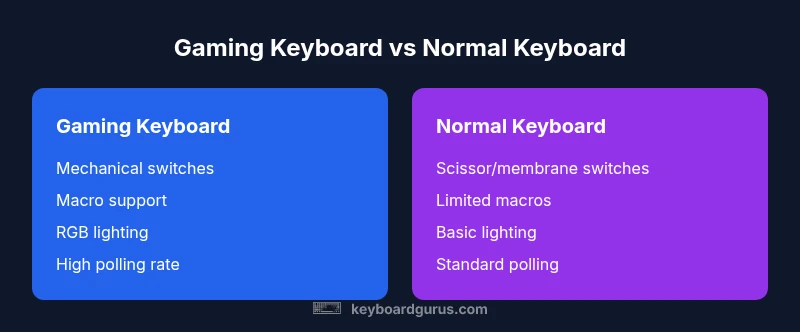
What's the difference between a gaming keyboard and a normal keyboard? In short, gaming keyboards emphasize speed, reliability, and customization, while normal keyboards prioritize comfort and affordability. Key gaps include switch types (mechanical vs membrane), key rollover and anti-ghosting, programmable macros, polling rate and latency, and lighting. Your choice should align with how you intend to use the keyboard—gaming, programming, or daily typing.
What's the core distinction between gaming keyboards and standard keyboards?
The gaming keyboard market is built around performance and customization, whereas standard keyboards emphasize comfort, reliability, and cost efficiency. The most impactful differences lie in switch choice, programmability, latency, and how you interact with the device during intense tasks. According to Keyboard Gurus, if your primary activity is competitive gaming or long marathon sessions, a gaming keyboard offers tangible benefits in response and control; for students and professionals who type a lot, a normal keyboard often suffices and reduces total cost of ownership.
Key switches and tactile feedback
Switch choice is the most visible difference between gaming and normal keyboards. Gaming keyboards typically feature mechanical switches with various actuation forces and tactile profiles, enabling fast, consistent keystrokes and audible feedback. Normal keyboards are more likely to use membrane or scissor mechanisms, which can feel softer and quieter but sacrifice some precision and repeatability. Beyond feel, mechanical switches can vary in lifespan ratings and key travel, affecting long-term reliability during high-intensity gaming or coding sessions. Keyboard Gurus emphasizes testing different switch types to find the right balance between speed and comfort for your use case.
Build quality and durability
Gaming keyboards are often built with reinforced frames, detachable cables, and hot-swappable switches in higher-end models, aiming to withstand aggressive key presses common in gaming. Normal keyboards generally prioritize a slim profile and cost efficiency, which can mean lighter frames and less durability under heavy use. The durability gap can influence long-term cost of ownership if you log many hours weekly or transport your setup to LAN events or campus labs. Consider weight, hinge design, key cap material, and warranty length when evaluating longevity.
Lag, polling rate, and input latency
One of the core technical claims for gaming keyboards is reduced input latency. Gaming models commonly advertise higher polling rates (up to 1000 Hz) and optimized firmware to minimize delay between keystroke and on-screen action. Normal keyboards usually offer standard latency tied to their polling rate (125–500 Hz). While a higher polling rate can improve responsiveness, real-world benefits depend on your system, USB controller, and the game you play. If timing is critical in your practice or competition, a gaming keyboard can provide a measurable edge.
Key layout, programmability and macro support
Gaming keyboards frequently include extensive macro capabilities, per-key lighting, and on-device memory to store profiles. This can be invaluable for players who execute complex sequences or if you want personal shortcuts for productivity tasks. Normal keyboards may offer basic or no programmability, and macro support is often limited to software-level configurations. When evaluating, check for on-board memory (for portability) and software stability, as some ecosystems can feel bloated or flaky across updates.
Backlighting and aesthetics
Backlighting and RGB customization are signature features of many gaming keyboards, serving both practical and aesthetic roles. Per-key lighting improves visibility in dim environments and aids key location during late-night sessions. Normal keyboards may offer single-color backlighting or none at all, with fewer customization options. If ambience matters for your setup, a gaming keyboard provides greater creative control, though it can also draw more power and be a distraction in quiet work environments.
Typing comfort and ergonomics
Typing comfort is not exclusive to any category, but gaming keyboards often come with features aimed at comfort during long sessions: adjustable feet, padded wrist rests, and key layouts designed for rapid keystrokes. Normal keyboards tend to focus on a slim, portable, and quiet typing experience, which can be advantageous for shared workspaces. If you type for extended periods, prioritize low-profile key caps, even spacing, and a keyboard angle that reduces strain. The right choice depends on your balance of comfort and practicality.
Price ranges and total cost of ownership
Gaming keyboards span a wider price range, from budget-friendly options to premium mechanical builds with advanced software. Normal keyboards are typically more affordable, with basic models offering reliable typing at a lower upfront cost. When considering total cost of ownership, include not just sticker price but software subscriptions, replacement keycaps, and potential warranty service. Keyboard Gurus analysis shows that the value proposition improves with meaningful features aligned to your primary use case.
How to choose your use case: a practical decision framework
Start by clarifying your primary activity: high-speed gaming, programming, writing, or a mix. If you prioritize speed, macros, and lighting for competitive play, a gaming keyboard makes sense. If you spend long hours typing in documents or code, a normal keyboard with a comfortable switch type or a quiet design may be more cost-effective. The Keyboard Gurus team recommends a hands-on test: try at least two switch types, evaluate key rollover in real-time tasks, and assess software stability across updates to ensure a smooth workflow.
Comparison
| Feature | Gaming keyboard | Normal keyboard |
|---|---|---|
| Switch type | Mechanical switches with various actuation profiles | Membrane or scissor switches |
| Key rollover / anti-ghosting | High NKRO / multiple-key rollover common | Limited or standard rollover |
| Programmability / macros | Extensive per-key programming and macro support | Limited or none |
| Latency / polling rate | Low latency with high polling rate (up to 1000 Hz) | Standard latency (125–500 Hz) |
| Backlighting / RGB | Full per-key RGB and effects | Basic backlighting or none |
| Durability | Often designed for high-keypress durability | Office-grade durability |
| Price range | Moderate to high depending on switches/features | Low to moderate |
| Best for | Gaming, esports, customization | Typing, general productivity, budget users |
Advantages
- Speed and responsiveness that help competitive play
- Extensive macro and profile support for complex workflows
- Vibrant aesthetics and per-key lighting for visibility
- Robust software ecosystems and community guides
- Strong resale value among enthusiasts
Drawbacks
- Higher upfront cost on many models
- Software suites can be bloated or unreliable
- Mechanical variants can be louder and heavier
- Bulkier designs may not suit compact desks
Gaming keyboards excel for speed and customization; normal keyboards are better for everyday typing and cost-conscious users.
Choose gaming keyboards if you value rapid input, macros, and lighting control. Choose normal keyboards if you prioritize comfort, quiet operation, and a lower upfront investment.
Got Questions?
Is a gaming keyboard worth it for casual gaming and everyday typing?
For casual gaming and typing, a gaming keyboard can offer smoother feel and better macros, but the benefits may be marginal if you do not rely on rapid actions or complex sequences. A normal keyboard often provides similar typing comfort at a lower price.
Casual users may enjoy a gaming keyboard, but it's not essential. You can get solid typing and reasonable performance from a non-gaming keyboard at a lower cost.
Are mechanical gaming keyboards louder than normal keyboards?
Mechanical switches are generally louder than membrane keys, especially tactile and clicky variants. However, many quiet mechanical options exist, and dampening accessories can reduce noise. Consider your environment when choosing.
Yes, they can be louder, but you can choose quieter switches or dampeners if noise is a concern.
Do gaming keyboards require software to function?
Most gaming keyboards offer essential typing functionality without software. Software is often needed for macro programming, lighting customization, and profile management. Look for models with on-board memory if you want portability.
Most work without software, but for macros and lighting you might use software.
Can you use a gaming keyboard for office work?
Yes, gaming keyboards can be used for office tasks. If you value quieter keys and a slim profile, choose models with quieter switches and a compact layout. Portable or quiet options reduce distraction for coworkers.
Yes, you can. Pick quieter switches and a slimmer design for office use.
What should I look for on a budget gaming keyboard?
Prioritize durable mechanical switches, adequate key rollover, reliable build quality, and essential macro features. Avoid models with heavy software dependencies that complicate setup. Check warranty length for long-term peace of mind.
For budget picks, focus on durable switches and basic macros, and avoid heavy software.
How does latency impact competitive gaming?
Lower latency and higher polling rates can reduce input delay, which helps in precise timing. Real-world gains vary with your system and game, but competitive players often prefer high-end keyboards for a marginal edge.
Lower latency helps timing in serious play, though gains depend on your setup.
What to Remember
- Define your primary use to guide switch and macro needs
- Expect higher upfront costs with gaming keyboards
- Consider latency and polling rate for competitive play
- Evaluate software ecosystems and on-device memory
- Balance aesthetics with comfort and budget