Gaming Keyboard vs Regular Keyboard: An Objective Guide
Explore the core differences between gaming keyboard vs regular keyboard, from switches and macros to ergonomics and value. A data-driven, expert comparison to help you choose the right keyboard for gaming, study, or work.


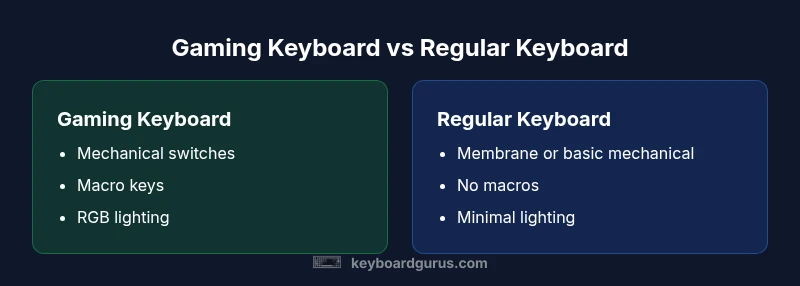
Gaming keyboards and regular keyboards differ in switches, features, and price. A gaming keyboard typically uses mechanical switches, per-key RGB lighting, and macro programming with onboard profiles, aiming for faster input and customization. Regular keyboards prioritize typing comfort, reliability, and lower cost, offering basic layouts with fewer software requirements. Choose based on your primary use and budget.
Context and scope: what this comparison covers
The debate between gaming keyboard vs regular keyboard arises from two distinct user personas: those who prioritize speed, customization, and visual flair for gaming, and those who need reliable, comfortable typing for work or study. This article analyzes both sides with a neutral lens, focusing on real-world implications rather than hype. Throughout, we anchor our discussion with practical criteria like switch type, key rollover, software needs, durability, and total cost of ownership. By understanding the core differences, keyboard enthusiasts can map personal priorities to specific features, ensuring the final choice aligns with how they actually type, game, and collaborate. The goal here is clarity, not brand or model gymnastics, so readers can assess the gaming keyboard vs regular keyboard decision with confidence.
What makes a gaming keyboard distinct
Gaming keyboards are built around speed, customization, and immediacy. A typical gaming keyboard features mechanical switches with varying actuation forces and travel distances, allowing players to feel and react to keystrokes quickly. They often include per-key RGB lighting for aesthetics and visibility in low-light setups, plus macro programming and onboard profiles that persist across devices. Software suites enable recording macros, remapping keys, and assigning complex commands to single keystrokes. In a gaming keyboard vs regular keyboard comparison, these elements are the practical differentiators that can translate into tangible in-game advantages or streamlined workflows for power users. However, the emphasis on features can come with trade-offs in price, complexity, and maintenance.
What makes a regular keyboard distinct
Regular keyboards tend to emphasize simplicity, reliability, and broad compatibility. They may rely on membrane switches or more straightforward mechanical options designed for everyday typing rather than peak gaming performance. The advantages are fewer software requirements, lower upfront cost, and a familiar typing experience that many users find comfortable for long sessions. In everyday tasks—typing documents, coding, or taking notes—the predictability and quiet operation of a regular keyboard can reduce fatigue and distraction. When pitted against gaming keyboards, the regular option shines in terms of straightforward usability, durability in basic models, and a cleaner software footprint.
Core technical differences: switches, rollovers, and latency considerations
Switch type is one of the most noticeable differences between a gaming keyboard vs regular keyboard. Gaming keyboards commonly use mechanical switches with various actuation forces, travel distances, and tactile profiles, which influence feedback and responsiveness. Key rollover and anti-ghosting determine whether multiple simultaneous presses are registered accurately—an important factor in fast, complex inputs. Latency, the time from press to recognition by the computer, is affected by polling rate, firmware optimization, and internal processing. While a high-end gaming keyboard can offer lower perceived latency, a well-engineered regular keyboard with responsive switches can satisfy many users. The practical takeaway is to weigh the perceived feedback and input consistency against cost and software overhead.
Backlighting, aesthetics, and software ecosystems
RGB lighting and per-key customization are signature features of many gaming keyboards. The software that powers these options often includes macro programming, onboard memory for profiles, and real-time lighting effects. In a gaming keyboard vs regular keyboard analysis, consider whether lighting enhances focus, reduces input errors, or simply achieves a desired ambiance. Regular keyboards may provide basic backlighting or none, with simpler configuration tools or none at all. For some users, the aesthetic signal matters—yet for others, a clean, distraction-free desk is more important. The key question is whether software features deliver real, measurable value for your workflow or gaming routine.
Typing feel, ergonomics, and long sessions
The feel of a keyboard profoundly affects endurance and comfort. Gaming keyboards often feature shorter actuation travel, quicker rebound, and sometimes sculpted keycaps to aid fast inputs. Regular keyboards can offer a more uniform typing surface with subdued acoustics, which matters in shared spaces or quiet environments. Ergonomics extend beyond the switch to include key spacing, board angle, wrist support, and perceived noise. When evaluating the gaming keyboard vs regular keyboard, prioritize a setup that minimizes fatigue during extended sessions and aligns with your preferred typing style, whether you crave tactile feedback or a low-noise experience.
Durability and maintenance: long-term ownership
Durability expectations differ by category. Mechanical gaming keyboards are designed for heavy use and easier switch replacement in select models, but they may require periodic cleaning and occasional lubrication or dust removal. Regular keyboards tend to have fewer moving parts and can be more straightforward to service, though the longevity of membrane switches varies by quality. Consider how you’ll maintain your keyboard over time, including keycap wear, dust ingress, and firmware updates. In the gaming keyboard vs regular keyboard landscape, durability should be matched to your usage patterns—intense gaming, frequent travel, or daily office work.
Price and value: upfront cost vs long-term value
Price is a critical decision factor. Gaming keyboards span a broad spectrum—from affordable options to premium builds with aluminum chassis, hot-swappable switches, and advanced software. Regular keyboards typically start at a lower baseline and may increase slowly with premium features, but often lack the breadth of customization found in gaming products. The total value depends on how much you value macro programming, switch life, lighting customization, and the anticipated lifespan of the device. In many cases, a well-chosen mid-range gaming keyboard can provide a balance of performance and cost, but for budget-conscious users, a solid regular keyboard may deliver the best long-term value.
Use-case match: gaming genres vs typing tasks
Different use cases demand different keyboards. Fast-paced action games benefit from accurate key timing and reliable input, making gaming keyboards attractive for competitive play. Writers and students, conversely, often prioritize comfort, quiet operation, and a familiar layout. The best choice depends on your primary activity: prioritize specialized switches and macros for gaming, or focus on consistent keystrokes and ergonomics for typing tasks. When in doubt, test for feel, noise level, and ergonomics in both categories before committing.
Debunking myths: do gaming keyboards improve performance?
A common belief is that a gaming keyboard alone guarantees higher scores or faster clicks. Reality is more nuanced: skill, practice, and strategy matter far more than hardware alone. Some features—such as dedicated macro keys—can provide an edge in certain gaming contexts, but they don’t substitute for fundamentals like aim, game sense, and decision-making. Likewise, software-heavy keyboards can introduce complexity; the most effective setups balance performance gains with reliability and ease of use. Use a balanced approach when evaluating the impact of switching to a gaming keyboard vs regular keyboard.
How to evaluate options: a practical decision framework
Begin by listing your top priorities: performance, typing comfort, portability, or budget. Map those priorities to concrete features: switch type, key rollover, backlighting, macros, and software requirements. Where possible, test models in person or rely on reputable return policies to iterate. Finally, consider total cost of ownership: replacement cycles, resale potential, and the likelihood of upgrades. A disciplined scoring approach helps avoid feature overload and aligns the final choice with real needs in the gaming keyboard vs regular keyboard spectrum.
Comparison
| Feature | Gaming Keyboard | Regular Keyboard |
|---|---|---|
| Switch type & feel | Mechanical with varied actuation and tactile profiles | Membrane or basic mechanical with standard feel |
| Key rollover / anti-ghosting | Excellent in many models (N-key rollover common) | Basic or limited ghosting protection |
| Backlighting & per-key customization | Per-key RGB, profiles, reactive effects | Basic backlighting or none |
| Macro keys / onboard profiles | Macro programming with onboard storage | Little to no macro support |
| Software ecosystem | Robust, feature-rich software for macros and lighting | Minimal software or none; plug-and-play |
| Durability & maintenance | High durability; some maintenance for switches and caps | Simpler construction; maintenance varies by model |
| Price range | Wide range from affordable to premium | Typically lower upfront cost |
| Best for | Competitive gaming, streaming, and enthusiasts | General typing, office work, and casual use |
Advantages
- Clear typist feedback and fast input for gaming
- Extensive customization with macros and RGB
- Durable construction in many mechanical models
- Onboard profiles reduce software dependence in some cases
- Broad model availability across budgets
Drawbacks
- Higher upfront cost than many regular keyboards
- Learning curve for macro setup and software
- Maintenance for mechanical switches (dust, lubrication)
- Software bloat and dependence can affect reliability
Gaming keyboards win on speed and customization for gamers; regular keyboards win on simplicity and typing comfort.
If you prioritize gaming performance and programmable features, a gaming keyboard is the better pick. If you mainly type and want a straightforward experience, a regular keyboard remains a solid choice with reliable performance and lower complexity.
Got Questions?
What is the main difference between gaming keyboards and regular keyboards?
The main difference lies in features and intended use: gaming keyboards emphasize speed, macros, and lighting, while regular keyboards prioritize comfort, reliability, and simplicity.
The main difference is features and use: gaming keyboards focus on speed and macros, while regular keyboards focus on comfort and reliability.
Do gaming keyboards improve typing speed?
Gaming keyboards can improve input speed in games due to switches and layout, but overall typing speed depends more on technique and practice. The keyboard is part of the setup, not the sole determinant.
They can help with speed in games, but typing speed mainly comes from technique and practice.
Are mechanical gaming keyboards worth it for casual gamers?
If you value tactile feedback, durability, and customization, they can be worthwhile. If budget is a constraint or you rarely use macros, a mid-range or budget option may suffice.
They can be worth it if you value feedback and durability, otherwise a budget option may be better.
Do gaming keyboards require software?
Many gaming keyboards use software for macros and profiles, but some models store settings onboard. Look for models with or without software depending on your preference for simplicity.
Many require software for macros, though some store profiles onboard.
What should I consider when choosing between gaming keyboard and regular keyboard?
Consider switch type, key rollover, macros, lighting, software needs, portability, and total cost of ownership. Align these with your gaming and typing needs.
Think about switches, macros, lighting, software, and cost to pick what fits your needs.
Is compact size always better for gaming and typing?
Compact layouts save desk space and may improve reach, but they can sacrifice dedicated function keys. Balance space, ergonomics, and your most-used keys.
Compact layouts save space but can reduce access to keys you rely on.
How does latency differ between gaming and regular keyboards?
Gaming keyboards can have lower perceived latency due to optimized firmware and higher polling rates, but a well-made regular keyboard can feel equally responsive in everyday tasks.
Gaming keyboards can feel quicker, but a good regular keyboard is often plenty responsive.
What to Remember
- Evaluate your primary use before buying
- Test switch feel and comfort for long sessions
- Consider hardware vs software trade-offs
- Balance price with expected lifespan
- Don't overlook ergonomics in favor of flashy features