Difference Between English Keyboard and US Keyboard: A Practical Guide
A thorough, analytical comparison of UK English and US keyboard layouts, covering layout standards, key placements, symbol mapping, and practical tips for students, gamers, and professionals. Learn how to switch, remap, and choose the right layout for your workflow.


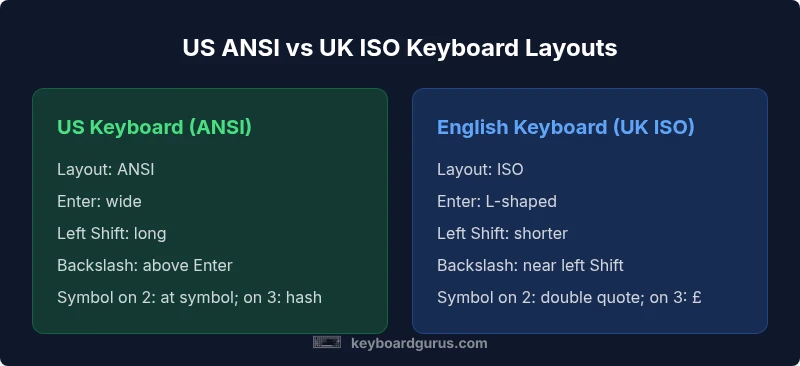
The difference between english keyboard and us keyboard boils down to layout standards, key placement, and symbol mapping. The US layout (ANSI) uses a longer left Shift and a wide Enter, while the English keyboard (UK ISO) adds an extra key near Z, shortens the left Shift, and places £ on the 3 key. These shifts affect shortcuts and punctuation usage for typing, coding, and gaming.
The key question: what does the difference between english keyboard and us keyboard mean in practice?
When people ask about the difference between english keyboard and us keyboard, they are typically comparing the UK English layout with the US layout. The practical impact goes beyond aesthetics: it shapes how you type symbols, navigate shortcuts, and enter currency signs in everyday work, study, and play. According to Keyboard Gurus, the most noticeable effects come from how the layouts define standard key positions, which in turn influence speed, accuracy, and muscle memory. For students and professionals who switch between documents produced in the US and the UK, familiarity with both layouts reduces friction and minimizes errors. For gamers and coders, the layout difference can affect hotkeys and symbol access, especially under time pressure.
This article uses the term difference between english keyboard and us keyboard to describe UK ISO versus US ANSI layouts, and it provides a practical framework for deciding which layout to adopt based on your primary tasks and software needs.
Core distinction: ISO vs ANSI in one sentence
The primary difference between the English keyboard and the US keyboard boils down to ISO vs ANSI standards: ISO adds a key, shortens the left Shift, and repositions a few symbols, while ANSI maximizes a single-row Enter and keeps the left Shift longer. Both systems exist to accommodate regional typing habits, but their effects appear most clearly in key placement and shortcut behavior.
Layout standards, origins, and the practical consequences
The US keyboard uses the ANSI layout, designed for simplicity and broad software compatibility. The English keyboard uses the ISO layout, common in Europe and the UK, which introduces an extra key near the left side and a differently shaped Enter key. These structural differences alter how you reach common symbols, how you perform shortcut sequences, and how you perceive visual labeling on physical keycaps. In practical terms, users who type mostly in English or in UK documents will benefit from UK ISO's currency and punctuation placements, while people who rely on global software ecosystems will feel more at home with US ANSI.
Real-world effects for writing, coding, and gaming
For writers, editors, and students dealing with UK-produced material, the £ symbol on the UK layout reduces the need to rely on AltGr or complex shortcuts. For developers, the placement of symbols like @,
, and others can change the frequency and cadence of keystrokes. Gamers may notice how certain keycaps align with in-game hotkeys. The key takeaway is that the difference between english keyboard and us keyboard is not only about which characters appear on which key, but also about the ease of achieving rapid, reliable input in your preferred software environment.
The practical impact on daily typing and workflow
In everyday tasks, UK ISO keyboards typically demand a different reach to access common punctuation compared to US ANSI keyboards. If you frequently switch between documents created in the UK and the US, you’ll benefit from muscle memory that can gracefully adapt to both conventions. Keyboard Gurus stresses that the best approach is to identify the primary writing language and software ecosystem you use, then align your physical keyboard and OS input method accordingly. The goal is to minimize finger travel, reduce short-term errors, and maintain consistent typing rhythm across contexts.
Comparison
| Feature | US Keyboard (ANSI) | English Keyboard (UK ISO) |
|---|---|---|
| Layout standard | ANSI (US) | ISO (UK) |
| Left Shift size | Long | Shorter |
| Enter key shape | Rectangular (ANSI) | L-shaped/ISO |
| Backslash key position | Above Enter | Near Left Shift/ISO region |
| Symbol key mappings | US: at symbol on 2; hash on 3 | UK: double quote on 2; pound on 3 |
| Currency symbol | No dedicated £ key | Dedicated £ on 3 |
| Dead keys and accents | Less common dead keys by default | More common dead key variants in some ISO layouts |
| Shortcut compatibility | US-centric shortcuts are widely supported | UK shortcuts may differ slightly for certain key presses |
Advantages
- Widespread compatibility with US software and games
- UK layout provides £ symbol directly on the key, improving local typing
- ISO layout can reduce dead-key friction for some Western European languages
- Clear mapping for international keyboards in many OS environments
Drawbacks
- Short-term confusion when switching between layouts or documents
- Some shortcuts differ, requiring retraining and muscle memory adjustments
- Labeling on physical keycaps may not reflect the active layout immediately
- Third-party software may assume US keyboard conventions for shortcuts
US ANSI is the practical default for most international software and gaming, while UK ISO is advantageous for UK-centric work and currency input.
Choose ANSI if your workflow prioritizes broad software compatibility and standard shortcuts. Choose ISO if you frequently work with UK documents and currency inputs, or if your OS environment favors European keyboard conventions.
Got Questions?
What is the main difference between US ANSI and UK ISO keyboard layouts?
The main difference is ISO versus ANSI: UK ISO adds an extra key and shortens the left Shift, while US ANSI uses a longer left Shift and a different Enter shape. This affects symbol placement and shortcuts. Keyboard Gurus explains that the impact depends on your use case.
The UK ISO layout adds an extra key and changes the left Shift and Enter keys, while the US ANSI layout uses a longer Shift and a different Enter. Your tasks determine which matters most.
Will this affect gaming or coding?
Yes. Shortcuts and key access can differ between layouts, potentially affecting hotkeys and strap-in sequences. Gamers and coders may benefit from practicing with their chosen layout to minimize mis-presses during fast actions.
Yes, some shortcuts differ between layouts, so practice helps reduce mis-presses during games or coding sessions.
Can I switch layouts on my computer easily?
Most modern operating systems support quick switching between US and UK layouts. You can add both input sources and toggle with a keyboard shortcut. This flexibility helps when you work with documents from different regions.
You can usually add both layouts in your OS settings and switch with a shortcut.
Which layout is better for programming?
Many programmers prefer US ANSI for consistency with most coding environments and sample code conventions. That said, if your project or team uses UK documents regularly, ISO may reduce friction for currency symbols and language-specific punctuation.
Most programmers lean toward US ANSI for consistency, but UK ISO can be advantageous in UK-focused work.
How do I type the currency symbol on a US keyboard?
On US keyboards, the currency symbol is typically a separate keyboard entry depending on locale. On UK layouts, the £ symbol is directly available on the 3 key. If you use US, you may need easier shortcuts or AltGr combos depending on your OS.
On a US keyboard, you might use a shortcut or a compose key depending on your OS to access the pound symbol.
Do Mac keyboards differ from Windows layouts?
Mac keyboards use the same physical layouts, but shortcuts and some symbol placements can differ due to macOS conventions. The choice between UK ISO and US ANSI applies to all platforms; you may adapt via input sources and remapping.
Mac and Windows share the same layouts, but shortcuts can feel different on macOS.
Is there a benefit to using a bilingual or multilingual layout?
Yes, bilingual layouts can reduce context switching for multilingual writers, especially when the UK is a primary locale. However, this often requires more frequent remapping and careful management of language-specific shortcuts.
Multilingual layouts help when you type in several languages, but they may require more setup.
Should I remap keys if I switch layouts often?
Remapping can smooth the transition, especially for frequently used shortcuts. Start with a small, critical set of keys and expand as you grow comfortable with the new layout, ensuring consistent muscle memory.
Yes, remapping can help when you switch layouts often; start with essential shortcuts.
What to Remember
- Identify your primary language and software ecosystem before choosing a layout
- US ANSI favors universal software shortcuts; UK ISO favors currency and regional punctuation
- Learn how to switch layouts efficiently in your OS
- Consider remapping if you frequently switch contexts