European keyboard vs US: A practical comparison
A thorough, analytical comparison of European ISO and US ANSI keyboard layouts, covering layout anatomy, typing experience, OS compatibility, and buying guidance for students, gamers, and professionals.


US ANSI layouts are broadly compatible with software and keyboards worldwide, making everyday typing and shortcut habits straightforward for English users. European ISO layouts excel for multilingual typing, additional keys, and dedicated dead keys, which ease accented characters. For most mixed use, the US layout wins on availability and simplicity, while the European layout is ideal when language diversity and ISO features matter more than compactness.
european keyboard vs us: key differences
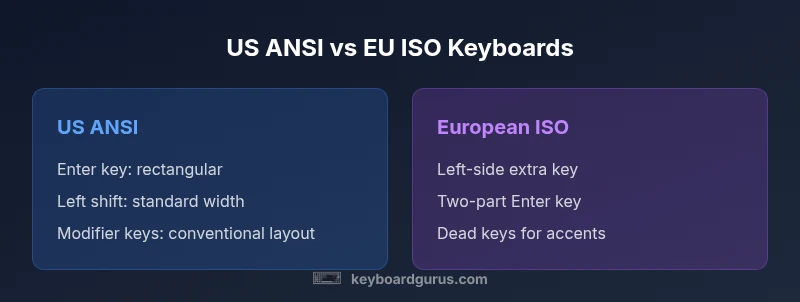
The European keyboard and the US keyboard place language and regional needs at the center of their design decisions. The US ANSI layout emphasizes a compact left-hand cluster and a straight, rectangular Enter key, which keeps the keyboard footprint predictable and the home row easy to reach for many programming tasks. European ISO layouts, by contrast, add an extra key near the left side and often place the Enter key in a two-part shape. This arrangement supports multilingual input and makes room for accented characters used in many European languages. According to Keyboard Gurus, these structural differences ripple through daily typing: you’ll notice different finger travel, varied shortcut locations, and distinct habits when switching between layouts. For professionals who work across languages, ISO can reduce the need to remap on the fly; for pure-English workflows and rapid shortcut access, ANSI often feels faster and more forgiving for gamers and programmers. The key takeaway is that layout choice is not only about characters; it’s about how you interact with your keyboard on a daily basis.
Layout anatomy: ISO vs ANSI
Layout anatomy matters because the physical differences affect how you reach keys and how shortcuts land. ANSI keyboards standardize the left-hand modifiers in a compact block and place the Enter key horizontally, which is familiar to many programmers and gamers. ISO keyboards add a dedicated key near the left side, often expanding the left shift area and changing the angle of the Enter key. Keyboard Gurus analysis shows that this rearrangement improves non-English typing flow in Europe but can disrupt muscle memory for users who rely on specific shortcut sequences. When you pick a keyboard, assess the overall footprint, how comfortable the left-hand row feels, and whether your typical shortcuts map cleanly to the new arrangement.
How characters are accessed: dead keys and AltGr
Accessing non-ASCII characters is one of the clearest practical differences between layouts. European ISO keyboards commonly use AltGr or dead keys to produce accented letters and currency symbols, reducing the need to switch input methods. US layouts rely on standard ASCII input plus simpler dead-key behavior via composition shortcuts in software. If you frequently type languages that use diacritics, AltGr-enabled layouts can save keystrokes and simplify typing. However, this can introduce a learning curve for users trained on US keyboard shortcuts. Keyboard Gurus suggests trying a temporary ISO layout in OS settings or selecting a keyboard with a removable keycap system to test comfort before full commitment.
Typing experience and key sizes
Perceived typing comfort hinges on key spacing, keycap size, and the vertical alignment of the Enter and Shift keys. European ISO keyboards tend to alter the left shift and Enter shapes, which can affect accuracy for some users during long sessions. US ANSI keyboards favor a uniform, predictable home-row spacing that many users learn quickly. If you type for long hours, consider a layout that minimizes finger travel and offers stable stabilizers for the most-used keys. Keyboard Gurus emphasizes testing both layouts in practice sessions to evaluate whether your typing rhythm remains fluent across tasks such as coding, document editing, and gaming.
OS mappings and software compatibility
Operating systems interpret hardware layouts, but the default keyboard mapping can diverge from physical key positions. Windows or macOS provide locale options to switch input methods; however, some shortcuts may map differently on ISO versus ANSI layouts. For programmers who rely on consistent shortcuts, the US layout tends to work predictably across development environments. European users may experience occasional mismatches with global software that assumes US key codes. The Keyboard Gurus Team notes that modern software generally supports both layouts, but your personal efficiency will improve after configuring a preferred layout and learning its calibration in your OS.
Hardware and keycap ecosystem
Keycap availability and mechanical keyboard compatibility differ between the two layouts. US layouts are widely supported with a vast array of aftermarket keycaps and ready-made builds. European layouts, while very common in Europe, may require vendors that explicitly offer ISO keycaps, and some keyboards ship with mixed key sizes. If you frequently switch between layouts or share a keyboard across environments, consider a hot-swappable board with programmable layers or a keycap set that includes both ISO and ANSI caps. The affordability of keycaps can influence how readily you adopt a new layout, especially for hobbyist builds.
Costs, availability, and regional considerations
Price and availability are practical determinants. In regions where ISO keyboards dominate, prices may reflect local manufacturing and supply chains, while ANSI-focused products often dominate North American markets. Import duties, shipping times, and warranty coverage can affect the total cost of ownership when buying a keyboard from overseas. When planning a purchase, weigh upfront costs against long-term comfort and typing efficiency, particularly if your daily work involves multilingual content or frequent cross-border collaboration. Keyboard Gurus encourages buyers to consider long-term use and potential keycap upgrades as part of the total cost of ownership.
When to choose US layout
For users whose work primarily involves English language content, standard programming tasks, and software shortcuts that rely on a familiar key map, US ANSI is often the simplest path. The layout tends to be easier to learn quickly and widely supported by peripherals and software tutorials. If you frequently use keyboard shortcuts native to English-language workflows, ANSI can minimize confusion and friction during collaboration across teams and projects. In mixed settings, ANSI’s broad compatibility reduces the friction of cross-platform usage.
When to choose European layout
Choose European ISO if multilingual input, accented characters, and localized software environments are central to your workflow. ISO layouts provide structural advantages for languages that rely on diacritics and non-English punctuation, and many European keyboards include dedicated keys that speed multilingual typing. If your job involves drafting in multiple languages, international customer support, or content creation across European markets, ISO is often the more natural fit. Consider the potential need for keycap changes or remapping if your primary tools assume US keyboard conventions.
Adapting to a new layout: tips and tricks
If you decide to switch layouts, plan a phased transition. Label keycaps or use a transparent overlay to avoid confusion during the transition. Create a personal cheat sheet of common shortcuts in the new layout, and re-train muscle memory with short practice sessions. Many users find it helps to use software remapping for a while while keeping the physical keyboard unchanged. Keyboard Gurus also recommends configuring your IDE and editor keymaps to preserve familiar shortcuts across layouts, easing the shift from one setup to another.
Real-world scenarios: gamers, students, professionals
Gamers often prioritize quick key access and consistent reaction time; ANSI’s compact footprint can be advantageous for crowded layouts and fast toggling. Students, especially those studying languages, benefit from ISO’s multilingual capabilities and dedicated punctuation keys. Professionals who collaborate across regions may require reliable cross-border compatibility and predictable shortcuts; here, the decision hinges on the dominant language of work and the primary software ecosystem. A practical approach is to align your keyboard choice with your most frequent tasks and test performance in representative workloads.
How to buy: quick decision checklist
Before purchasing, verify layout availability, keycap compatibility, and OS support. Check whether you need ISO-specific keys for your language needs, and consider whether a dual-layer or programmable keyboard could offer the best of both worlds. Finally, ensure a return policy that supports trying a layout in real-world tasks, so you can switch if comfort or efficiency falters.
Comparison
| Feature | US/ANSI layout | European/ISO layout |
|---|---|---|
| Layout type | ANSI (US) | ISO (EU) |
| Enter key shape | Rectangular Enter | Two-part Enter / thicker edge near left |
| Left-hand keys | Standard width left shift | Extended left shift with additional key |
| Extra keys near left side | None | Left-side key (AltGr or dead keys) |
| Character access | ASCII-focused input | AltGr and dead keys for accents |
| Language support | Primarily English | Multilingual with accents |
| Keycap availability | Widely available | ISO-capable, region-specific options |
| Software compatibility | Broad, standard shortcuts | Potential locale-related mappings |
Advantages
- Broad software and hardware compatibility across regions
- Simplified keycap sourcing for US layouts
- Efficient for English-dominated programming and gaming
- Well-supported by mainstream textbooks and tutorials
Drawbacks
- Less built-in support for non-English languages without extra dead keys
- ISO layouts add keys that can disrupt muscle memory for some users
- Remapping may be necessary when switching layouts for frequent tasks
US ANSI generally suits broad, English-centric workflows; ISO shines when multilingual input is essential
If your work is English-heavy and you need broad compatibility, ANSI is the safer default. If you routinely type in multiple languages or use diacritics, ISO offers real advantages, especially with AltGr and dead keys.
Got Questions?
What are the main physical differences between US ANSI and European ISO layouts?
The US ANSI layout has a compact left-hand cluster and a rectangular Enter key. European ISO adds a left-side key and a two-part Enter, which affects the left Shift and overall footprint. These changes influence typing rhythm and shortcut location.
US ANSI keeps things compact, while European ISO adds an extra key and a two-part Enter, which changes how your fingers land on keys.
Can I use a European layout on a US keyboard without buying a new keycap set?
Yes, you can physically use a European layout by applying ISO keycaps or using an overlay. However, the keyboard’s actual switch positions may not match the labels, so software remapping or keycap sets are often needed for accurate labeling.
You can try ISO keycaps or overlays, but you may also remap keys to avoid confusion.
Is one layout better for programming?
Programming benefits from predictable key placements and consistent shortcuts. US ANSI tends to be easier for many programmers due to its compact Enter and standardized modifiers, but ISO can be advantageous if you work with multilingual code or non-English comments.
If you code mostly in English, ANSI is usually simpler; if your projects include many languages, ISO may help.
Will OS language settings automatically adjust key mappings?
OS language settings can switch input methods, but physical key positions still matter. You may need to adjust keyboard layout preferences, shortcuts, or use a keyboard with programmable layers to keep shortcuts consistent.
OS can switch input methods, but you’ll often want to map shortcuts to your layout.
How do I switch between layouts on Windows and macOS?
Both Windows and macOS support adding multiple keyboard layouts. You can switch via a menu or keyboard shortcut. For a smooth transition, configure editors and toolchains to respect the active layout and consider labeling or remapping keys for clarity.
Add the layouts you need in settings and switch with a shortcut; adjust toolchains to your layout.
Are there universal adapters for keyboards that support both layouts?
No universal hardware adapter exists to perfectly convert layouts across all software. You can use dual-layout keyboards, programmable layers, or physical keycap swaps to emulate one layout while using another.
Dual-layout keyboards or programmable layers let you work with both layouts.
What to Remember
- Choose ANSI for universal compatibility and quick onboarding
- Opt for ISO when multilingual typing is a daily need
- Consider a keyboard with programmable layers to blend benefits
- Test both layouts in real tasks before committing