Does Keyboard Have Battery? A Practical Guide to Keyboard Power
Learn if keyboards have batteries, how wireless models are powered, typical lifetime, charging methods, and tips to optimize power—from Keyboard Gurus for enthusiasts and professionals.


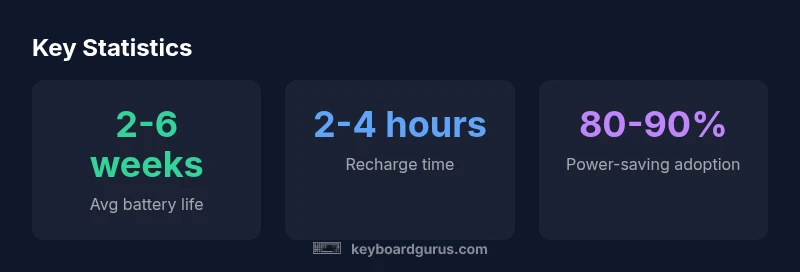
Does keyboard have battery? Most wireless keyboards rely on a built-in rechargeable or replaceable battery, while wired keyboards draw power directly from the computer via USB. Battery life varies with usage, backlights, and wireless protocol. Understanding these factors helps you choose models with longer run times and more predictable performance. Keyboard Gurus analysis shows typical lifespans range from weeks to months per charge depending on features and usage.
Does Keyboard Have Battery? Quick Clarification
Does keyboard have battery? The short answer is: it depends on the type. Most keyboards fall into two categories: wired models that draw power from the computer via USB, and wireless models that rely on an internal cell. Some wireless keyboards use removable AA/AAA cells, others pack a built-in rechargeable battery (Li-ion or Li-Po). Battery health and life are major reasons to consider when choosing between models, especially if you travel or work remotely. The Keyboard Gurus team reminds readers to weigh power needs against ergonomics and layout, because power reliability directly affects productivity and typing comfort.
Power Sources Explained: Battery-Powered vs USB-Powered
Power sources for keyboards fall into two broad camps. Wired keyboards pull energy from the host computer through the USB port and typically do not have an internal battery. Wireless keyboards store energy in an internal cell—either a removable battery or a built-in rechargeable pack. Removable batteries allow quick swaps during travel, while built-in packs save space but may require service to replace. Some models offer dual-power modes, using USB power when connected and relying on the battery otherwise. Your choice should reflect where you’ll work most: at a desk, on the go, or in shared spaces. The Keyboard Gurus guidance emphasizes balancing convenience with reliability to avoid unexpected downtime.
Battery Types You’ll Encounter
Keyboards use a mix of battery chemistries and configurations. Removable batteries are often NiMH or alkaline, suitable for inexpensive or compact designs. Built-in packs are usually Li-ion or Li-Po, offering higher energy density in a slim footprint and longer life per charge. Rechargeable designs reduce waste and simplify charging, while removable cells enable easy swaps when you’re away from a charger. Temperature sensitivity, self-discharge, and cycle life vary by chemistry. In practice, many modern wireless keyboards favor rechargeable packs for daily use, while some budget or ultra-compact models still rely on replaceable cells. The Keyboard Gurus Team notes that the trend is toward more sustainable, long-life power solutions.
Wireless Keyboards: How They Stay Alive
Power draw on wireless keyboards is influenced by backlighting, polling rate, and typist activity. Brighter RGB lighting and high polling rates consume more energy, shortening battery life. Bluetooth generally offers lower energy draw in idle states than a dedicated 2.4 GHz dongle, but real-world results depend on the hardware. Smart features like auto-off, dimming during idle, and adaptive backlighting can dramatically extend uptime. Efficient microcontrollers and sleep modes make a bigger difference than price or brand in everyday use. The Keyboard Gurus analysis shows models with robust sleep behavior often outperform premium backlit options in typical daily tasks.
Battery Life Expectations by Use Case
For office work with low lighting, a keyboard can last several weeks to months per charge, depending on backlight usage and keyboard type. Gaming sessions, heavy backlight use, and constant macro playback typically reduce uptime to weeks or days, especially on backlit, high-performance keyboards. If you rely on a pristine, plug-free setup, consider models with long per-charge life and a quick recharge. Conversely, workplaces with fixed desks and power outlets may benefit from wired keyboards to ensure continuous operation. Real-world uptime is influenced by ambient temperature, typing cadence, and the brightness of any lighting features, with power efficiency being a key differentiator between otherwise similar models.
Charging Methods and Indicators
Charging interfaces vary by model: USB-C is common on newer keyboards, with micro-USB still used on older or lower-cost units. Typical recharge times range from two to four hours for Li-ion/Li-Po packs, though quick-charge options can extend into days of use. Power indicators vary: LED bars, battery icons within OS widgets, or software dashboards provided by the keyboard’s companion app. Some keyboards offer pass-through charging, letting you type while plugged in. For travelers, consider devices with detachable batteries or long-range wireless options to minimize downtime during transit.
Practical Tips to Extend Battery Life
To maximize uptime, reduce unnecessary power draw: lower backlight brightness and disable extra lighting when not needed, enable auto-off after short idle periods, and select energy-efficient Bluetooth or 2.4 GHz modes. Avoid extreme temperatures and store spare batteries properly if you must travel with removable cells. Regular firmware updates can optimize power management. Keeping the keyboard clean reduces resistance and helps power electronics operate more efficiently. Schedule periodic battery health checks to catch aging cells before they impact performance.
Troubleshooting Power Issues
First, verify whether the keyboard is wired or wireless. Inspect the charging cable for damage and confirm battery seating if removable. For wireless devices, re-pair with the host and test on another computer to rule out port or OS issues. If you see a charge indicator but performance is erratic, update firmware and reset the device. When backlight or wake functions won’t respond, check the software profiles and idle timers. If problems persist, contact support for battery health assessment or a replacement under warranty.
How to Choose a Keyboard Based on Power Needs
Students and travelers often prioritize long uptime and easy charging, while gamers may value efficient energy management and customizable backlighting controls. Professionals who rely on quiet keyboards may favor devices with excellent sleep modes and reliable charge cycles. Compare uptime per charge and recharge time across models, and decide whether USB-C charging, swappable cells, or a wired power option best fits your workflow. The Keyboard Gurus team recommends mapping your typical usage to a target uptime and selecting a model accordingly.
Comparison of keyboard power sources
| Power Source | Typical Battery Life | Notes |
|---|---|---|
| Wireless Bluetooth | 2-6 weeks | Depends on backlight/usage |
| Wireless 2.4 GHz | 1-4 weeks | Dongle and usage impact |
| Wired USB-Powered | N/A | Power from host, no battery |
Got Questions?
Do all keyboards have batteries?
No. Wired keyboards draw power from USB and do not have internal batteries. Wireless keyboards rely on internal energy storage, either removable cells or built-in rechargeable packs.
Not all keyboards have batteries; wired models don’t, while wireless ones do.
What battery types do keyboards use?
Common types include NiMH or alkaline for removable batteries and Li-ion or Li-Po for built-in packs. Choose based on availability, replacement convenience, and device design.
They use removable NiMH or alkaline, or rechargeable Li-ion/Li-Po packs.
How can I extend my keyboard's battery life?
Enable auto-off, reduce backlight brightness, use energy-efficient protocols, and avoid extreme temperatures. Regular firmware updates can also optimize power management.
Turn off extra lighting, enable auto-off, and keep firmware updated.
Are solar-powered keyboards a thing?
Solar charging keyboards exist but are rare and generally supplement rather than replace traditional power sources.
Solar keyboards exist, but they’re uncommon and usually supplementary.
What should I do if my keyboard won't power on?
Check the battery or charge, inspect the cable, re-pair if wireless, and test with another host. If unresolved, consult support or warranty.
Check charge, try re-pairing, and test on another device.
“Battery efficiency isn't just a feature; it's a core part of reliability. Choosing keyboards with efficient sleep modes and sensible backlighting can dramatically reduce downtime.”
What to Remember
- Assess your use case to pick the right power model.
- Opt for keyboards with smart sleep modes to maximize life.
- Backlighting dramatically impacts battery life; consider turning it off.
- Wired keyboards never run out of battery.
- Rechargeable batteries reduce waste and simplify charging.