How Much Is a Computer Keyboard? A 2026 Price Guide
Explore a practical, data-driven guide to keyboard pricing in 2026. Learn how much computer keyboards cost, what drives price, and how to buy smart with Keyboard Gurus analysis.


Prices for computer keyboards span a wide range: basic membrane models start around $20, while premium mechanical and feature-rich keyboards can exceed $300. Most buyers pay roughly $50 to $150 for a solid mid-range keyboard with reliable switches, solid build, and essential features like wired connectivity or optional backlighting. Price hinges on switches, layout, build quality, and features; choose based on use case to maximize value.
Why Prices Vary
Prices for computer keyboards vary widely across brands, configurations, and regions. In part this reflects what you get for your money: the tactile feel of the switches, the quality of the case, and the feature set. According to Keyboard Gurus, price is driven by three core axes: switch type and actuation, keycap material and profile, and the level of customization or connectivity offered. Entry models rely on membrane switches with simple layouts and basic plastic cases; mid-range keyboards balance durability with more robust switches and better keycaps; premium builds push premium materials, hot-swappable switches, PBT keycaps, and advanced software. As a result, two keyboards that look similar can differ markedly in price due to the internals and finishes, not just the branding. In real-world shopping, a buyer can encounter dense catalogs where a small increase in switch quality or keycap material translates into a meaningful jump in price. Budget considerations, warranty terms, and after-sales service also shape the total cost of ownership over time.
What Determines the Cost
The cost of a keyboard is not just a single feature; it’s a bundle of choices that affect usability, durability, and delight. The most influential variable is the switch type and its feel: linear, tactile, and clicky switches each have different price points and lifespans. Build materials matter too: aluminum top plates or polycarbonate shells raise costs but improve rigidity and longevity. Keycap material—PBT vs ABS—and profiles impact tactile experience and wear resistance. Connectivity (wired vs wireless, Bluetooth latency) and software customization (macro programming, per-key lighting) add value for some users. Finally, design choices such as hot-swappability (the ability to swap switches without soldering) and switch life ratings influence price. Brand premium and warranty length can tilt the final tag as well. For many buyers, the sweet spot lies in a mid-range mechanical keyboard that balances feel, reliability, and features without splurging on bespoke details. Keyboard Gurus notes that real-world durability and after-sales support should factor into the total cost of ownership, not just the sticker price.
Price Ranges by Category
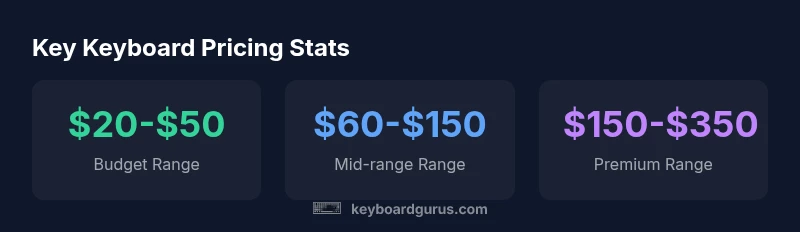
Prices cluster into distinct ranges that map roughly to use-case and expectations. Budget keyboards typically live in the $20-$50 zone and mostly appeal to students or light typists; these models may use membrane switches or lower-cost mechanicals and often ship with basic features. Mid-range keyboards, often priced from $60-$150, deliver better switches, sturdier cases, and sometimes hot-swappability or RGB lighting. Premium mechanical keyboards run from about $150-$350 and target enthusiasts who want top-tier switches, premium keycaps, and robust software. For artisan or fully customized builds, prices can climb well above $300, sometimes reaching into the thousands for limited editions. The mid-range option currently attracts the broadest audience, while premium and artisan keyboards serve niche markets where build quality and customization justify the cost. When planning a purchase, be mindful of taxes, shipping, and regional pricing differences that can adjust the final price by 5-15% or more.
Features That Add Most Value
Not all features justify their price, so it helps to map features to your use case. For many typists and general users, reliable mechanical switches with a comfortable layout, solid build, and a long warranty offer the best value. Backlighting is nice-to-have for dim environments, but it rarely affects typing comfort; it does influence price if it includes per-key RGB, effects, or software control. Wireless or Bluetooth connectivity adds convenience but can introduce latency or pairing quirks, depending on the chipset. Hot-swappability is valuable for enthusiasts who like to experiment with different switches without soldering. PBT keycaps resist shine and wear better than ABS, but come at a higher price. Finally, software ecosystems that enable macros and layer customization can add intangible value for gamers and professionals who rely on complex keyboard commands. When evaluating price against value, isolate the features you will actually use, and consider future-proofing through upgrade-friendly designs.
Buying Smart: Strategies and Timing
Savvy buyers optimize price by timing purchases around sales windows and using bundled deals. When searching for “how much is a computer keyboard,” it’s common to see price dips during seasonal promotions, back-to-school events, or retailer anniversaries. Group buys and limited-edition runs can produce strong price-to-performance ratios for enthusiasts, but they also carry longer lead times. Refurbished or open-box units from reputable sellers can offer substantial savings with minimal risk when warranty terms are honored. Compare multiple retailers, check return policies, and read user reviews focusing on reliability and latency. If you’re undecided, start with a solid mid-range model and reserve your upgrade funds for future-proof features like hot-swappability or a changeable keycap profile. Keyboard Gurus recommends prioritizing build quality and serviceability because a keyboard that lasts longer and is easier to repair often reduces total cost of ownership over time.
Common Misconceptions About Keyboard Pricing
A common myth is that the most expensive keyboard always delivers the best performance. In reality, price often reflects the complexity of the build or the brand premium, not necessarily the daily typing experience. Another misconception is that wireless keyboards are inherently cheaper or more convenient; wireless setups can introduce latency or power management concerns, especially on older hardware. Some buyers assume you must buy premium switches to have a quality feel; excellent budgets exist with well-chosen switches and key materials. Lastly, buyers sometimes equate more RGB or software features with better value; those features add cost but may not improve typing comfort or reliability for everyone. The truth is that value comes from a thoughtful match between intended use, mechanical action, and longevity plus after-sales support, not merely novelty features.
Choosing For Your Use Case: Gaming, Typing, and Professional Work
Different use cases demand different keyboard characteristics. Gamers typically prioritize fast Actuation, low latency, anti-ghosting, and programmable macros, often in a durable build with responsive switches. Students and everyday typists value comfort, typographer-friendly key layouts, and long keycap life. Professionals—especially developers and data workers—benefit from software macros, programmable layers, stable typing feel, and excellent keycap durability. In all cases, test keys when possible, consider your preferred switch type, and balance price against expected lifespan. If you expect to upgrade in a few years, a mid-range keyboard with a robust warranty can be a smarter purchase than chasing a trendy but fragile build. Keyboard Gurus emphasizes choosing a model that aligns with your cognitive load and workflow, rather than chasing the latest embellishments.
Global and Regional Price Considerations
Prices vary by region due to taxes, shipping costs, and local availability. In some markets the same model may be offered with different firmware or exclusions that alter value. Import duties and VAT can add a noticeable margin to the late-stage price. When comparing prices, make sure you’re evaluating equivalent configurations (same switches, lighting, wireless options, and warranty terms) and account for in-region support. If you’re relocating or shopping from abroad, consider serviceable warranty coverage and the availability of replacement parts in your area. Overall, while the headline price is important, total cost of ownership—covering service, warranty, and potential repairs—often tells a more accurate story about long-term value.
Price ranges by keyboard category
| Keyboard Type | Typical Price Range | Notes |
|---|---|---|
| Budget Membrane | $20-$50 | Entry-level typing with basic features |
| Mid-range Mechanical | $60-$150 | Balanced feel, reliability, features |
| Premium Mechanical | $150-$350 | Top-tier build, customization, software |
| Artisan/Custom | $300-$1000+ | Limited runs, high craftsmanship |
Got Questions?
What is the average price of a standard keyboard in 2026?
In 2026, most users find value in keyboards priced between $50 and $150, which balances quality and features. Prices outside this range exist for specialized builds, but the majority of mainstream models fall within this band.
Most keyboards hover around fifty to one hundred fifty dollars for solid performance.
Is a cheaper keyboard worth it for casual use?
Cheaper keyboards can be suitable for casual typing or basic gaming, but they may lack durability or consistent feel. If you type daily or game regularly, investing a bit more can yield a noticeably better experience and longer life.
Yes, cheaper can work for light use, but for frequent typing or gaming, spend a bit more for better switches and build.
Should I buy a mechanical or membrane keyboard?
Mechanical keyboards generally offer better tactile feedback and longevity, especially in high-use scenarios. Membrane keyboards are quieter and cheaper but may wear more quickly with heavy use. Your choice should reflect how often you type, your tactile preferences, and budget.
Mechanical tends to feel better and last longer; membrane is cheaper and quieter.
Do wireless keyboards cost more, and are they reliable?
Wireless keyboards cost more upfront and can introduce latency if the chipset or software is not well-optimized. Modern wireless options are reliable for most tasks, but gaming still benefits from a wired connection in many setups.
Wireless is convenient, often reliable, but wired can be faster for gaming.
Do prices differ by geography or retailer?
Yes. Taxes, shipping, and local demand affect prices. Compare regional offers and check whether warranty support is available locally before buying from abroad.
Prices vary by region; check warranty and taxes before buying.
Are budget keyboards a good option for students?
Budget keyboards can be a good starting point for students, provided they deliver reliable switches and a comfortable layout. If you type long hours, a mid-range option often yields better comfort and durability over time.
Yes, budget keyboards can work, but consider mid-range for long-term typing comfort.
“Prices reflect the intersection of switch quality, materials, and features; understanding your use case helps avoid overspending.”
What to Remember
- Understand price drivers: switches, materials, and features.
- Mid-range keyboards offer the best value for most users.
- Consider total cost of ownership, not just sticker price.
- Align features with your actual use case to maximize value.