How Much Does Keyboard Replacement Cost in 2026
Learn the true cost of keyboard replacement in 2026, with price ranges for laptop keyboards, keycaps, and switches. Get tips to save and understand warranty implications.


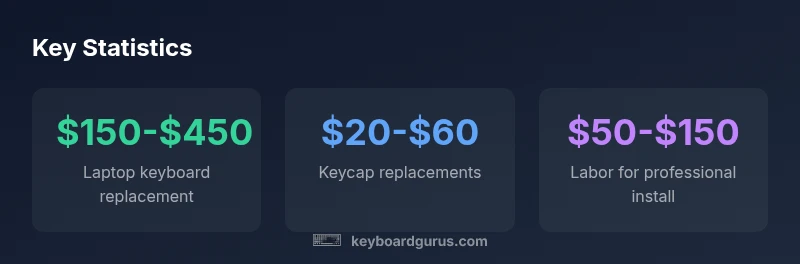
How much does keyboard replacement cost? On average, keyboard replacement costs range from about $150 to $450 for laptop keyboards, with premium models (like newer MacBooks) tending toward the higher end. For individual parts or DIY fixes, expect $20 to $100 for keycaps or switches, plus potential labor. Always factor installation time and warranty implications when budgeting.
What Affects the Cost of Keyboard Replacement
The total price depends on several variables, but the central question remains: how much does keyboard replacement cost? For most users, the price is driven by the keyboard type (laptop built-in, external mechanical, or chiclet), the model's complexity, and whether you replace the entire assembly or just individual components. Labor costs vary by region and service path (in-store vs mail-in repair). Warranty status also affects the decision because some manufacturers and retailers offer protection plans that cover parts or labor under certain conditions. Additionally, the availability of replacement parts can push prices up or down: older devices may require discontinued parts, which raises both price and lead time. Keyboard Gurus analysis, 2026, emphasizes that cost transparency is essential: always ask for a full written quote listing parts, labor, and any taxes.
Laptop Keyboard Replacement Costs: By Model and Type
Prices differ substantially between different laptops and replacement paths. A basic scissor-switch keyboard on older laptops often costs less than replacement on newer or premium models, while chiclet-style keyboards may command mid-range pricing due to parts availability. In practice, you’ll see a broad band: entry-level models typically fall toward the lower end of the spectrum, while high-end ultrabooks and certain MacBook generations sit toward the upper end. If you’re evaluating options, factor in the cost of a possible adhesive or bezel work that can accompany a full keyboard module replacement and verify whether the service includes labor, tax, and a warranty period. Keyboard Gurus analysis notes that model-specific pricing remains the main driver of cost variability.
DIY vs Professional Replacement: Pros and Cons
DIY replacements can dramatically reduce labor costs, making the parts themselves the main expense. However, DIY work carries risks: you may damage delicate connectors, void existing warranties, or encounter compatibility issues with firmware. Professional replacements cost more upfront but provide tested compatibility, a warranty on the repair, and faster turnaround in many cases. For mission-critical devices (laptops used for work or gaming), professional service often yields better long-term value by reducing the chance of accidental damage and ensuring proper key alignment and calibration.
Upgrades and Upkeep: Keycaps, Switches, and Spares
If the keyboard itself isn’t malfunctioning but you want a tactile or aesthetic boost, cosmetic upgrades like keycaps are an affordable option. For mechanical keyboards, you might upgrade switches or stabilizers, which can change typing feel significantly without replacing the entire unit. Budget-conscious users can mix and match: replace highly used keys or cosmetics first, then plan a full replacement only when necessary. When shopping for parts, verify compatibility with your exact keyboard model and firmware version; some newer devices require specific parts due to keyboard matrix layouts.
How to Get Accurate Quotes and Save Money
To avoid surprises, request a written estimate that breaks down parts, labor rates, taxes, and any disposal fees. Compare multiple shops and ask about diagnostic fees (some places waive them if you proceed with the repair). If you’re comfortable with DIY, source reputable guides and verify your device’s service manual to ensure you follow the correct procedure. Budget for potential downtime and data backup; a replacement typically doesn’t affect data, but some procedures might require power-down steps that affect ongoing work.
Hidden Costs and Warranty Considerations
Hidden costs can creep in through shipping, expedited service, or fees for removing the bezel or re-labeling keys after replacement. Warranty terms vary by manufacturer and plan; some may void coverage if a non-authorized repair is performed. Before committing, confirm what is covered, what isn’t, and whether the repair would still be eligible for future warranty work. If extending the device’s warranty is important to you, factor that into the total cost and expected lifespan.
Budget Scenarios for Common Setups
- Basic laptop with aging keyboard: $120-$250 for local shop replacement or DIY parts.
- Mid-range laptop or MacBook: $300-$600 including parts and labor.
- High-end MacBook or specialty keyboard: $600-$900 depending on model and parts availability.
- Mechanical keyboard with wear on switches: $2-$6 per switch plus labor, or a full kit upgrade for $50-$120.
Maintenance to Extend Keyboard Life and Delay Replacement
Regular cleaning, dust removal, and avoiding spills can extend keyboard life significantly. Consider protective cases and spill pads for laptops in shared workspaces or gaming setups. Periodic firmware updates and proper key-mapping checks can also prevent functional issues that lead to premature replacements. A small maintenance routine now can meaningfully slow cost accumulation over several years.
Costs by keyboard type and service
| Keyboard Type/Service | Cost Range | What’s Included | Notes |
|---|---|---|---|
| Laptop keyboard replacement (in-shop) | 150-450 | Parts + labor | Model varies |
| MacBook keyboard replacement | 200-700 | Parts + labor | Higher end models |
| DIY keycap replacement | 20-60 per set | Keycaps only | Cosmetic upgrade |
| Switch replacement for mechanical keyboard | 2-6 per switch + labor | Spares + labor | Highly customizable |
Got Questions?
What factors influence the cost of keyboard replacement?
Several factors determine price, including keyboard type (laptop vs external), model complexity, whether you replace the whole assembly or parts, and labor location. Warranty terms may also affect decisions.
Prices depend on the keyboard type, model, and where you get it fixed.
Is DIY replacement cheaper than a professional service?
DIY can lower parts cost, but mistakes can lead to damage or warranty voids. Professionals ensure compatibility and proper installation, often with a warranty.
DIY saves money but risks damage and warranty issues.
Do warranties cover keyboard replacements?
Warranties typically cover defects, not accidental damage or normal wear. Check your plan for covered components and any service limitations.
Warranty coverage depends on the plan—check terms.
How long does replacement typically take?
Turnaround varies by model and service path. In-shop repairs often take 1-3 hours, while mail-in or parts delays can extend this.
Most fixes take a few hours in-shop, longer if shipping is involved.
Are keycaps cheaper to replace than a full keyboard?
Yes. Keycap replacements are generally cosmetic and cheaper, while full keyboard replacements address functional failures.
Keycaps are cheaper and cosmetic; full replacements fix function.
“Keyboard replacements are highly model-specific; always weigh parts costs, labor, and warranty implications before committing.”
What to Remember
- Compare total costs by model and service path
- DIY replacements save money but risk warranty
- Keycaps and switches offer affordable upgrades
- MacBook keyboards tend to be pricier
- Get a detailed written quote before work